Choosing Linux dedicated server ZFS vs mdadm is about more than RAID performance. The decision affects data integrity, memory consumption, disk replacement, expansion flexibility, and long-term infrastructure costs.
OpenZFS combines filesystem and volume management with checksums and storage pools. Linux mdadm manages software RAID devices, usually beneath a separate filesystem such as ext4 or XFS. Understanding these architectural differences helps businesses select reliable dedicated storage without overspending.
ZFS vs mdadm RAID: Key Differences
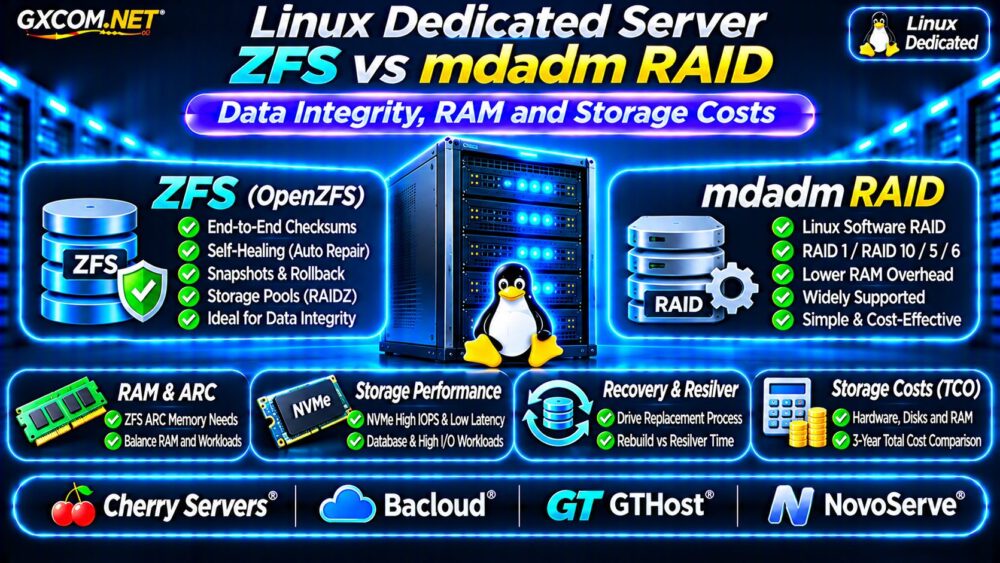
Both technologies can provide disk redundancy, but they operate at different layers. ZFS manages data placement, checksumming, caching, and filesystem features together. mdadm assembles Linux block devices into RAID arrays while leaving filesystem behavior to another component.
| Feature | OpenZFS | mdadm RAID |
|---|---|---|
| Storage architecture | Integrated filesystem and volume manager | Block-level software RAID |
| Data checksums | Built-in data integrity verification | Depends on additional layers |
| Memory caching | Adaptive Replacement Cache | Linux page cache and filesystem caching |
| Common redundancy | Mirrors and RAIDZ | RAID 1, 5, 6 and 10 |
| Administration | Pool and dataset management | Array plus filesystem management |
Neither approach eliminates the need for backups or operational monitoring.
Data Integrity: Why ZFS Checksums Matter
ZFS verifies stored data using checksums, helping detect corruption that ordinary disk redundancy might not identify. When valid redundant copies exist, ZFS can often repair damaged data automatically.
This capability is valuable for databases, backups, document repositories, and other workloads where silent corruption creates business risk.
However, self-healing requires suitable redundancy. A single-disk ZFS pool can detect certain errors without necessarily recovering the affected data.
What Does mdadm Protect?
mdadm provides redundancy at the block-device layer. A mirrored array can continue operating after certain disk failures, but conventional mdadm RAID does not provide the same end-to-end filesystem checksumming model as ZFS.
Administrators can combine mdadm with filesystems or applications offering additional integrity checks. Evaluate the complete storage stack rather than assuming RAID alone guarantees correctness.
ZFS ARC Memory Requirements
ZFS uses the Adaptive Replacement Cache (ARC) to retain frequently accessed data and metadata in memory. ARC can improve read performance, but administrators must leave sufficient RAM for applications and the operating system.

There is no universal requirement that every ZFS deployment needs 1GB of RAM per terabyte of storage. Actual requirements depend on workload, metadata, caching goals, and optional features.
For database servers, measure memory pressure and configure ARC limits where appropriate. Avoid allocating excessive memory to storage caching at the expense of database buffers.
Does mdadm Use Less RAM?
mdadm itself generally has modest memory overhead, although the operating system and chosen filesystem still use caching and metadata memory.
This can make mdadm attractive for smaller dedicated servers, but total performance depends on the filesystem, application, and available RAM.
RAIDZ vs mdadm RAID 1 and RAID 10
ZFS mirrors and RAIDZ offer different capacity and fault-tolerance tradeoffs. mdadm RAID 1 and RAID 10 likewise balance redundancy, usable capacity, and write behavior.
For example, four equal-capacity drives configured as two mirrored pairs generally provide approximately half their raw capacity before filesystem overhead.
RAIDZ parity layouts follow different capacity calculations and rebuild characteristics. Do not assume RAIDZ1 and RAID 5 behave identically in every failure scenario.
Read our Dedicated Server RAID 1 vs RAID 10 Comparison for additional redundancy considerations.
NVMe Performance and Database Latency
Modern NVMe drives can support high IOPS and low storage latency, but filesystem and RAID choices influence actual database performance.
Benchmark sustained writes, transaction commits, random reads, and P95/P99 latency using realistic datasets. ZFS settings such as record size, compression, and synchronous-write behavior require workload-specific testing.
Do not disable critical write-safety mechanisms simply to improve benchmark results. Storage durability depends on application settings, filesystem configuration, and hardware behavior.
Our NVMe vs SSD Performance Guide explains additional benchmark considerations.
Disk Replacement, Expansion and Recovery
Both ZFS and mdadm require documented procedures for failed-drive replacement. Administrators should monitor disk health, array status, and rebuild or resilver progress.
ZFS pool expansion depends on vdev topology, OpenZFS version, and supported features. mdadm expansion also varies by RAID level and filesystem.
Before purchasing hardware, verify available drive bays, replacement access, and whether the provider permits your preferred storage layout.
RAID Is Not a Backup Strategy
Disk redundancy cannot reliably protect against ransomware, accidental deletion, administrator mistakes, or catastrophic infrastructure loss.
Maintain independent backup copies, define recovery objectives, and regularly test restoration. Review our Snapshot Backup and Recovery Guide for broader recovery principles.
Four Linux Dedicated Server Providers to Compare
These GXCOM.NET-approved affiliate providers are candidates for storage-focused deployments. Confirm hardware specifications and management capabilities before ordering.
Cherry Servers: Bare Metal Storage Flexibility
Cherry Servers is worth evaluating for configurable bare metal infrastructure. Ask about disk layouts, memory upgrades, remote console access, and operating system installation options.
Bacloud: Budget Storage Planning
Bacloud may suit cost-sensitive deployments. Compare drive quantities, NVMe availability, RAM capacity, replacement procedures, and optional backup services.
GTHost: Dedicated Hardware and Recovery
GTHost provides another comparison option for Linux dedicated servers. Verify storage interfaces, supported configurations, rescue access, and hardware replacement responsibilities.
NovoServe: Bare Metal Capacity and Networking
NovoServe can be considered when deployment location and storage capacity matter. Confirm available drive combinations, private networking, remote management, and provisioning conditions.
Do not assume that any provider includes ZFS administration, custom RAID setup, or managed recovery by default.
Calculate Three-Year Storage Ownership Costs
Compare server rental, additional RAM, storage upgrades, backups, monitoring, and administrator time rather than focusing exclusively on drive capacity.

Consider a hypothetical configuration costing $130 monthly for hardware, $25 for additional memory, $35 for backups, and $20 for monitoring.
The combined monthly estimate is $210, equivalent to $7,560 over 36 months before taxes, setup charges, and labor. These figures are illustrative, not live provider quotations.
For alternative infrastructure models, see our Dedicated vs Cloud Server Comparison.
ZFS vs mdadm Buying Checklist
- Determine whether end-to-end checksumming is essential.
- Measure application RAM and caching requirements.
- Compare usable capacity and redundancy layouts.
- Test realistic database latency and sustained writes.
- Verify drive replacement and expansion procedures.
- Budget for independent backups and recovery testing.
Frequently Asked Questions
Is ZFS Better Than mdadm for Data Integrity?
ZFS provides integrated checksumming and can repair certain errors when valid redundant data exists. mdadm requires other layers for comparable filesystem-level integrity protection.
Does ZFS Always Require More RAM?
Not necessarily. ARC caching consumes memory, but requirements depend on workload and configuration. Both approaches need sufficient memory for applications.
Can ZFS and mdadm Replace Backups?
No. RAID protects against selected hardware failures, not every form of data loss. Independent, tested backups remain necessary.
Final Verdict
Choose ZFS when integrated integrity verification, snapshots, and pool management justify its operational requirements. Choose mdadm when a conventional Linux RAID stack better matches your filesystem, skills, and hardware budget.
Compare Cherry Servers, Bacloud, GTHost, and NovoServe using current configurations, written support terms, and complete storage costs before purchasing.