Game server port configuration determines whether multiplayer clients can connect, discover available worlds and access authorized services. Incorrect settings can leave a healthy server unreachable or expose administrative interfaces unnecessarily. Hosting customers also need to understand whether additional ports and dedicated IP addresses increase their monthly costs.
This guide compares network requirements for Minecraft, Rust and ARK Survival Ascended, explains secure multi-instance deployment and identifies commercial questions worth asking before renting infrastructure.
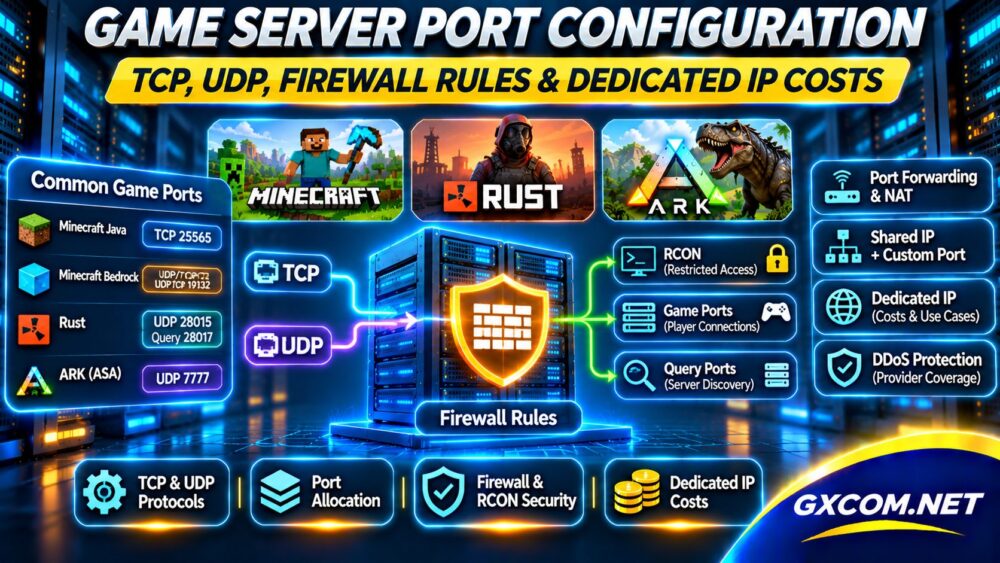
Understand TCP, UDP and Game Server Ports
TCP provides reliable, ordered delivery through established connections. UDP sends datagrams without equivalent built-in delivery guarantees. Games choose transport protocols according to their networking architecture; UDP is not automatically faster under every condition.
Gameplay endpoints carry player traffic, while query endpoints provide discovery information. Remote console interfaces allow administrative commands and should receive substantially stricter access controls. Steam server queries commonly use UDP, but not every game implements the same discovery mechanism.
Check Game Ports for the Installed Server Version
| Game or service | Port reference | Protocol |
|---|---|---|
| Minecraft Java gameplay | 25565 | TCP |
| Minecraft Java optional query | 25565 | UDP |
| Minecraft Java optional RCON | 25575 | TCP |
| Bedrock legacy IPv4 gameplay | 19132 | UDP |
| Bedrock NetherNet signaling | 19132 | TCP, with separate UDP gameplay requirements |
| Rust example gameplay | 28015 | UDP |
| Rust example RCON | 28016 | TCP |
| Rust derived query in this example | 28017 | UDP |
These numbers are configuration references, not universal hosting allocations. Minecraft Java administrators can change their listening ports through server properties. Optional query and remote console services should remain disabled unless required.
Minecraft’s official Bedrock guidance describes an October 2026 transition to NetherNet. For affected deployments, use BDS 26.60 or newer and configure the required TCP signaling and UDP traffic. Review server-udp-ports when restrictive firewalls or translated networks require explicitly allocated UDP ranges. Older UDP-only forwarding instructions may be insufficient.

Facepunch requires separate Rust gameplay and query UDP endpoints. Unless explicitly configured, its query port is derived by adding one to the higher of the gameplay and RCON ports.
ARK Survival Ascended commonly uses a configurable UDP gameplay endpoint such as 7777 and optional TCP remote administration. Confirm the actual launch parameters and discovery requirements for the installed release. Do not automatically copy Survival Evolved peer and Steam query rules into Ascended deployments.
Prevent Port Conflicts Across Multiple Instances
Two ordinary listeners generally cannot occupy the same local address, transport protocol and port simultaneously. Different instances can share a public IP by using separate external ports. TCP and UDP allocations are distinct even when their numbers match.
For example, two Java worlds could use TCP 25565 and 25566, while Rust uses separately assigned UDP endpoints. Maintain an inventory containing each instance, protocol, internal port, external port and authorized source network.
Docker bridge networking permits containers to reuse internal ports while publishing different host ports. A mapping such as 25566:25565/tcp exposes a second Java instance through host port 25566. Avoid publishing its administration endpoint publicly.
See our multiple community hosting guide for broader instance management considerations.
Configure NAT and Firewall Rules Together
Port forwarding translates incoming connections to an internal destination. Firewall rules decide whether traffic is permitted. A working deployment must satisfy both mechanisms wherever translation is involved.
Check the application listener, container mapping, host firewall, provider firewall and upstream NAT in sequence. Carrier grade NAT may prevent customer-controlled inbound forwarding entirely. A routed public address or suitable hosting allocation can resolve that limitation.
On Linux, inspect listening sockets using:
sudo ss -lntupFor a native Java server using an existing UFW configuration, a narrowly scoped gameplay rule could be:
sudo ufw allow 25565/tcpThis is an illustrative rule, not a complete firewall configuration. Preserve administrative access and recovery options before changing policies. Docker published ports can bypass ordinary UFW input filtering, so verify the container forwarding rules separately.
Keep RCON and Backend Services Private
Use a private management network or VPN for remote administration wherever supported. Restrict necessary external management access to trusted source addresses, use unique strong credentials and grant moderators only required permissions. Traditional RCON should not be assumed to encrypt commands or passwords.
For Minecraft proxy networks, prevent players from bypassing the public proxy and connecting directly to protected backend instances. Our Minecraft proxy hosting comparison discusses forwarding and backend isolation.
Upstream DDoS mitigation complements these controls but cannot replace authentication or application security. Review our dedicated server firewall guide for safe rule deployment.
Compare Shared Addresses and Dedicated Port Costs
A shared IP with a custom port is often adequate. Minecraft Java clients can use a compatible DNS SRV record to discover a nonstandard TCP port through a memorable hostname. Other games and platforms may not support equivalent discovery.
Dedicated default ports simplify connection instructions. Exclusive IPv4 addresses may provide greater allocation flexibility, but neither option inherently improves latency or simulation performance.
Shockbyte
Shockbyte offers Minecraft memory packages, advertised DDoS mitigation and paid default port subscriptions through its Ports panel. Its purchase documentation does not establish a public add-on price. Confirm address exclusivity, additional allocations and the recurring checkout total.
Sparked Host
Sparked Host lists an Enterprise Minecraft package with 1 GB RAM, two vCPUs and 100 GB storage at $2.59 monthly. Its Apollo panel supports additional port allocations. One Java or Bedrock default port costs $4 monthly, while the combined option costs $6.75.
Confirm whether the selected add-on provides an exclusive address or only specific ports. The advertised vCPU allocation does not guarantee exclusive physical cores.
Host Havoc
Host Havoc advertises Rust hosting with TCAdmin management, WebRCON support and DDoS protection. Its UK product page displays £11.75 monthly for 30 slots before applicable billing adjustments and extras. Ask support about management endpoint restrictions, assigned ports and any address charges.
Calculate Network Costs Before Ordering
A hypothetical $15 monthly subscription with a $4 default port totals $19 monthly or $228 annually. The port adds $48 each year, excluding taxes. Compare that expense against compatible hostname discovery and existing allocations.
Before purchasing, request written confirmation of assigned protocols, port persistence, firewall control, attack mitigation coverage and renewal charges. Test gameplay and discovery from an independent network, and verify that management endpoints remain inaccessible to unauthorized users.