Dedicated game server bandwidth affects how reliably players connect, how much traffic a community can transfer, and what operators ultimately pay for hosting. Yet a server advertised with a 1Gbps port does not necessarily include unlimited monthly data transfer.
For Minecraft, Rust, ARK, and multi-instance hosting, understanding port speed, traffic allowances, latency, and billing policies is essential. This guide explains how to estimate network requirements and compare dedicated server offers without paying for capacity your community may never use.
What Is Dedicated Game Server Bandwidth?
Dedicated game server bandwidth describes the network capacity available to a physical server. Providers commonly advertise port speeds such as 100Mbps, 1Gbps, or 10Gbps, alongside separate monthly traffic allowances.
Port speed measures the maximum theoretical transfer rate of a network interface or connection. Monthly transfer measures the total data sent or received over time, depending on the provider’s billing rules.
Neither figure alone guarantees low latency, consistent throughput, or protection against network congestion.
100Mbps vs 1Gbps: Which Port Is Better?
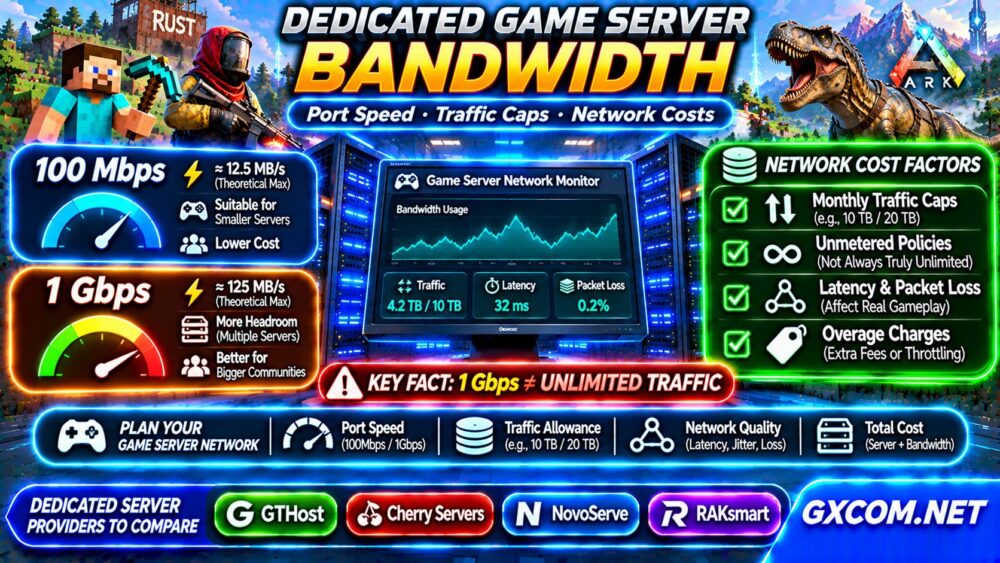
A 100Mbps connection has a theoretical maximum of 12.5 megabytes per second, while 1Gbps corresponds to 125 megabytes per second. Actual throughput is lower because of protocol overhead, congestion, and other limitations.
| Port Speed | Theoretical Transfer Rate | Typical Consideration |
|---|---|---|
| 100Mbps | 12.5 MB/s | Smaller workloads with predictable traffic |
| 1Gbps | 125 MB/s | Multiple instances and larger traffic bursts |
| 10Gbps | 1,250 MB/s | High-density deployments with verified demand |
A faster port provides greater headroom but does not automatically reduce game latency. A lightly loaded 100Mbps connection can outperform a congested 1Gbps route in real gameplay.
How Much Bandwidth Do Minecraft, Rust, and ARK Need?
Game traffic varies with player counts, movement, entity updates, world complexity, mods, and server configuration. There is no reliable universal Mbps-per-player figure for every game.
Minecraft communities may experience different traffic patterns depending on view distance, plugins, and exploration. Rust and ARK servers can generate substantial state updates during busy multiplayer sessions.
Measure actual peak usage before selecting a dedicated port. For related infrastructure decisions, explore our Game Server Hosting Guides.

Monthly Traffic Caps vs Unmetered Bandwidth
Some dedicated hosting plans include a fixed monthly transfer allowance, such as 10TB or 20TB. Others advertise unmetered traffic on a specified port.
Unmetered usually means usage is not billed by a conventional monthly transfer quota, but it does not necessarily mean unrestricted capacity. Port limits, fair-use policies, acceptable-use conditions, and network management rules may still apply.
Check whether the allowance counts outbound traffic, inbound traffic, or both. Also verify what happens when the limit is exceeded: additional charges, throttling, suspension, or an upgrade requirement.
How to Estimate Monthly Game Server Traffic
A practical estimate starts with average sustained transfer rather than the advertised port maximum.
For example, 10Mbps sustained continuously for 30 days represents approximately 3.24TB of transferred data using decimal units. Actual usage changes with peak periods, downtime, updates, and traffic direction.
Use this calculation:
Monthly GB =
Average Mbps × 0.125 × 86,400 × Days / 1,000
This estimates transferred data for the measured traffic direction. Record real network statistics for several weeks and add a reasonable allowance for growth, updates, and unusual events.
Latency, Jitter, and Packet Loss Matter More Than Advertised Speed
Players often blame insufficient bandwidth when the real problem is poor routing, packet loss, or unstable latency.
Latency measures communication delay. Jitter describes variation in that delay, while packet loss occurs when transmitted packets fail to reach their destination.
A dedicated server with adequate throughput may still deliver poor gameplay when players are geographically distant or network routes are unreliable.
Choose data center locations based on your player community and test connectivity from representative regions whenever possible.
What About 95th Percentile Billing?
Some network contracts use 95th percentile bandwidth billing instead of a fixed transfer allowance. Providers sample traffic rates, discard the highest five percent of measurements, and bill according to the remaining peak measurement under their contract methodology.
This can suit certain predictable workloads, but unexpected sustained spikes may increase costs. Ask about sampling intervals, traffic directions, committed rates, and overage charges.
Do not assume that an advertised dedicated server includes this billing model; many standard hosting plans use simpler transfer quotas.
Monitor Dedicated Server Network Usage
Administrators should monitor average throughput, peak utilization, packet loss, interface errors, and monthly transferred data. Linux tools such as vnstat, iftop, and interface statistics can help identify trends.
Compare network measurements with player activity and server performance. High CPU load or slow storage can cause gameplay problems even when network utilization remains low.
For broader hardware comparisons, read our Dedicated Server vs VPS Guide.
Four Dedicated Hosting Providers to Compare
GTHost, Cherry Servers, NovoServe, and RAKsmart are approved infrastructure providers worth evaluating for dedicated game server deployments.
With GTHost, compare available locations, port specifications, transfer allowances, and hardware options. For Cherry Servers, investigate bare-metal configurations, network policies, and storage choices.
NovoServe offers infrastructure options worth researching for regional deployments. Compare its European server options and US server options against your players’ locations and current contract terms.

For RAKsmart, verify the available dedicated configurations, regional connectivity, traffic billing, and support scope before purchasing.
These comparisons are evaluation criteria, not verified performance rankings. Consult our Bare Metal Server Comparison for further research.
When Should You Upgrade Network Capacity?
Consider upgrading when measured peak utilization regularly approaches your available port capacity, legitimate traffic exceeds the monthly allowance, or multiple communities compete for network resources.
Before upgrading, rule out routing problems, packet loss, CPU bottlenecks, and misconfigured applications. A faster port cannot fix every connection problem.
Our Game Dedicated Servers Guides provide additional infrastructure planning context.
Frequently Asked Questions
Is 1Gbps Enough for a Dedicated Game Server?
It may be more than sufficient for many communities, but requirements depend on measured traffic, simultaneous instances, and peak demand.
Does Unmetered Bandwidth Mean Unlimited Speed?
No. Unmetered transfer and port speed are different contractual specifications.
Does a Faster Port Reduce Game Ping?
Not necessarily. Routing quality, geographic distance, congestion, and packet loss are often more important.
Final Verdict
The right dedicated game server bandwidth plan balances port capacity, monthly transfer, network reliability, and predictable costs. Measure your community’s real traffic, understand the provider’s billing terms, and choose infrastructure with enough headroom for growth without paying for unnecessary network capacity.