A small business website does not need the most powerful server on the internet.
It needs hosting that works reliably when customers visit, keeps the website secure, provides usable backups, offers responsive support and leaves enough room for the business to grow.
That sounds simple, but choosing the best web hosting for small business can be surprisingly difficult.
Some hosting plans compete primarily on introductory price. Others emphasize storage, WordPress tools, performance or premium support. The cheapest plan can look attractive until renewal costs increase, traffic grows or your business needs help recovering a broken website.
For a business website, downtime and poor performance are not merely technical inconveniences.
They can affect leads, sales and customer trust.
In this guide, GXCOM.NET compares leading small business hosting options including hosting.com, Bluehost, IONOS, ScalaHosting, GreenGeeks, FastComet, HostArmada and ChemiCloud, while explaining which hosting features actually matter to a growing business.

Best Web Hosting for Small Business at a Glance
| Hosting Provider | Best For | Key Strength |
|---|---|---|
| hosting.com | Best Overall | Strong balance of performance and usability |
| Bluehost | WordPress Beginners | Beginner-friendly WordPress ecosystem |
| IONOS | Budget-Conscious Businesses | Affordable entry and broad product range |
| ScalaHosting | Growing Businesses | Strong path toward managed VPS and cloud |
| GreenGeeks | Eco-Conscious Businesses | WordPress-friendly hosting and environmental positioning |
| FastComet | International Businesses | Multiple server locations and managed features |
| HostArmada | Managed Hosting Experience | Beginner-friendly managed hosting approach |
| ChemiCloud | Small Business Support | Managed hosting features and website migration |
Quick recommendation: hosting.com is a strong all-around choice for small businesses, while Bluehost is particularly relevant for first-time WordPress users. IONOS deserves consideration when initial budget matters, and ScalaHosting becomes especially interesting when future growth and managed VPS infrastructure are priorities.
What Does a Small Business Actually Need From Web Hosting?
A small business should not choose hosting the same way a hobby website might.
The website may generate:
- Customer inquiries
- Appointments
- Phone calls
- Product sales
- Local leads
- Email signups
- Customer trust
That means hosting becomes part of the business infrastructure.
The priorities should usually be:
RELIABILITY
↓
PERFORMANCE
↓
SECURITY
↓
BACKUPS
↓
SUPPORT
↓
SCALABILITY
↓
LONG-TERM COST
Storage size alone should be much lower on the decision list for most ordinary business websites.
1. hosting.com — Best Overall Web Hosting for Small Business
Best for: Small businesses looking for a balanced combination of website performance, WordPress capability and room to grow.
hosting.com, formerly known as A2 Hosting, is a strong candidate for businesses that want more than a bare-bones entry-level hosting account.
Its hosting ecosystem covers conventional website hosting as well as WordPress-oriented solutions, allowing businesses to choose an environment appropriate for their website rather than immediately moving to VPS infrastructure.
Why It Works for Small Businesses
- WordPress-friendly hosting
- Performance-focused infrastructure
- SSL support
- Website migration options
- Backup and security features depending on plan
- Upgrade options as requirements increase
For a small business, that balance is important.
You generally want enough management that routine hosting does not become another full-time job, while retaining enough flexibility for the website to grow.
Best fit: Local businesses, professional services, company websites, WordPress sites and growing content-driven businesses.
2. Bluehost — Best for Small Business WordPress Beginners
Best for: Business owners building their first WordPress website.
Bluehost has long focused heavily on WordPress and remains particularly relevant for users who prefer a guided hosting experience rather than server administration.
That makes it suitable for businesses where the person managing the website is not necessarily a system administrator.
Typical priorities include:
- Easy WordPress setup
- SSL
- Domain integration
- Website management tools
- Automatic WordPress functionality
- Support
- WooCommerce options
This is useful for a business owner whose real job is running the company—not managing Linux.
Who Should Consider Bluehost?
Bluehost is particularly relevant for:
- Consultants
- Local businesses
- Professional services
- Blog-based businesses
- New WordPress users
- Small ecommerce projects
Best fit: Businesses that prioritize simplicity and WordPress usability over advanced server control.
3. IONOS — Best for Budget-Conscious Small Businesses
Best for: Small businesses that want to keep initial hosting costs low.
IONOS operates a broad portfolio spanning website hosting, WordPress and more advanced infrastructure.
Its entry-level products can be attractive to new businesses that do not yet need high-resource hosting.
But there is an important rule when evaluating low-cost hosting:
INTRODUCTORY PRICE ≠ LONG-TERM COST.
Before purchasing, compare:
- Initial billing period
- Renewal pricing
- Contract term
- Number of websites
- Storage
- Backups
- SSL
- Support
A low introductory price is useful only when the service still makes financial sense after renewal.
Best fit: Startups, small brochure websites, freelancers and cost-conscious local businesses.
4. ScalaHosting — Best for Growing Small Businesses
Best for: Businesses that expect traffic, applications or resource requirements to grow.
A business website may begin small and change dramatically over several years.
You might start with:
COMPANY WEBSITE
↓
MORE CONTENT
↓
MORE TRAFFIC
↓
ONLINE STORE
↓
MORE CPU / RAM
ScalaHosting is particularly interesting because its ecosystem provides a natural route toward more powerful managed infrastructure.
This matters when a business eventually outgrows conventional web hosting but does not want to manage an unmanaged VPS.
Why Scalability Matters
Changing hosting companies is possible, but migration becomes more complicated as a website accumulates:
- Databases
- Customer data
- DNS records
- Applications
- Large media libraries
A provider with a clear upgrade path can therefore have strategic value.
Best fit: Growing WordPress sites, ecommerce businesses and companies expecting to need more infrastructure later.
5. GreenGeeks — Best for Eco-Conscious Small Businesses
Best for: Businesses that want mainstream hosting functionality combined with environmental positioning.
GreenGeeks differentiates itself through its environmental focus while still providing the hosting features expected by WordPress and small business users.
This can be relevant to companies where sustainability is part of their brand identity.
But environmental positioning should not replace normal hosting evaluation.
You should still compare:
- Performance
- Backups
- Support
- Security
- Resource limits
- Renewal costs
Best fit: Small businesses, agencies and WordPress websites that value environmental positioning alongside conventional hosting functionality.

6. FastComet — Best for International Small Businesses
Best for: Businesses serving customers across different geographic regions.
Server location affects network latency between the origin server and visitors.
FastComet is worth considering when geographic hosting options and managed hosting features are important.
A business serving customers internationally should think about both:
ORIGIN SERVER LOCATION
+
CDN
+
CACHING
rather than relying on server location alone.
Best fit: International businesses, WordPress sites and companies with geographically distributed audiences.
7. HostArmada — Best for a Managed Hosting Experience
Best for: Small business owners who prefer a hosting environment designed to reduce routine technical work.
For many small businesses, the ideal hosting experience is not maximum control.
It is minimum unnecessary administration.
The business owner usually wants to manage:
PRODUCTS → CUSTOMERS → MARKETING → SALES
rather than:
SERVER PATCHES → SERVICES → COMMAND LINE → SECURITY CONFIGURATION.
HostArmada is therefore worth comparing for users looking for a more managed approach to conventional website hosting.
Best fit: Small businesses and WordPress users who prioritize ease of management and support.
8. ChemiCloud — Best for Small Businesses That Value Support
Best for: Businesses that want managed hosting features, migration assistance and a relatively hands-off hosting experience.
Support quality matters more to businesses than many hosting comparison tables suggest.
When a website generates customer leads, a technical problem can become a business problem very quickly.
A useful hosting provider should make common tasks such as migration, SSL, account management and website troubleshooting easier.
ChemiCloud is therefore worth evaluating for businesses where support and managed convenience are important purchasing factors.
Best fit: Small businesses migrating from another provider or users who prefer managed assistance.
Best Small Business Hosting by Use Case
| Business Need | Provider to Consider |
|---|---|
| Best Overall | hosting.com |
| WordPress Beginner | Bluehost |
| Budget-Conscious Business | IONOS |
| Growing Business | ScalaHosting |
| Eco-Conscious Business | GreenGeeks |
| International Audience | FastComet |
| Managed Experience | HostArmada |
| Support-Focused Business | ChemiCloud |
These are use-case recommendations rather than a claim that one provider will outperform every other provider for every website.
Shared Hosting vs Managed WordPress vs VPS for Small Business
Choosing a provider is only part of the decision.
You also need the correct type of hosting.
Shared Hosting
Shared hosting can be an excellent starting point for:
- Local business websites
- Professional services
- Company brochure sites
- Small blogs
- Low-to-moderate traffic WordPress sites
It is inexpensive and relatively easy to manage.
The tradeoff is that resource allocation is more constrained.
Our Shared Hosting vs VPS comparison explains when those limitations start to matter.
Managed WordPress Hosting
Managed WordPress hosting can make sense when WordPress is central to the business and you value features such as:
- WordPress-specific caching
- Automatic updates
- Backups
- Security tools
- Staging
- WordPress-focused support
It generally costs more than basic shared hosting, but the additional management can save business owners time.
See our Managed WordPress Hosting vs Shared Hosting guide for a deeper comparison.
VPS Hosting
A VPS becomes more relevant when a business needs:
- More CPU
- More RAM
- Greater resource isolation
- Custom software
- More server control
- Higher-resource workloads
But VPS is not automatically better.
A poorly managed VPS can create more problems than a well-managed shared hosting environment.
MORE CONTROL = MORE RESPONSIBILITY.
How Important Is Uptime for a Small Business?
Reliability is one of the most important hosting factors for a commercial website.
If your website is unavailable, customers may not be able to:
- Find your services
- Submit a contact form
- Book an appointment
- Place an order
- Access account information
However, do not judge reliability only from a headline uptime percentage.
Look at the complete picture:
- Infrastructure redundancy
- Network quality
- Monitoring
- Backup systems
- Support response
- Recovery processes
UPTIME CLAIM ≠ COMPLETE RELIABILITY STRATEGY.
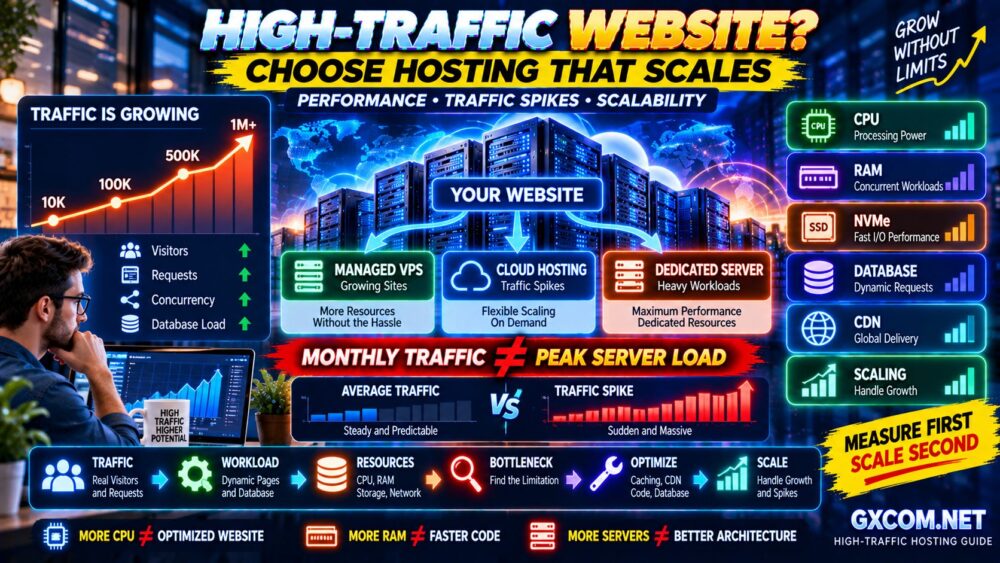
How Much Traffic Can Small Business Hosting Handle?
There is no universal visitor number because website resource usage varies dramatically.
A cached five-page company website can be much lighter than a WooCommerce store receiving the same number of visitors.
Capacity depends on:
TRAFFIC
×
PAGE COMPLEXITY
×
DATABASE ACTIVITY
×
CACHE HIT RATE
×
SERVER RESOURCES
Do not buy hosting based on vague claims such as “supports thousands of visitors” without understanding the workload.
Does a Small Business Need NVMe Hosting?
NVMe storage can provide substantially faster storage operations than older storage technologies, particularly for workloads involving frequent disk access.
But NVMe alone does not guarantee a fast website.
Real website performance depends on:
CPU → RAM → STORAGE → DATABASE → CACHE → NETWORK → APPLICATION
If the bottleneck is a slow plugin or uncached database query, changing storage alone may not solve the problem.
Business Email: Should It Be Included With Hosting?
Many small businesses want addresses such as:
[email protected]
[email protected]
[email protected]
Some hosting plans include email accounts, while others separate website hosting and professional email.
Neither model is automatically better.
Before purchasing, check:
- Number of mailboxes
- Mailbox storage
- Spam filtering
- Webmail
- IMAP/SMTP support
- Backup policy
- Sending limits
For business-critical email, many companies eventually prefer a dedicated email platform rather than depending entirely on their web hosting account.
Backups Are Essential for Business Websites
A hosting account without a usable recovery strategy creates unnecessary business risk.
Ask:
- Are backups automatic?
- How frequently are they created?
- How long are they retained?
- Can you restore them yourself?
- Are databases included?
- Are email accounts included?
For important business websites, consider keeping an independent off-site backup as well.
A BACKUP YOU HAVE NEVER TESTED IS NOT A RECOVERY PLAN.
Security Features Small Businesses Should Look For
At minimum, evaluate:
- SSL
- Account isolation
- Malware protection
- Firewall protection
- Login security
- Automatic software updates
- Backups
- Multi-factor authentication
WordPress businesses should also keep themes and plugins updated and remove software that is no longer used.
Hosting security and website security work together.
Why Customer Support Matters More for Businesses
A hobby website owner may be willing to spend an evening troubleshooting a problem.
A business owner may have customers waiting.
That makes support scope extremely important.
Before choosing a provider, determine whether support covers:
- Hosting account problems
- WordPress issues
- Migration
- SSL
- DNS
- Backups
- Security incidents
Remember:
24/7 SUPPORT ≠ THEY WILL FIX EVERYTHING.
Read the provider's support scope before assuming website-level management is included.
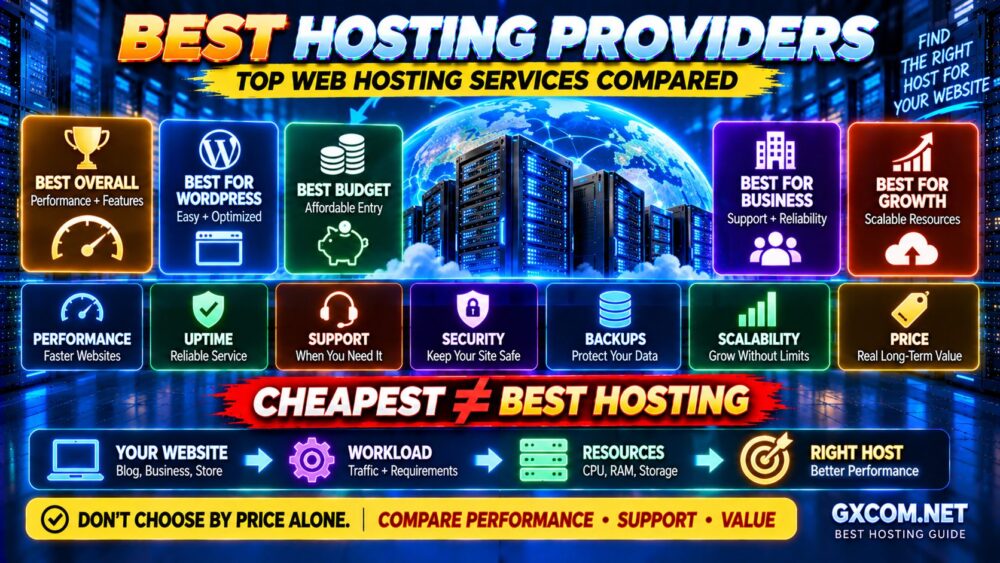
Should a Small Business Choose the Cheapest Hosting?
Usually not based on price alone.
Imagine two hosting plans:
PLAN A
Very low introductory price
Limited resources
Basic backups
Higher renewal
PLAN B
Higher initial cost
Better resources
Better backups
Better support
The cheapest first invoice does not tell you which plan provides better business value.
Instead calculate:
TOTAL COST
+
TIME REQUIRED
+
BUSINESS RISK
=
REAL HOSTING COST
How Much Should Small Business Web Hosting Cost?
Hosting prices vary substantially depending on the service level, resources and contract.
Rather than relying on a fixed price range that quickly becomes outdated, compare:
- Introductory cost
- Renewal cost
- Contract duration
- Number of websites
- Storage
- Backups
- Security
- CDN
- Migration
- Support
Our Best Hosting Providers guide provides a broader comparison of mainstream hosting options beyond the small-business use case.
When Should a Small Business Upgrade Its Hosting?
Do not upgrade simply because a provider offers a more expensive plan.
Upgrade when the workload justifies it.
Common warning signs include:
- Repeated CPU limits
- Memory exhaustion
- I/O throttling
- Slow uncached pages
- Traffic spikes causing errors
- WooCommerce performance problems
- Need for custom server software
- Need for greater resource isolation
Use this process:
MEASURE
↓
FIND THE BOTTLENECK
↓
OPTIMIZE
↓
MEASURE AGAIN
↓
UPGRADE IF NECESSARY
That prevents unnecessary infrastructure spending.
Small Business Hosting Checklist
Before purchasing, check these 15 items:
- ✓ Hosting type matches the website
- ✓ Resource limits are clear
- ✓ Server location suits your audience
- ✓ SSL is included
- ✓ Backup schedule is documented
- ✓ Restore process is practical
- ✓ Security features are adequate
- ✓ WordPress tools are suitable
- ✓ Business email requirements are covered
- ✓ Migration assistance is available if needed
- ✓ Support scope is understood
- ✓ Renewal price is acceptable
- ✓ Upgrade path exists
- ✓ Cancellation/refund policy is understood
- ✓ The plan leaves room for growth
The goal is not to buy the largest plan.
The goal is to buy enough hosting for today's workload with a sensible path for tomorrow.
Which Web Hosting Provider Is Best for Your Small Business?
Choose hosting.com if you want a strong all-around balance of performance, WordPress capability and usability.
Consider Bluehost if you are launching your first WordPress business website and want a beginner-friendly ecosystem.
Compare IONOS if keeping initial costs low is particularly important.
Consider ScalaHosting if your business is growing and you value a future path toward more powerful managed infrastructure.
Look at GreenGeeks if environmental positioning matters to your business.
Consider FastComet if your customers are geographically distributed.
Compare HostArmada when managed convenience is a priority.
And evaluate ChemiCloud when migration and support are important parts of your hosting decision.
There is no single provider that fits every small business.
CHOOSE FOR YOUR WORKLOAD, NOT THE BIGGEST DISCOUNT.
Small Business Web Hosting FAQ
What is the best web hosting for a small business?
The best hosting depends on your website platform, traffic, technical skills and growth plans. hosting.com is a strong all-around candidate, while Bluehost is particularly relevant to WordPress beginners, IONOS to budget-conscious businesses and ScalaHosting to businesses expecting to scale.
Is shared hosting good enough for a small business?
Yes. Shared hosting can be sufficient for many local business, professional service and low-to-moderate traffic WordPress websites. Upgrade when resource limits or technical requirements justify it.
Does a small business need VPS hosting?
Not necessarily. VPS hosting becomes useful when you need greater resource isolation, server control or higher resource allocations. Many small business websites can run effectively on quality shared or managed WordPress hosting.
What hosting is best for a small business WordPress site?
Look for WordPress-friendly hosting with SSL, backups, caching, security, current PHP support and responsive technical assistance. Managed WordPress hosting can be useful when you prefer less hands-on maintenance.
Should web hosting include business email?
It depends on your requirements. Bundled email can be convenient for small organizations, while businesses with more demanding email requirements may prefer a dedicated business email service.
How much storage does a small business website need?
Many ordinary business websites use relatively little storage. Large image libraries, video, email and backups can increase requirements, but CPU, RAM, I/O and database performance may affect website speed more than total storage capacity.
Can I change hosting providers later?
Yes. Websites can be migrated between hosting providers. However, migrations involving email, DNS, large databases or ecommerce sites require more planning, so choosing a provider with an appropriate growth path can reduce future disruption.
What is more important: cheap hosting or reliable hosting?
For a commercial website, reliability generally deserves greater weight. A very inexpensive plan can become poor value if downtime, weak backups, resource limits or inadequate support interfere with the business.
Final Verdict: Choose Hosting That Supports the Business
The best small business hosting is not necessarily the provider offering the largest discount, most storage or longest feature list.
The right choice should support what the website actually does for the business.
Start with:
WHAT DOES THE WEBSITE DO?
↓
HOW MUCH TRAFFIC DOES IT RECEIVE?
↓
WHAT RESOURCES DOES IT NEED?
↓
HOW IMPORTANT ARE SUPPORT AND BACKUPS?
↓
HOW FAST COULD THE BUSINESS GROW?
For many small businesses, hosting.com offers a strong overall balance. Bluehost provides an approachable route into WordPress, while IONOS can appeal to budget-conscious businesses. ScalaHosting becomes particularly attractive when future infrastructure growth matters.
GreenGeeks, FastComet, HostArmada and ChemiCloud each offer different strengths for businesses with more specific priorities.
Whatever provider you choose, remember:
YOUR WEBSITE IS BUSINESS INFRASTRUCTURE.
RELIABILITY > BIG STORAGE NUMBERS.
BACKUPS > MARKETING PROMISES.
LONG-TERM VALUE > FIRST-YEAR DISCOUNTS.
Choose hosting that keeps the website available today and gives the business somewhere to grow tomorrow.