GPU computing has become essential for artificial intelligence, large language models, machine learning, generative AI, inference, rendering, and high-performance computing. The problem is cost: powerful GPUs such as NVIDIA H100, A100, L40S, and AMD Instinct accelerators can make AI infrastructure expensive very quickly.
Finding the Best GPU Server Deals is therefore not simply about choosing the lowest advertised hourly rate. A good GPU deal should balance accelerator performance, GPU memory, CPU resources, system RAM, NVMe storage, networking, availability, billing terms, and workload efficiency.
This guide compares cheap AI GPU hosting options from GPU-focused providers, cloud platforms, and GPU marketplaces. It also explains hourly versus monthly pricing, dedicated versus cloud GPUs, and how to identify a GPU hosting deal that actually saves money.
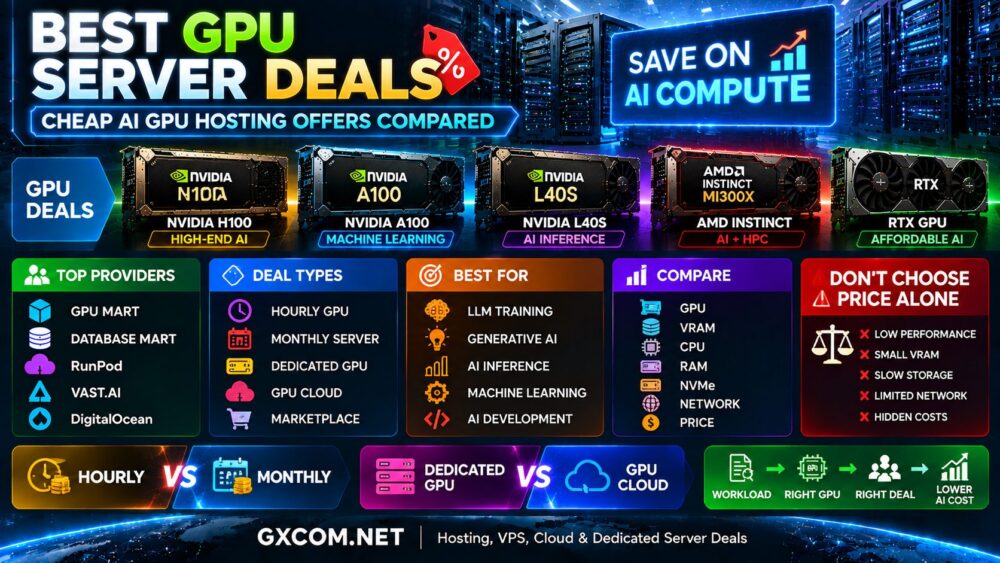
Best GPU Server Deals at a Glance
| Provider | Service Model | Good For | Deal Strategy |
|---|---|---|---|
| GPU Mart | GPU-focused hosting | Persistent GPU workloads | Compare monthly configurations |
| Database Mart | Server + GPU infrastructure | Long-running servers | Compare complete server value |
| RunPod | GPU cloud | AI development and LLMs | Pay for flexible GPU usage |
| Vast.ai | GPU marketplace | Budget GPU computing | Compare competing host offers |
| DigitalOcean | Developer cloud + GPU | Cloud-native AI | Combine GPU and cloud infrastructure |
Pricing and GPU availability can change frequently, so always verify the current configuration and billing terms directly with the provider before ordering.
What Makes a Good GPU Server Deal?
A cheap GPU is not automatically a good GPU deal.
The real value of GPU hosting depends on how much useful work the infrastructure can complete for the total amount you pay.
Compare at least these factors:
- GPU model
- GPU memory or VRAM
- Number of GPUs
- CPU allocation
- System RAM
- NVMe storage
- Network speed
- Data transfer allowance
- Billing minimums
- Hourly or monthly pricing
- Availability
- Technical support
For example, a lower hourly price may provide poor value if the server has slow storage, limited networking, or insufficient VRAM for the model.
Best GPU Deals by GPU Type
| GPU Type | Typical Use Case | Deal Priority |
|---|---|---|
| NVIDIA H100 | LLM training and high-end AI | Performance per workload |
| NVIDIA A100 | Machine learning and AI training | Price-performance |
| NVIDIA L40S | Inference and generative AI | Balanced performance |
| AMD Instinct | AI and HPC | Memory + software compatibility |
| RTX-Class GPU | Development and affordable AI | Low entry cost |
NVIDIA H100 GPU Server Deals
NVIDIA H100 targets demanding artificial intelligence workloads including large language model training, generative AI, inference, and high-performance computing.
Because H100 infrastructure sits at the premium end of GPU hosting, finding a good deal requires looking beyond the headline rate.
Check whether the offer includes:
- The exact H100 variant
- GPU memory
- Dedicated or cloud GPU access
- CPU resources
- System RAM
- NVMe storage
- Multi-GPU connectivity
- Network bandwidth
A cheaper H100 offer may not be the better deal if another configuration completes the workload significantly faster or includes more useful infrastructure.
For a detailed H100 analysis, see our
NVIDIA H100 Server Hosting
guide.
NVIDIA A100 Deals
A100 can still offer strong value for machine learning, deep learning, AI research, fine-tuning, and established production workloads.
The existence of newer GPUs can sometimes make older-generation infrastructure more attractive when providers adjust pricing.
This makes A100 worth comparing for organizations that do not specifically require the performance characteristics of H100-class hardware.
When comparing A100 deals, check the memory configuration and complete server specifications rather than assuming every A100 offer is equivalent.
NVIDIA L40S Deals
L40S is particularly interesting for users who need a combination of AI inference and graphics capabilities.
Potential workloads include:
- Generative AI
- AI inference
- Image generation
- Computer vision
- Rendering
- Visualization
For workloads that do not need premium training hardware, an L40S server may offer a more appropriate balance between performance and infrastructure cost.
RTX GPU Server Deals
RTX-class GPU servers can be among the most attractive options for budget-conscious AI users.
They can work well for:
- AI development
- Model testing
- Image generation
- Smaller-model inference
- Computer vision
- Rendering
The main limitation is often VRAM. Before choosing an inexpensive RTX server, verify that the model can fit efficiently into available GPU memory.
For additional budget options, read our
Cheap GPU Servers
comparison.
GPU Mart GPU Server Deals
GPU Mart specializes in GPU hosting and is particularly relevant for users looking for persistent GPU infrastructure rather than only temporary cloud instances.
When comparing GPU Mart deals, evaluate the entire server:
- GPU model
- GPU memory
- CPU
- RAM
- Storage
- Bandwidth
- Server location
- Billing period
Monthly GPU hosting can be attractive for workloads that run continuously because budgeting is more predictable than purely usage-based infrastructure.
Database Mart GPU Deals
Database Mart combines traditional server hosting with GPU-oriented infrastructure.
This model can appeal to users who prefer persistent servers and conventional hosting management rather than highly elastic GPU cloud environments.
A Database Mart deal should be evaluated using the total server configuration rather than the GPU model alone. CPU performance, memory, storage, networking, and billing period all contribute to real value.
RunPod GPU Deals
RunPod takes a more cloud-oriented approach to GPU computing and is popular with AI developers who need flexible access to accelerators.
This can be attractive when workloads are temporary or unpredictable because users do not necessarily need to maintain a monthly GPU server that remains idle between jobs.
RunPod is particularly relevant for:
- AI development
- LLM workloads
- Model fine-tuning
- Inference
- GPU experimentation
When comparing cloud GPU deals, calculate how many hours the workload will actually run each month.
Vast.ai GPU Deals
Vast.ai uses a marketplace model that can create strong price competition between GPU hosts.
This makes it particularly interesting for users searching for cheap GPU rental deals.
However, the lowest listing price should not be the only consideration.
Compare:
- Host reliability
- GPU model
- GPU count
- VRAM
- CPU
- RAM
- Storage speed
- Network performance
- Availability
Marketplace pricing can be attractive, but infrastructure characteristics may vary between machines.
DigitalOcean GPU Hosting Deals
DigitalOcean takes a broader cloud-platform approach.
GPU resources can be useful for teams that also need cloud compute, storage, networking, databases, and application infrastructure within the same environment.
This means the value proposition is not necessarily based on the lowest standalone GPU price.
For a cloud-native AI application, operational simplicity and integration with other infrastructure can also contribute to total value.
GPU Server Deals: Provider Comparison
| Provider | Model | Pricing Approach | Good Fit |
|---|---|---|---|
| GPU Mart | GPU hosting | Server-oriented | Persistent workloads |
| Database Mart | Server infrastructure | Server-oriented | Long-running deployments |
| RunPod | GPU cloud | Usage oriented | Flexible AI computing |
| Vast.ai | Marketplace | Market driven | Budget GPU rental |
| DigitalOcean | Cloud GPU | Cloud based | Cloud-native AI |
Hourly vs Monthly GPU Server Deals
One of the most important decisions is whether to pay by usage or rent GPU infrastructure for a longer period.
| Usage Pattern | Pricing Model to Compare |
|---|---|
| A few hours of testing | Hourly GPU |
| Short training job | On-demand GPU |
| Occasional inference | Usage-based cloud |
| Continuous AI workload | Monthly / dedicated GPU |
| Stable production inference | Compare monthly and reserved cloud |
There is no universal point where monthly hosting automatically becomes cheaper. The calculation depends on GPU price, utilization, performance, storage, bandwidth, and workload duration.
Dedicated GPU Deals vs GPU Cloud Deals
Dedicated GPU servers provide predictable access to reserved resources, while GPU cloud platforms emphasize flexibility and rapid scaling.
| Factor | Dedicated GPU | GPU Cloud |
|---|---|---|
| Resources | Reserved | Platform dependent |
| Deployment | Provider dependent | Usually fast |
| Scaling | Hardware dependent | Flexible |
| Billing | Often monthly | Often usage based |
| Best For | Stable workloads | Variable workloads |
For a full comparison, see our
Best Dedicated GPU Servers
guide.
Best GPU Deals for LLM Training
Large language model training can require high-end GPUs operating at high utilization for long periods.
When comparing LLM GPU deals, prioritize:
- GPU memory
- Compute performance
- Memory bandwidth
- Multi-GPU communication
- Storage throughput
- Network performance
- Total training time
A lower hourly rate can become more expensive overall if the workload takes substantially longer to complete.
Best GPU Deals for AI Inference
Inference economics can be very different from training.
The most important metrics may include:
- Latency
- Throughput
- VRAM
- Batch size
- Context length
- Cost per request
- Utilization
This is why the most powerful GPU is not automatically the best inference deal.
Hidden Costs in Cheap GPU Hosting
Always check whether the advertised GPU price excludes other infrastructure costs.
Potential additional charges can include:
- Persistent storage
- Snapshots
- Data transfer
- Public IP resources
- CPU and RAM
- Idle instances
- Management
- Software services
For dedicated servers, also check setup fees, contract length, bandwidth limits, and renewal pricing.
How to Find the Best GPU Server Deal
- Define the AI workload.
- Determine the required GPU memory.
- Select suitable GPU models.
- Estimate monthly GPU usage.
- Compare hourly and monthly options.
- Check CPU, RAM, storage, and networking.
- Review bandwidth and additional charges.
- Compare provider reliability and support.
- Calculate total workload cost.
- Check whether a cheaper GPU can deliver sufficient performance.
Cheap GPU Deal Red Flags
Extremely Low Price Without Full Specifications
A GPU price is difficult to evaluate without knowing CPU, RAM, storage, networking, and GPU allocation.
Unclear GPU Model
Always verify the exact accelerator and VRAM configuration.
Very Cheap Introductory Pricing
Check renewal pricing and whether the discount applies only to the initial billing period.
Ignoring Data Transfer
AI datasets can be large, making bandwidth policies important to total cost.
Choosing Price Over Workload Fit
The cheapest GPU can become expensive when it takes much longer to complete the same workload.
Are GPU Server Deals Worth It?
Yes, but only when the discount matches the workload.
A genuine GPU server deal should reduce the cost of completing useful AI work rather than simply advertise a low GPU price.
For short-term projects, RunPod or marketplace-style services such as Vast.ai can provide flexible ways to access GPU computing. Persistent workloads may justify comparing server-oriented options from GPU Mart or Database Mart. DigitalOcean can make sense when GPU resources need to integrate with a broader cloud architecture.
The right provider depends on how long the GPU runs, which accelerator the workload needs, and what infrastructure surrounds it.
Final Thoughts
The best GPU server deals combine the right accelerator with the right billing model.
H100 is designed for demanding AI and LLM workloads, A100 remains relevant for established machine learning, L40S can provide a strong balance for inference and graphics, while RTX-class GPUs can reduce the entry cost for development and smaller AI projects.
Do not choose a GPU deal based only on the advertised hourly or monthly rate. Compare VRAM, CPU, RAM, NVMe storage, network performance, billing terms, utilization, and the time required to complete your workload.
The better buying path is:
Workload → GPU → VRAM → Usage → Provider → Deal → Total Cost.