Cloud server monthly vs hourly billing is an important decision for businesses trying to control infrastructure spending. Hourly pricing appears attractive because customers pay for billable usage, while monthly plans offer more predictable budgets. However, a powered-off server, unused disk, or forgotten test environment can still create charges.
The cheapest option depends on workload duration, billing rules, and supporting resources. This guide explains how to calculate break-even hours, identify idle resource costs, and compare hosting providers without relying on advertised compute rates alone.
How Monthly and Hourly Cloud Billing Work
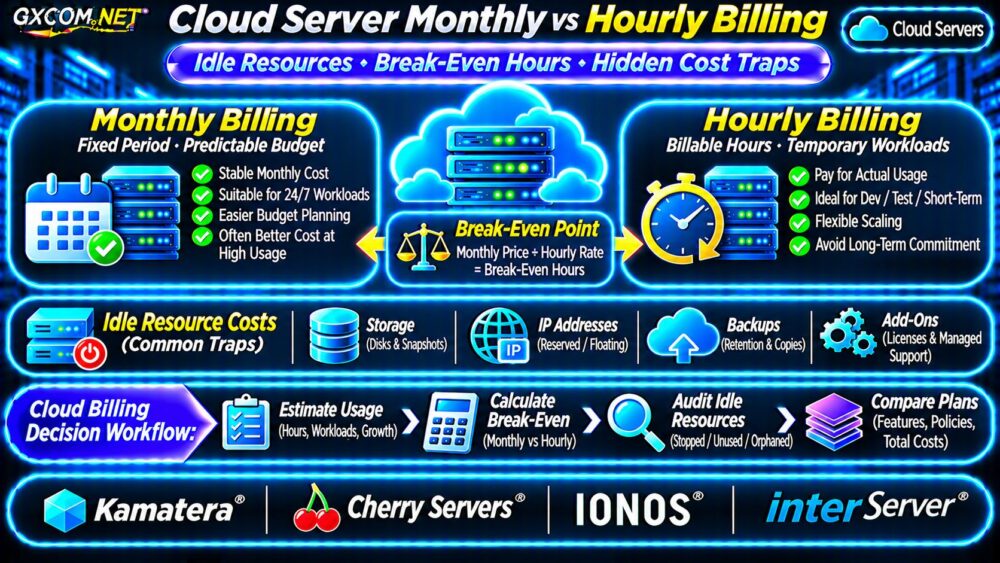
Monthly billing generally charges for a defined service period. Some plans use a fixed subscription, while others calculate resource usage and invoice it monthly. These arrangements are not interchangeable.
Hourly billing calculates eligible compute charges using billable time. Providers may measure usage by the hour, minute, or another increment. A monthly invoice can therefore contain hourly charges.
| Billing Model | Typical Advantage | Potential Limitation |
|---|---|---|
| Fixed monthly | Predictable recurring cost | Unused capacity may still cost money |
| Hourly compute | Suitable for temporary workloads | Continuous operation accumulates charges |
| Usage-based services | Pay according to measured resources | Multiple billing meters complicate forecasts |
| Fixed-term commitment | Potentially different contracted pricing | Reduced cancellation flexibility |
Read the provider’s product-specific terms before assuming that hourly billing means charges stop whenever an application becomes inactive.
Calculate the Monthly vs Hourly Break-Even Point
Start with the compute-only comparison:
Hourly compute cost = billable hours × hourly rate.
Break-even hours = comparable monthly compute price ÷ hourly compute rate.
Suppose an illustrative server costs $24 monthly or $0.05 per billable hour. The break-even point is 480 hours. Running the hourly instance for 160 hours costs $8 in compute charges; operating it for 730 hours costs $36.50.
In this simplified example, monthly billing becomes less expensive above 480 hours. The calculation assumes equivalent resources and excludes storage, licensing, and network differences.
Why 730 Hours Is Only a Planning Average
A thirty-day month contains 720 hours, while a thirty-one-day month contains 744. Using approximately 730 hours is convenient for annualized estimates, but invoices follow actual billing periods and provider rules.
For broader infrastructure budgeting, consult our cloud server cost optimization guide.

Does Stopping a Cloud Server Stop Billing?
Not necessarily. A stopped virtual machine may stop accumulating eligible compute charges while retaining billable storage, reserved addresses, backups, or other resources.
For example, Kamatera documents residual storage and IP charges for powered-off hourly servers. Other providers apply different policies, so verify the exact product before scheduling shutdowns.
Distinguish three actions:
- Stop: Shut down compute while preserving the instance and selected resources.
- Suspend: Pause an instance under provider-specific billing and state-retention rules.
- Delete: Remove the instance, potentially leaving separately managed volumes, snapshots, or addresses.
Deletion can permanently destroy data. Create and verify required backups before removing production or development resources.
Five Hidden Cloud Billing Traps
1. Forgotten Development Instances
Temporary test servers sometimes remain provisioned after a project ends. Use ownership labels, expiration dates, and scheduled resource reviews to identify abandoned infrastructure.
2. Persistent Storage After Shutdown
Disk capacity can remain billable even when the attached server is stopped. Check whether charges depend on provisioned gigabytes, storage class, or performance settings.
3. Snapshots and Backup Retention
Automatic snapshots and backup copies may continue accumulating storage charges. Establish retention policies without deleting recovery points needed for compliance or restoration.
4. IP Addresses and Network Services
Reserved IPs, load balancers, outbound transfers, and related networking services can create separate expenses. Network billing should be assessed independently from compute time.
Our cloud VPS bandwidth overages guide explains transfer caps and excess-traffic considerations.
5. Licenses and Management Add-Ons
Windows licensing, control panels, managed support, and monitoring may have separate billing terms. A low hourly compute quote is not a complete hosting estimate.
Choose Billing Based on Workload Patterns
Production websites: Continuously operating applications benefit from comparing monthly plans against full-month hourly costs. Include backup and availability requirements.
Development environments: Hourly compute can be economical when teams reliably shut down resources outside working hours and understand residual charges.
Batch processing: Temporary jobs may benefit from usage-based infrastructure if startup time, storage, and transfer costs remain reasonable.
Seasonal applications: Compare baseline monthly capacity with temporary additional resources. Do not assume scaling automatically removes unused instances.
Compare Four Approved Hosting Providers
Kamatera: Hourly and Monthly Cloud Options
Kamatera provides configurable cloud servers with hourly and monthly pricing arrangements. Its documentation distinguishes monthly commitments from hourly usage and identifies certain charges that remain after shutdown. Verify configurations using its calculator.
Cherry Servers: Flexible Infrastructure Billing
Cherry Servers lists hourly, fixed-term, and spot infrastructure options. Compare virtual server availability, storage, network resources, and termination rules for each selected product.
IONOS: Time-Based Cloud Compute
IONOS offers cloud compute products with usage-based pricing. Review the exact service edition, billing increments, persistent storage, and product-specific shutdown policies before comparing costs.
InterServer: Monthly VPS Budget Alternative
InterServer is worth evaluating when a conventional VPS meets application requirements and predictable recurring expenditure matters more than granular compute billing. Compare actual plan terms rather than assuming cloud-equivalent flexibility.
Our Kamatera cloud server review explores configurable resources and billing considerations.
Build a Realistic Monthly Cost Scenario
Consider a hypothetical test environment using 180 billable compute hours at $0.05 hourly, plus $6 monthly storage and $2 in backup charges. The estimated total is $17.
A comparable $24 monthly compute plan with the same additional expenses totals $32. For this temporary workload, hourly billing saves $15 under the stated assumptions.

At 730 compute hours, the hourly alternative totals $44.50, making the illustrative monthly option $12.50 cheaper.
Actual invoices may differ because providers apply different inclusions, caps, minimums, and resource charges. Compare identical workloads, not unrelated entry-level advertisements.
Cloud Billing Control Checklist
- Calculate expected billable hours for every environment.
- Compare monthly and hourly prices for equivalent configurations.
- Check powered-off compute, storage, and IP charges.
- Tag temporary resources and assign accountable owners.
- Configure spending alerts and review invoices regularly.
- Verify backups before deleting unused infrastructure.
For additional purchasing context, read our pay-as-you-go cloud server comparison.
Frequently Asked Questions
Is Hourly Cloud Hosting Always Cheaper?
No. Hourly billing often suits short-lived workloads, but continuously running servers can cost more than comparable monthly plans.
Will a Stopped Server Still Cost Money?
It can. Storage, IP addresses, snapshots, and other retained resources may remain billable depending on the provider.
Should Production Servers Use Monthly Billing?
Not automatically. Compare full-month costs, availability requirements, flexibility, and contract conditions before choosing.
Final Verdict
Cloud server monthly vs hourly billing should be evaluated using actual workload schedules and complete resource costs. Hourly plans can reduce spending on temporary infrastructure, while monthly arrangements may offer better predictability for continuous workloads.
Compare Kamatera, Cherry Servers, IONOS, and InterServer using verified product terms. The best billing model is the one that minimizes total costs without compromising operational requirements.