Choosing a Linux VPS for PostgreSQL requires balancing available RAM, database connections, storage performance, and reliable backups. A low-cost server may handle a small application comfortably but struggle when connection counts increase or memory-intensive queries run simultaneously.
This guide explains how to size PostgreSQL resources, prevent connection exhaustion, configure pooling, and plan recoverable backups before comparing Linux VPS hosting providers.
How Much RAM Does PostgreSQL Need?
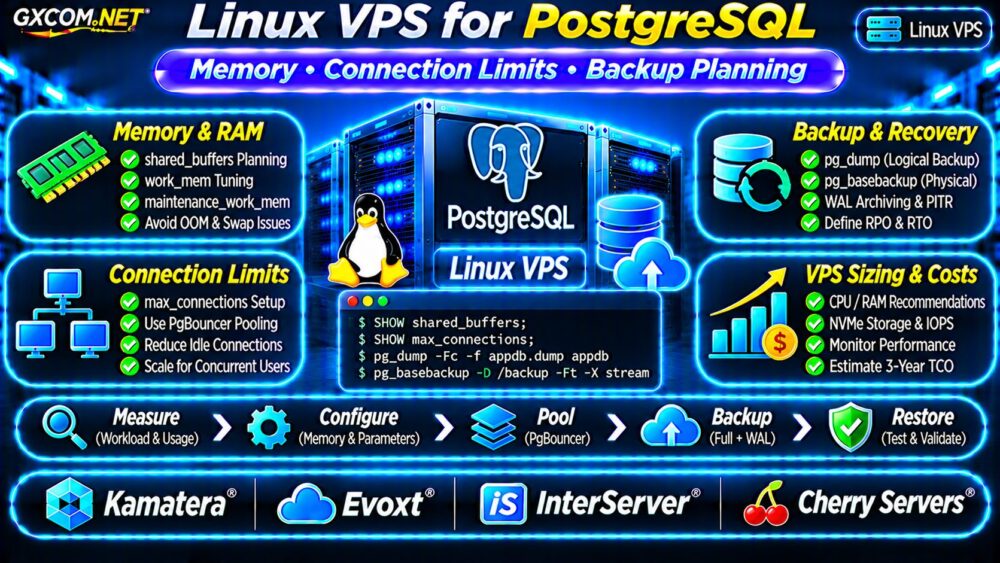
PostgreSQL uses memory for shared buffers, backend processes, query operations, and maintenance. Linux also needs RAM for the operating system, filesystem cache, and supporting applications.
A useful starting point is allocating approximately 25% of server RAM to shared_buffers on a dedicated database server, then measuring workload behavior. This is a starting guideline, not a universal optimum.
| Workload | Illustrative VPS Starting Point |
|---|---|
| Development database | 2 vCPU / 4GB RAM |
| Small production application | 2–4 vCPU / 8GB RAM |
| Growing SaaS database | 4–8 vCPU / 16GB RAM |
| Memory-intensive workload | 8+ vCPU / 32GB+ RAM |
Actual requirements depend on active connections, query complexity, database size, caching, and other processes. Benchmark representative workloads before purchasing larger plans.
Understand PostgreSQL Memory Settings
Three important settings are shared_buffers, work_mem, and maintenance_work_mem.
shared_buffers controls PostgreSQL’s shared buffer cache. work_mem limits memory used by individual query operations such as sorting or hashing, subject to operation-specific behavior. Multiple operations and concurrent sessions can consume substantially more memory than one configured value.
maintenance_work_mem affects maintenance operations, including certain index builds and vacuum tasks.
Inspect your current settings:
SHOW shared_buffers;
SHOW work_mem;
SHOW maintenance_work_mem;
SHOW max_connections;
Do not multiply work_mem by connections and treat the result as an exact memory requirement. Query plans, parallel execution, and active operations determine actual consumption.
PostgreSQL max_connections and Connection Limits
Every PostgreSQL connection consumes server resources. Increasing max_connections without sufficient memory can worsen performance or trigger out-of-memory conditions.
Inspect active sessions using:
SELECT state, count(*)
FROM pg_stat_activity
GROUP BY state;
This identifies connection states but does not directly measure memory consumption. Investigate long-running transactions and excessive idle connections separately.

Why PgBouncer Helps
PgBouncer is a lightweight connection pooler that can reduce the number of PostgreSQL backend connections required by applications.
Transaction pooling can support many short-lived client transactions through fewer server connections. However, applications relying on session-level state, certain prepared-statement behaviors, or session-specific features require compatibility testing.
Choose pooling mode according to application behavior rather than automatically enabling transaction pooling everywhere.
Prevent OOM and Swap Problems
Linux may terminate processes when memory becomes exhausted. PostgreSQL workloads can also slow significantly when active database memory is repeatedly swapped to disk.
Monitor memory availability and swap activity:
free -h
vmstat 1 10
journalctl -k --since "1 hour ago"
Check kernel logs for OOM events and correlate them with application errors. Avoid disabling swap blindly; instead, identify the memory pressure source and evaluate workload requirements.
When storage latency is suspected, consult our NVMe VPS vs SSD Performance Guide.
PostgreSQL Backup Planning on a Linux VPS
Reliable database hosting requires more than provider snapshots. PostgreSQL backups must support consistent restoration and meet the application’s recovery objectives.
Logical Backups with pg_dump
For smaller databases, pg_dump creates a logical backup that can be restored into a compatible PostgreSQL environment.
pg_dump -Fc -f appdb.dump appdbRun this command with appropriate database permissions. Protect the output because it may contain sensitive application data.
Logical dumps are useful for portability but do not independently provide continuous point-in-time recovery.
Physical Backups and WAL Archiving
Physical backup tools, including pg_basebackup, support server-level recovery workflows. Combined with properly configured WAL archiving, physical backups can enable point-in-time recovery (PITR).
WAL retention, archive integrity, PostgreSQL version compatibility, and restore procedures must be planned together.
Keep independent backup copies outside the primary VPS and periodically test complete restoration.
Our VPS Snapshot Backup and Recovery Guide covers broader backup considerations.
Define RPO and RTO Before Choosing Storage
Recovery point objective (RPO) defines acceptable data loss. Recovery time objective (RTO) defines the targeted restoration duration.
A business tolerating one day of data loss may use a simpler backup schedule than a transactional application requiring recovery close to the failure time.
Measure restoration time using a separate test environment. Backup completion alone does not establish recovery readiness.
Four Linux VPS Providers for PostgreSQL
These GXCOM.NET-approved affiliate providers are infrastructure candidates, not automatically managed PostgreSQL services. Confirm actual storage, backup, and administration terms.
Kamatera: Adjustable Database Resources
Kamatera is worth comparing when CPU, RAM, and storage flexibility matter. Verify resource upgrade procedures, backup options, and database management responsibilities.
Evoxt: Smaller Database Deployments
Evoxt may fit development databases and lighter production workloads. Examine available memory, storage performance, sustained CPU policies, and recovery options.
InterServer: Linux VPS Cost Planning
InterServer offers another comparison point for VPS resources and recurring expenses. Check Linux image availability, backup services, and technical support boundaries.
Cherry Servers: Growing Infrastructure Needs
Cherry Servers can be evaluated for database workloads requiring additional compute or storage resources. Confirm the specifications and isolation characteristics of the selected product.
For broader provider selection, see our Best VPS Providers Comparison.
Calculate PostgreSQL VPS Hosting Costs
Consider a hypothetical Linux VPS costing $30 monthly, independent backup storage costing $8, and monitoring costing $7.

The infrastructure subtotal is $45 monthly, or $540 annually. Three years would cost $1,620 before taxes, database administration, migration, and additional recovery infrastructure.
These figures are illustrative rather than live provider quotations.
Compare the cost of self-management with managed alternatives using our Managed vs Unmanaged VPS Guide.
Linux VPS PostgreSQL Buying Checklist
- Estimate peak connections and concurrent query activity.
- Measure RAM usage, swap activity, and query performance.
- Evaluate PgBouncer compatibility before deployment.
- Confirm storage latency and available disk capacity.
- Define RPO, RTO, and off-server backup retention.
- Test restoration and calculate long-term hosting costs.
Frequently Asked Questions
Is 4GB RAM Enough for PostgreSQL?
It can be sufficient for development or modest workloads. Production requirements depend on connection counts, query complexity, and caching needs.
Should I Increase max_connections?
Only after checking memory capacity and application connection behavior. Connection pooling may be more efficient than allowing unlimited backend growth.
Are VPS Snapshots Enough for PostgreSQL Backups?
Not necessarily. Verify consistency, retention, off-server storage, and successful database restoration. PITR requires an appropriate physical backup and WAL strategy.
Final Verdict
The best Linux VPS for PostgreSQL balances memory headroom, controlled connections, predictable storage performance, and recoverable backups.
Compare Kamatera, Evoxt, InterServer, and Cherry Servers using verified specifications and realistic workloads. Prioritize measured database reliability over advertised RAM or CPU figures alone.