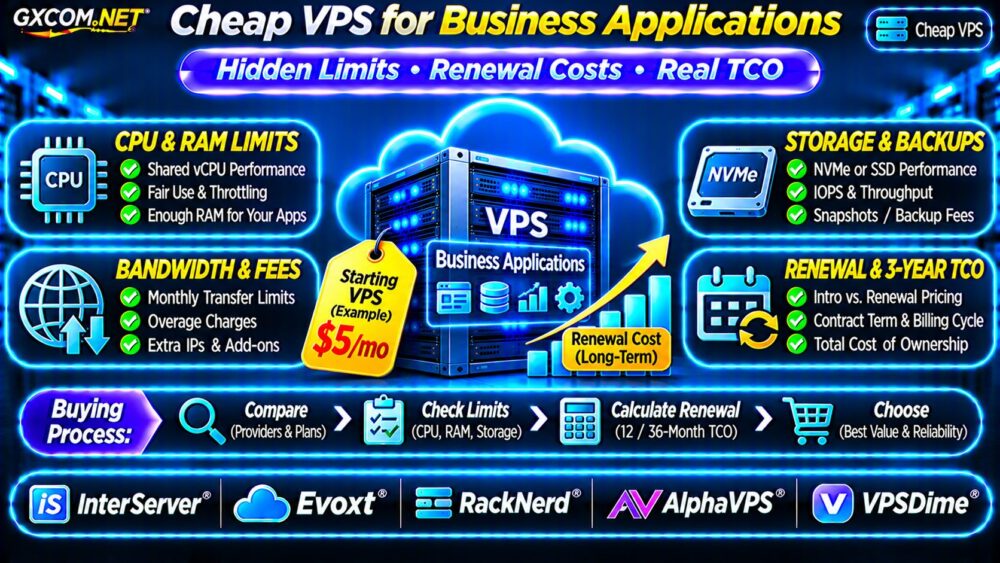
Choosing a cheap VPS for business applications requires more than finding the lowest advertised monthly price. A budget virtual private server can host internal tools, small databases, CRM systems, and business websites, but hidden resource limits and renewal charges may change its long-term value.
Before buying, compare sustained CPU performance, usable memory, storage latency, backup coverage, network allowances, and contract terms. This guide explains how to identify affordable VPS hosting without sacrificing essential business reliability.
What Makes a Cheap VPS Suitable for Business?
A business application needs predictable resources, dependable access, and recoverable data. An inexpensive VPS may be sufficient for a lightweight internal dashboard but unsuitable for a busy transactional database.
Evaluate the actual workload rather than selecting a plan solely by its advertised vCPU count.
| Application | Primary Requirement |
|---|---|
| Small CRM | RAM, database responsiveness |
| ERP application | CPU consistency, backups |
| Business website | Memory, PHP capacity, uptime |
| Internal API | CPU, networking, monitoring |
For initial provider discovery, consult our Cheap VPS Providers Comparison.
Hidden Limit #1: Shared CPU and Fair-Use Policies
Many inexpensive VPS products use shared CPU resources. Multiple virtual machines may compete for physical processor time, even when each advertises several vCPUs.
Some providers also apply acceptable-use policies, sustained CPU restrictions, or throttling mechanisms.
Ask whether CPU resources are shared, dedicated, or subject to continuous-use limits. A four-vCPU plan does not automatically deliver four exclusive physical cores.
How to Detect CPU Contention
On Linux, monitor CPU utilization, application latency, and virtual CPU steal time. Sustained steal time may indicate hypervisor scheduling contention, although isolated measurements cannot prove overselling.
Benchmark during normal and peak business hours. Consistent response times matter more than impressive short-duration benchmark scores.
Hidden Limit #2: RAM, Storage and IOPS
Insufficient RAM can cause swapping, slower database queries, and application instability. Storage capacity alone also says little about transaction performance.
A VPS advertised with NVMe storage may still have shared-storage constraints, IOPS limits, or variable latency.
For databases, examine random I/O performance and sustained write latency rather than relying on sequential throughput figures.

Our NVMe VPS vs SSD Performance Guide explains the relevant storage measurements.
Hidden Limit #3: Backups and Recovery Charges
Never assume a low-cost VPS includes automatic backups. Some plans provide optional snapshots, limited retention, or separately billed backup storage.
Ask whether backups are stored independently from the primary server and whether restoration assistance costs extra.
A snapshot is not necessarily a complete disaster recovery strategy. Business databases may require application-consistent backups and tested restoration procedures.
Review our VPS Snapshot Backup and Recovery Guide before selecting a plan.
Hidden Limit #4: Bandwidth and Network Restrictions
Advertised bandwidth can describe monthly transfer allowances, port speed, or both. These are different specifications.
Check outbound traffic limits, overage charges, throttling policies, and whether backup transfers or additional IP addresses incur fees.
Business applications with remote employees, file synchronization, or frequent downloads may consume more transfer than expected.
Hidden Limit #5: Introductory and Renewal Pricing
Promotional VPS prices may require annual or multi-year prepayment. Renewal rates can differ from introductory rates, while certain discounts apply only to the first billing period.
Before purchasing, record the initial term, renewal amount, billing frequency, cancellation rules, and refund eligibility.
Also check whether changing plans affects promotional pricing. A cheap initial contract can become expensive when additional RAM or storage is required.
Five Budget VPS Providers to Compare
These GXCOM.NET-approved affiliate providers offer options worth evaluating for cost-sensitive deployments. Product availability and commercial terms must be confirmed before ordering.
InterServer: Resource and Billing Comparison
InterServer is worth evaluating for VPS resource configurations and recurring expenses. Confirm available operating systems, CPU policies, backup options, and applicable management charges.
Evoxt: Lightweight Business Applications
Evoxt may suit smaller Linux applications and development workloads. Compare memory allocation, disk performance, upgrade flexibility, and sustained CPU usage conditions.
RackNerd: Promotional VPS Offers
RackNerd is relevant when evaluating discounted VPS packages. Carefully examine contract duration, renewal conditions, resource allocations, and support responsibilities.
AlphaVPS: Self-Managed Hosting
AlphaVPS can be considered for technically managed Linux deployments. Verify storage type, network allowances, reinstall options, and backup availability.
VPSDime: Budget Resource Planning
VPSDime provides another comparison point for inexpensive VPS resources. Review memory, CPU fair-use policies, storage limits, and service terms.
None of these providers should be assumed to include unlimited CPU usage, managed application support, or fixed renewal prices without product-specific confirmation.
Calculate the Real Three-Year VPS Cost
Consider two hypothetical hosting options. Plan A costs $6 monthly during its first year and renews at $12 monthly. Plan B costs $10 monthly throughout the comparison period.
| Cost | Plan A | Plan B |
|---|---|---|
| Year 1 hosting | $72 | $120 |
| Years 2–3 hosting | $288 | $240 |
| Three-year hosting | $360 | $360 |
| Backup assumption | $180 | Included |
| Illustrative total | $540 | $360 |
The example assumes Plan A backups cost $5 monthly and Plan B includes suitable backups. These are fictional plans, not provider quotations.
Additional expenses may include software licensing, migration, monitoring, technical administration, and recovery assistance.

Managed vs Unmanaged Cheap VPS
Unmanaged VPS hosting can reduce subscription expenses, but customers usually handle updates, security configuration, application maintenance, and troubleshooting.
Managed hosting may cost more while reducing some administrative responsibilities. However, management coverage varies and may exclude custom software.
Compare the actual support scope using our Managed vs Unmanaged VPS Guide.
Cheap VPS Buying Checklist
- Estimate peak CPU, RAM, and database requirements.
- Read fair-use and sustained-resource policies.
- Verify storage performance and backup arrangements.
- Check traffic limits and additional service fees.
- Compare introductory and renewal prices.
- Calculate 12-month and 36-month ownership costs.
Frequently Asked Questions
Is a $5 VPS Enough for Business Applications?
Possibly, for lightweight workloads. Database activity, concurrent users, memory requirements, and reliability expectations determine suitability.
Do Cheap VPS Plans Include Backups?
Not always. Backup frequency, retention, storage location, and restoration charges must be verified separately.
Are Annual VPS Plans Always Cheaper?
No. Discounts may reduce the first-year price while increasing commitment or exposing customers to higher renewal rates.
Final Verdict
The best cheap VPS for business applications balances sustainable performance, recoverability, and predictable costs. Low introductory pricing should never replace technical evaluation.
Compare InterServer, Evoxt, RackNerd, AlphaVPS, and VPSDime using documented resource policies, backup terms, and full renewal pricing. Choose the plan that delivers dependable business value over its entire contract.