A Linux dedicated server for Redis can provide predictable memory access, dedicated CPU resources, and direct control over storage and operating system settings. However, moving Redis from a VPS to physical hardware does not automatically eliminate latency spikes or out-of-memory failures.
Redis performance depends on dataset size, memory overhead, persistence settings, and application traffic patterns. This guide explains how to size a dedicated server, choose between RDB and AOF, and evaluate hosting providers without paying for unnecessary hardware.
When Does Redis Need a Dedicated Server?
Redis commonly supports application caching, sessions, queues, and low-latency data access. Shared infrastructure may be sufficient for smaller deployments, but sustained workloads can benefit from dedicated memory capacity and predictable CPU scheduling.
Consider physical hardware when memory consumption approaches available capacity, background persistence affects response times, or shared CPU contention becomes measurable.
Before migrating, establish baseline throughput, P95 and P99 latency, memory usage, and recovery requirements. Dedicated hardware is a capacity decision, not a substitute for application optimization.
Redis Memory Sizing: More Than Dataset Size
Redis stores primary data structures in memory, but total memory usage includes key metadata, allocator overhead, client buffers, replication buffers, and fragmentation. The logical dataset size alone is insufficient for purchasing RAM.
Calculate Working Memory and Headroom
Start with Redis INFO memory metrics, including used_memory, used_memory_rss, and mem_fragmentation_ratio. Interpret fragmentation alongside absolute memory usage because ratios can be misleading on lightly loaded systems.
For illustration, a dataset using 20GB of Redis memory might require substantially more physical RAM after operating system needs, fragmentation, and persistence overhead are considered.
A 32GB machine could be restrictive for that workload, especially during background saves. A 64GB configuration may offer more room, but the correct choice requires measured peak usage and workload testing.
Set maxmemory Carefully
The maxmemory setting limits Redis memory subject to its accounting rules; it is not a hard cap on every byte consumed by the process. Leave sufficient headroom for persistence, client activity, the operating system, and other services.
Choose an eviction policy based on application semantics. Cache workloads may tolerate eviction, while durable queues or critical state require a different design.
RDB vs AOF: Redis Persistence Options
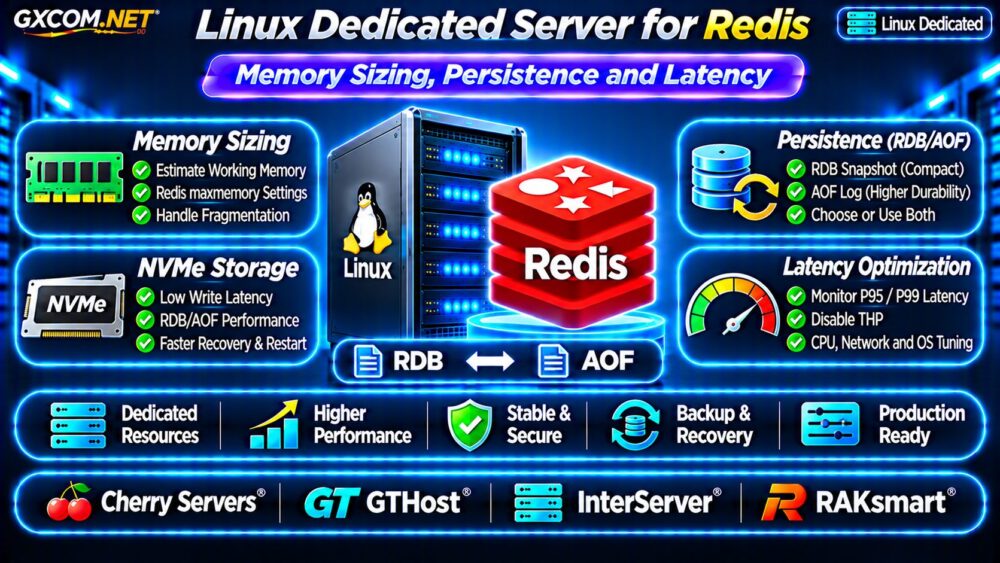
Persistence determines how Redis reconstructs data after restart or failure. Redis supports point-in-time RDB snapshots and append-only file (AOF) logging. Some deployments use both.
RDB Snapshots
RDB creates compact snapshots suitable for certain backup and recovery workflows. However, data written after the latest successful snapshot may be lost during an unexpected shutdown.

Background snapshot creation uses fork and copy-on-write behavior. Write-heavy workloads can increase temporary memory pressure while a snapshot is running.
AOF Logging
AOF records data-changing operations and offers different durability tradeoffs. The appendfsync everysec policy is a common compromise, but it does not guarantee zero data loss.
More aggressive synchronization can increase disk activity and latency. AOF rewriting also creates resource demands that should be included in capacity planning.
Use the official Redis persistence documentation to confirm behavior for your deployed Redis version.
Why NVMe Matters for Redis Persistence
Redis primarily serves data from memory, so faster disks do not automatically accelerate every command. Storage performance becomes important during AOF writes, snapshot creation, loading, and recovery.
Compare sustained write latency, disk endurance, and available capacity rather than relying only on headline sequential throughput.
Our NVMe vs SSD Performance Guide explains relevant storage tradeoffs.
Linux Tuning for Lower Redis Latency
Linux kernel settings and CPU behavior can influence Redis response times. Review transparent huge pages (THP), memory overcommit, swapping, CPU frequency behavior, and NUMA placement where relevant.
THP and Memory Overcommit
Redis guidance commonly recommends disabling THP for predictable latency. Verify current recommendations against your Redis version and Linux distribution before making system-wide changes.
Background persistence may also require appropriate vm.overcommit_memory configuration. Monitor memory pressure instead of treating a kernel setting as a substitute for sufficient RAM.
Network and CPU Considerations
Keep application servers geographically close to Redis when possible. Network round trips, client connection patterns, and inefficient commands can dominate latency even on fast dedicated hardware.
Modern CPU cores often matter more than large counts of older cores for workloads dominated by a primary Redis execution thread. Additional threads and background work can still benefit from CPU capacity.
For related performance diagnostics, see our VPS CPU Steal Time Troubleshooting Guide.
Measure Redis P99 Latency Before Upgrading
Average latency can hide occasional slow requests. Track P95 and P99 response times under representative production traffic, including persistence operations and peak client concurrency.
Use Redis latency monitoring, SLOWLOG, application telemetry, and controlled benchmarking. Investigate expensive commands, large keys, network delays, and disk stalls before blaming the server.
Benchmark changes one at a time. An apparently faster machine may provide little benefit if the bottleneck is application-side serialization or inefficient key access.
Four Linux Dedicated Server Providers to Compare
The following GXCOM.NET-approved providers are infrastructure candidates. Confirm actual CPU models, usable RAM, NVMe options, locations, and management responsibilities before purchasing.
Cherry Servers: Memory and Bare Metal Flexibility
Cherry Servers is worth evaluating for Redis deployments requiring substantial RAM and physical hardware control. Compare available memory configurations, processor generations, disk performance, and replacement procedures.
GTHost: Location and Network Latency
GTHost can be compared when network location and dedicated resource availability matter. Request current specifications and evaluate latency from your application environment.
InterServer: Redis Hosting Budget
InterServer offers another dedicated infrastructure comparison point. Review RAM capacity, CPU age, storage options, recurring costs, and whether hardware upgrades require migration.
RAKsmart: Regional Deployment Options
RAKsmart is a candidate for geographically targeted infrastructure. Confirm selected data center availability, Linux support, network conditions, and the complete server quotation.
These comparisons do not imply that Redis administration or managed database support is included with every dedicated plan.

Redis Dedicated Server Cost Planning
Calculate total cost using server rental, memory upgrades, storage, backups, monitoring, and operational support. Include the cost of replicas or standby infrastructure when availability requirements justify them.
A hypothetical $140 server with $25 backup storage and $35 monitoring or management services totals $200 monthly, or $2,400 annually. These figures illustrate budgeting only.
For a broader architecture decision, review our Dedicated vs Cloud Server Comparison.
Redis Dedicated Hosting Buying Checklist
- Measure peak Redis memory, RSS, and fragmentation.
- Reserve RAM for fork, persistence, and operating system overhead.
- Choose RDB, AOF, or both based on acceptable data loss.
- Benchmark NVMe writes and application P99 latency.
- Verify CPU generation, network location, and upgrade options.
- Plan backups, replicas, monitoring, and recovery testing.
Frequently Asked Questions
Is 32GB RAM Enough for Redis?
It depends on dataset size, overhead, write activity, and persistence settings. Measure actual peak memory consumption before choosing capacity.
Does Redis Require NVMe Storage?
Not always. NVMe is especially useful when persistence, recovery, or other disk-intensive operations are important.
Does AOF Guarantee Zero Data Loss?
No. Durability depends on synchronization policy, system behavior, and failure conditions.
Final Verdict
A Linux dedicated server for Redis should be selected around measured memory requirements, persistence overhead, and tail latency rather than headline CPU specifications.
Compare Cherry Servers, GTHost, InterServer, and RAKsmart using workload benchmarks and written quotations. Prioritize adequate RAM headroom, dependable storage, and predictable recovery over unnecessary hardware upgrades.