Finding the best VPS providers for remote desktop teams requires more than comparing monthly hosting prices. A Windows VPS may support Remote Desktop Protocol (RDP), but that does not automatically make it suitable—or properly licensed—for several employees working simultaneously.
RAM capacity, CPU performance, Windows Server licensing, Remote Desktop Services (RDS) access rights, and security all affect the purchasing decision. This guide explains how to evaluate five hosting providers and calculate the infrastructure your team actually needs.
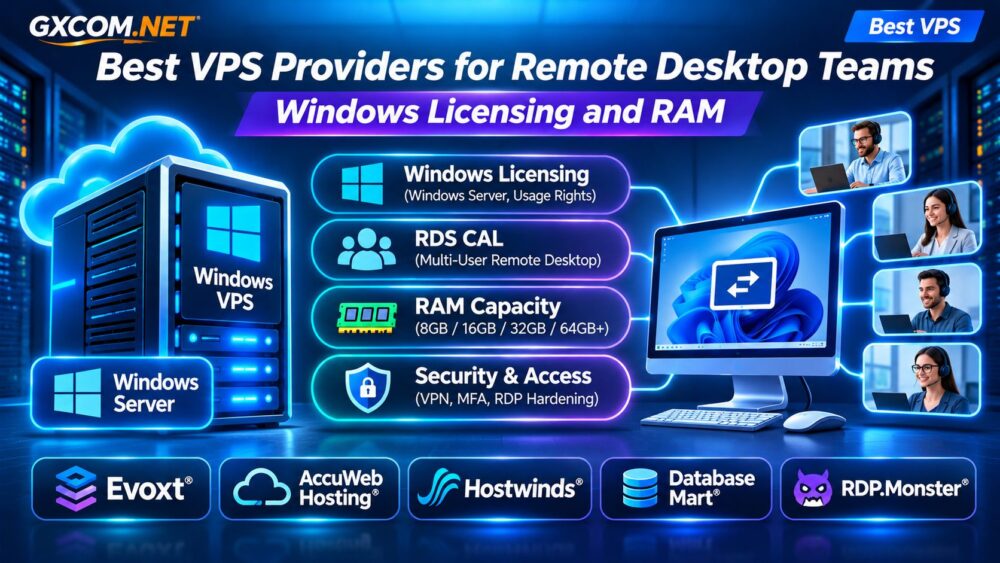
Best VPS Providers for Remote Desktop Teams: Quick Comparison
| Provider | Best Fit | What to Verify |
|---|---|---|
| Evoxt | Budget-conscious Windows VPS buyers | Windows licensing and available RAM |
| AccuWeb Hosting | Business Windows hosting | Management, backups, and RDS eligibility |
| Hostwinds | Expandable Windows VPS deployments | Resource upgrades and license charges |
| Database Mart | Windows business applications | Storage, OS licensing, and support |
| RDP.Monster | Remote desktop-focused requirements | Session rights, service terms, and isolation |
This shortlist identifies providers worth investigating, not verified multi-user RDS bundles. Confirm current plans and licensing directly before ordering.
Windows VPS vs Remote Desktop Services: Understand the Difference
Windows Server includes Remote Desktop capabilities for server administration. The commonly referenced two administrative connections are not a substitute for licensing a shared desktop environment used by employees.
When multiple people need interactive Windows sessions for daily work, Remote Desktop Services licensing may be required. Depending on the deployment and licensing program, this can involve Windows Server access licenses, RDS Client Access Licenses (CALs), and additional service-provider licensing arrangements.
Hosted Windows licensing can differ from traditional on-premises licensing. Ask the provider which rights are included, whether commercial multi-user sessions are permitted, and who supplies the required licenses.
For broader infrastructure comparisons, see our Best VPS Providers Guide.
How Much RAM Does a Remote Desktop Team Need?
RAM requirements depend on the operating system, concurrent users, and applications. A team opening browser tabs, spreadsheets, accounting software, and PDF documents will typically consume more memory than administrators performing occasional maintenance.
Use these illustrative starting points for capacity testing:
| Workload | RAM to Evaluate |
|---|---|
| One light administrative session | 4–8GB |
| Two light business users | 8–12GB |
| Three to five office users | 16–32GB |
| Six to ten mixed-workload users | 32–64GB+ |
These are planning examples, not guaranteed requirements. Modern browsers, large spreadsheets, ERP applications, and background services can substantially increase consumption.

Monitor peak committed memory, paging, and application response times during a realistic pilot. Reserve capacity for Windows updates, antivirus software, and temporary workload spikes.
CPU, NVMe Storage, and Network Performance
RAM alone does not determine the remote desktop experience. Several users launching applications or processing spreadsheets simultaneously can create CPU contention. Compare dedicated versus shared vCPU policies and measure sustained performance.
NVMe storage can improve application loading and file operations, but advertised drive technology does not guarantee consistent IOPS. Network latency also matters: a powerful server located far from employees may feel sluggish during interactive work.
Choose a data center close to the team’s primary location and test connectivity before migration.
Five VPS Providers to Evaluate
1. Evoxt: Windows VPS for Cost-Conscious Teams
Evoxt deserves consideration when budget is important and the deployment can start with a smaller Windows VPS. Compare available CPU, RAM, storage, and regional options.
Before purchasing, verify whether the quoted price includes a properly licensed Windows Server installation. For employee desktop sessions, request explicit confirmation of supported RDS licensing arrangements rather than assuming ordinary RDP access is sufficient.
2. AccuWeb Hosting: Business-Oriented Windows VPS
AccuWeb Hosting is relevant to businesses seeking Windows VPS configurations and additional operational assistance. Evaluate managed versus unmanaged service options, backup coverage, and technical support boundaries.
Ask whether the selected environment supports your intended number of users and how Windows Server and RDS licensing are handled.
3. Hostwinds: Windows VPS Resource Flexibility
Hostwinds is a candidate for teams expecting changing resource requirements. Compare available Windows VPS configurations, upgrade procedures, and storage capacity.
Check the final monthly cost after operating system charges, backups, and any separately required management services. Confirm whether resizing involves downtime or migration.
4. Database Mart: Windows Business Application Hosting
Database Mart is worth examining for organizations running Windows-based business applications, accounting systems, or database-connected desktop software.
Prioritize application compatibility, disk capacity, backup restoration, and reliable remote connectivity. Confirm current plan availability, Windows licensing, and whether the provider supports your intended RDS deployment.
5. RDP.Monster: Remote Desktop-Focused Requirements
RDP.Monster may be relevant when remote desktop access is the primary purchasing requirement. However, a remote desktop-oriented product should not automatically be treated as a fully isolated VPS or a licensed multi-user Windows Server environment.
Verify administrator privileges, resource isolation, permitted applications, user-session rights, security controls, and service terms before comparing it with conventional Windows VPS hosting.
Windows Licensing and the Real Monthly Cost
A low advertised VPS price can be misleading if it excludes Windows licensing, RDS access rights, backups, or administration.
Consider this hypothetical monthly budget for a small team:
| Expense | Illustrative Cost |
|---|---|
| Windows VPS infrastructure | $45 |
| Windows licensing, if separate | $15 |
| RDS licensing allowance | $35 |
| Backups and monitoring | $15 |
| Total planning budget | $110 |
These figures are hypothetical, not vendor quotes or a valid licensing offer. Actual RDS licensing eligibility, billing structures, and costs must be confirmed with an authorized provider.
Our Windows Dedicated Server Cost and Licensing Guide explains related expenses when evaluating larger deployments.
Security Checklist for Remote Desktop Teams
Exposing RDP directly to the public internet increases attack exposure. A secure deployment should include:
- A VPN or appropriately secured Remote Desktop Gateway.
- Multi-factor authentication wherever supported.
- Restricted network access and strong account policies.
- Regular Windows and application security updates.
- Independent backups with tested restoration procedures.
- Monitoring for suspicious logins and resource exhaustion.
Review our Unmanaged Server Security Checklist for additional hardening practices.

Managed vs Unmanaged Windows VPS
Managed hosting can reduce routine maintenance, but providers may exclude application support, user account administration, and RDS configuration. Unmanaged VPS hosting generally leaves these tasks with your IT team.
Compare written support policies before deciding. Our Managed vs Unmanaged VPS Comparison provides a broader responsibility breakdown.
Frequently Asked Questions
Can Multiple Employees Use One Windows VPS?
Potentially, if the server configuration and applicable licensing permit it. Administrative RDP access alone does not authorize ordinary multi-user desktop hosting.
Is 8GB RAM Enough for a Remote Desktop Team?
It may support a small, light workload, but application usage and simultaneous sessions determine actual requirements. Test before committing.
Does a Windows VPS Include RDS CALs?
Not necessarily. Ask for written confirmation of the licensing model and all required user or device access rights.
Final Verdict: Which Provider Should You Choose?
Start with Evoxt when evaluating budget Windows VPS options, AccuWeb Hosting for business-oriented support, Hostwinds for configurable resources, Database Mart for Windows application workloads, and RDP.Monster for specialized remote desktop requirements.
However, provider selection should follow licensing verification and realistic workload testing. The best remote desktop VPS is not simply the cheapest server—it is the configuration that legally supports your users, delivers consistent performance, and remains secure as your team grows.