Minecraft server pre-generation can reduce chunk loading spikes when players explore unfamiliar terrain. Instead of generating every new area during gameplay, administrators prepare a defined section of the world before opening the server to the public.
This approach is especially useful for Minecraft Java communities expecting simultaneous exploration, new settlements, or a busy launch day. However, pre-generation consumes CPU time, memory, and storage during preparation. Understanding these tradeoffs helps administrators avoid unnecessary upgrades and unstable launches.
Why Does Minecraft Chunk Generation Cause Lag?
Minecraft divides worlds into chunks, each covering a horizontal area of 16 by 16 blocks. When players travel into unexplored regions, the server must generate terrain, structures, and other world data.
Generating many chunks simultaneously can increase CPU activity and disk writes. If the server cannot complete its simulation work quickly enough, players may experience delayed block interactions, entity movement, or other gameplay actions.
Pre-generation moves much of this expensive work into a scheduled preparation period. Previously generated terrain still requires loading, but the server generally avoids repeating the full terrain-generation process.
What Is Minecraft Server Pre-Generation?
Pre-generation creates chunks across a selected area before players need them. Administrators usually define a center point and radius, then allow a compatible tool to process the region.
It is particularly valuable before launching a new survival world, introducing a custom map, or expecting many players to explore simultaneously.
Pre-generation does not automatically optimize plugins, entity processing, redstone machines, or network latency. Those workloads require separate investigation.
How to Pre-Generate Chunks with Chunky
Chunky is a popular world pre-generation tool for compatible Minecraft server environments. Installation methods and available commands depend on the specific plugin or mod version.
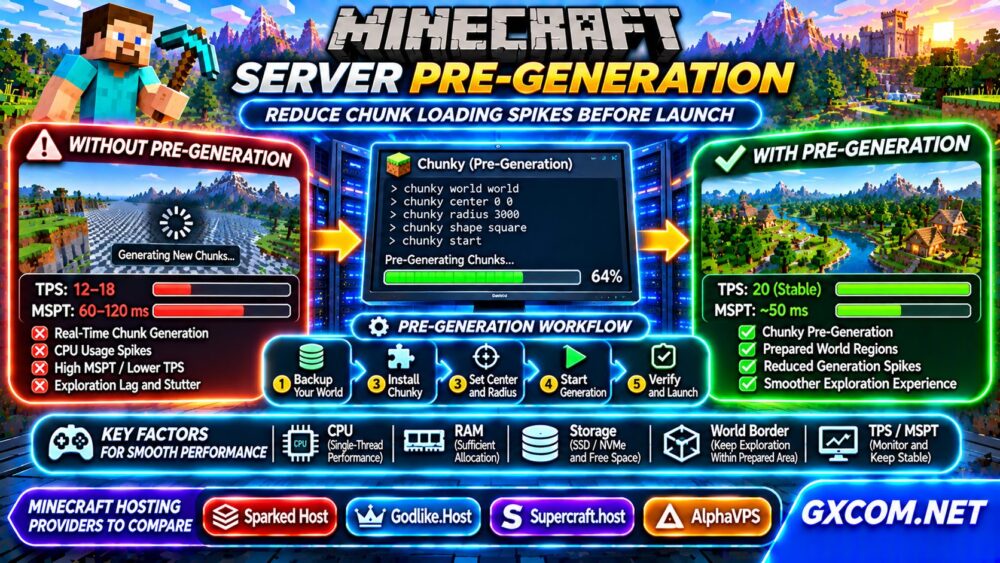
For a compatible Bukkit-based installation, a typical workflow looks like this:
- Back up the world and verify that the backup can be restored.
- Install a Chunky release compatible with your server software.
- Stop unnecessary background tasks and schedule maintenance.
- Choose the target world, center, shape, and generation radius.
- Start pre-generation and monitor resource usage.
- Verify the completed area before allowing players to join.
Example console commands for compatible Chunky plugin versions:
chunky world world
chunky center 0 0
chunky shape square
chunky radius 3000
chunky start
chunky progress
The radius is expressed in blocks, not chunks. Confirm your installed version’s command syntax and the correct world name before execution.

How Large Should the Pre-Generated Area Be?
Start with the area players are likely to explore during the first weeks. A larger radius increases coverage but also increases generation time and storage requirements.
| Radius | Approximate Square Area | Planning Use |
|---|---|---|
| 1,000 blocks | 4 million square blocks | Small launch region |
| 2,000 blocks | 16 million square blocks | Growing community |
| 3,000 blocks | 36 million square blocks | Wider exploration area |
These areas assume a square centered on the selected coordinates. Doubling the radius quadruples the covered area, making overly ambitious generation jobs expensive.
A world border can help keep exploration within prepared terrain, but the border and pre-generated area must be configured consistently.
How Much CPU and RAM Does Pre-Generation Need?
World generation is computationally demanding. Modern terrain generation, structures, datapacks, and modifications can substantially change processing requirements.
Strong single-thread performance remains important for Minecraft, although generation can involve additional threads. A VPS advertising many vCPUs may still struggle when CPU scheduling or sustained processing capacity is limited.
Monitor memory consumption rather than assigning all available RAM to Java. The operating system, filesystem cache, and management tools also need resources.
Our VPS CPU Steal Time Troubleshooting Guide explains how virtualization contention can affect sustained workloads.
Storage Planning: Why NVMe and Free Space Matter
Pre-generated terrain occupies disk space even before players construct buildings. Region files, structures, additional dimensions, logs, and backups increase total storage requirements.
Actual world size varies with Minecraft version, terrain, generated structures, and modifications. Avoid relying on a fixed number of gigabytes per thousand chunks.
SSD or NVMe storage can help with demanding file operations, but advertised NVMe hardware does not guarantee unrestricted I/O performance.
Check available capacity before generation, preserve room for backups, and monitor disk usage throughout the process. See our NVMe VPS Storage Performance Guide for additional considerations.
Monitor TPS, MSPT, and Generation Progress
TPS measures server simulation ticks per second, while MSPT describes the time spent processing each tick. Minecraft normally targets 20 TPS, corresponding to a 50-millisecond tick budget.
During pre-generation, monitor MSPT, CPU utilization, memory, disk activity, and the tool’s progress output. Temporary slowdowns during scheduled maintenance are less disruptive than similar spikes during active gameplay.
If performance becomes unstable, pause generation using the tool’s documented controls and investigate the bottleneck before resuming.
After completion, test movement through generated and unexplored regions to compare behavior.
Should You Pre-Generate the Nether and End?
The Overworld is not the only dimension that may require preparation. Nether exploration and End travel can also trigger generation workloads.
However, each dimension has different terrain characteristics and gameplay requirements. Generate only the regions your community is likely to use, and confirm the correct world identifiers before starting additional jobs.
Maintain separate backups and monitor combined storage consumption.
Four Minecraft Hosting Providers to Compare
Sparked Host, Godlike.Host, Supercraft.host, and AlphaVPS are candidates for communities evaluating pre-generation workflows. Their current products, resource policies, and administrative permissions should be checked individually.
Sparked Host
Investigate compatible Minecraft software, console access, scheduled tasks, backup tools, and available CPU or memory upgrades.
Godlike.Host
Compare file management, world backup options, modded server compatibility, and the ability to run extended generation jobs.

Supercraft.host
Review Minecraft hosting availability, plugin installation, storage capacity, and resource policies before selecting a plan.
AlphaVPS
For self-managed deployments, compare Linux VPS resources, virtualization, storage, and sustained CPU policies. Administrators must handle software installation, security, and backups themselves.
Explore our Game Hosting Comparisons when weighing managed hosting against self-managed infrastructure.
When Is a Hosting Upgrade Necessary?
Consider upgrading if generation repeatedly exhausts memory, storage becomes insufficient, or measured CPU contention prevents completion within a reasonable maintenance window.
First reduce unnecessary background activity, check plugin behavior, and choose a realistic generation radius. Buying more RAM will not necessarily solve a CPU scheduling bottleneck.
For alternative infrastructure, browse our Gaming VPS Guides.
Frequently Asked Questions
Does Pre-Generation Permanently Fix Minecraft Lag?
No. It reduces terrain-generation work during exploration but does not eliminate entity, plugin, redstone, or network bottlenecks.
Can I Pre-Generate Chunks While Players Are Online?
Some tools support it, but scheduled maintenance is safer for resource-constrained servers.
Does Pre-Generation Increase World File Size?
Yes. Generated chunks occupy storage before players visit them.
Final Verdict
Minecraft server pre-generation is a practical launch optimization when administrators define realistic boundaries, monitor resource usage, and maintain reliable backups. Prepare the areas players need, verify server stability, and select hosting based on sustained CPU performance, storage capacity, and management flexibility rather than advertised player slots alone.