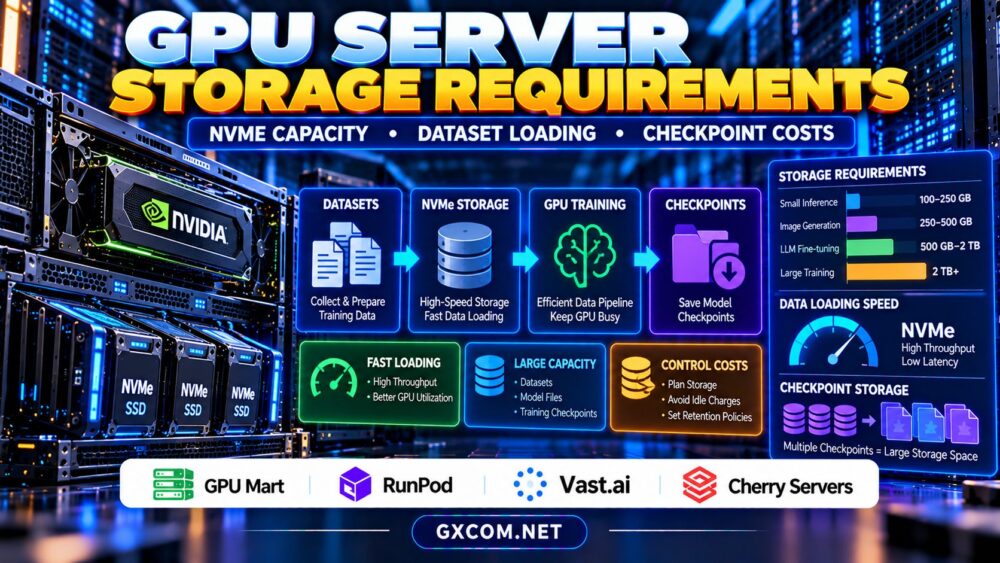
GPU server storage requirements are easy to underestimate when planning AI training, fine-tuning, or inference infrastructure. A powerful NVIDIA GPU cannot deliver its full potential if datasets load slowly, model checkpoints fill the disk, or temporary files exhaust available storage.
Choosing the right NVMe capacity involves more than adding up model sizes. You must consider dataset copies, preprocessing, training checkpoints, container images, caching, and persistent storage charges. This guide explains how to size GPU server storage, identify performance bottlenecks, and compare hosting options without overspending.
How Much Storage Does a GPU Server Need?
Storage requirements depend on workload type, dataset size, model architecture, and retention policies. Inference servers may need relatively little storage beyond model weights and application files, while training systems can require multiple copies of large datasets.
A practical starting formula is:
Required storage = datasets + processed data + model files + checkpoints + temporary workspace + operating system + free-space reserve.
For example, a training project might use 400 GB of raw data, 250 GB of processed data, 100 GB of model files, 300 GB of checkpoints, and 100 GB of temporary workspace. Adding 100 GB for the operating system and tools gives 1.25 TB before additional headroom.
In this hypothetical scenario, a 2 TB NVMe volume provides more flexibility than a nearly full 1 TB configuration.
Recommended NVMe Capacity by GPU Workload
| Workload | Planning Capacity | Primary Storage Concern |
|---|---|---|
| Small-model inference | 100–250 GB | Model files and containers |
| AI image generation | 250–500 GB | Checkpoints, extensions, outputs |
| LLM fine-tuning | 500 GB–2 TB | Datasets and checkpoint retention |
| Large-scale training | 2 TB or more | Data pipelines and repeated checkpoints |
These ranges are illustrative planning categories, not universal minimums. Large models, multimodal datasets, or extensive experiment histories can exceed them substantially.
Always calculate capacity from your actual files rather than selecting a plan solely from its advertised GPU model.
Why NVMe Storage Matters for GPU Performance
NVMe solid-state storage can deliver high throughput and low latency, but actual performance depends on the drive, interface, filesystem, contention, and hosting environment.
Training pipelines repeatedly load samples, decode files, apply transformations, and prepare batches. If these operations cannot supply data quickly enough, expensive GPUs may spend time waiting.
Sequential throughput matters for large files, while random I/O and metadata performance become important when datasets contain millions of smaller objects.
Monitor GPU utilization alongside disk throughput, CPU usage, and data-loader wait time. Low GPU utilization does not automatically indicate insufficient storage performance.

Dataset Loading: Local NVMe vs Network Storage
Local NVMe storage can reduce repeated network transfers and improve access to frequently used datasets. However, it may be temporary, tied to one machine, or lost when an instance is terminated.
Network-attached storage offers different advantages, including shared access and easier data persistence. Its performance depends on network bandwidth, storage architecture, and concurrent workloads.
One practical approach is to maintain durable source datasets separately and copy frequently accessed training data onto local NVMe before execution.
For distributed workloads, review our NVIDIA AI GPU servers guide when comparing accelerator infrastructure and deployment requirements.
How Much Space Do Training Checkpoints Need?
Checkpoint size depends on what the training process saves. Model weights alone may occupy far less space than a complete training state containing optimizer parameters, gradients, and scheduler information.
Consider a hypothetical training checkpoint occupying 40 GB. Retaining ten versions requires approximately 400 GB, excluding temporary files and other artifacts.
Saving checkpoints frequently can improve recovery options, but keeping every version indefinitely increases storage consumption.
Use retention policies that preserve recent checkpoints, important milestones, and verified recovery points. Test restoration procedures before deleting older copies.
Persistent Storage and Hidden GPU Hosting Costs
GPU compute and storage are not always billed together. A stopped instance may no longer incur active compute charges while persistent volumes, snapshots, or reserved resources continue generating expenses.
For illustration, storing 1 TB at a hypothetical rate of $0.08 per GB-month would cost approximately $80 monthly using 1,000 GB as the billing quantity.
Actual charges depend on the provider’s storage units, billing model, and selected product.
Our GPU cloud idle costs guide explains why stopped instances and retained storage can affect your total bill.
Four Approved GPU Hosting Providers to Compare
GPU Mart: Persistent GPU Server Requirements
GPU Mart is worth evaluating for workloads requiring longer-lived GPU environments. Compare the available storage capacity, disk type, expansion options, GPU allocation, and backup arrangements.
Confirm whether storage remains available after shutdown and how additional capacity is charged.
RunPod: GPU Compute and Data Persistence
RunPod is relevant for AI development, training experiments, and inference deployments. Evaluate the storage options associated with your selected deployment type, including persistence and lifecycle behavior.
Read our RunPod GPU cloud review for additional provider context.
Vast.ai: Compare GPU Marketplace Configurations
Vast.ai can appeal to teams comparing GPU rental offers with different hardware and storage characteristics. Individual listings may vary in available disk space, connectivity, and operational reliability.
Check storage limits before downloading large datasets, and maintain independent backups of valuable checkpoints.
Cherry Servers: Dedicated Infrastructure Evaluation
Cherry Servers is another approved infrastructure provider to consider when comparing dedicated server requirements. Verify whether an appropriate GPU-enabled configuration and NVMe storage combination is currently offered.
Dedicated infrastructure may provide greater configuration control, but procurement decisions should account for provisioning terms and total operating costs.
How to Reduce GPU Storage Expenses
Remove obsolete temporary files, deduplicate datasets, and avoid retaining unnecessary container images. Compress appropriate artifacts and move infrequently accessed checkpoints to lower-cost storage where practical.
Separate durable data from disposable compute environments. This can make it easier to replace GPU instances without losing important project files.
For broader infrastructure budgeting, compare affordable GPU server options before committing to a long-term configuration.
GPU Server Storage Purchasing Checklist
Before ordering, calculate peak disk usage rather than average usage. Confirm NVMe capacity, measured throughput, persistent storage behavior, backup policies, and expansion options.

Ask whether local disks survive instance deletion, whether additional volumes can be attached, and whether outbound dataset transfers incur separate charges.
Storage requirements also depend on the deployment model. Our GPU VPS versus dedicated GPU server comparison explains important resource-allocation differences.
Compare GPU Servers With Suitable NVMe Storage
Evaluate GPU performance, usable disk capacity, data persistence, and checkpoint storage costs before selecting your next AI server.
Frequently Asked Questions
Is 500 GB enough for an AI GPU server?
It may be sufficient for smaller inference or image generation projects. Large datasets and repeated training checkpoints can require substantially more capacity.
Does NVMe storage make GPU training faster?
It can improve performance when data loading is the bottleneck. If computation, preprocessing, or networking dominates, faster storage may provide limited benefit.
Should checkpoints use local or persistent storage?
Local storage can support fast checkpoint writes, while durable storage protects important recovery data. Many workflows benefit from combining both.
Final Verdict
GPU server storage requirements should be calculated alongside GPU memory and compute performance. Size NVMe capacity for datasets, checkpoints, temporary files, and future growth. Compare GPU Mart, RunPod, Vast.ai, and verified Cherry Servers configurations using real storage performance, persistence policies, and total hosting costs.