Running large language models is expensive when GPU memory limits batch sizes, model placement, and the number of concurrent requests. Lower-precision inference can reduce those constraints, but choosing a smaller numerical format introduces new questions about accuracy, hardware compatibility, and real serving costs.
This FP8 vs FP4 Inference comparison explains GPU memory savings, quantization trade-offs, model quality, throughput, and infrastructure purchasing decisions. Rather than assuming four-bit inference automatically halves your cloud bill, we examine where the savings actually come from.
FP8 vs FP4 Inference: Quick Verdict
Choose FP8 when you want a practical balance between memory efficiency, model quality, and support across compatible GPU architectures and inference frameworks.
Consider FP4 when model weights consume substantial VRAM, your target hardware supports an efficient four-bit execution path, and quality testing confirms that the quantized model meets application requirements.
FP4 can reduce theoretical weight storage by 50% compared with FP8. That does not guarantee 50% lower total GPU memory consumption, twice the inference speed, or identical model outputs.
What Is FP8 Inference?
FP8 uses eight-bit floating-point representations to store or process numerical values. Different FP8 formats make different trade-offs between numerical range and precision.
In AI inference, FP8 can reduce model weight storage and memory bandwidth requirements compared with higher-precision formats such as FP16 or BF16.
Actual performance depends on whether the GPU, kernels, and inference engine support the selected FP8 operations efficiently.
FP8 is attractive for production deployments because it can offer meaningful efficiency gains while preserving acceptable quality for many models after appropriate conversion and validation.
What Is FP4 Inference?
FP4 represents numerical values using four bits. Modern AI deployments may use specialized formats such as NVIDIA NVFP4 or other block-scaled four-bit representations.
These implementations are not interchangeable. Their scaling methods, supported operations, numerical behavior, and hardware requirements can differ.
FP4 can dramatically reduce weight storage, but achieving strong inference performance requires more than storing numbers in four bits.
The execution framework must support the format, and the hardware must provide an efficient path for the relevant operations.
GPU Memory Savings: FP8 vs FP4
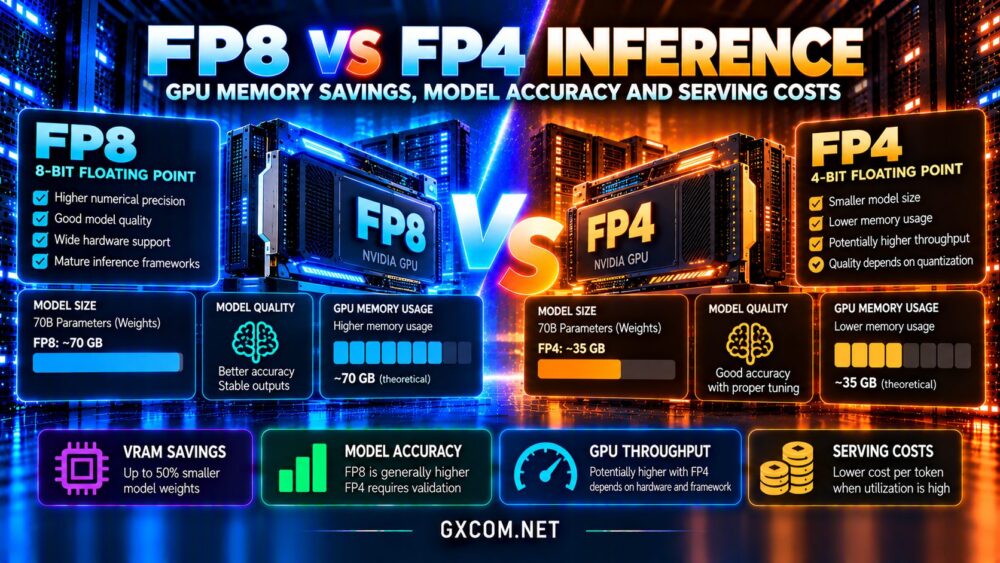
For a simplified model containing 70 billion parameters, storing every weight as FP8 requires approximately 70 billion bytes, or 70 GB in decimal units.
Storing the same number of weights as raw four-bit values requires approximately 35 GB before additional metadata.
That comparison explains why FP4 attracts attention for memory-constrained inference. However, actual model files and runtime memory consumption are larger or more complicated than these theoretical figures.
Why FP4 Does Not Always Halve VRAM Usage
Quantized models may require scaling factors, metadata, higher-precision layers, temporary buffers, and conversion workspaces.
Inference servers also allocate memory for activations, attention operations, and KV caches. These components do not necessarily shrink when model weights change from FP8 to FP4.
For long-context workloads, KV cache consumption can become a major part of the memory budget.
Measure peak allocated VRAM under realistic context lengths and concurrency rather than relying exclusively on downloaded model size.
For broader hardware selection, read our NVIDIA GPU server providers guide.

Model Accuracy: Does FP4 Reduce Quality?
Lower precision introduces quantization error because fewer numerical values can be represented directly.
FP8 generally provides more representational flexibility than FP4, but actual model quality depends on the quantization method, scaling strategy, calibration data, and model architecture.
Some models tolerate aggressive weight quantization well. Others may experience measurable degradation in reasoning, coding, mathematical tasks, or instruction following.
Test Quality Before Production Deployment
Evaluate representative prompts, domain-specific datasets, structured output reliability, and failure cases that matter to your users.
For customer-facing applications, include factual accuracy, formatting compliance, and tool-calling behavior in the evaluation process.
Compare the quantized model against an appropriate higher-precision baseline using identical test conditions.
A lower hosting bill is not a saving if reduced output quality creates more retries, manual corrections, or customer support work.
GPU Hardware Support and Tensor Cores
Hardware support is one of the most important differences between FP8 and FP4 deployment.
Selected NVIDIA GPU generations support accelerated FP8 computation, while efficient native FP4 inference is associated with newer architectures and supported numerical formats.
A GPU that can store four-bit weights does not necessarily execute native FP4 matrix operations efficiently.
Some frameworks unpack or convert compressed weights into another numerical format during computation, changing the expected performance benefit.
Verify the exact GPU model, supported data types, inference engine version, and available kernels before choosing a server.
Our GPU vs CPU server comparison explains the wider role of hardware acceleration.
Inference Speed: Tokens per Second
FP4 can improve inference throughput when reduced memory traffic or supported low-precision computation removes a real bottleneck.
However, performance depends on whether the workload is limited by memory bandwidth, compute throughput, or another part of the serving pipeline.
Prefill vs Decode Performance
During prefill, the model processes input tokens and performs substantial parallel computation. During autoregressive decoding, it generates tokens incrementally.
Different stages can respond differently to quantization. Lower weight bandwidth may help decoding, while prefill performance depends heavily on compute kernels and batch characteristics.
Measure time to first token, output tokens per second, and completed requests per second separately.
Also test different batch sizes and context lengths. A benchmark using one short prompt may not represent a production chatbot handling many concurrent users.
FP8 vs FP4 for Multi-GPU Deployment
Large models may require tensor parallelism, pipeline parallelism, or other techniques to distribute computation across GPUs.
Reducing weight storage can sometimes allow a model to fit on fewer GPUs, potentially lowering infrastructure costs and communication overhead.
However, the result depends on available VRAM, runtime buffers, KV cache requirements, and model architecture.
Interconnect bandwidth and software support remain important when the workload spans multiple accelerators.
Compare complete serving configurations rather than assuming that smaller weights automatically eliminate a GPU.
How to Calculate Real GPU Serving Costs
The most useful financial metric is often cost per million successfully generated output tokens, measured under a defined workload and service-level target.
For example, suppose an FP8 deployment costs $2 per GPU-hour and generates 100,000 output tokens during that hour. Its illustrative compute cost is $20 per million output tokens.
If an FP4 deployment costs the same hourly amount but produces 150,000 tokens, the corresponding compute cost falls to approximately $13.33 per million output tokens.
These are hypothetical numbers, not provider quotations or performance benchmarks.
Include input processing, idle capacity, retries, networking, storage, and engineering overhead when estimating total production costs.
Explore our affordable GPU servers guide for additional purchasing considerations.
GPU Hosting Providers Worth Comparing
RunPod: GPU Rental for AI Workloads
RunPod is relevant for teams testing inference frameworks and GPU configurations. Compare available accelerator models, VRAM, deployment options, storage charges, and current rental terms.
Vultr: Cloud GPU Infrastructure
Vultr offers GPU cloud infrastructure worth evaluating for managed deployment workflows and regional requirements. Confirm the specific GPU generation and software compatibility before planning FP4 inference.
Cherry Servers: Dedicated GPU Infrastructure
Cherry Servers is relevant for organizations considering dedicated hardware and predictable workloads. Evaluate available accelerators, memory capacity, network configuration, and deployment support.
GPU Mart: GPU Server Alternatives
GPU Mart is another candidate for comparing GPU hosting configurations. Check the exact GPU model, driver support, virtualization limitations, and available memory before purchasing.
For additional infrastructure options, review our AI GPU VPS providers comparison.

When Should You Choose FP8?
FP8 is a strong starting point when supported hardware is available, model quality is important, and the existing inference framework has a mature deployment path.
It may also be preferable when the model already fits comfortably in available VRAM and FP4 provides limited measurable throughput improvement.
When Does FP4 Make More Sense?
FP4 becomes attractive when weight memory is a major constraint, supported hardware can execute the selected format efficiently, and representative quality tests show acceptable results.
It may enable larger models, greater concurrency, or fewer GPUs, but these benefits must be demonstrated rather than assumed.
For hardware comparisons, see our affordable NVIDIA GPU VPS guide.
Frequently Asked Questions
Does FP4 use half the memory of FP8?
Raw four-bit weights require half the storage of eight-bit weights. Total runtime memory savings are usually different.
Is FP4 always faster than FP8?
No. Performance depends on native hardware support, inference kernels, model architecture, and workload characteristics.
Does FP4 always reduce model accuracy?
It introduces quantization error, but practical quality impact varies. Representative evaluation is essential.
Can every GPU run FP4 inference?
Some GPUs can process compressed weights through software conversion, but efficient native FP4 execution requires compatible hardware and software.
Final Verdict: FP8 or FP4 for AI Inference?
The FP8 vs FP4 Inference decision should balance memory efficiency, output quality, hardware compatibility, and measured serving costs.
Choose FP8 for a broadly practical low-precision deployment strategy on compatible hardware. Evaluate FP4 when supported acceleration and validated model quality create a clear economic advantage.
Compare RunPod, Vultr, Cherry Servers, and GPU Mart using actual GPU specifications and workload benchmarks. The winning configuration is the one delivering reliable model outputs at the lowest sustainable cost, not simply the smallest weight format.