Rust Server Requirements by Player Count
The following estimates are starting points for planning a typical Rust community server. They are not official Facepunch minimum requirements or guaranteed player limits. Actual usage depends on map size, entity count, plugins, server population, and configuration.
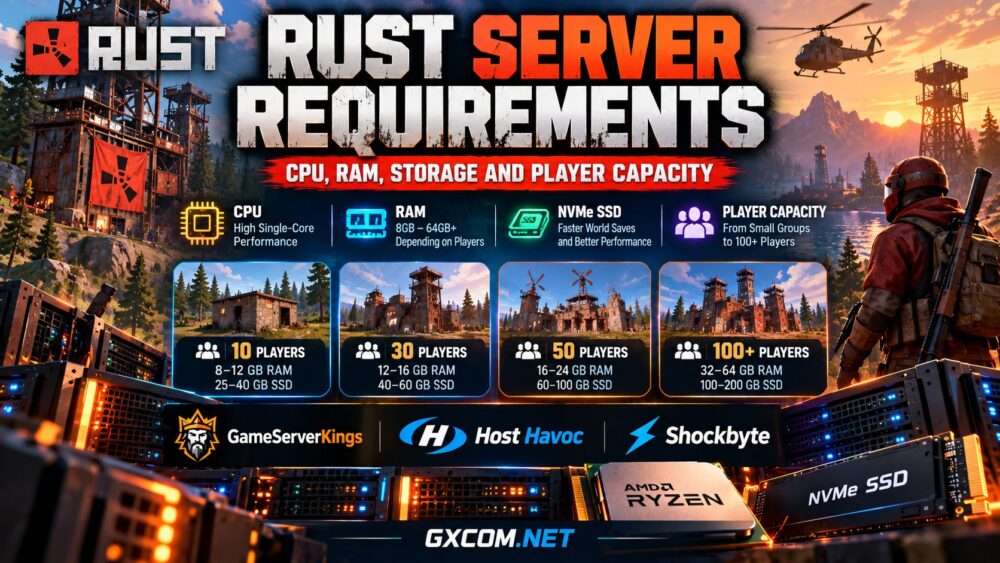
| Concurrent Players | Suggested RAM | CPU Priority | Storage Planning |
|---|---|---|---|
| 1–10 | 8–12 GB | Modern CPU with strong single-thread speed | 25–40 GB SSD/NVMe |
| 10–30 | 12–16 GB | High-frequency CPU with adequate dedicated resources | 40–60 GB NVMe |
| 30–60 | 16–24 GB | High-performance Ryzen or Intel CPU | 60–100 GB NVMe |
| 60–100 | 24–32 GB | Strong per-core performance and sustained capacity | 100 GB or more |
| 100+ | 32–64 GB or more | Dedicated high-performance hardware | 100–200 GB or more |
These ranges include planning headroom, not just the memory consumed immediately after startup. Large or heavily customized servers may require substantially more resources.
For a provider-focused comparison, see our best Rust server hosting guide.
Rust Server CPU Requirements: Why Clock Speed Matters
Rust servers process player movement, combat, building interactions, AI behavior, physics, and world simulation continuously. Some of these operations depend heavily on individual CPU threads.
Consequently, a modern processor with strong single-thread performance can be more useful than an older CPU advertising many cores.
Single-Core Performance vs Core Count
High per-core speed helps a busy server complete simulation work quickly. Additional cores remain useful for networking, background tasks, operating system services, and multiple game instances.
However, doubling the number of CPU cores does not automatically double the player capacity of one Rust instance.
When comparing hosting plans, investigate whether CPU resources are shared, how heavily the host is utilized, and whether performance remains consistent during peak periods.
Are AMD Ryzen CPUs Good for Rust Hosting?
Modern AMD Ryzen processors are attractive for Rust hosting because of their strong per-core performance. Certain Ryzen X3D models also provide additional cache that may benefit some workloads.
Nevertheless, no specific processor guarantees a particular player count. Plugin behavior, world complexity, memory speed, and server configuration all influence the final result.
For larger communities considering exclusive physical hardware, explore our best dedicated game servers comparison.
How Much RAM Does a Rust Server Need?
Rust can be memory-intensive because the server maintains a persistent world containing terrain, structures, deployable objects, inventories, entities, and other simulation data.
A relatively small server may work within an 8–12 GB planning range, while a more active community may benefit from 16–32 GB or additional memory.
RAM requirements can grow as players build larger bases and the world accumulates more entities. A server that performs well immediately after a wipe may behave differently later in the wipe cycle.

Map Size and Memory Consumption
Larger maps can increase the amount of world data the server must manage. However, map size alone cannot predict memory consumption.
Player activity, monument configurations, custom maps, and the number of persistent objects also matter.
Choose a realistic map size for your intended community rather than automatically selecting the largest available world.
Plugins and Modded Rust Servers
Oxide-compatible plugins, Carbon-based configurations, custom events, and administrative tools can add processing and memory overhead.
Some plugins are lightweight, while others perform frequent entity scans, database operations, or complex gameplay calculations.
When adding plugins, measure memory usage and server performance before and after installation. Remove unnecessary extensions and keep compatible versions updated.
Rust Server Storage Requirements: SSD vs NVMe
Rust servers read and write world files, player information, logs, plugin data, and backups. Fast storage can help reduce delays during saves, restarts, and other disk-intensive operations.
NVMe SSDs are generally preferable to mechanical hard drives for modern Rust hosting. They offer low-latency access and strong potential throughput, although real-world results depend on drive quality and competing workloads.
Storage capacity should account for more than the current world file. Leave room for backups, logs, updates, and future growth.
Do not confuse available disk space with storage performance. A large but slow disk may provide a worse experience than a smaller, properly sized NVMe configuration.
How Many Players Can a Rust Server Handle?
Player capacity is not determined by RAM alone. A server with 32 GB of memory can still struggle if its main simulation workload saturates the CPU.
Actual capacity depends on several interacting factors:
- CPU performance: Simulation speed under sustained load.
- RAM: Available capacity for world and entity data.
- Map size: Terrain, monuments, and world complexity.
- Entity count: Bases, deployables, NPCs, and active objects.
- Plugins: Additional scripts and gameplay systems.
- Network: Stable routing and sufficient traffic capacity.
Advertised player slots are therefore not a performance guarantee. Test your configuration with realistic activity and maintain spare capacity for peak periods.
Network Requirements: Latency, Bandwidth and DDoS Protection
Low latency is especially important in Rust because combat and movement are sensitive to network delays. A powerful server located far from its players can still deliver a frustrating experience.
Choose a hosting location near your main audience and investigate routing quality rather than relying only on advertised port speed.
A 1 Gbps or 10 Gbps connection describes port capacity, not guaranteed throughput or low ping. Network congestion, transit providers, and attack mitigation can affect real performance.
Public Rust communities should also evaluate DDoS protection. Confirm that the provider supports the game's traffic patterns and explain what happens when an attack is detected.
For a broader hardware and connectivity overview, read our game server CPU, RAM, storage and bandwidth guide.
Managed Rust Hosting vs Dedicated Rust Servers
Managed game hosting is usually the simpler choice for small and medium-sized communities. Providers typically offer a control panel, game installation tools, and access to common configuration settings.
Dedicated hardware becomes attractive when a community needs exclusive physical resources, extensive operating system control, or multiple game instances.
Dedicated servers also introduce responsibilities. Depending on the plan, administrators may need to handle security updates, backups, monitoring, firewall rules, and software maintenance.
Our game server hosting explained article covers these deployment models in more detail.
Rust Hosting Providers Worth Comparing
After estimating your requirements, compare providers based on actual CPU allocation, available RAM, storage, server locations, and management features.
If you are comparing hosting companies across different multiplayer games, our best game server hosting providers guide offers a broader perspective on performance, management features, and reliability.
GameServerKings — For Growing Rust Communities
GameServerKings offers Rust game hosting and dedicated server options. It is worth evaluating when your community needs a path from managed hosting toward configurable physical infrastructure.
Check the current hardware specifications, provisioning conditions, and whether the selected product includes game management services.
Host Havoc — For Managed Rust Hosting
Host Havoc is another specialist provider to compare for Rust server hosting. Consider its current locations, control panel, plugin compatibility, backup options, and upgrade flexibility.
For larger communities, compare its dedicated hosting products separately from ordinary managed game instances.
Shockbyte — An Additional Managed Hosting Option
Shockbyte is another game hosting provider worth checking for Rust-related hosting options. Verify current Rust availability, plan specifications, and regional deployment choices before purchasing.
Whichever provider you choose, match the product to your actual workload instead of relying solely on the maximum advertised player slots.

How to Improve Rust Server Performance
- Choose a modern CPU with strong sustained per-core performance.
- Keep map size appropriate for the community.
- Monitor entity counts and expensive plugin operations.
- Use NVMe storage with a reliable backup strategy.
- Schedule maintenance and world wipes thoughtfully.
- Review memory usage, server FPS, and CPU load during peak activity.
- Choose a network region close to your players.
Performance optimization should begin with measurements. Upgrading RAM will not resolve a CPU bottleneck, and faster storage will not compensate for poor network routing.
Frequently Asked Questions
Is 8 GB RAM enough for a Rust server?
It may be sufficient for a small, lightly populated configuration, but 12–16 GB provides more flexibility. Large maps, plugins, and growing entity counts can require considerably more memory.
How much RAM is needed for 50 Rust players?
Approximately 16–24 GB can be a useful initial planning range, but actual needs depend on map size, plugins, world activity, and server configuration.
Is Ryzen better than Intel for Rust servers?
Both can perform well. Compare specific processor models, per-core performance, sustained operating conditions, and the resources allocated to your instance.
Does NVMe increase Rust server FPS?
NVMe can improve storage-intensive operations, but simulation performance is often more dependent on CPU behavior. It should not be treated as a guaranteed FPS upgrade.
Do I need a dedicated server for 100 players?
Not necessarily, but dedicated hardware may provide more predictable resources and control for a demanding community. Test actual performance before committing to a larger deployment.
Final Verdict: Choosing the Right Rust Server Hardware
The best Rust server configuration balances fast CPU cores, sufficient RAM, reliable NVMe storage, and stable network connectivity.
Small private communities can begin with modest managed hosting plans, while busy public servers may benefit from higher memory allocations and dedicated hardware.
GXCOM.NET recommendation: Estimate your workload, monitor real player activity, and select a provider with clear specifications and practical upgrade options. The right configuration is the one that maintains consistent performance throughout your server's busiest periods.