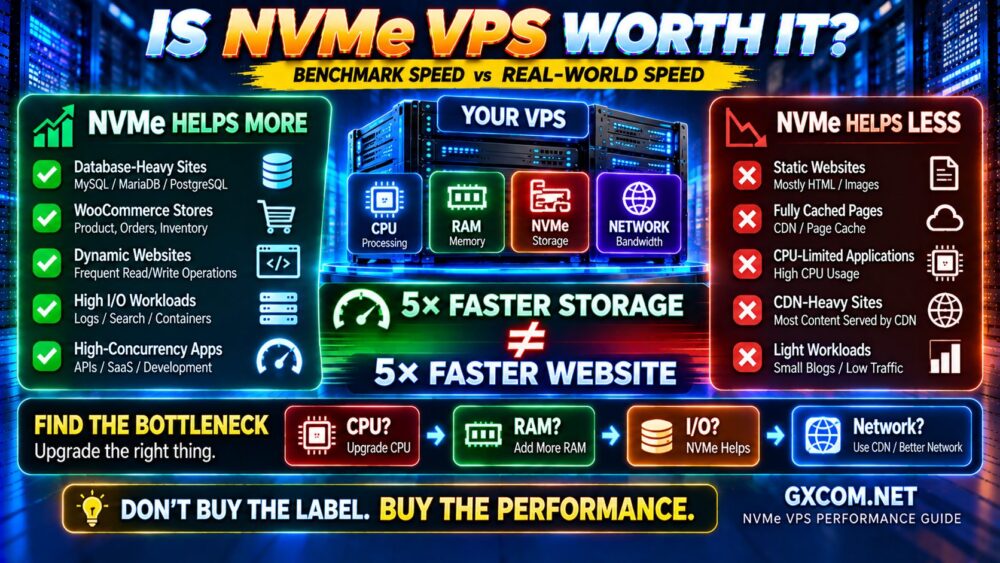
NVMe has become one of the most common performance claims in VPS hosting.
Providers advertise NVMe storage, impressive read and write speeds, and sometimes extremely high IOPS figures. At first glance, choosing the fastest VPS seems simple: find the biggest storage benchmark number.
Real-world VPS performance is more complicated.
A server showing excellent sequential read speeds can still feel slow under a database workload. Two VPS plans using NVMe can deliver very different performance. And a website may barely become faster after moving from SSD to NVMe if storage was never the bottleneck.
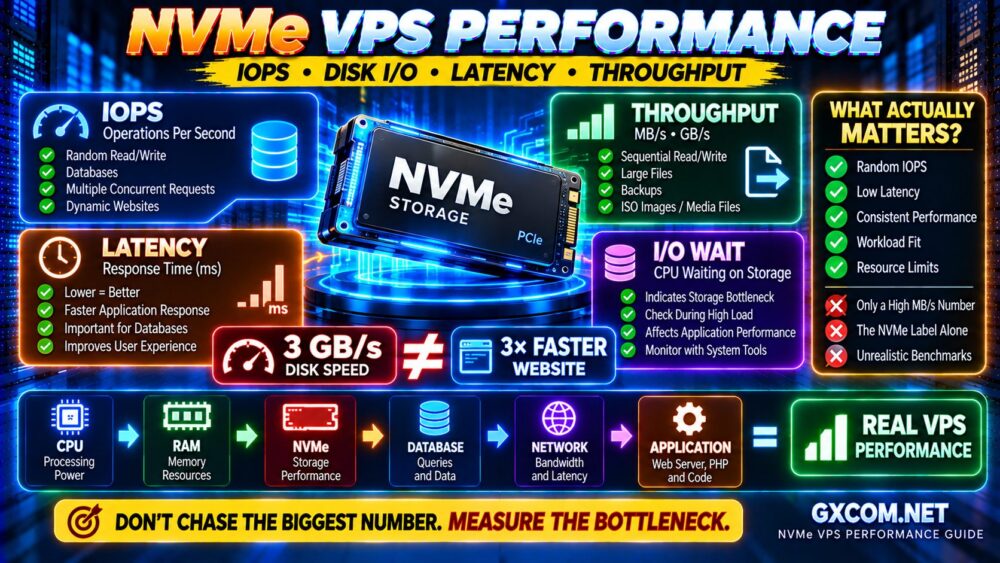
To understand NVMe VPS performance, you need to look beyond the NVMe label and understand four important concepts:
- IOPS
- Disk throughput
- Storage latency
- I/O wait
This guide explains what those metrics mean, how they affect real workloads, and what actually matters when comparing NVMe VPS hosting.
What Determines NVMe VPS Performance?
The physical NVMe drive is only the beginning.
Actual VPS storage performance can be influenced by:
- NVMe hardware
- PCIe generation
- Storage architecture
- RAID configuration
- Local vs distributed storage
- Virtualization platform
- IOPS limits
- Throughput limits
- Host-node contention
- Queue depth
- Workload type
That means:
NVMe HARDWARE ≠ NVMe PERFORMANCE AVAILABLE TO YOUR VPS.
The provider may operate extremely fast physical storage while limiting each virtual server to a specific level of I/O performance.
What Is IOPS?
IOPS stands for Input/Output Operations Per Second.
It measures how many individual storage operations can be completed during one second.
Imagine two workloads.
Workload A reads one large video file.
Workload B performs thousands of small database reads scattered across storage.
Both are reading data, but their storage behavior is completely different.
The second workload depends much more heavily on the ability to process many small I/O operations quickly.
This is where IOPS becomes important.
Why IOPS Matters for VPS Hosting
High IOPS can benefit workloads involving many small or random storage operations, including:
- MySQL and MariaDB databases
- PostgreSQL
- WooCommerce
- Busy WordPress websites
- Search indexes
- Application servers
- Containers
- Development environments
- Logging systems
But there is no universal IOPS number that every website needs.
A small cached WordPress site may perform very little disk I/O during normal traffic, while a database-heavy application can generate continuous random reads and writes.
MORE IOPS ONLY HELPS WHEN YOUR WORKLOAD NEEDS MORE IOPS.
Random I/O vs Sequential I/O
This distinction is critical when interpreting VPS benchmarks.
Sequential I/O
Sequential operations read or write large blocks of data in order.
Examples include:
- Large file transfers
- Backup archives
- Video files
- Disk images
- Large data exports
Sequential performance is commonly expressed in MB/s or GB/s.
Random I/O
Random operations access smaller pieces of data from different storage locations.
Examples include:
- Database queries
- Metadata operations
- Application files
- CMS workloads
- Concurrent small reads and writes
Random performance is often more relevant to dynamic web applications than an impressive sequential throughput number.
This explains why:
3 GB/s SEQUENTIAL SPEED ≠ 3 GB/s WEBSITE PERFORMANCE.
What Is Disk Throughput?
Disk throughput measures how much data storage can transfer over a period of time.
It is commonly measured in:
- MB/s
- GB/s
Throughput matters when transferring large amounts of data.
For example, a workload reading a large archive or processing large files can benefit from high throughput.
However, a database performing thousands of tiny random operations may be limited by latency or IOPS long before it reaches maximum sequential throughput.
IOPS vs Throughput: What's the Difference?
| Metric | Measures | Important For |
|---|---|---|
| IOPS | Operations per second | Databases, random I/O, small files |
| Throughput | Data transferred per second | Large files, backups, sequential workloads |
| Latency | Time required for an operation | Responsive applications and databases |
| I/O Wait | CPU time waiting for storage | Identifying storage bottlenecks |
No single metric tells the entire story.
Storage Latency May Matter More Than You Think
Storage latency measures how long it takes to complete an I/O operation.
For interactive applications, low latency can be extremely important.
Imagine a database query requiring multiple storage operations.
If each operation takes longer, those delays can accumulate before the application generates its response.
NVMe technology is capable of very low latency, but actual VPS latency can still be affected by:
- Virtualization overhead
- Storage network architecture
- Host load
- Queue depth
- Provider limits
- Other workloads using shared infrastructure
This is one reason two “NVMe VPS” products can behave differently in real applications.
What Is Disk I/O?
Disk I/O broadly describes data being read from or written to storage.
Common VPS operations generating disk I/O include:
- Database reads
- Database writes
- Website logs
- Application logs
- File uploads
- Cache files
- Backups
- Software installation
- Container activity
The amount of I/O alone does not tell you whether the server has a problem.
You need to understand whether the storage system can service those operations quickly enough for the workload.
What Is I/O Wait?
I/O wait is a useful diagnostic concept when investigating a slow server.
In simplified terms, it represents time during which the CPU has work dependent on I/O but is waiting for storage operations to complete.
If your application feels slow while CPU utilization itself does not appear saturated, storage may deserve investigation.
Potential signs of a storage bottleneck include:
- Elevated I/O wait
- High storage latency
- Slow database operations
- Slow file operations
- Performance degradation during backups
- Long application response times during heavy I/O
But do not diagnose a server from one metric alone.
Look at the workload as a system.
The Four Metrics You Should Understand
When evaluating NVMe VPS storage, think in four dimensions:
IOPS
How many operations?
THROUGHPUT
How much data?
LATENCY
How long does each operation take?
I/O WAIT
Is the workload waiting for storage?
Together, these provide a much more useful picture than the word “NVMe” alone.
Why NVMe VPS Benchmarks Can Be Misleading
Benchmarks are useful, but only when you understand what they measure.
A storage benchmark can change dramatically depending on:
- Block size
- Read vs write workload
- Random vs sequential access
- Queue depth
- Number of parallel jobs
- Cache behavior
- Test duration
This means two benchmark screenshots cannot necessarily be compared directly unless they use equivalent test conditions.

For example:
4K RANDOM READ
and:
1M SEQUENTIAL READ
measure very different characteristics.
A provider highlighting only the most impressive benchmark number may not be showing the metric most relevant to your application.
Why Block Size Matters
Storage operations are performed using blocks of data.
Small block sizes are useful when evaluating workloads involving many small operations.
Larger blocks are more relevant when measuring bulk sequential transfer.
For example:
4K RANDOM testing can help reveal performance characteristics relevant to many database and application workloads.
LARGE-BLOCK SEQUENTIAL testing is more useful for large-file throughput.
Neither result is inherently better.
They answer different questions.
Why Queue Depth Matters
Queue depth represents how many I/O requests are waiting or being processed concurrently.
Modern NVMe devices are designed to handle high levels of parallelism.
As a result, very high benchmark numbers can sometimes be achieved under deep queues and highly parallel workloads.
But a lightly loaded website may never generate that type of storage workload.
This creates another important rule:
PEAK BENCHMARK PERFORMANCE ≠ YOUR WORKLOAD PERFORMANCE.
NVMe VPS Performance for WordPress
WordPress performance depends on much more than storage.
A request may involve:
VISITOR
↓
WEB SERVER
↓
PHP
↓
DATABASE
↓
STORAGE
↓
RESPONSE
NVMe can help when WordPress generates significant database and storage activity.
Examples include:
- Large databases
- Many uncached requests
- Search functionality
- Large admin operations
- Frequent content updates
- High concurrency
But if full-page caching serves most visitor requests, the storage system may play a much smaller role.
That is why a benchmark showing huge NVMe throughput does not mean WordPress pages will load several times faster.
NVMe VPS Performance for WooCommerce
WooCommerce tends to create more dynamic database activity than a simple blog.
Operations can include:
- Shopping carts
- Checkout
- Orders
- Customer accounts
- Product searches
- Inventory updates
- Scheduled tasks
Many of these requests cannot be handled entirely by static page caching.
As concurrency increases, database and storage performance can become more important.
For WooCommerce, pay particular attention to:
- Random I/O latency
- Database performance
- CPU performance
- Available RAM
- Object caching
- Application optimization
NVMe is valuable—but it is only one layer of the stack.
NVMe VPS Performance for Databases
Databases are one of the strongest use cases for fast storage.
MySQL, MariaDB and PostgreSQL workloads can perform many small random reads and writes.
But database performance also depends heavily on memory.
If frequently accessed data fits in RAM and is effectively cached, fewer reads need to reach physical storage.
That creates an important relationship:
MORE EFFECTIVE RAM CACHE → FEWER STORAGE READS
This means a database server with sufficient RAM and good SSD storage can sometimes outperform a poorly configured server using faster NVMe hardware.
NVMe CANNOT FIX BAD DATABASE DESIGN.
RAM vs NVMe: Which Matters More?
It depends on the bottleneck.
RAM is dramatically faster than persistent storage.
Operating systems and databases therefore use memory to cache frequently accessed data.
If a VPS constantly runs out of RAM and swaps heavily, adding memory may provide a much larger improvement than upgrading from SSD to NVMe.
| Problem | Likely Priority |
|---|---|
| Memory exhaustion | More RAM |
| Heavy swap usage | More RAM / application tuning |
| High storage latency | Investigate storage |
| High I/O wait | Investigate disk workload |
| Database random I/O bottleneck | NVMe may help |
CPU vs NVMe: Which Matters More?
Again, measure first.
A CPU-bound PHP application will not suddenly become fast because the VPS has higher storage IOPS.
Likewise, a storage-bound database may not benefit much from adding another CPU core.
The correct process is:
MEASURE
↓
IDENTIFY BOTTLENECK
↓
OPTIMIZE
↓
UPGRADE THE RIGHT RESOURCE
Never upgrade based purely on the most attractive specification.
Local NVMe vs Network-Attached Storage
Not every NVMe VPS uses the same storage architecture.
Some platforms use NVMe drives directly attached to the physical host.
Others use distributed or network-attached storage backed by SSD or NVMe hardware.
Local storage can offer excellent latency and performance, while distributed storage can provide architectural advantages such as redundancy and easier workload mobility.
Neither design is automatically superior for every use case.
The important questions are:
- What performance does the VPS actually receive?
- How consistent is that performance?
- What redundancy does the platform provide?
- What happens if a host fails?
STORAGE ARCHITECTURE MATTERS MORE THAN THE LABEL.
Shared Storage and the Noisy Neighbor Problem
VPS infrastructure is shared by design.
Depending on the platform, multiple virtual machines may share underlying CPU, network and storage resources.
If storage resources are poorly controlled, another workload generating heavy I/O can potentially affect performance consistency.
Quality VPS platforms use resource controls and infrastructure design to manage this problem, but buyers should still care about consistency.
A benchmark result of:
FAST → FAST → FAST → VERY SLOW → FAST
may be less useful for a production database than:
CONSISTENT → CONSISTENT → CONSISTENT.
Performance Consistency Matters More Than Peak Speed
Suppose VPS A reaches an impressive peak storage benchmark but performance fluctuates dramatically.
VPS B produces a slightly lower peak result but remains stable throughout the day.
For production applications, VPS B may deliver the better user experience.
This is why a useful VPS evaluation should consider:
- Peak performance
- Average performance
- Latency
- Variability
- Performance under load
- Performance over time
CONSISTENCY > ONE SCREENSHOT.
Can Providers Limit NVMe Performance?
Yes.
A physical NVMe device may be capable of enormous performance, but a VPS platform can enforce resource limits.
These can include:
- IOPS caps
- Read throughput caps
- Write throughput caps
- Fair-use policies
- Burst limits
These controls are not necessarily bad.
Reasonable limits can prevent one customer from consuming excessive shared storage resources and can improve consistency for everyone.
What matters is whether the available performance is appropriate for your workload.
How to Benchmark an NVMe VPS Properly
A useful benchmark should reflect the workload you actually care about.
Instead of asking:
“WHAT IS THE BIGGEST NUMBER I CAN GET?”
ask:
“WHAT TEST BEST REPRESENTS MY APPLICATION?”
Consider testing:
- Sequential reads
- Sequential writes
- Random reads
- Random writes
- Mixed read/write workloads
- Different block sizes
- Different queue depths
- Latency
Run tests long enough to identify unstable performance, but avoid aggressive benchmarking on production systems without understanding its impact.
Benchmark Tools for Linux VPS
Several tools can help analyze storage performance.
fio
fio is widely used for flexible storage testing and can simulate different block sizes, read/write patterns, queue depths and concurrency levels.
iostat
iostat is useful for observing storage activity and device utilization while a real workload is running.
vmstat
vmstat provides a broader view of processes, memory, CPU and I/O behavior.
The key is not to collect as many benchmark numbers as possible.
The goal is to connect the numbers to application behavior.
Don't Benchmark Only When the Server Is Empty
A newly created VPS with no website traffic can produce impressive results.
But your real concern is performance when:
- The database is active
- Traffic increases
- Backups are running
- Multiple applications are working
- Logs are being written
- Background jobs are active
Real-world monitoring is therefore just as important as synthetic benchmarking.
Does NVMe Always Beat SATA SSD in Real Websites?
At the storage layer, NVMe has significant technical advantages over traditional SATA SSD interfaces.
At the website layer, the difference depends on how much the workload depends on storage.
A heavily cached website might follow:
VISITOR → CACHE → RESPONSE
A dynamic application may follow:
VISITOR → PHP → DATABASE → STORAGE → DATABASE → RESPONSE
The second workload has more opportunity to benefit from faster storage.
For the full technology comparison, read NVMe VPS vs SSD VPS: Performance, Speed and Cost Compared.
Is Paying More for NVMe VPS Worth It?
If the price difference is small, quality NVMe storage is generally an attractive feature.
But storage should not be evaluated independently from the rest of the VPS.
Compare:
- CPU generation
- Shared vs dedicated CPU
- RAM
- Storage performance
- Storage capacity
- Network
- Bandwidth
- Backup options
- Support
- Total cost
For a workload-based analysis, see Is NVMe VPS Worth It?.
How Storage Fits Into Overall VPS Performance
Storage is one part of a larger system.
A useful model is:
CPU
+
RAM
+
STORAGE
+
DATABASE
+
NETWORK
+
APPLICATION
=
REAL VPS PERFORMANCE
A powerful NVMe subsystem cannot compensate for:
- Slow CPU
- Insufficient RAM
- Bad SQL queries
- Poor PHP code
- Missing caching
- Network latency
- External API delays
That is why troubleshooting should always start with measurements rather than assumptions.
NVMe VPS Providers: What Should You Compare?
NVMe is now available across many VPS and cloud platforms, but the implementation and surrounding infrastructure can differ.
Developer-focused platforms such as DigitalOcean and Vultr are relevant when comparing flexible VPS and cloud infrastructure.
Database Mart is another option users may encounter when comparing VPS and server configurations, while budget-focused buyers may also evaluate providers such as RackNerd.
Do not select a provider purely because the product page says NVMe.
Instead, compare:
CPU QUALITY
↓
RAM
↓
IOPS
↓
LATENCY
↓
I/O CONSISTENCY
↓
NETWORK
↓
TOTAL COST
The best VPS is the one that performs well for your workload—not the one with the most impressive isolated benchmark.
What Actually Matters When Choosing an NVMe VPS?
Use this checklist:
- ✓ CPU generation and performance
- ✓ Shared vs dedicated CPU
- ✓ Available RAM
- ✓ NVMe storage capacity
- ✓ Random I/O performance
- ✓ Sequential throughput
- ✓ Storage latency
- ✓ Published IOPS limits
- ✓ Published throughput limits
- ✓ Performance consistency
- ✓ Local vs distributed storage
- ✓ Network performance
- ✓ Bandwidth allowance
- ✓ Backup options
- ✓ Datacenter location
- ✓ Total monthly cost
DON'T BUY THE NVMe LABEL.
BUY CONSISTENT PERFORMANCE FOR YOUR WORKLOAD.
NVMe VPS Performance FAQ
What is IOPS in VPS hosting?
IOPS means Input/Output Operations Per Second. It measures how many storage operations can be processed each second and is particularly relevant to workloads involving many small or random reads and writes.
How many IOPS does a VPS need?
There is no universal number. A small cached website may require relatively little storage activity, while databases and high-concurrency applications can benefit from much higher IOPS. Measure the workload rather than targeting an arbitrary figure.
Is IOPS more important than MB/s?
It depends on the workload. IOPS is often more relevant to random database and application activity, while MB/s or GB/s throughput matters more for large sequential transfers.
What is I/O wait on a VPS?
I/O wait is associated with CPU time spent waiting for I/O operations to complete. Elevated I/O wait can be one clue that storage deserves investigation, but it should be analyzed together with latency, workload activity and other server metrics.
Does NVMe make WordPress faster?
It can improve storage-dependent and database-heavy WordPress workloads. Highly cached websites may see a smaller difference because many requests avoid repeated database and disk operations.
Is NVMe good for MySQL?
Fast, low-latency storage can benefit MySQL workloads involving significant random I/O. However, database indexes, query design, RAM, buffer configuration and CPU performance remain critically important.
Why is my NVMe VPS still slow?
The bottleneck may not be storage. CPU contention, insufficient RAM, database queries, application code, network latency, resource limits or poor caching can all make an NVMe VPS feel slow.
Can an NVMe VPS have slow disk performance?
Yes. Virtualization, I/O limits, shared infrastructure, storage architecture and host contention can all affect the performance available to an individual VPS.
Should I choose the VPS with the highest benchmark score?
Not necessarily. Benchmark conditions may not represent your workload, and performance consistency can matter more than one peak result. Compare equivalent tests and monitor real application behavior.
Final Verdict: What Really Matters for NVMe VPS Performance?
NVMe is an excellent storage technology, but the word itself tells you surprisingly little about how a VPS will perform.
To understand real NVMe VPS performance, look at:
IOPS
How many operations can it handle?
THROUGHPUT
How much data can it move?
LATENCY
How quickly are operations completed?
CONSISTENCY
Does performance remain stable?
WORKLOAD
Does your application actually need that storage performance?
Then place storage in the context of the entire VPS:
CPU → RAM → STORAGE → DATABASE → NETWORK → APPLICATION
A high sequential benchmark is not a fast website.
A high IOPS result is not automatically a fast database.
And an NVMe label is not a performance guarantee.
The best approach is simple:
BENCHMARK THE RIGHT METRIC.
MONITOR THE REAL WORKLOAD.
FIND THE BOTTLENECK.
THEN OPTIMIZE THE RESOURCE THAT ACTUALLY MATTERS.