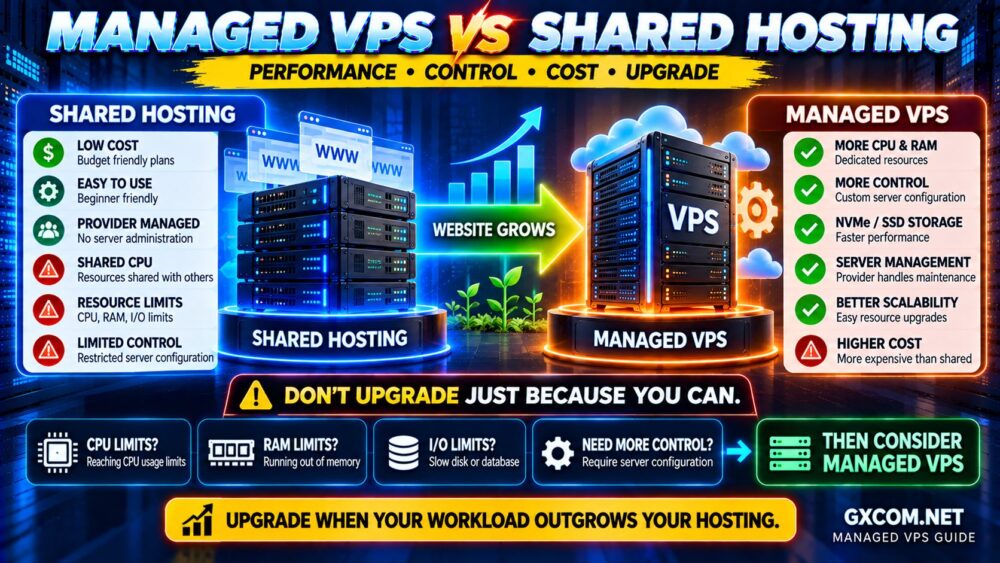
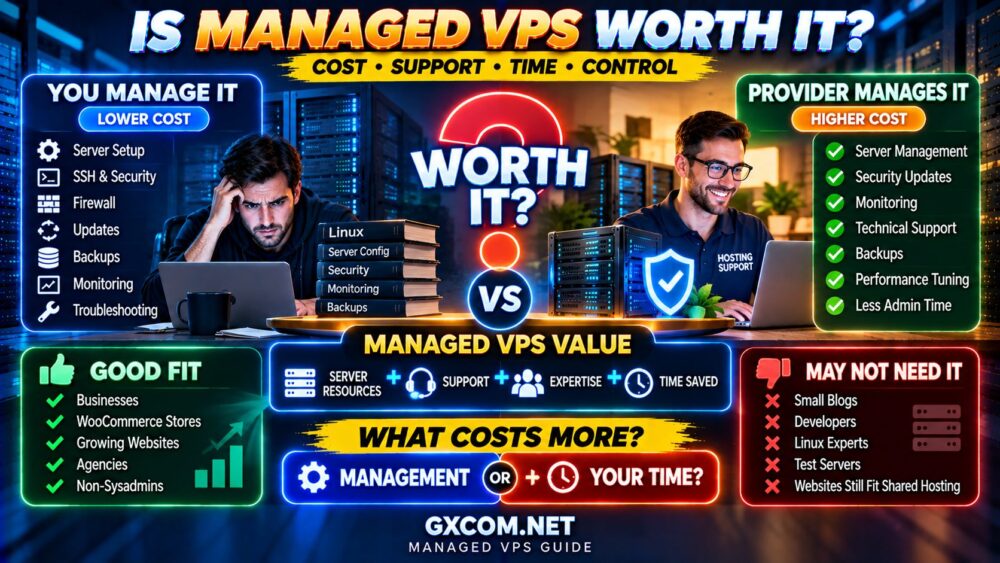
Managed VPS hosting can cost anywhere from around the price of premium shared hosting to well over $100 per month, depending on server resources, management level, control panel, backups, support and infrastructure.
That wide price range creates an obvious question:
How much should you actually pay for a managed VPS?
The answer depends on much more than CPU cores and RAM.
With managed VPS hosting, you are paying for two things at the same time:
VIRTUAL SERVER RESOURCES + SERVER MANAGEMENT.
A cheap VPS may provide plenty of CPU and RAM but leave security, updates, backups and troubleshooting entirely to you. A more expensive managed VPS may include monitoring, server optimization, control panel licensing and technical support.
This guide explains managed VPS hosting cost, typical pricing ranges, what features affect the price, hidden expenses to check and how to decide which plan offers the best value for your workload.
How Much Does Managed VPS Hosting Cost?
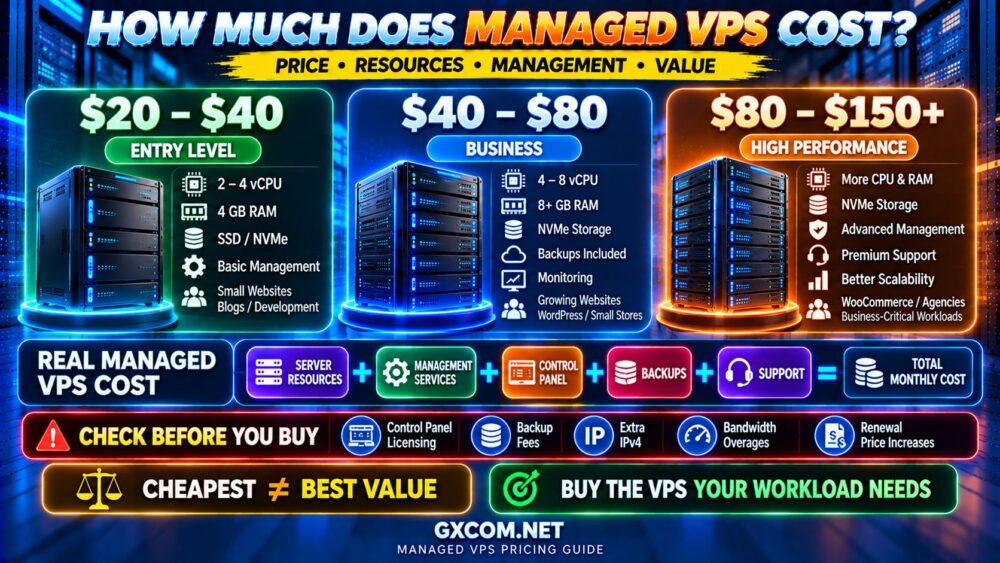
As a general market framework, managed VPS hosting can be divided into several pricing tiers.
| Managed VPS Tier | Typical Monthly Price | Common Use Case |
|---|---|---|
| Entry-Level | $20–$40 | Small websites, blogs, development |
| Mid-Range | $40–$80 | Business websites, growing WordPress, small stores |
| High-Performance | $80–$150+ | Busy WooCommerce, agencies, multiple websites |
| Enterprise / Custom | $150+ | Large applications and demanding workloads |
These ranges are useful for comparison, but they should not be treated as fixed industry prices.
Providers package management differently, and promotional pricing can make an introductory plan look significantly cheaper than its long-term renewal cost.
The correct question is therefore not:
“WHAT IS THE CHEAPEST MANAGED VPS?”
It is:
“WHAT AM I GETTING FOR THE TOTAL MONTHLY COST?”
What Are You Paying for With Managed VPS Hosting?
A managed VPS combines virtual server infrastructure with an ongoing administration service.
The total price can include:
- vCPU resources
- RAM
- SSD or NVMe storage
- Network traffic
- Operating system management
- Security updates
- Server monitoring
- Control panel
- Backups
- Technical support
- Server troubleshooting
This creates a more useful pricing equation:
VPS INFRASTRUCTURE
+
MANAGEMENT
+
CONTROL PANEL
+
BACKUPS
+
SUPPORT
=
REAL MANAGED VPS COST
This is why comparing a $6 unmanaged VPS with a $40 managed VPS based only on RAM and CPU is misleading.
Managed VPS vs Unmanaged VPS Cost
An unmanaged VPS is normally cheaper because the provider mainly supplies the infrastructure.
You are responsible for tasks such as:
- Server setup
- SSH security
- Firewall configuration
- Operating system updates
- Web server configuration
- Database administration
- Monitoring
- Backup configuration
- Troubleshooting
A managed VPS transfers some or most of those responsibilities to the hosting provider.
For someone experienced with Linux administration, an unmanaged VPS can offer excellent value.
For a business owner who would otherwise need to hire technical help, managed VPS hosting can actually be the more economical option.
Our Managed vs Unmanaged VPS comparison explains the operational differences in greater detail.
What Determines Managed VPS Pricing?
Several factors can dramatically change the monthly price.
1. CPU Resources
CPU is one of the most important pricing factors.
Plans may advertise:
- 2 vCPU
- 4 vCPU
- 8 vCPU
- 16+ vCPU
But the number of vCPUs does not tell the entire story.
Performance also depends on:
- CPU generation
- Clock speed
- Shared vs dedicated CPU allocation
- Host utilization
- Provider resource policies
4 vCPU ≠ 4 vCPU PERFORMANCE.
A more expensive VPS with newer processors and better resource allocation may outperform a cheaper plan advertising more cores.
2. RAM
RAM is another major driver of VPS pricing.
Common managed VPS configurations may provide:
- 4 GB RAM
- 8 GB RAM
- 16 GB RAM
- 32 GB RAM or more
Additional memory can support more PHP processes, database caching, object caching and simultaneous applications.
But buying unnecessary RAM wastes money.
MORE RAM ≠ AUTOMATICALLY FASTER.
If CPU or database queries are the bottleneck, doubling RAM may provide little improvement.
3. SSD vs NVMe Storage
Storage capacity and technology can affect pricing.
Modern managed VPS plans increasingly use NVMe storage because it can provide lower latency and greater I/O performance than traditional SATA SSDs.
However, do not choose a server based only on the word “NVMe.”
Actual performance also depends on:
- IOPS limits
- Disk I/O limits
- Storage architecture
- Host load
- Virtualization
Our NVMe VPS vs SSD VPS comparison explains why the same NVMe label can deliver very different real-world performance.
4. Server Management Level
This is one of the biggest differences between managed VPS plans.
Some providers offer basic management that may cover the operating system and supported control panel.
Others provide a broader service including:
- 24/7 monitoring
- Security patching
- Server hardening
- Web stack optimization
- Database assistance
- Backup monitoring
- Migration assistance
- Proactive troubleshooting
There is no universal definition of fully managed VPS.
Always read the management policy before comparing prices.
5. Control Panel Licensing
A hosting control panel can add a meaningful amount to the monthly bill.
Depending on the provider, the VPS may use or offer platforms such as:
- cPanel/WHM
- Plesk
- DirectAdmin
- A proprietary control panel
Some providers include a panel in the advertised price.
Others charge separately.
This can make a seemingly inexpensive VPS more expensive after configuration.
6. Backups
Never assume managed VPS means backups are automatically included.
Providers may offer:
- Daily backups
- Weekly backups
- Snapshots
- Off-site backups
- Optional paid backup storage
Check:
- Backup frequency
- Retention period
- Storage location
- Restore fees
- Self-service restoration
MANAGED ≠ AUTOMATICALLY BACKED UP.
7. Bandwidth and Network
Managed VPS plans can include anything from a limited monthly transfer allowance to several terabytes or more.
Compare:
- Monthly transfer
- Port speed
- Overage charges
- Datacenter location
- Network quality
- DDoS protection
A server with excellent CPU and storage can still provide a poor user experience if network latency or connectivity is weak.
8. Technical Support
Support is one of the reasons managed VPS pricing varies so much.
There is a major difference between:
“THE SERVER IS ONLINE.”
and:
“WE WILL HELP DIAGNOSE WHY YOUR WEB STACK IS FAILING.”
Before buying, check whether support covers:
- Operating system issues
- Web server problems
- Database problems
- Control panel issues
- Performance troubleshooting
- Security incidents
- Application-level problems
Entry-Level Managed VPS: $20–$40 per Month
This range can be suitable for users moving beyond shared hosting but who do not yet need large server resources.
Typical use cases include:
- Small WordPress websites
- Small business websites
- Development environments
- A few lightweight websites
- Users learning VPS hosting
The most important thing to check at this price is the management scope.
A plan marketed as “managed” at a very low price may provide less hands-on administration than expected.
Mid-Range Managed VPS: $40–$80 per Month
This is often the most interesting range for growing businesses.
You may find plans with a stronger combination of:
- Multiple vCPUs
- 4–8+ GB RAM
- NVMe storage
- Control panel options
- Backups
- Monitoring
- Technical support
This tier can make sense for:
- Growing WordPress sites
- Small-to-medium WooCommerce stores
- Agencies hosting multiple sites
- Business applications
- Resource-intensive websites
High-Performance Managed VPS: $80–$150+ per Month
At this level, buyers should expect more than simply larger numbers on a specification sheet.
Look for improvements in:
- CPU quality
- Memory allocation
- Storage performance
- Backup systems
- Management coverage
- Monitoring
- Support response
- Network quality
This tier may be appropriate for busy online stores, agencies, multiple production websites and business-critical applications.
Managed VPS Hidden Costs to Check Before Buying
The advertised monthly price may not represent your actual long-term cost.
Before purchasing, check for these potential extras:
- Control panel license
- Backup service
- Additional storage
- Extra IPv4 addresses
- Migration fees
- Security add-ons
- Premium support
- Bandwidth overages
- Windows licensing
- Renewal price increases
A better buying calculation is:
ADVERTISED PRICE
+
REQUIRED ADD-ONS
+
RENEWAL DIFFERENCE
=
REAL HOSTING COST
Introductory Price vs Renewal Price
Promotional pricing can make managed VPS hosting look significantly cheaper during the first billing period.
Always compare the renewal price before making a long-term decision.
For example, instead of asking:
“HOW MUCH DOES THIS VPS COST TODAY?”
ask:
“HOW MUCH WILL I PAY OVER 12 OR 24 MONTHS?”
This is especially important when a discount requires annual or multi-year prepayment.
Monthly Billing vs Long-Term VPS Plans
Longer billing periods can reduce the effective monthly cost, but they also increase commitment.
Monthly billing provides flexibility if:
- You are testing a new provider
- Your workload may change
- You are unsure about support quality
- You may migrate soon
Long-term billing becomes more attractive after you are confident that the provider meets your requirements.
LOWER MONTHLY PRICE ≠ LOWER RISK.
Managed VPS Cost for WordPress
A small WordPress website does not automatically need managed VPS hosting.
Quality shared or managed WordPress hosting may provide better value when resource usage is low.
A managed VPS becomes easier to justify when WordPress requires:
- More CPU
- More PHP workers
- Larger databases
- Object caching
- Custom server configuration
- Multiple websites
- More predictable resources
The upgrade decision should be based on resource requirements rather than visitor count alone.
Managed VPS Cost for WooCommerce
WooCommerce can justify managed VPS hosting sooner because many store operations are dynamic.
Cart sessions, checkout, customer accounts, inventory and orders can generate significant PHP and database activity.
For a revenue-generating store, paying more for reliable resources and technical management may make sense if poor server performance affects customers or sales.
However, buying the largest VPS available is not the answer.
SIZE THE SERVER FOR THE WORKLOAD.
Managed VPS vs Shared Hosting Cost
Shared hosting is cheaper because many users share the same managed server environment.
A managed VPS costs more because you receive a more isolated virtual server with defined resources and additional management.
If your website still operates comfortably within shared hosting limits, there may be little reason to pay for a VPS.
If CPU, RAM or I/O restrictions are consistently limiting a growing website, the additional cost becomes easier to justify.
Our Managed VPS vs Shared Hosting comparison explains when that upgrade makes sense.
Managed VPS Providers Worth Comparing
Managed VPS buyers should compare management coverage as carefully as hardware specifications.
ScalaHosting is particularly relevant for users looking for a managed VPS environment where server management is an important part of the purchase decision.
AccuWeb Hosting is another provider worth comparing for users evaluating different hosting and VPS configurations as their websites grow.
Hostwinds can also be considered when comparing VPS resources and management options.
The cheapest provider is not automatically the best value.
Compare:
CPU → RAM → STORAGE → MANAGEMENT → BACKUPS → SUPPORT → RENEWAL PRICE.
How to Compare Managed VPS Prices Correctly
Before buying, create a simple comparison using the same criteria for every provider.
| What to Compare | Why It Matters |
|---|---|
| vCPU | Processing capacity |
| CPU Type | Real per-core performance |
| RAM | Applications, database and caching |
| Storage | Capacity and performance |
| Disk I/O / IOPS | Real storage performance |
| Bandwidth | Traffic capacity and overages |
| Management Scope | What the provider actually manages |
| Control Panel | May add licensing cost |
| Backups | Data recovery |
| Support | Troubleshooting capability |
| Renewal Price | Long-term cost |
Is Cheap Managed VPS Hosting Worth It?
It can be.
A lower-cost provider may offer exactly the resources and management you need.
But investigate why the price is low.
Possible tradeoffs can include:
- Older CPU hardware
- More shared resources
- Lower storage performance
- Limited management
- Fewer backups
- Slower support
- Higher renewal pricing
Cheap is valuable when the service matches the workload.
CHEAP + SUITABLE = GOOD VALUE.
CHEAP + WRONG WORKLOAD = EXPENSIVE MISTAKE.
When Is Managed VPS Worth Paying For?
Managed VPS hosting becomes easier to justify when:
- Your website generates revenue
- Shared hosting resource limits are becoming restrictive
- You need more CPU or RAM
- You need custom server configuration
- You run multiple demanding websites
- You do not want to administer Linux yourself
- Downtime has meaningful business consequences
- You value access to server-level technical support
If you have strong Linux administration skills and enjoy managing your own infrastructure, an unmanaged VPS may provide better price-to-resource value.
Managed VPS Buying Checklist
Before paying for a managed VPS, check:
- ✓ CPU generation and allocation
- ✓ RAM
- ✓ SSD or NVMe storage
- ✓ Disk I/O and IOPS policies
- ✓ Monthly bandwidth
- ✓ Datacenter location
- ✓ Exact management scope
- ✓ Root access policy
- ✓ Control panel cost
- ✓ Backup frequency and retention
- ✓ Monitoring
- ✓ Migration assistance
- ✓ Support scope
- ✓ Introductory price
- ✓ Renewal price
COMPARE THE COMPLETE SERVICE, NOT JUST THE VPS SPECIFICATIONS.
Managed VPS Hosting Cost FAQ
How much does managed VPS hosting cost per month?
Entry-level managed VPS hosting may start around $20–$40 per month, while stronger business plans commonly move into the $40–$80 range. High-performance managed VPS services can cost $80–$150 or more depending on resources and management.
Why is managed VPS more expensive than regular VPS?
You are paying for both server resources and administration. Management may include updates, monitoring, security, troubleshooting, backups and control panel support.
Is a $20 managed VPS good enough?
It can be for lightweight workloads, but check CPU, RAM, storage and especially the management scope. Very low-cost “managed” plans may provide more limited administration.
Is managed VPS cheaper than hiring a system administrator?
For many small businesses, it can be. Managed hosting spreads administration costs across the provider's customer base, although it does not replace every function of a dedicated system administrator.
Does managed VPS include cPanel?
Not always. Some providers include a control panel, while others charge an additional licensing fee or use another management platform.
Are backups included with managed VPS?
It depends on the provider. Check backup frequency, retention, restore procedures and whether backup storage costs extra.
Should I pay monthly or annually for managed VPS?
Monthly billing provides more flexibility, especially when testing a provider. Longer terms may reduce the effective monthly price but increase your commitment.
How much RAM does a managed VPS need?
It depends on the workload. A lightweight site may need only a few gigabytes, while busy WordPress, WooCommerce, database or multi-site environments can require substantially more. Measure actual usage before paying for unnecessary RAM.
Final Verdict: How Much Should You Spend on Managed VPS Hosting?
There is no single ideal managed VPS price.
A $30 plan can be excellent value for one website and completely inadequate for another.
A $100 plan can be unnecessary for a small blog but inexpensive compared with the cost of downtime for a busy online store.
Start with the workload:
WORKLOAD
↓
CPU + RAM + STORAGE
↓
MANAGEMENT REQUIREMENTS
↓
BACKUPS + SUPPORT
↓
TOTAL MONTHLY COST
For many buyers, the best managed VPS is not the cheapest plan and not the most powerful plan.
It is the plan that provides enough resources, the right level of management and predictable long-term pricing.
DON'T BUY THE CHEAPEST VPS.
DON'T BUY THE BIGGEST VPS.
BUY THE VPS YOUR WORKLOAD ACTUALLY NEEDS.