Shared hosting is affordable, easy to use and powerful enough for millions of small websites. But every shared hosting account has limits—even when a plan advertises “unlimited” or “unmetered” features.
The limits that matter most are often not storage space or bandwidth.
They are resources such as CPU, RAM, disk I/O, IOPS, entry processes, PHP processes, database resources and inodes.
When one of these resources reaches its account limit, your website may become slow, return errors or temporarily stop processing new requests even though you still have plenty of disk space and bandwidth available.
This guide explains the most important shared hosting limitations, what each resource actually does, how to recognize a bottleneck and when upgrading your hosting makes sense.
“UNLIMITED HOSTING” DOES NOT MEAN UNLIMITED SERVER RESOURCES.
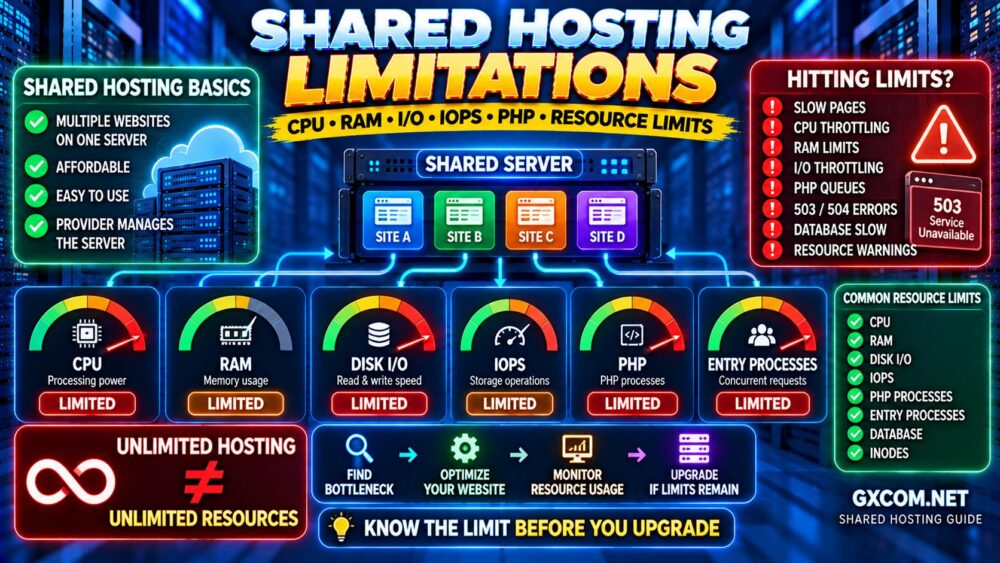
What Are Shared Hosting Resource Limits?
Shared hosting places many customer accounts on the same underlying server infrastructure.
The hosting provider needs to prevent one website from consuming excessive resources and affecting other customers.
For that reason, accounts are normally subject to resource controls.
Depending on the hosting platform, these may include:
- CPU usage
- Physical memory (RAM)
- Disk I/O
- IOPS
- Entry processes
- Number of processes
- PHP workers or PHP processes
- Database connections
- Inodes
- Email sending limits
The exact terminology and limits vary between providers.
Some hosts display them clearly inside a control panel such as cPanel. Others manage them behind the scenes.
The important concept is:
SHARED SERVER
↓
RESOURCE POOL
↓
ACCOUNT LIMITS
↓
FAIR RESOURCE USAGE
Shared Hosting Limits at a Glance
| Resource | What It Affects | Possible Symptom When Limited |
|---|---|---|
| CPU | PHP and application processing | Slow dynamic pages |
| RAM | Memory available to processes | Processes fail or terminate |
| Disk I/O | Storage read/write throughput | Slow files, backups or database operations |
| IOPS | Storage operations per second | Storage-intensive tasks slow down |
| Entry Processes | Concurrent application requests | Requests queue or fail |
| PHP Processes | Concurrent PHP execution | Dynamic pages become slow |
| Database | Queries and connections | Slow or failed dynamic requests |
| Inodes | Number of files/directories | Unable to create additional files |
1. CPU Limits Explained
CPU is one of the most important shared hosting resources because dynamic applications need processing power to execute code.
For WordPress, CPU can be consumed by:
- PHP execution
- WordPress core
- Plugins
- Theme functions
- Database-related processing
- WooCommerce operations
- Cron jobs
- Image processing
- Security scans
- Backup generation
A provider may limit an account to a certain percentage of CPU capacity or another platform-specific allocation.
If your website continuously reaches that limit, the hosting platform may throttle processing.
The result can be:
- Slow page generation
- Slow WordPress admin
- Longer server response times
- Failed background jobs
- Timeouts during traffic spikes
CPU usage is particularly important for dynamic websites because cached pages require significantly less application processing.
MORE TRAFFIC DOES NOT ALWAYS MEAN MORE CPU.
MORE DYNAMIC PROCESSING USUALLY DOES.
2. RAM Limits Explained
RAM provides fast working memory for active processes.
In a shared hosting environment, your account usually has a memory limit even though you do not control the server's total RAM.
Memory may be consumed by:
- PHP processes
- Application scripts
- Background jobs
- Control panel processes
- Database-related operations
When memory usage reaches the hosting account limit, processes may be terminated or fail to start.
This can cause:
- 500 errors
- Failed PHP requests
- Incomplete background jobs
- Website instability
Do not confuse hosting account RAM limits with the WordPress PHP memory limit.
They are related concepts but not the same thing.
The PHP memory limit controls how much memory an individual PHP script may use, while the hosting environment can impose broader limits on the entire account.
3. Disk I/O Limits Explained
Disk I/O measures the rate at which your hosting account can read data from or write data to storage.
This resource is often overlooked because customers tend to focus on whether the server uses SSD or NVMe storage.
But:
NVMe STORAGE ≠ UNLIMITED DISK PERFORMANCE.
A shared hosting provider can still limit how much storage throughput each account may consume.
High I/O activity can be created by:
- Website backups
- Large file uploads
- Website migrations
- Security scans
- Cache generation
- Database activity
- Large plugin operations
If your account reaches the I/O limit, storage operations may be throttled.
The website may feel slow even when CPU and RAM usage look reasonable.
4. IOPS Limits Explained
IOPS means Input/Output Operations Per Second.
While disk I/O focuses on the amount of data transferred, IOPS focuses on how many storage operations can occur within a period of time.
This distinction matters because workloads behave differently.
Reading one large file is different from reading thousands of small files.
WordPress websites contain many PHP, plugin, theme, cache and media files, which can generate large numbers of small storage operations.
Therefore:
DISK I/O = HOW MUCH DATA
IOPS = HOW MANY OPERATIONS
Both can become bottlenecks.
5. Entry Process Limits Explained
Entry Processes, commonly shown as EP on hosting platforms using resource-control systems such as CloudLinux, are another frequently misunderstood limit.
An entry process generally represents a request entering the account's controlled environment.
This can include requests that trigger PHP or other dynamic processing.
If your website receives many simultaneous dynamic requests, the number of entry processes can increase.
When the account reaches its EP limit, additional requests may fail or wait.
This is why a website can have relatively modest monthly traffic and still experience resource problems during a sudden spike.
MONTHLY TRAFFIC ≠ CONCURRENT TRAFFIC.
6. PHP Process and Worker Limits
PHP powers WordPress and many other popular web applications.
Dynamic requests may require PHP for:
- WordPress pages not served from cache
- Admin dashboard requests
- Website search
- Forms
- WooCommerce carts
- Checkout
- Membership areas
- API requests
If all available PHP processing capacity is busy, additional dynamic requests may queue.
This can cause slow performance during busy periods even if the website appears fast when only a few users are online.
Caching can dramatically reduce this pressure because cached requests may bypass much of the PHP and database processing.
Our Website Caching Explained guide explains how browser, server, CDN and object caching reduce workload.
7. Database Resource Limits
Dynamic websites frequently depend on MySQL or MariaDB.
A database can become a bottleneck because of:
- Too many concurrent connections
- Slow queries
- Large database tables
- Excessive WordPress autoload data
- Inefficient plugins
- WooCommerce activity
- Search queries
Shared hosting providers may restrict database connections or other database resources to protect the server.
Even without a clearly visible database limit, inefficient queries can consume CPU and I/O resources.
Adding a larger hosting plan does not automatically fix inefficient database design.
MORE RESOURCES CAN HIDE A BAD QUERY.
THEY DO NOT MAKE IT A GOOD QUERY.
8. Inode Limits Explained
An inode represents a filesystem object such as a file or directory.
This means a website using only a few gigabytes of disk space can still have a very large inode count.
WordPress sites can accumulate files through:
- Plugins
- Themes
- Images
- Cache files
- Backup archives
- Temporary files
- Staging copies
This creates an important distinction:
DISK SPACE = HOW MUCH DATA YOU STORE
INODES = HOW MANY FILESYSTEM OBJECTS YOU STORE
A hosting account can therefore have plenty of free storage but still reach its inode limit.
9. Bandwidth and Traffic Limits
Some shared hosting plans advertise large or unmetered bandwidth allowances.
That sounds attractive, but bandwidth is only one part of hosting capacity.
You could theoretically have substantial bandwidth remaining while your website is already limited by:
- CPU
- RAM
- I/O
- PHP processes
- Database capacity
Therefore:
UNMETERED BANDWIDTH ≠ UNLIMITED WEBSITE TRAFFIC.
If you want to understand how these limits translate into real visitor capacity, read our How Much Traffic Can Shared Hosting Handle? guide.
Why Shared Hosting Providers Need Resource Limits
Resource limits are not automatically a sign of a bad hosting provider.
They are necessary in a shared environment.
Imagine one customer starts a resource-intensive backup while another receives a traffic spike and a third launches a malware scan.
Without resource controls, a small number of accounts could consume a disproportionate share of the server.
Proper resource isolation can actually improve shared hosting stability.
The real issue is whether:
- The limits are reasonable
- The provider communicates them clearly
- The server is not excessively overloaded
- There is an affordable upgrade path
“Unlimited Hosting” vs Resource Limits
The word “unlimited” can create confusion.
A provider may offer:
- Unlimited websites
- Unmetered bandwidth
- Generous storage
while still enforcing CPU, memory, process or fair-use limits.
This is not necessarily contradictory because the advertised feature and server resources are different things.
For example:
UNLIMITED WEBSITES
does not mean:
UNLIMITED CPU + UNLIMITED RAM + UNLIMITED I/O.
Before buying a plan, check the resource and acceptable-use policies instead of relying only on the headline features.
How Caching Changes Shared Hosting Resource Usage
Caching is particularly powerful on shared hosting because it can reduce the amount of dynamic processing required for each visitor.
Without caching:
REQUEST
↓
PHP
↓
WORDPRESS
↓
DATABASE
↓
RESPONSE
With effective page caching:
REQUEST
↓
CACHED PAGE
↓
RESPONSE
This can reduce CPU, PHP and database demand substantially.
For cacheable content websites, optimization can sometimes delay the need for a hosting upgrade.
Can a CDN Help With Shared Hosting Limits?
A CDN can reduce requests and bandwidth reaching the origin server by serving suitable content from edge locations.
It is particularly useful for:
- Images
- CSS
- JavaScript
- Downloads
- Cacheable HTML where supported
A CDN cannot solve every resource problem.
Dynamic WordPress admin, WooCommerce checkout and logged-in sessions may still require PHP and database processing on the origin.
See our CDN vs No CDN guide for a deeper comparison.
Why WooCommerce Hits Shared Hosting Limits Faster
A normal content website can cache a large percentage of public page requests.
WooCommerce introduces more dynamic activity.
This includes:
- Cart sessions
- Checkout
- Customer accounts
- Inventory operations
- Payment processing
- Database activity
- Background jobs
As a result, a WooCommerce store can consume substantially more CPU, PHP and database resources than a cached blog receiving the same number of visitors.
This is another reason not to judge shared hosting capacity using visitor numbers alone.
How to Check Shared Hosting Resource Usage
Many hosting control panels provide a resource usage section.
Depending on the provider, look for metrics such as:
- CPU Usage
- Physical Memory Usage
- I/O Usage
- IOPS
- Entry Processes
- Processes
- Faults
Do not panic because a resource reaches a high level for a few seconds.
Look for repeated or sustained patterns.
For example:
ONE CPU SPIKE
≠
YOU NEED A VPS
But:
REPEATED THROTTLING + SLOW WEBSITE + RESOURCE FAULTS
=
TIME TO INVESTIGATE
What Causes High Shared Hosting Resource Usage?
Common causes include:
- Sudden traffic spikes
- Poorly optimized WordPress plugins
- Heavy themes or page builders
- Bad bots
- Brute-force attacks
- Security scans
- Backup plugins
- WordPress cron jobs
- Slow database queries
- WooCommerce activity
- Insufficient caching
- Malware
This is why upgrading immediately is not always the correct solution.
You first need to identify the bottleneck.
How to Reduce Shared Hosting Resource Usage
1. Enable Page Caching
Reduce repeated PHP and database processing for cacheable pages.
2. Optimize WordPress Plugins
Remove unnecessary or inefficient plugins that continuously consume resources.
3. Optimize the Database
Investigate slow queries, oversized tables and unnecessary data.
4. Control Bad Bots
Automated traffic can consume CPU and PHP capacity without providing useful visitors.
5. Schedule Backups Carefully
Large local backups can create CPU and I/O spikes. Avoid running resource-intensive tasks during peak traffic periods.
6. Use a CDN
Offload suitable static and cacheable content from the origin server.
7. Optimize Images
Reduce unnecessary storage and bandwidth usage.
8. Review Cron Jobs
Frequent background tasks can create unnecessary processing.
9. Keep Software Updated
Use supported versions of WordPress, PHP, plugins and themes.
10. Monitor Before Upgrading
Identify whether CPU, memory, I/O, PHP or the database is actually limiting performance.
For a broader optimization workflow, read our How to Speed Up a Website guide.
When Shared Hosting Limits Mean You Should Upgrade
Optimization has limits.
You should consider upgrading when a properly optimized website repeatedly reaches resource limits under legitimate traffic.
Warning signs include:
- CPU is repeatedly throttled
- Memory faults occur regularly
- I/O reaches its limit during normal usage
- Entry process limits are repeatedly reached
- Dynamic requests frequently queue
- Traffic spikes create server errors
- WooCommerce performance becomes unreliable
- Your business needs more predictable resources
- You require server-level configuration
The correct process is:
IDENTIFY → OPTIMIZE → MONITOR → UPGRADE IF NECESSARY.
Shared Hosting vs VPS Resource Limits
Moving to VPS hosting gives you a more isolated environment with clearer resource allocations.
A VPS plan commonly specifies:
- vCPU
- RAM
- Storage
- Bandwidth
This does not mean a VPS has no limits.
Every server has finite resources, and virtual CPU performance can still depend on the provider and virtualization environment.
The major difference is that VPS resources are usually more transparent and controllable.
Our Shared Hosting vs VPS comparison explains when the additional resources and control justify upgrading.
Managed Hosting Is Another Option
If shared hosting limits are becoming restrictive but you do not want to administer a VPS yourself, managed hosting or managed VPS can provide another upgrade path.
The progression can look like:
SHARED HOSTING
↓
HIGHER-RESOURCE MANAGED HOSTING
↓
MANAGED VPS
↓
SELF-MANAGED VPS / CLOUD
A managed VPS can provide clearer CPU and RAM resources while allowing the provider to handle more of the server administration.
Our Managed Hosting vs VPS guide compares these upgrade paths.
Shared Hosting Providers: What to Compare
When comparing shared hosting providers, do not judge a plan only by introductory price, storage or the word “unlimited.”
Compare:
- Resource policies
- CPU restrictions
- Memory restrictions
- I/O policies
- Backup features
- Server technology
- Support
- Renewal pricing
- Upgrade options
Hostinger is worth comparing for users looking for accessible shared and WordPress hosting with upgrade options as websites grow.
hosting.com (formerly A2 Hosting) is another provider worth evaluating where shared hosting performance and future upgrade options are important.
AccuWeb Hosting can also be compared across shared and more advanced hosting products when you want multiple infrastructure options from the same provider.
If your workload eventually requires VPS resources with more provider management, ScalaHosting becomes relevant as a managed VPS alternative.
The important question is not:
“WHO OFFERS THE MOST UNLIMITED FEATURES?”
It is:
“WHAT HAPPENS WHEN MY WEBSITE STARTS USING REAL SERVER RESOURCES?”
Shared Hosting Resource Checklist
Before purchasing or upgrading a shared hosting plan, check:
- ✓ CPU policy
- ✓ Memory limits
- ✓ Disk I/O limits
- ✓ IOPS limits
- ✓ Entry process limits
- ✓ PHP process limits
- ✓ Inode limits
- ✓ Database restrictions
- ✓ Backup policy
- ✓ Upgrade options
This information is often more useful than simply comparing disk space.
Shared Hosting Limitations FAQ
Does shared hosting have CPU limits?
Yes. Shared hosting providers generally control how much CPU an individual account can consume so one customer cannot monopolize the shared server.
How much RAM does shared hosting provide?
It varies by provider and plan. Some hosts disclose account memory limits clearly, while others do not advertise a dedicated RAM amount in the same way as VPS providers.
What is I/O in shared hosting?
I/O refers to the rate at which your account can read and write data to storage. Reaching the I/O limit can slow file, database, backup and other storage-intensive operations.
What is IOPS in hosting?
IOPS means Input/Output Operations Per Second and measures how many storage operations can be processed over time.
What are entry processes?
Entry processes generally represent requests entering a hosting account's controlled application environment. High concurrent dynamic traffic can cause the limit to be reached.
What happens when I reach shared hosting resource limits?
The provider may throttle resources, delay requests or temporarily prevent additional processes from running. Visitors may experience slow pages, timeouts or server errors depending on which limit is reached.
Does unlimited hosting really mean unlimited?
Usually not in terms of computing resources. A plan may offer unmetered bandwidth or generous website allowances while still enforcing CPU, memory, I/O and fair-use policies.
Should I upgrade to VPS when I reach shared hosting limits?
Not immediately. First identify and optimize the cause. If legitimate traffic repeatedly exceeds the resources available on an optimized shared hosting account, VPS or managed hosting may be the logical next step.
Final Verdict: Understand the Limits Before You Upgrade
Shared hosting limitations exist because CPU, RAM, storage performance and application processes must be divided fairly between customers using the same infrastructure.
The most important limits to understand are:
CPU
RAM
DISK I/O
IOPS
ENTRY PROCESSES
PHP
DATABASE RESOURCES
INODES
Do not assume your website needs a VPS simply because one resource briefly spikes.
Instead:
FIND THE BOTTLENECK
↓
OPTIMIZE THE WEBSITE
↓
MONITOR RESOURCE USAGE
↓
UPGRADE IF LIMITS REMAIN
Shared hosting remains an excellent choice while your website operates comfortably within those limits.
When a properly optimized website repeatedly exceeds them, moving to higher-resource managed hosting, managed VPS or self-managed VPS becomes much easier to justify.
UNLIMITED FEATURES ≠ UNLIMITED RESOURCES.
KNOW THE BOTTLENECK BEFORE YOU BUY MORE HOSTING.