Website caching is one of the most effective ways to improve performance, but the word “cache” can describe several very different technologies.
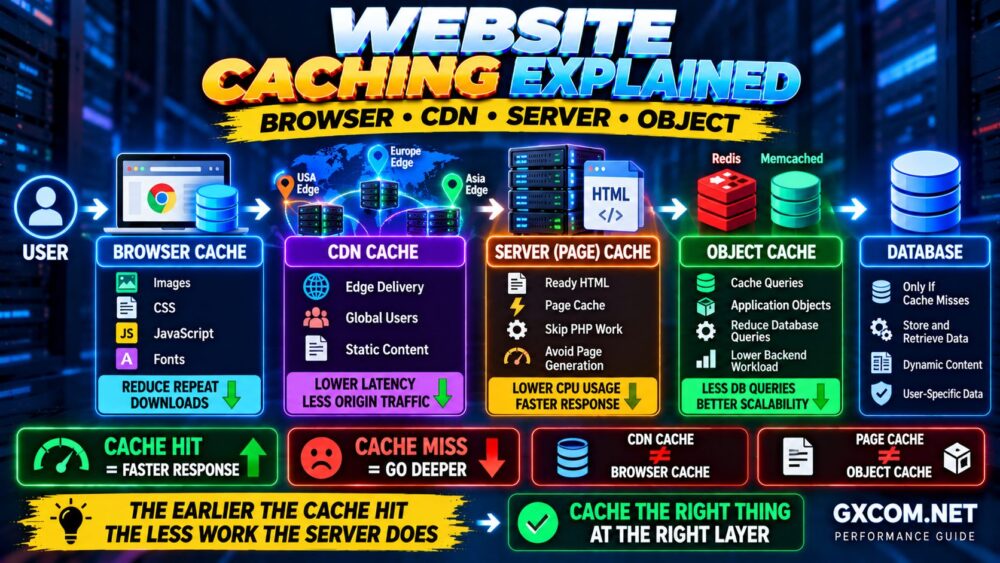
Browser cache, CDN cache, server page cache and object cache all reduce repeated work—but they operate at different points in the request path.
Understanding those differences is important because installing an object cache does not replace a CDN, and enabling browser caching does not eliminate expensive server-side processing for uncached requests.
This guide explains website caching, compares the major cache types and shows how multiple caching layers can work together to make a website faster.
BROWSER → CDN → SERVER CACHE → APPLICATION → OBJECT CACHE → DATABASE
What Is Website Caching?
Caching means temporarily storing reusable data or content so it does not need to be generated, downloaded or retrieved from the original source every time it is requested.
Without caching, a dynamic request might look like:
Visitor → Web Server → Application → Database → Generate Page → Visitor
If thousands of visitors request substantially the same content, the server may repeat much of that work thousands of times.
With caching, a previously generated result can sometimes be reused:
Visitor → Cache → Ready Response
This can reduce:
- Page generation time
- CPU usage
- Database queries
- Origin bandwidth
- Network latency
- Application workload
The key principle is simple:
DO THE EXPENSIVE WORK ONCE → REUSE THE RESULT WHEN SAFE.
Browser vs Server vs CDN vs Object Cache
| Cache Type | Where It Lives | What It Commonly Stores | Main Benefit |
|---|---|---|---|
| Browser Cache | User device | Images, CSS, JS, fonts | Reduces repeat downloads |
| CDN Cache | Edge network | Static assets, cacheable HTML | Reduces latency and origin traffic |
| Server/Page Cache | Origin/server layer | Generated pages/responses | Avoids repeated page generation |
| Object Cache | Server memory/cache service | Query results and application objects | Reduces repeated backend work |
These caching methods are complementary rather than mutually exclusive.
A high-performance website may use all four.
1. Browser Cache Explained
Browser caching stores reusable website resources on the visitor's own device.
When someone first visits a page, the browser may download resources such as:
- Images
- CSS
- JavaScript
- Fonts
- Icons
When the visitor opens another page—or returns later—the browser may be able to reuse those local resources instead of downloading them again.
The difference is:
FIRST VISIT
Browser → Server → Download Resources
REPEAT VISIT
Browser → Local Cache → Reuse Resources
When Browser Caching Helps Most
Browser caching is particularly useful for assets that do not change on every request.
Examples include logos, stylesheets, fonts and versioned JavaScript files.
This can reduce repeat network transfers and make navigation between pages feel faster.
Browser Cache Limitation
The browser cache belongs to an individual visitor.
If a completely new visitor opens your website, that person's browser does not already have your cached resources.
Browser caching therefore does not replace server-side or CDN caching.
BROWSER CACHE = REUSE ON THE USER SIDE.
2. CDN Cache Explained
A CDN cache stores website resources on distributed edge infrastructure rather than only at the origin server.
Without a CDN:
Visitor → Origin Server
With an edge cache:
Visitor → Nearby CDN Edge → Cached Resource
If the requested resource is already cached at the edge, the CDN can return it without requesting a new copy from the origin.
This can provide two major benefits:
- Reduce network distance for geographically distributed users
- Reduce the number of requests reaching the origin server
CDN caching is especially effective for images, CSS, JavaScript, fonts, downloads and other cacheable content.
Some architectures can also cache HTML responses when it is safe to do so.
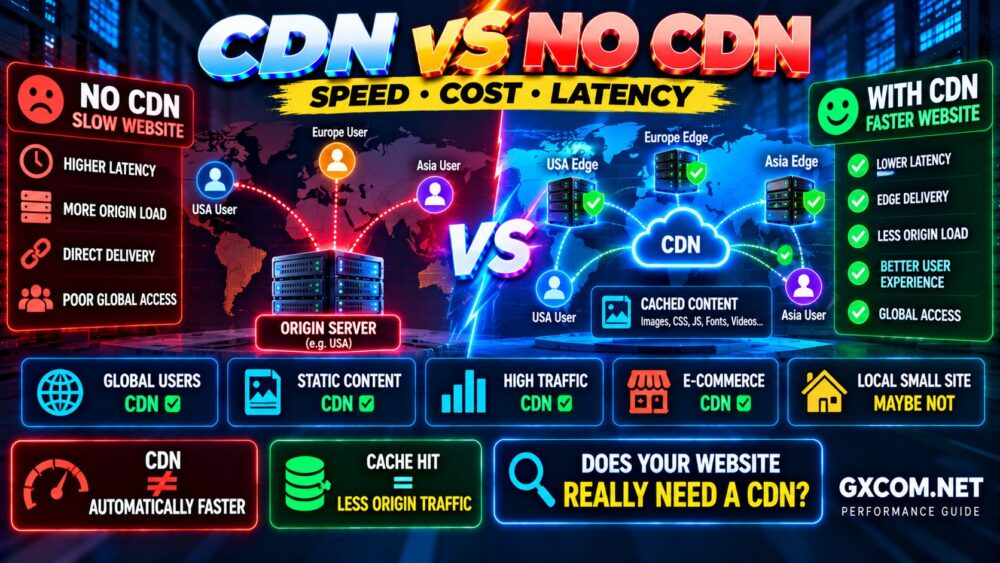
For a complete comparison of when edge caching makes sense, see our CDN vs No CDN Guide.
What Is a CDN Cache Hit?
A CDN request can result in a cache hit or cache miss.
CACHE HIT
Requested content already exists at the edge.
Visitor → Edge → Content
CACHE MISS
The edge does not have a valid cached copy and needs to retrieve the resource from the origin.
Visitor → Edge → Origin → Edge → Visitor
A higher useful cache hit ratio generally means more eligible requests are being served without going back to the origin.
However, maximizing cache hits blindly is not the goal. Personalized, private or rapidly changing content should not be cached incorrectly simply to increase a metric.
CACHE WHAT IS SAFE TO CACHE.
3. Server Page Cache Explained
Server-side page caching addresses a different problem: repeatedly generating the same response.
Consider a dynamic CMS page.
Without page cache:
Request
↓
Application
↓
Database Queries
↓
Generate HTML
↓
Response
With page caching:
Request
↓
Page Cache
↓
Ready HTML
When a valid cached page can be served, expensive application and database processing may be avoided.
This is one reason full-page caching can produce substantial performance improvements for content-heavy websites.
Where Can Server Cache Exist?
Server-side caching can be implemented at different layers depending on the hosting architecture.
Examples include:
- Web server caching
- Reverse proxy caching
- Application page caching
- Hosting-platform caching
- CMS caching systems
The implementation is less important than understanding the purpose:
DO NOT REBUILD THE SAME PAGE IF A VALID COPY ALREADY EXISTS.
4. Object Cache Explained
Object caching operates deeper inside dynamic applications.
Instead of storing the entire finished page, an object cache stores reusable pieces of data that the application may need repeatedly.
For example:
Application → Database Query → Result
may become:
Application → Object Cache → Result
when a valid cached result already exists.
Popular technologies used for persistent object caching include Redis and Memcached.
An object cache can reduce repeated database queries and application processing, especially on dynamic websites where full-page caching is not always possible.
Page Cache vs Object Cache
This distinction is particularly important.
| Feature | Page Cache | Object Cache |
|---|---|---|
| Stores | Complete generated response/page | Reusable data or objects |
| Can Skip Application Work | Often yes | Usually reduces part of the work |
| Can Reduce DB Queries | Indirectly/strongly | Directly |
| Best For | Cacheable pages | Dynamic applications |
| Examples | Page/reverse proxy cache | Redis, Memcached |
Object cache does not automatically make page cache unnecessary.
And page cache does not make object cache useless for requests that bypass full-page caching.
PAGE CACHE ≠ OBJECT CACHE.
How Multiple Cache Layers Work Together
A well-optimized website may use a request path like this:
VISITOR
↓
BROWSER CACHE
↓
CDN EDGE CACHE
↓
SERVER PAGE CACHE
↓
APPLICATION
↓
OBJECT CACHE
↓
DATABASE
The request only needs to travel as deep as necessary.
If the browser already has a valid asset, it may not need to download it again.
If the CDN can serve the content, the origin may not receive the request.
If the CDN misses but the origin page cache has the response, the application may not need to regenerate it.
If the request reaches the application, object caching may still prevent repeated database work.
This gives us the most important caching principle:
THE EARLIER A SAFE CACHE CAN ANSWER, THE LESS WORK THE REST OF THE STACK HAS TO DO.
What Is Cache Expiration?
Cached content cannot necessarily remain stored forever.
Websites change.
Articles are updated, product prices change, CSS is modified and application data evolves.
Caching systems therefore need rules controlling how long cached content remains valid.
This is often described using a TTL, or Time to Live.
Conceptually:
RESOURCE CACHED → TTL → EXPIRES → REFRESH
Longer cache lifetimes can reduce repeated work but increase the risk of serving stale content if invalidation is not handled correctly.
Shorter lifetimes provide fresher content but may result in more origin requests.
The correct TTL depends on how frequently the resource changes.
What Is Cache Purging?
Sometimes you cannot wait for cached content to expire naturally.
If you update an important page, stylesheet or image, you may need the new version to appear immediately.
Cache purging removes or invalidates an existing cached copy so the next request can retrieve the updated content.
Depending on the platform, you may be able to purge:
- A single URL
- A group of resources
- A cache tag
- The entire cache
Purging the entire cache every time a small resource changes is usually less efficient than targeted invalidation.
What Is Cache Busting?
Cache busting is commonly used when static files change.
Instead of asking browsers or caches to guess whether an old file is still valid, the resource URL changes when a new version is deployed.
For example:
style.css?v=1
may become:
style.css?v=2
or production build systems may generate versioned filenames.
The new URL tells caches that this is effectively a different resource.
This makes it possible to use longer cache lifetimes while still deploying updated assets reliably.
What Content Should Not Be Cached Carelessly?
Not every response should be shared between users.
Examples requiring careful cache rules can include:
- Shopping carts
- Checkout pages
- User account pages
- Admin dashboards
- Personalized content
- Private API responses
- Authentication pages
- Sensitive user data
A caching mistake on public static assets may create stale styling.
A caching mistake involving private user content can become a serious security and privacy problem.
FASTER IS NEVER AN EXCUSE TO CACHE PRIVATE DATA INCORRECTLY.
Website Caching and WordPress
WordPress can benefit significantly from caching because uncached pages may require PHP execution and database queries.
A WordPress performance stack might use:
BROWSER CACHE
↓
CDN CACHE
↓
FULL-PAGE CACHE
↓
PHP / WORDPRESS
↓
REDIS OBJECT CACHE
↓
DATABASE
However, more caching plugins do not automatically mean better performance.
Installing multiple plugins that perform overlapping page caching, minification or optimization can create conflicts.
Use one clear caching architecture rather than stacking tools without understanding what each one does.
For the broader optimization process, see How to Speed Up WordPress.
Do You Need Redis Object Cache?
Not every website needs Redis.
Persistent object caching becomes more valuable when an application performs repeated database operations that cannot simply be eliminated with full-page caching.
Examples may include:
- Busy dynamic websites
- E-commerce stores
- Membership sites
- Authenticated applications
- Complex CMS installations
- Database-intensive workloads
A small static or heavily page-cached website may see much less benefit.
Before adding Redis simply because it sounds faster, determine whether database or application work is actually a bottleneck.
Does Caching Improve Core Web Vitals?
Caching can contribute to faster delivery, but it does not automatically solve every Core Web Vitals problem.
For example, faster cached delivery may improve how quickly important content becomes available.
But caching alone cannot fix:
- Excessive client-side JavaScript
- Long main-thread tasks
- Layout shifts
- Poorly sized images
- Slow user interactions
For those issues, see our Core Web Vitals Optimization Guide.
Can Too Much Caching Cause Problems?
Yes. Poorly designed caching can cause:
- Stale content
- Old CSS or JavaScript
- Outdated prices
- Login problems
- Shopping cart issues
- Broken personalization
- Debugging confusion
This is why caching should be designed around the content lifecycle.
The goal is not:
CACHE EVERYTHING FOREVER.
The goal is:
CACHE THE RIGHT CONTENT → AT THE RIGHT LAYER → FOR THE RIGHT AMOUNT OF TIME.
Caching vs Faster Hosting
Caching and server upgrades solve different problems.
Suppose a page requires substantial PHP and database processing.
A faster CPU may generate that page more quickly.
But if the same page can safely be cached, avoiding repeated generation may be even more efficient.
This does not mean caching makes server performance irrelevant.
Uncached requests still depend on the underlying infrastructure.
The strongest architecture combines:
FAST SERVER + EFFECTIVE CACHE.
If your website remains slow after caching, use our Slow Server Troubleshooting Guide to identify CPU, RAM, disk and network bottlenecks.
Common Website Caching Mistakes
Assuming Every Cache Does the Same Thing
Browser, CDN, page and object caching operate at different layers.
Installing Multiple Caching Systems Without a Plan
Overlapping tools can create conflicts and make troubleshooting difficult.
Caching Personalized Pages Publicly
Private and user-specific responses require appropriate cache controls.
Using Extremely Short Cache Lifetimes Everywhere
This can reduce the benefit of caching by forcing unnecessary revalidation or regeneration.
Using Extremely Long Cache Lifetimes Without Versioning
Visitors may continue receiving outdated assets.
Purging the Entire Cache Constantly
Frequent full-cache purges reduce cache efficiency and can suddenly increase origin load.
Adding Redis Without Measuring the Database
An object cache cannot fix every performance bottleneck.
How to Choose the Right Cache Layer
| Problem | Cache Layer to Consider |
|---|---|
| Repeat static downloads | Browser Cache |
| Global static delivery | CDN Cache |
| Repeated page generation | Server/Page Cache |
| Repeated database/application data | Object Cache |
| Global traffic + expensive page generation | CDN + Page Cache |
| Dynamic application + repeated DB queries | Object Cache |
| Complete performance stack | Multiple coordinated cache layers |
Website Caching FAQ
What is website caching?
Website caching temporarily stores reusable content or data so browsers, edge networks or servers can avoid repeatedly downloading or generating the same resources.
What is the difference between browser cache and CDN cache?
Browser cache stores resources on an individual visitor's device. CDN cache stores resources on distributed edge infrastructure that can serve many visitors.
What is the difference between page cache and object cache?
Page cache generally stores a completed page or response, while object cache stores reusable application data such as query results or computed objects.
Is Redis a page cache?
Redis is an in-memory data store commonly used for persistent object caching. It should not automatically be treated as a replacement for full-page caching.
Does a CDN replace server caching?
No. CDN and server caching can complement each other. If an edge request misses, the origin's page cache may still prevent expensive application processing.
Does caching make a website faster?
Often yes, when it reduces repeated network transfers, application execution or database work. The improvement depends on the workload and which layer is causing the bottleneck.
Should I clear my website cache regularly?
Not simply as routine maintenance. Purge or invalidate cached content when necessary after relevant changes. Constantly clearing valid caches can reduce performance.
Can caching break a website?
Incorrect caching rules can cause stale content, outdated assets, authentication issues or personalization problems. Test important functionality after changing cache behavior.
Website Caching Checklist
- ✓ Enable appropriate browser caching
- ✓ Cache static resources efficiently
- ✓ Consider CDN caching for distributed visitors
- ✓ Use full-page caching where responses can safely be reused
- ✓ Consider object caching for repeated backend data
- ✓ Set appropriate cache lifetimes
- ✓ Use versioning for changing static assets
- ✓ Exclude private and personalized content appropriately
- ✓ Purge only what needs to be invalidated when possible
- ✓ Monitor CDN cache hit ratio
- ✓ Measure server load before and after caching
- ✓ Avoid overlapping caching tools without a clear architecture
Final Recommendation
The easiest way to understand website caching is to stop thinking about “the cache” as one technology.
A modern website can use several layers:
BROWSER CACHE
Reuse resources on the visitor's device.
↓
CDN CACHE
Serve reusable content closer to visitors.
↓
SERVER PAGE CACHE
Avoid regenerating the same page.
↓
OBJECT CACHE
Avoid repeating expensive application and database work.
↓
DATABASE
Only perform the work that cannot be answered earlier.
The goal is not to add every caching technology available.
The goal is to identify repeated work and eliminate it at the most appropriate layer.
DON'T CACHE EVERYTHING.
CACHE THE RIGHT THING AT THE RIGHT LAYER.