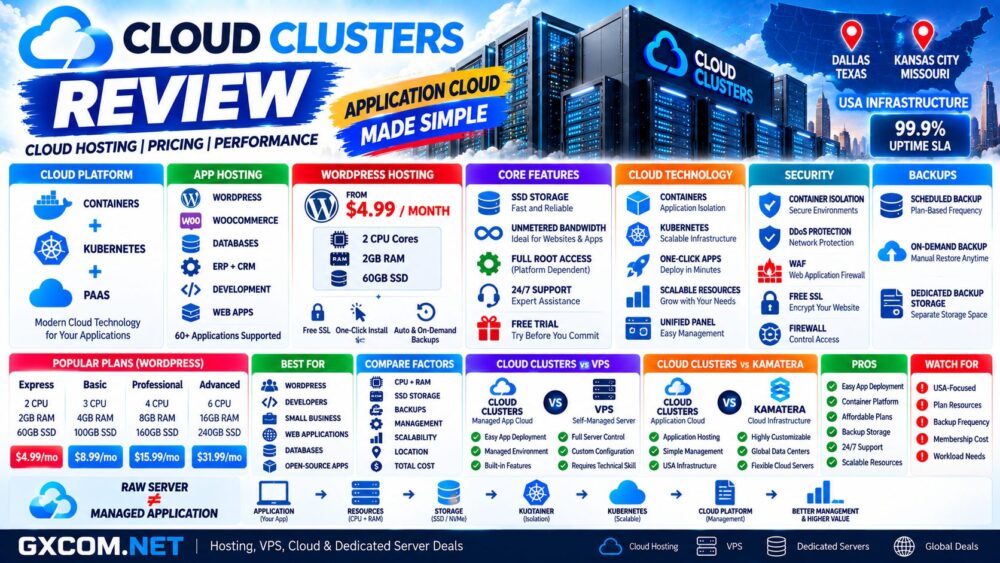
Cloud Clusters is a U.S.-based cloud infrastructure and application hosting provider built around a different approach from conventional shared hosting. Its cloud platform uses container and Kubernetes technologies to deploy and manage applications while providing customers with a unified control panel for websites, databases, SSL certificates, backups, domains, and other services.
The platform targets developers, small businesses, application owners, and users who want managed application hosting without building an entire Kubernetes environment themselves.
Cloud Clusters also operates its own VPS, dedicated server, GPU server, and Kubernetes infrastructure, making the company more than a conventional web hosting provider.
In this Cloud Clusters review, we examine its cloud hosting architecture, application hosting, pricing, WordPress hosting, Docker and Kubernetes technologies, performance factors, scalability, backups, U.S. infrastructure, support, and the major pros and cons to consider before choosing the platform.
Cloud Clusters Review: Quick Overview
| Feature | Cloud Clusters |
|---|---|
| Founded | 2017 |
| Primary Focus | Cloud application hosting and infrastructure |
| Architecture | Containers + Kubernetes |
| Cloud Platform | Self-developed PaaS |
| Application Hosting | Yes |
| WordPress Hosting | Yes |
| Docker | Supported |
| Kubernetes | Core platform technology and dedicated cluster options |
| SSD Storage | Yes |
| Unmetered Bandwidth | Available on application hosting plans |
| Backup | Included according to plan |
| On-Demand Backup | Available on current application plans |
| 24/7 Support | Yes |
| Uptime SLA | 99.9% for applicable infrastructure/services |
| Infrastructure Location | United States |
| Best For | Websites, applications, developers, SMBs and managed open-source apps |
What Is Cloud Clusters?
Cloud Clusters was established in 2017 as a cloud infrastructure and application hosting company.
Its product portfolio now extends across several infrastructure layers:
- Cloud application hosting
- Web hosting
- WordPress hosting
- Linux VPS
- Dedicated servers
- GPU servers
- GPU VPS
- Kubernetes clusters
The cloud application platform is particularly interesting because it attempts to simplify containerized application deployment.
Instead of requiring every customer to manually configure Kubernetes, containers, networking, databases, SSL, backups, and application deployment, Cloud Clusters provides a management layer around these technologies.
How Cloud Clusters Cloud Hosting Works
Traditional shared hosting normally places multiple websites inside conventional server accounts managed through a hosting control panel.
Cloud Clusters takes a more application-oriented approach.
Its self-developed PaaS platform uses container and Kubernetes architecture underneath the hosting environment.
A simplified model looks like:
Application → Container → Kubernetes Infrastructure → Physical Servers
This architecture allows applications to be isolated and managed without requiring the customer to administer the underlying container orchestration stack manually.
Cloud Application Hosting
Cloud Clusters supports a broad range of application categories rather than focusing exclusively on WordPress.
Potential workloads include:
- CMS platforms
- ERP systems
- CRM applications
- Databases
- eCommerce
- Development frameworks
- Runtime environments
- DevOps tools
- Web hosting stacks
- Business applications
This makes the platform relevant to users who want application hosting rather than simply a blank virtual machine.
Cloud Clusters WordPress Hosting Pricing
WordPress provides a useful example of how Cloud Clusters structures its application hosting plans.
At the time of this review, the published WordPress plans include:
| Plan | CPU | RAM | SSD | Backup Storage | Current Price* |
|---|---|---|---|---|---|
| Express | 2 Cores | 2 GB | 60 GB | 60 GB SATA | $4.99/mo |
| Basic | 3 Cores | 4 GB | 100 GB | 100 GB SATA | $8.99/mo |
| Professional | 4 Cores | 8 GB | 160 GB | 160 GB SATA | $15.99/mo |
| Advanced | 6 Cores | 16 GB | 240 GB | 240 GB SATA | $31.99/mo |
*Prices and promotions can change. Always verify the current billing term, renewal price, resources, and conditions before ordering.
All four currently published WordPress plans include unmetered bandwidth, backup storage, on-demand backup, and 24/7 technical support.
Cloud Clusters WordPress Features
The WordPress platform includes features designed to reduce the amount of manual server administration required from website owners.
Current features include:
- One-click WordPress installation
- Container-based isolation
- Free SSL
- DDoS protection
- Web application firewall protection
- Scheduled backups
- On-demand backups
- Website migration
- 24/7 support
This positions Cloud Clusters differently from a self-managed VPS where the customer normally installs and maintains the complete WordPress stack.
Cloud Clusters Container Architecture
Container technology is one of the platform's more distinctive features.
Containers allow applications and their required environments to be separated from other workloads while remaining relatively lightweight compared with deploying an entire virtual machine for every application.
Potential advantages include:
- Application isolation
- Consistent environments
- Faster deployment
- Resource flexibility
- Simplified application management
However, containers alone do not guarantee application performance. CPU availability, memory, storage, network conditions, database configuration, caching, and application code remain important.
Cloud Clusters and Kubernetes
Kubernetes forms an important part of Cloud Clusters' infrastructure strategy.
For ordinary application-hosting customers, the major advantage is that they do not necessarily need to manage Kubernetes themselves.
Cloud Clusters also offers dedicated Kubernetes clusters for organizations that require direct cluster infrastructure.
Those dedicated configurations are substantially different from low-cost application hosting because they can consist of multiple bare-metal servers, master nodes, worker nodes, private networking, monitoring, and other Kubernetes components.
The distinction is important:
Managed Application Hosting ≠ Dedicated Kubernetes Cluster.
Cloud Clusters Web Hosting
Cloud Clusters also supports pre-configured web development stacks for different applications and programming environments.
Current examples include:
- LAMP
- LEMP
- IIS
- ASP.NET
- Java
- Python
- Node.js
- Ruby on Rails
- Go
- WordPress
- WooCommerce
- Magento
- Docker
This gives developers multiple deployment paths without requiring every environment to begin as an empty server.
Cloud Clusters Performance
Cloud Clusters operates its services on its own U.S.-based server infrastructure rather than positioning the application platform simply as a reseller of a hyperscale public cloud.
However, cloud hosting performance should not be judged from CPU and RAM specifications alone.
Real-world application performance depends on:
- CPU allocation
- RAM
- SSD performance
- Container resource allocation
- Database performance
- Caching
- Application code
- Network latency
- Geographic location
This is particularly important for dynamic websites and databases where backend processing can have a larger impact than static page delivery.
Have We Independently Benchmarked Cloud Clusters?
This review analyzes Cloud Clusters using its currently published infrastructure specifications, platform documentation, pricing, and product features.
Unless a GXCOM.NET article explicitly publishes benchmark methodology and measured results, provider specifications should not be interpreted as independent hands-on benchmark data.
For an important production application, users should take advantage of available testing or trial options and measure the actual workload.
Useful measurements include:
- Time to First Byte
- Dynamic page response
- Database queries
- Concurrent users
- Disk I/O
- Network latency
- Application-specific processing
Cloud Clusters Scalability
Cloud Clusters allows resources to be adjusted as application requirements grow.
Depending on the product, customers can increase:
- CPU
- Memory
- Storage
- GPU resources
- Server capacity
For application hosting, this makes it possible to begin with a smaller environment and move to a larger plan as traffic or resource requirements increase.
This is generally preferable to purchasing oversized infrastructure before it is required.
Cloud Clusters Backup and Restore
Backup features depend on the selected hosting product and plan.
For example, current WordPress application plans include dedicated SATA backup storage equal to the plan's primary SSD allocation.
Express and Basic currently include scheduled backups twice per month, while Professional and Advanced include weekly backups.
On-demand backup is also included in the current plans.
Even when provider backups are included, business-critical websites should consider maintaining an additional independent backup outside the primary hosting account.
Cloud Clusters Security
Cloud Clusters combines infrastructure-level and application-level security features depending on the service.
Current hosting features can include:
- Container isolation
- DDoS protection
- Web application firewall
- SSL certificates
- Configurable firewalls
- Private networking
- Secure port management
These controls can reduce exposure, but they do not replace application updates, strong authentication, secure configuration, monitoring, and independent backups.
Cloud Clusters Data Center Infrastructure
Cloud Clusters currently focuses its physical infrastructure in the United States.
Its published data center information describes redundant power systems, generator backup, UPS infrastructure, redundant cooling, video surveillance, physical security, and continuous environmental monitoring.
The U.S.-focused model can be useful for:
- American websites
- U.S. business applications
- North American customers
- Projects requiring U.S. IP addresses
The trade-off is that customers do not currently receive the same worldwide region selection offered by large global cloud providers.
Cloud Clusters Uptime SLA
Cloud Clusters currently provides a 99.9% network and platform uptime SLA for applicable infrastructure services.
99.9% availability corresponds to approximately 8 hours and 46 minutes of theoretical downtime per year.
An SLA is not the same as an independent measurement of every hosted application.
Application availability can also be affected by software errors, customer configuration, databases, plugins, code, and third-party services.
Cloud Clusters Support
Cloud Clusters advertises 24/7 technical support and currently provides support through channels including ticket, email, and live chat.
For application hosting, support can be particularly useful for customers who want to avoid handling every infrastructure task themselves.
However, the exact scope of support can vary by service. Customers running custom software should confirm whether a particular application-level issue is covered before assuming the environment is fully managed.
Cloud Clusters Membership Discounts
Cloud Clusters also operates an annual membership program specifically for application hosting customers.
| Membership | Annual Fee | Hosting Discount |
|---|---|---|
| Bronze | $49/year | 30% off |
| Silver | $149/year | 45% off |
| Gold | $349/year | 60% off |
| Platinum | $649/year | 75% off |
The membership program becomes more relevant for customers running multiple hosted applications because the annual membership fee must be considered against the total hosting savings.
Importantly, these membership discounts apply to application hosting and should not be assumed to apply to VPS, dedicated servers, or GPU servers.
Cloud Clusters Cloud Hosting vs VPS
| Factor | Cloud Application Hosting | VPS |
|---|---|---|
| Main Focus | Application deployment | Virtual server |
| Infrastructure | Container/Kubernetes platform | Virtual machine |
| Server Administration | Reduced | Greater customer responsibility |
| Application Installation | Prebuilt/automated options | Usually manual |
| Root Control | Depends on service | Full root access |
| Best For | Managed applications | Custom server environments |
Users who want full server-level control may prefer a VPS, while users primarily interested in running an application may find cloud application hosting easier to manage.
See our
Cloud Hosting vs VPS
guide for a broader comparison.
Cloud Clusters vs Kamatera
Cloud Clusters and Kamatera both provide cloud infrastructure, but their approaches are substantially different.
| Factor | Cloud Clusters | Kamatera |
|---|---|---|
| Main Strength | Application hosting | Customizable cloud servers |
| Cloud Model | Container/Kubernetes PaaS | Configurable IaaS |
| Application Deployment | Strong focus | More infrastructure-oriented |
| Global Locations | U.S.-focused | Global |
| Server Customization | Plan/application based | Highly granular |
| Best Fit | Hosted applications | Custom cloud infrastructure |
The distinction can be summarized as:
Cloud Clusters → Deploy the application.
Kamatera → Build the cloud infrastructure.
Neither approach is automatically better; the appropriate choice depends on how much infrastructure control and administration the project requires.
Cloud Clusters Pros and Cons
| Pros | Cons |
|---|---|
| Container and Kubernetes-based application platform | Physical infrastructure is U.S.-focused |
| Affordable entry-level application hosting | Smaller global footprint than major cloud providers |
| One-click application deployment | Not every product has the same backup schedule |
| SSD storage | Plan-based resources provide less granular customization than some IaaS clouds |
| Unmetered bandwidth on current app plans | Advanced custom architectures may require VPS, dedicated servers or Kubernetes clusters |
| Scheduled and on-demand backups | Membership savings require an annual fee |
| 24/7 technical support | Membership discounts do not cover every infrastructure product |
| WordPress and many open-source applications | Users needing worldwide regions may prefer another cloud platform |
| Free trial availability | — |
Who Should Consider Cloud Clusters?
Cloud Clusters can be particularly relevant for:
- WordPress websites
- Small businesses
- Developers
- Startups
- Open-source applications
- ERP and CRM systems
- eCommerce
- Databases
- Docker workloads
- Users who want simplified application deployment
Its strongest use case is a customer who wants to deploy and operate an application without manually building every infrastructure component from scratch.
Who May Prefer an Alternative?
Users requiring worldwide data center selection may prefer a provider with a larger global infrastructure footprint.
Infrastructure engineers who want granular control over individual vCPU, RAM, networking, and storage resources may also prefer a conventional IaaS cloud.
At the opposite end, someone running only a very simple website may find conventional shared hosting sufficient.
Is Cloud Clusters Good for WordPress?
WordPress is one of the more compelling applications on the Cloud Clusters platform because the service combines container isolation with one-click installation, SSD storage, backup storage, on-demand backup, SSL, security features, and technical support.
The current $4.99 entry configuration also provides substantially more dedicated resource specifications than many conventional entry-level shared hosting plans.
However, users should compare actual workload requirements rather than CPU and RAM specifications alone.
For more options, see our
Best WordPress Hosting
guide.
Is Cloud Clusters Good Value?
Cloud Clusters' value proposition is strongest when its application-management layer is useful to the customer.
If you simply need raw compute, a VPS or configurable cloud server may offer a more direct infrastructure model.
If you want to deploy WordPress, an ERP platform, database, CMS, development environment, or another supported application without managing the complete underlying stack, Cloud Clusters becomes more interesting.
Customers operating multiple applications should also calculate whether the membership program reduces their effective long-term hosting cost.
A useful comparison is:
Application → Resources → Management → Backup → Location → Scalability → Support → Total Cost.
Cloud Clusters Review: Final Thoughts
Cloud Clusters takes a different approach from both traditional shared hosting and conventional cloud VPS providers.
Its main differentiator is an application-oriented PaaS built around containers and Kubernetes, combined with one-click deployment, a unified management panel, SSD storage, backup options, security features, and 24/7 support.
The platform is particularly interesting for WordPress, open-source applications, business software, databases, development environments, and customers who want to reduce infrastructure administration.
The main trade-off is geographic reach. Cloud Clusters currently focuses its infrastructure in the United States, so projects requiring deployment close to users across multiple continents may prefer a cloud provider with a broader global region network.
For U.S.-oriented applications, however, Cloud Clusters combines relatively low entry pricing with an unusually broad application-hosting platform.
Before choosing a plan, use this decision path:
Application → CPU + RAM → Storage → Backup → Management → Location → Scaling → Total Cost.