Kamatera is a global cloud infrastructure provider built around customizable cloud servers rather than traditional fixed hosting plans. Customers can select CPU type, vCPU, RAM, NVMe storage, operating system, data center, networking, backup, and management options, then scale the infrastructure as requirements change.
That flexibility places Kamatera somewhere between conventional VPS hosting and much larger public cloud platforms. Developers and businesses can deploy relatively simple virtual servers while still having access to cloud features such as load balancers, firewalls, private networks, backups, and global deployment locations.
In this Kamatera Cloud review, we examine its cloud servers, pricing, performance architecture, NVMe storage, CPU options, global data centers, networking, scalability, backup, managed services, and the major pros and cons you should understand before deploying production infrastructure.
Kamatera Cloud Review: Quick Overview
| Feature | Kamatera Cloud |
|---|---|
| Cloud Servers | Yes |
| Starting Price | From $4/month |
| Hourly Pricing | From $0.005/hour |
| Storage | NVMe SSD |
| CPU Models | Availability, General Purpose, Burstable, Dedicated |
| Cloud Firewall | Available |
| Load Balancer | Available |
| Private Network | Available |
| Extended Backup | Optional |
| Managed Service | Optional |
| Linux | Yes |
| Windows Server | Yes |
| Global Locations | 20+ locations |
| Uptime Guarantee | 99.95% |
| Free Trial | 30 days, subject to limits |
| Best For | Developers, businesses, scalable applications and customizable cloud infrastructure |
What Is Kamatera Cloud?
Kamatera is an infrastructure-as-a-service provider focused on configurable cloud computing.
Instead of selecting only from a handful of predefined hosting packages, users can build cloud infrastructure around individual requirements.
The ecosystem includes:
- Cloud servers
- Virtual dedicated servers
- Cloud load balancers
- Cloud firewalls
- Private networks
- Cloud storage
- Extended backups
- Managed cloud services
This modular approach is one of the biggest differences between Kamatera and conventional web hosting.
A small project can begin with a single cloud server, while a growing application can later add additional servers, load balancing, private networking, and other infrastructure components.
Kamatera Cloud Server Pricing
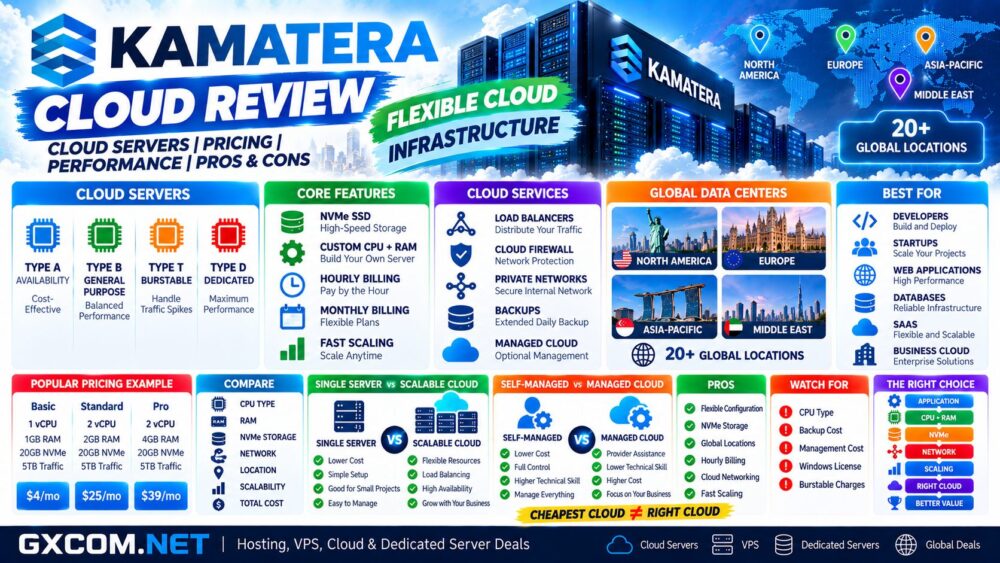
Kamatera currently advertises cloud servers starting from $4 per month or approximately $0.005 per hour.
The entry-level configuration includes:
- 1 Type A vCPU
- 1GB RAM
- 20GB NVMe SSD
- 5TB Internet traffic
- Ubuntu Server
However, the $4 server should be understood as the entry point rather than a representative price for every production workload.
| Configuration | CPU | RAM | NVMe | Traffic | Published Price* |
|---|---|---|---|---|---|
| Basic | 1 Type A vCPU | 1GB | 20GB | 5TB | $4/mo |
| Standard | 2 Type B vCPU | 2GB | 20GB | 5TB | $25/mo |
| Pro | 2 Type B vCPU | 4GB | 20GB | 5TB | $39/mo |
*Published configurations and prices can change. The final cost depends on CPU type, vCPU, RAM, storage, traffic, operating system, licenses, backups, management, and additional cloud services.
Hourly vs Monthly Cloud Pricing
Kamatera supports both hourly and monthly cloud server billing.
Hourly billing is useful for infrastructure that does not need to operate permanently, including:
- Development environments
- Testing
- Temporary servers
- Proof-of-concept projects
- Short-term applications
- Staging environments
Kamatera states that hourly servers are billed by the minute.
Monthly pricing may be easier to budget for long-running production infrastructure.
The important point is that users should calculate the complete cloud environment rather than comparing only the $4 entry price.
Kamatera Cloud CPU Types
One of the most important differences between Kamatera cloud configurations is CPU allocation.
Kamatera currently offers four CPU types.
Type A – Availability
Type A uses non-dedicated physical CPU threads without guaranteed CPU resources.
It is the least expensive option and currently starts from $4 per month.
Typical workloads include development, testing, microservices, and applications that do not require guaranteed CPU resources.
Type B – General Purpose
Type B uses dedicated physical CPU threads with reserved resources.
It is designed for conventional production workloads such as web servers, APIs, application servers, databases, containers, and storage servers.
Type T – Burstable
Type T provides reserved CPU threads but is designed for workloads with relatively low average utilization and temporary CPU bursts.
Customers should examine the utilization-based pricing carefully because sustained CPU use above the applicable threshold can create additional charges.
Type D – Dedicated
Type D assigns dedicated physical CPU cores and is intended for more performance-sensitive workloads.
Potential applications include busy databases, compute-intensive software, HPC, containers, and production systems requiring greater CPU consistency.
Kamatera Cloud Performance
Kamatera uses modern Intel Xeon infrastructure and NVMe storage across its cloud platform.
However, cloud performance cannot be determined from processor branding or vCPU count alone.
Actual performance depends on:
- CPU resource type
- Number of vCPUs
- RAM
- NVMe storage
- Application architecture
- Operating system
- Database configuration
- Network latency
- Data center location
This is why selecting the appropriate CPU class is especially important on Kamatera.
A low-cost Type A server should not automatically be compared with a Type B or Type D server simply because the configurations display similar vCPU counts.
NVMe Cloud Storage
Kamatera cloud servers use NVMe SSD storage, providing a modern storage foundation for virtualized applications.
NVMe can benefit disk-intensive workloads such as:
- Databases
- WordPress
- WooCommerce
- Application servers
- APIs
- Development environments
- Logging systems
Storage can be configured separately from CPU and RAM, allowing users to build infrastructure closer to their actual requirements.
For additional cloud options, see our
Best Cloud Hosting Solutions
comparison.
Kamatera Global Data Centers
Global infrastructure is one of Kamatera's strongest cloud advantages.
The current network includes more than 20 deployment locations across North America, Europe, the Middle East, and Asia-Pacific.
Current locations include cities such as:
- New York
- Los Angeles
- Santa Clara
- Seattle
- Dallas
- Chicago
- Miami
- Atlanta
- Toronto
- London
- Amsterdam
- Frankfurt
- Madrid
- Milan
- Stockholm
- Bucharest
- Tel Aviv
- Hong Kong
- Singapore
- Tokyo
- Sydney
This allows infrastructure to be deployed closer to users instead of placing every workload in a single U.S. or European facility.
Why Cloud Location Matters
Server location affects latency.
For a static website using a CDN, the effect may be relatively small for cached content.
For interactive applications, APIs, databases, Remote Desktop, and real-time services, geographic distance can be much more important.
Kamatera provides latency testing for its data center locations, making it possible to compare locations before deploying a server.
A useful decision rule is:
Users → Application → Latency → Data Center → Cloud Architecture.
Kamatera Cloud Scalability
Scalability is one of the main reasons to consider Kamatera over a traditional fixed-plan hosting provider.
Cloud servers can be resized as requirements change, and additional infrastructure components can be deployed around them.
You can scale:
- CPU
- RAM
- Storage
- Number of servers
- Load balancers
- Firewalls
- Private networks
This allows a project to start relatively small rather than paying immediately for infrastructure designed for future peak traffic.
Kamatera Load Balancers
Cloud load balancing becomes relevant when an application expands beyond a single server.
Instead of sending every request to one machine, traffic can be distributed across multiple application or web servers.
A simplified architecture could look like:
Users → Load Balancer → Cloud Server A + Cloud Server B + Cloud Server C
This can support horizontal scaling and reduce dependence on one application server.
However, simply adding a load balancer does not automatically create high availability. Databases, storage, sessions, DNS, backups, and application architecture must also be designed appropriately.
Kamatera Cloud Firewall
Kamatera allows cloud firewall functionality to be added to an infrastructure environment.
Firewall rules can help restrict network access and reduce unnecessary exposure of cloud services.
Typical rules might allow:
- HTTP / HTTPS to web servers
- SSH only from trusted addresses
- RDP only from authorized networks
- Database access only from private application servers
A cloud firewall should form one layer of security rather than replace operating-system patching, authentication, application security, backups, and monitoring.
Private Cloud Networking
Private networking allows cloud servers to communicate internally without exposing every service directly to the public internet.
For example:
Internet → Load Balancer → Web Servers → Private Database Server
This architecture can be preferable to exposing the database directly through a public interface.
Private networking becomes increasingly valuable as an application grows from one server into a multi-server environment.
Kamatera Cloud Backup
Extended daily backup is available as an optional service.
Kamatera describes this as backing up server storage to an additional external storage array with the ability to restore previous file, directory, or storage versions.
Because this is an optional feature, users should not assume that the lowest advertised cloud-server price includes a complete production backup strategy.
Before deployment, verify:
- Backup frequency
- Retention
- Backup price
- Restore procedure
- Recovery time requirements
- Off-platform backup requirements
Important applications should consider an independent backup outside the primary cloud account as well.
Self-Managed vs Managed Kamatera Cloud
Kamatera can operate as self-managed infrastructure or customers can add management services.
| Factor | Self-Managed Cloud | Managed Cloud |
|---|---|---|
| Operating System Management | Customer | Provider assistance |
| Technical Knowledge | Higher | Lower |
| Infrastructure Control | High | High |
| Cost | Lower | Higher |
| Best For | Developers and administrators | Businesses needing assistance |
Users who prefer managed infrastructure can also compare our
Best Managed Cloud Hosting Providers
guide.
Kamatera Windows Cloud Servers
Kamatera supports Windows Server as well as Linux operating systems.
Windows cloud servers can be useful for:
- Remote Desktop
- .NET applications
- Windows development
- Microsoft-oriented applications
- Business software
Windows licensing can materially increase the final server cost, particularly as CPU resources increase.
Always compare the complete configured price rather than the Linux-based starting price.
Kamatera Linux Cloud Servers
Linux remains a natural choice for many Kamatera cloud workloads.
Potential applications include:
- Web servers
- WordPress
- WooCommerce
- Docker
- Databases
- APIs
- Development
- Microservices
- VPN servers
Linux also avoids Windows Server licensing costs and provides broad flexibility for open-source software stacks.
Kamatera 99.95% Uptime Guarantee
Kamatera currently advertises a 99.95% uptime guarantee covering core cloud infrastructure components including servers, CPUs, firewalls, load balancers, and storage.
The theoretical downtime corresponding to 99.95% availability is approximately 4 hours and 23 minutes per year.
However, an SLA should not be interpreted as an independent measurement of every customer's application availability.
Applications with strict availability requirements should consider redundancy, monitoring, backups, load balancing, and appropriately designed failover architecture.
Kamatera 30-Day Free Trial
Eligible new customers can currently use a 30-day free trial worth up to $100 for one cloud server, subject to Kamatera's trial conditions.
This is useful because cloud performance should ideally be tested against the actual application.
During testing, measure:
- CPU performance
- NVMe disk I/O
- Network latency
- Database response
- Application response time
- Website performance
A workload-specific test is generally more useful than relying solely on generic benchmarks.
Kamatera Cloud vs Traditional VPS
| Factor | Kamatera Cloud | Traditional VPS |
|---|---|---|
| Configuration | Highly customizable | Usually predefined |
| Hourly Billing | Yes | Often no |
| CPU Models | Multiple resource models | Usually fewer options |
| Scaling | Flexible | Plan upgrades |
| Load Balancing | Available | Provider dependent |
| Cloud Firewall | Available | Provider dependent |
| Private Networking | Available | Provider dependent |
| Global Deployment | 20+ locations | Varies |
For a deeper infrastructure comparison, see
Cloud Hosting vs VPS.
Kamatera Cloud vs Hyperscale Cloud
Kamatera takes a relatively infrastructure-focused approach compared with hyperscale platforms such as AWS, Microsoft Azure, and Google Cloud.
This can make the platform easier to understand for customers primarily looking for configurable virtual servers, networking, firewalls, load balancing, and storage.
Hyperscale platforms generally offer much larger catalogs of proprietary services, including extensive serverless computing, managed databases, AI platforms, analytics, and specialized enterprise products.
The appropriate model depends on whether the workload primarily needs flexible compute infrastructure or a much broader managed-cloud ecosystem.
Kamatera Cloud Pros and Cons
| Pros | Cons |
|---|---|
| Cloud servers from $4/month | $4 configuration uses non-guaranteed Type A CPU resources |
| Hourly and monthly billing | Production configurations can cost considerably more than entry pricing |
| NVMe storage | Extended backup costs extra |
| Four CPU resource models | Managed service is optional and adds cost |
| 20+ global locations | Windows licensing increases total cost |
| Load balancers | Burstable CPU pricing requires monitoring |
| Cloud firewall | More complex than conventional shared hosting |
| Private networking | Smaller managed-service ecosystem than hyperscale clouds |
| Rapid scaling | Architecture decisions remain the customer's responsibility on self-managed deployments |
| 30-day trial | — |
Who Should Consider Kamatera Cloud?
Kamatera can be particularly relevant for:
- Developers
- Startups
- Business applications
- SaaS platforms
- Web applications
- APIs
- Databases
- Windows cloud workloads
- Linux infrastructure
- Globally distributed projects
- Applications requiring flexible scaling
It is especially attractive when you want more infrastructure flexibility than a fixed VPS plan but do not necessarily need the enormous service catalog of a hyperscale public cloud.
Who May Prefer an Alternative?
Users looking only for maximum RAM and storage at the lowest fixed monthly price may find a traditional budget VPS provider more straightforward.
Beginners primarily hosting one WordPress website may also prefer managed WordPress or conventional web hosting rather than building their own cloud infrastructure.
At the other end of the market, enterprises that depend heavily on specialized managed databases, analytics, serverless platforms, AI services, or other proprietary cloud products may require a larger hyperscale ecosystem.
Is Kamatera Cloud Good Value?
Kamatera's value proposition is less about providing the largest server specification for the lowest price and more about allowing users to build infrastructure around actual requirements.
You can choose CPU resource type, RAM, NVMe capacity, operating system, data center, billing model, backup, and management independently.
That flexibility can reduce overprovisioning.
However, it also means that comparing only the $4 starting price is misleading for larger production workloads.
The more useful calculation is:
Workload → CPU Type → RAM → NVMe → Traffic → Location → Network Architecture → Backup → Management → Total Cloud Cost.
Kamatera Cloud Review: Final Thoughts
Kamatera occupies an interesting position between conventional VPS hosting and hyperscale public cloud infrastructure.
Its strongest features are highly configurable cloud servers, four CPU resource models, NVMe storage, hourly and monthly billing, a broad global data center footprint, load balancers, cloud firewalls, private networks, and flexible scaling.
The $4 entry server provides an inexpensive way to begin, but production workloads should be designed around performance requirements rather than the lowest advertised configuration.
Type B or Type D CPU resources may make more sense for applications requiring predictable compute performance, while load balancing and private networking become increasingly relevant as infrastructure expands beyond a single server.
Kamatera is therefore particularly relevant for developers and businesses that want configurable cloud infrastructure without immediately adopting the complexity of a hyperscale cloud ecosystem.
Before deploying, use this decision path:
Application → CPU Type → RAM → NVMe → Data Center → Network → Scaling → Backup → Management → Total Cost.