Managed dedicated server backups should protect businesses against accidental deletion, failed updates, ransomware, and hardware incidents. Yet a hosting plan advertised as “fully managed” does not necessarily include offsite copies, long retention periods, or guaranteed recovery times.
Before choosing dedicated hosting, examine how backups are created, stored, verified, and restored. The details matter more than a simple “daily backups included” claim.
What Do Managed Dedicated Server Backups Include?
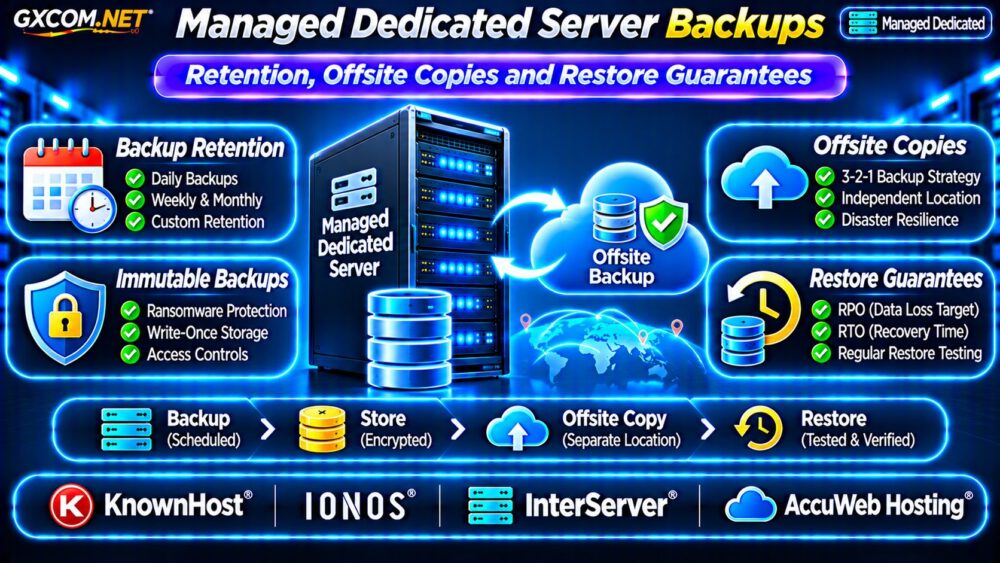
A managed hosting provider may handle operating system maintenance and monitoring while treating backup storage as an optional service. Other plans include scheduled backups but leave application consistency and restoration requests to the customer.
Ask whether protection covers the entire system, individual files, databases, virtual machines, or only selected directories. Clarify who configures schedules, monitors failures, and investigates missing recovery points.
Our Managed vs Unmanaged VPS Guide explains the broader difference between operational support and customer responsibilities.
Backup Retention: Daily Does Not Mean 30 Days
Backup frequency describes how often copies are created. Retention describes how long recovery points remain available. A provider might run daily backups but retain only the most recent few copies.
Daily, Weekly and Monthly Recovery Points
A practical policy might preserve seven daily copies, four weekly copies, and three monthly copies. This is an illustrative schedule, not a universal recommendation. Regulatory obligations, storage costs, and recovery needs may require different periods.
Also confirm what happens when storage fills up. Incremental backup chains can complicate recovery if required base data becomes unavailable.
Why Longer Retention Matters
Some incidents remain undetected for weeks. A short retention window can leave only corrupted or encrypted copies. Longer retention improves recovery options but increases storage consumption and management complexity.
Offsite Copies and Independent Failure Domains
A backup stored on another disk inside the same server does not protect against server loss. Copies on nearby infrastructure may also share power, networking, administrative access, or physical disaster risks.
Offsite storage should reside in an appropriately separate failure domain. Ask whether copies remain accessible if the primary data center, hosting account, or management system becomes unavailable.

The 3-2-1 backup principle offers a useful starting framework: three copies of data, two storage types or systems, and one offsite copy. It is a planning guideline, not a guarantee of recovery.
Immutable Backups and Ransomware Protection
Immutable or write-protected backup copies can reduce the risk of attackers deleting recovery points. However, the protection depends on configuration, access permissions, retention locks, and administrator separation.
Use independent credentials, multifactor authentication, and restricted deletion privileges where supported. Test whether backup administrators can accidentally remove protected copies before the required retention period ends.
For complementary operational controls, see our Unmanaged Server Security Checklist.
RPO vs RTO: What Can the Provider Promise?
Recovery Point Objective (RPO) defines the maximum acceptable data loss measured in time. Recovery Time Objective (RTO) defines the target time to restore an affected service.
For example, a business with a four-hour RPO may need more frequent protection than a single nightly backup. A two-hour RTO may require prepared infrastructure, documented procedures, and sufficient restore bandwidth.
Targets are not contractual guarantees unless explicitly stated. A provider may guarantee response time to a support ticket without guaranteeing completed restoration within that period.
Restore Testing: The Missing Verification Step
Successful backup jobs do not prove that applications can be restored. Database consistency, missing encryption keys, damaged archives, and incorrect permissions can cause failures during recovery.
Schedule test restores to an isolated environment. Validate database integrity, application login, file ownership, DNS dependencies, and expected recovery duration.
Document results and update runbooks after major application changes. Our VPS Snapshot Backup and Recovery Guide explains why snapshots and independent backups serve different purposes.
Four Managed Dedicated Hosting Providers to Compare
These approved GXCOM.NET affiliate providers are candidates for dedicated infrastructure procurement. Their current backup products and contractual obligations must be confirmed for the specific server and location.
KnownHost: Management and Restore Responsibilities
KnownHost is worth evaluating when hands-on server management matters. Ask whether backup configuration, monitoring, retention, offsite storage, and restoration labor are included in the quoted plan.
IONOS: Infrastructure and Recovery Architecture
IONOS can be compared for dedicated infrastructure and business continuity planning. Request details about backup storage independence, scheduling, available restore methods, and recovery-related charges.
InterServer: Backup Options and Total Cost
InterServer provides another dedicated hosting comparison point. Confirm whether backups are bundled or optional, what management covers, and how storage or restoration requests are billed.
AccuWeb Hosting: Windows and Linux Recovery Needs
AccuWeb Hosting is a candidate for businesses with specific operating system requirements. Verify application-aware database backups, retention periods, and supported recovery procedures rather than assuming identical coverage across plans.
Calculate the Real Cost of Backup Protection
Monthly backup spending can include storage capacity, data transfer, additional snapshots, immutable retention, monitoring, and managed restoration work.
Consider a hypothetical $180 dedicated server, $25 backup storage service, and $35 managed recovery option. The combined monthly budget is $240, or $2,880 annually, before taxes and usage-based charges. These are illustrative numbers, not provider quotations.
Ask about backup growth, retrieval fees, emergency labor, and costs for restoring to replacement hardware. Compare alternative architectures in our Dedicated vs Cloud Server Comparison.

Backup SLA and Contract Checklist
- Confirm protected data, backup frequency, and retention schedule.
- Identify offsite location and independent access controls.
- Check encryption, immutability, and deletion permissions.
- Separate support response SLAs from restoration commitments.
- Request RPO, RTO, restore testing, and escalation procedures.
- Verify storage, transfer, retrieval, and recovery labor costs.
Frequently Asked Questions
Does Fully Managed Dedicated Hosting Include Backups?
Not always. Management and backup services may have separate terms, exclusions, and charges. Review the selected plan rather than relying on a general marketing label.
Are Offsite Backups Enough Against Ransomware?
No. Offsite copies improve resilience, but access controls, immutability, credential separation, and tested recovery remain important.
Can a Provider Guarantee Zero Data Loss?
Ordinary scheduled backups cannot guarantee zero data loss. Such requirements demand specialized replication, application design, and explicit contractual commitments.
Final Verdict
Managed dedicated server backups should be evaluated by recoverability, not marketing terminology. Prioritize transparent retention, independent offsite copies, tested restores, and realistic RPO and RTO commitments.
Compare KnownHost, IONOS, InterServer, and AccuWeb Hosting using written backup specifications and complete quotations. Choose the plan whose recovery capabilities match your business risk and budget.