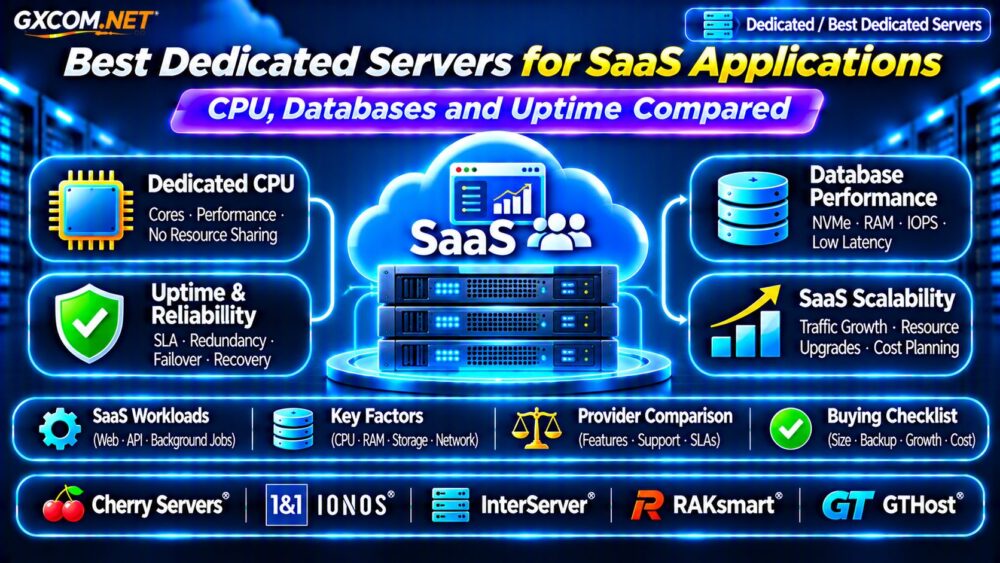
Choosing the best dedicated servers for SaaS applications requires more than comparing CPU cores and monthly prices. Subscription platforms, customer dashboards, APIs, and multi-tenant databases need predictable performance, reliable storage, and infrastructure that supports business growth.
Dedicated hosting provides physical server resources without sharing the host with unrelated virtual machines. However, stronger hardware alone cannot guarantee application uptime. This guide compares five infrastructure providers and explains how to evaluate CPU performance, database workloads, availability, and long-term costs.
When Does a SaaS Application Need Dedicated Hosting?
Many SaaS products begin on shared hosting, cloud VPS instances, or managed application platforms. These environments can work well until workloads become resource-intensive or require greater infrastructure control.
Dedicated servers become worth evaluating when CPU contention, sustained database activity, storage latency, or specialized software requirements limit the existing environment.
For example, an analytics SaaS processing continuous background jobs may benefit from predictable compute resources. A customer-facing application with unpredictable demand may still benefit more from elastic cloud infrastructure.
Our Dedicated vs Cloud Server Comparison provides additional architectural context.
CPU Performance: Cores, Clock Speed and Workload Type
CPU selection should reflect how the application processes requests. High-frequency processors can benefit latency-sensitive operations, while additional cores help parallel workloads, background workers, and concurrent tasks.
Do not compare processors using core counts alone. CPU generation, architecture, cache, memory bandwidth, and sustained performance all influence results.
Dedicated CPU vs Shared vCPU
A physical dedicated server avoids competing with unrelated customers for the same host CPU resources. Nevertheless, applications can still experience internal contention between their own processes.
Benchmark representative workloads and monitor CPU saturation, request queues, and application response-time percentiles before selecting a configuration.
Database Performance: NVMe, RAM and IOPS
Database performance often determines the responsiveness of a SaaS application. Slow queries, insufficient memory, and storage bottlenecks can affect customers even when overall CPU utilization appears moderate.
NVMe SSDs can provide low-latency storage, but real performance depends on drive models, controller behavior, RAID configuration, and database access patterns.
For MySQL or PostgreSQL workloads, prioritize sufficient RAM for frequently accessed data, reliable storage, tested backups, and effective query indexing.
Read our NVMe vs SSD Performance Guide for additional storage considerations.

Uptime: Hardware Reliability Is Not High Availability
A dedicated server offers resource isolation, but a single physical machine remains a potential failure point.
Power supplies, drives, network equipment, and other components can fail. Provider uptime commitments also differ from application-level availability.
Ask about network redundancy, hardware replacement procedures, monitoring, remote management, and incident response.
Designing SaaS Failover
Business-critical SaaS applications may require redundant application servers, database replication, load balancing, and tested recovery procedures.
These capabilities generally involve additional infrastructure rather than appearing automatically with a dedicated hosting plan.
Define acceptable recovery time and data loss before designing failover. Our High Availability Server Guide explains related resilience principles.
Five Dedicated Server Providers for SaaS Applications
The following providers represent different infrastructure purchasing options. They are comparison candidates rather than a benchmark-based performance ranking.
1. Cherry Servers: Dedicated Compute Flexibility
Cherry Servers is worth evaluating for SaaS workloads requiring dedicated compute resources and infrastructure-level control.
Compare processor generations, memory capacity, storage configurations, network options, and provisioning arrangements. Teams operating database-heavy applications should request configuration-specific details.
2. IONOS: Business Infrastructure Planning
IONOS offers dedicated infrastructure options relevant to businesses assessing predictable hosting expenses.
Review operating system availability, management responsibilities, hardware specifications, support terms, and renewal pricing. Confirm whether additional services are included or separately charged.
3. InterServer: Long-Running SaaS Workloads
InterServer is another candidate for applications requiring continuously available physical server resources.
Evaluate available processor configurations, storage, bandwidth allowances, administrative access, and backup arrangements. Compare total ownership costs rather than headline monthly rates alone.
4. RAKsmart: Regional Infrastructure Options
RAKsmart can be considered when deployment geography and network connectivity influence SaaS performance.
Check the exact location, available hardware, network policies, technical support, and service conditions. Regional availability should be verified for each proposed configuration.
5. GTHost: Dedicated Hardware and Network Selection
GTHost is worth comparing for teams seeking physical server configurations and location-specific deployment options.
Review processor specifications, disk arrangements, network capacity, replacement procedures, and applicable support coverage before ordering.
Dedicated Server Sizing for SaaS Growth
Start with actual production metrics: peak concurrent requests, database transactions, memory pressure, storage latency, and background processing demand.
Estimate growth over the next six to twelve months, then reserve capacity for traffic spikes and maintenance operations.
For example, a SaaS application consuming 24 GB of RAM during representative peaks may require a 32 GB or larger configuration, depending on caching, operating system overhead, and expected growth.
Do not assume that adding CPU cores will solve inefficient queries or insufficient storage throughput.
Managed vs Unmanaged Dedicated Hosting
Unmanaged servers give experienced teams greater operational responsibility. Administrators typically handle operating system updates, security configuration, monitoring, backups, and application recovery.
Managed services can reduce routine administration, but coverage differs significantly among providers and plans.
Clarify whether support includes database tuning, security incident handling, application troubleshooting, and restoration assistance.
See our Managed vs Unmanaged Hosting Guide for a related comparison of management responsibilities.
Calculate Total SaaS Hosting Costs
Monthly server rental is only one expense. Include storage upgrades, backup destinations, operating system licensing, security services, bandwidth, technical administration, and recovery infrastructure.

For illustration, a hypothetical $120 server plus $20 backup storage and $40 administration expenses produces a $180 monthly operating budget.
These figures are examples, not current provider quotations. Evaluate annual spending alongside expected utilization, application performance, and operational risk.
Dedicated Hosting Buying Checklist
- Benchmark CPU performance using representative SaaS workloads.
- Verify database storage latency and available memory.
- Review network connectivity and hardware replacement procedures.
- Confirm backup ownership, recovery testing, and failover requirements.
- Compare management responsibilities and full recurring costs.
- Check upgrade options and migration procedures before purchasing.
Frequently Asked Questions
Are Dedicated Servers Better Than Cloud VPS for SaaS?
They can offer more predictable physical resources, but cloud VPS platforms may provide easier scaling and redundancy. The better choice depends on workload characteristics.
How Much RAM Does a SaaS Database Need?
Requirements depend on active data size, query patterns, connection counts, and caching. Measure memory pressure rather than relying on universal sizing rules.
Does Dedicated Hosting Guarantee 100% Uptime?
No. Hardware failures, networking incidents, software problems, and maintenance can still interrupt service. Resilience requires appropriate architecture and recovery planning.
Final Verdict
The best dedicated servers for SaaS combine suitable CPU performance, reliable database storage, adequate memory, and clearly defined support responsibilities.
Compare Cherry Servers, IONOS, InterServer, RAKsmart, and GTHost against your application benchmarks and business requirements. Choose the infrastructure that delivers sustainable performance and manageable long-term costs rather than purchasing solely on specifications.