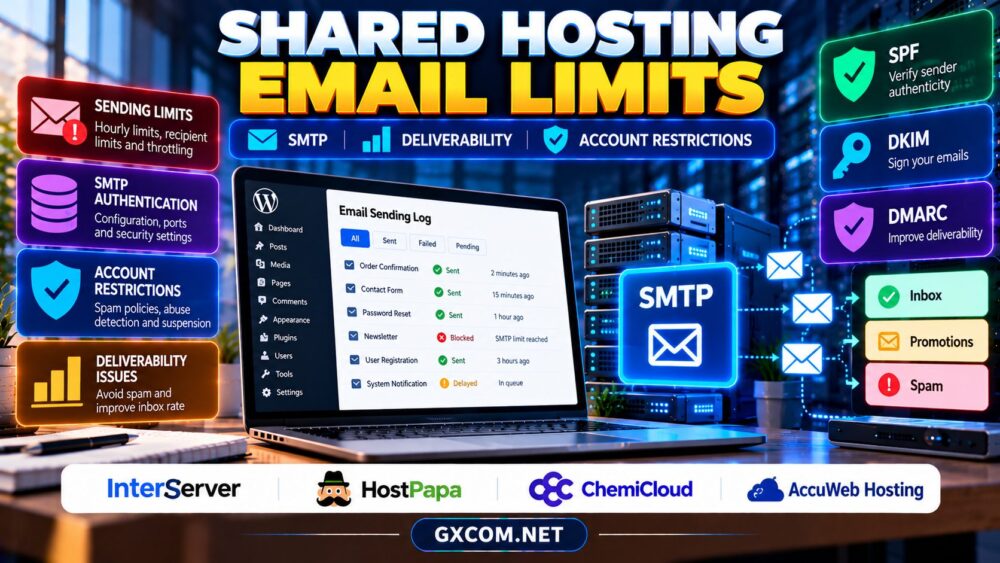
Shared hosting email sending limits can surprise website owners when contact forms stop delivering, WooCommerce receipts disappear, or an account is temporarily restricted after a mailing spike. An inexpensive hosting plan may include email accounts without allowing unrestricted outbound messages.
Understanding SMTP rules, deliverability, and account policies helps you choose the right hosting service and avoid unreliable customer communication. This guide explains what to check before purchasing and when a dedicated transactional email provider makes more sense.
Why Shared Hosting Limits Outgoing Email
Shared servers serve many customers using common infrastructure. Excessive outbound email can consume resources, trigger abuse complaints, or damage the reputation of shared sending IP addresses. Providers therefore apply rate limits, recipient limits, filtering, and account restrictions.
A mailbox allowance is not the same as a sending allowance. A plan advertising numerous email addresses may still restrict messages per hour, recipients per message, or automated scripts. Limits can differ between webmail, authenticated SMTP, and PHP-generated messages.
1. Understand Hourly Limits and Throttling
Before buying, ask for the current outbound email policy for your exact hosting tier. Determine whether limits apply per mailbox, domain, account, or server, and whether the provider counts individual recipients or individual messages.
Throttling may delay mail rather than reject it immediately. Other systems temporarily suspend sending or return SMTP errors when a threshold is exceeded. Ask how long restrictions last, whether warnings are issued, and how to request a review.
For a store, estimate password resets, receipts, shipping notifications, and marketing traffic separately. A quiet website can generate sudden bursts during a sale or registration campaign.
2. SMTP Authentication and PHP Mail
SMTP authentication identifies a sending account to a mail server. WordPress sites often use an SMTP plugin or API-based mail integration instead of relying on the default PHP mail function, which may lack consistent authentication and delivery reporting.
However, switching to authenticated SMTP does not automatically bypass your hosting provider’s limits. If messages still travel through the same outbound mail infrastructure, account policies may continue to apply.
Check whether your plan permits external SMTP connections, which ports are available, and whether encrypted connections are supported. Some environments restrict outbound connections to reduce abuse. Use application-specific credentials when available and protect them carefully.
For general hosting selection, consult our web hosting services comparison.

3. SPF, DKIM and DMARC for Deliverability
Successful submission does not guarantee inbox placement. Receiving providers evaluate sender authentication, domain reputation, message content, and recipient engagement. SPF identifies authorized sending systems, while DKIM provides cryptographic signatures for messages.
DMARC lets domain owners publish a policy for messages that fail aligned authentication checks and receive useful reports. Configure these records for the actual service sending your mail; copying generic DNS examples can break legitimate delivery.
Test messages to multiple mailbox providers and inspect authentication results. Avoid misleading sender addresses, purchased lists, and sudden bulk campaigns from a new domain.
4. Transactional Email vs Marketing Campaigns
Transactional messages include account verification, password resets, purchase confirmations, and other application-triggered notices. Marketing campaigns involve newsletters and promotional messages, often with different consent and unsubscribe obligations.
Many shared hosts discourage or prohibit bulk marketing from ordinary hosting accounts. Even when sending is technically possible, a specialist email platform may provide better queue management, suppression lists, event logs, and reputation controls.
Separate essential customer notifications from promotional campaigns so marketing activity does not jeopardize password resets or order receipts.
5. Four Shared Hosting Providers to Compare
InterServer
InterServer is relevant when comparing conventional web hosting and email functionality. Verify the selected package’s current outbound rate policy, SMTP access, mailbox restrictions, and escalation process if automated messages are blocked.
HostPapa
HostPapa may suit small businesses seeking hosting alongside email services. Check which email products are included, whether outbound limits vary by service, and how domain authentication and external SMTP integrations are handled.
ChemiCloud
ChemiCloud deserves consideration for WordPress websites with contact forms and routine notifications. Ask about sending thresholds, restrictions on bulk mail, authentication options, and support for diagnosing delivery failures.
AccuWeb Hosting
AccuWeb Hosting offers another comparison point for web hosting environments. Confirm email allowances for the exact operating system and hosting product, along with SMTP connection rules and any account-level anti-abuse policies.
For a separate perspective on managed services and support boundaries, read our managed hosting provider review. It is not a test of these four providers’ email deliverability.
6. Troubleshoot Missing WordPress Emails
First determine whether WordPress generated the message. Review plugin logs, form settings, and application errors. Then check the SMTP response, sending queue, authentication records, and recipient spam folder.
A rejected message, delayed queue, and delivered-but-filtered message require different fixes. Ask your host for the relevant mail logs where available. Avoid repeatedly retrying large batches while an account is rate-limited.
Our PHP and MySQL hosting requirements guide provides additional context for application compatibility and server configuration.
7. When to Use a Dedicated Email Service
Consider a specialist transactional email service when missed receipts affect revenue, delivery logs are essential, or application volume approaches hosting limits. Compare pricing by messages, dedicated IP requirements, API integration, and technical support.
Moving mail delivery away from the web host can improve operational separation, but it introduces another vendor and does not remove the need for domain authentication, monitoring, or responsible sending practices.
If hosting resources are also restrictive, our VPS vs shared hosting guide explains broader upgrade considerations.
8. Compare Total Costs and Account Policies
Include hosting renewals, paid mailboxes, transactional email subscriptions, domain management, and staff time spent investigating delivery failures. Review suspension rules and acceptable-use policies before committing a business-critical application.

Check our web hosting deals for purchasing opportunities, but do not assume a discounted plan includes unrestricted outbound email.
Compare Hosting Email Policies
Verify SMTP support, sending limits, authentication, and account restrictions before choosing a plan.
Explore InterServer Hosting → | Explore ChemiCloud Hosting →
Shared Hosting Email FAQ
Does SMTP remove shared hosting sending limits?
No. Authenticated SMTP may improve configuration and reporting, but limits still apply when the host controls the sending infrastructure.
Why do contact form emails reach spam?
Possible causes include failed authentication, weak sender reputation, message content, and recipient filtering. Check logs and DNS records before changing providers.
Can I send newsletters from shared hosting?
That depends on the provider’s acceptable-use policy and sending limits. Dedicated marketing platforms are often more appropriate for bulk campaigns.
Final Verdict
Shared hosting email sending limits should be part of every purchasing checklist. Compare InterServer, HostPapa, ChemiCloud, and AccuWeb Hosting using documented SMTP policies, deliverability controls, and account restrictions. For important transactional messages, consider separating email delivery from website hosting.