Understanding dedicated server upgrade paths helps businesses avoid expensive hardware limitations, unnecessary migrations, and unexpected application downtime. Unlike a virtual server, a physical dedicated server cannot always be resized through a control panel. Adding memory, expanding NVMe storage, or changing processors may require technician intervention, hardware replacement, or migration to another machine.
For growing websites, SaaS platforms, databases, and virtualization environments, upgrade flexibility should be evaluated before the initial purchase.
This guide compares RAM, NVMe, and CPU upgrades, explains migration risks, and outlines what to verify when evaluating dedicated infrastructure from Cherry Servers, ServerMania, InterServer, and NovoServe.
Why Dedicated Server Upgrade Planning Matters
A dedicated server provides exclusive access to physical hardware, but its expansion options depend on the motherboard, processor platform, chassis, available components, and hosting provider policies.
Some upgrades can be completed on the existing machine. Others require moving workloads to a replacement server with a different configuration.
Before choosing a plan, review our dedicated server hardware guide to understand how initial specifications influence future flexibility.
1. RAM Upgrades: Capacity, Compatibility and Downtime
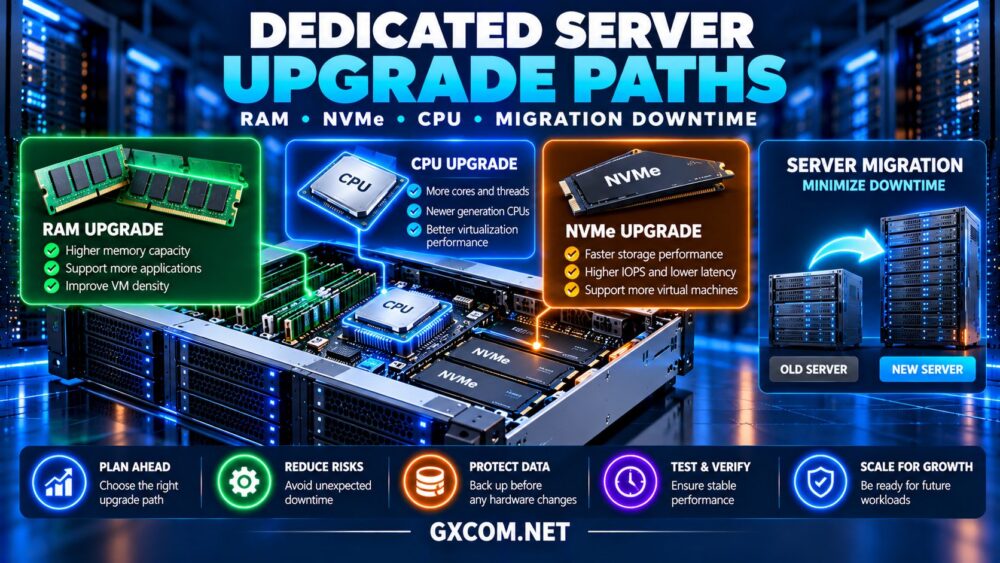
Memory expansion is often the most straightforward hardware upgrade, provided the server has available DIMM slots and supports additional capacity.
Check the processor’s memory limits, supported DIMM types, installed module configuration, and whether the platform requires matched memory arrangements.
Adding RAM normally requires shutting down a conventional dedicated server. After installation, administrators should verify detected capacity and review system logs for hardware errors.
For virtualization hosts, additional memory can increase guest capacity without necessarily requiring more CPU cores. However, workloads may still encounter processor or storage bottlenecks.
Ask the provider: Is additional RAM available for this exact server, what is the recurring or one-time charge, and how much maintenance downtime is expected?
2. NVMe Upgrades: Storage Expansion and Data Safety
NVMe upgrades require more planning because storage changes may affect data availability and recovery procedures.
Some servers support additional drive bays, while others require replacing existing SSDs or moving to a different chassis.
Hot-swappable hardware does not automatically mean every storage operation is safe without downtime. RAID layout, filesystem design, operating system support, and workload activity all matter.
Before changing storage, create a verified backup and document the existing partition, RAID, and filesystem configuration.
Replacing a drive in a redundant array may trigger a rebuild, potentially increasing latency and placing additional load on remaining disks.
Expanding usable storage can also require separate RAID, logical volume, and filesystem operations after the hardware work is complete.
3. CPU Upgrades: Why Server Replacement Is Common
Processor upgrades are usually more restrictive than memory expansion. Compatibility depends on socket type, motherboard firmware, thermal capacity, power delivery, and supported processor generations.

A faster CPU may not be compatible with an older platform, even when both processors belong to the same product family.
Changing processors also requires planned downtime and physical intervention.
For significant performance improvements, migrating to a newer dedicated server may be more practical than upgrading the existing CPU.
Compare modern processor architecture, memory bandwidth, and application performance rather than relying entirely on core counts.
4. Compare Dedicated Server Upgrade Methods
| Upgrade | Typical Approach | Main Risk | Downtime Consideration |
|---|---|---|---|
| RAM | Add or replace DIMMs | Compatibility | Usually requires shutdown |
| NVMe | Add drives or replace storage | Data loss or rebuild load | Depends on architecture |
| CPU | Compatible processor replacement | Platform limitations | Usually requires shutdown |
| Full server | Migrate to replacement hardware | Cutover and data consistency | Can be staged |
These are general planning considerations. Actual procedures and maintenance windows depend on the selected infrastructure.
5. When Is Migration Better Than an Upgrade?
Migration becomes attractive when existing hardware cannot accommodate the required CPU generation, memory capacity, or storage layout.
A replacement server may also provide better long-term value when several components need upgrading simultaneously.
Before migrating, inventory applications, databases, network configuration, operating system dependencies, scheduled tasks, and backup requirements.
Provision and test the destination before changing production traffic whenever possible.
For Windows workloads, our Windows dedicated server migration guide covers staged transfers, application testing, and rollback planning.
6. Reduce Migration Downtime with a Staged Cutover
Start by transferring relatively static application files and creating a synchronized copy of the required data.
Test the replacement environment using a temporary hostname or controlled network access.
For databases, choose a supported replication, backup-and-restore, or transaction synchronization method that preserves consistency.
During the final cutover, pause writes where necessary, apply remaining changes, validate the destination, and update routing or DNS.
DNS caching can delay traffic changes, so lower TTL values ahead of time where appropriate. Keep the original server available until the new deployment passes operational checks.
Define rollback conditions before the migration begins. Reversing traffic after new writes occur requires a plan for reconciling data.
7. Compare Dedicated Server Providers for Upgrade Flexibility
Upgrade policies differ between hardware models and contracts. The following providers are relevant candidates for evaluating physical infrastructure and long-term expansion.
Cherry Servers: Configurable Infrastructure
Cherry Servers is worth investigating for businesses seeking configurable dedicated hardware.
Review available memory configurations, NVMe options, remote management, and whether a requested change can be completed on the existing server.
Best for: Technical teams planning customized bare metal deployments.
ServerMania: Business Hardware Planning
ServerMania is relevant for organizations comparing dedicated configurations and documented support arrangements.
Ask about hardware upgrade procedures, replacement availability, technician scheduling, and migration assistance.
Best for: Businesses requiring predictable infrastructure planning.
InterServer: Cost-Conscious Expansion
InterServer is worth evaluating when hardware costs and ongoing rental expenses are important.
Confirm available RAM and storage upgrades, setup charges, and whether changing configurations affects the existing billing agreement.
Best for: Administrators balancing hardware flexibility with budget constraints.
NovoServe: Network and Migration Considerations
NovoServe deserves consideration for workloads where connectivity and data transfer influence upgrade decisions.
Verify replacement hardware options, bandwidth terms, network configuration, and whether moving servers requires IP or routing changes.
Best for: Network-intensive applications planning infrastructure transitions.
8. Calculate Upgrade Costs Versus Replacement Costs
Compare both the immediate expense and the remaining expected contract period.
Consider a hypothetical server costing $110 monthly. An upgrade adds $35 monthly and a $75 installation fee.
Over twelve months, the upgraded configuration costs $1,815, excluding taxes and other services.

A replacement server costing $155 monthly totals $1,860 over the same period before migration expenses.
The $45 difference may be less important than processor generation, performance, hardware availability, or expected downtime.
Review our dedicated server renewal costs guide when comparing setup fees and contract changes.
9. Verify Provider Responsibilities Before Ordering
Ask whether hardware upgrades are performed by provider technicians, whether maintenance is scheduled in advance, and whether any data migration assistance is included.
Clarify whether an upgrade changes the billing cycle, introduces a new commitment, or requires a replacement IP address.
Check remote console availability, recovery procedures, and the process for handling failed hardware changes.
Compare available offers in our dedicated server deals guide, but assess upgrade flexibility alongside the advertised rental price.
10. Build an Upgrade Plan Before Capacity Runs Out
Monitor memory pressure, CPU utilization, storage latency, and disk capacity over time.
Set upgrade thresholds based on sustained demand and projected growth rather than waiting for a production outage.
Maintain current backups, document system dependencies, and schedule maintenance during periods of lower business activity.
For critical workloads, consider redundant application capacity so that a single hardware maintenance event does not interrupt every service.
Final Verdict
Effective dedicated server upgrade paths depend on hardware compatibility, storage design, provider policies, and the cost of moving workloads.
RAM expansion may be straightforward, NVMe changes require careful data planning, and major CPU improvements often justify migration to newer hardware.
Cherry Servers, ServerMania, InterServer, and NovoServe are relevant providers to compare. Verify the exact upgrade options, fees, and downtime expectations before committing to a dedicated server.