Azure Windows VM licensing costs can be surprisingly complex when a business deploys Windows Server, SQL Server, or both on Microsoft Azure. The advertised virtual machine price is only one part of the bill. Operating system licensing, database editions, storage, backups, and network usage can significantly change the total.
For IT managers planning migrations or long-running workloads, understanding each licensing component is essential. This guide explains Azure billing options, Hybrid Benefit eligibility, and when conventional Windows VPS hosting deserves consideration.
What Makes Up an Azure Windows VM Bill?
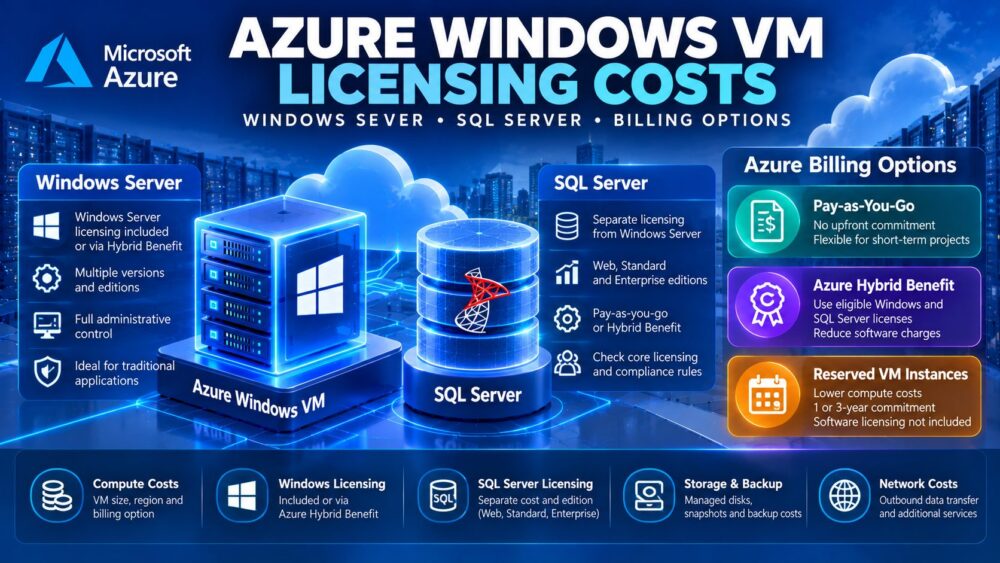
An Azure Windows virtual machine combines infrastructure resources with software licensing. The main cost categories include compute capacity, Windows Server licensing, managed disks, outbound traffic, and optional services such as backup or monitoring.
Adding SQL Server introduces another licensing decision. A Windows Server license does not automatically include a production SQL Server Standard or Enterprise license.
Businesses seeking simpler infrastructure packages can also compare Windows cloud servers from Kamatera and Windows VPS products from Hostwinds. Our affordable Windows dedicated servers guide provides another perspective for larger, predictable workloads.
Windows Server Licensing: Pay-as-You-Go vs Hybrid Benefit
Pay-as-You-Go Windows Licensing
With a standard Azure Windows Server VM configuration, the applicable Windows licensing charge is incorporated into the running VM’s software billing. This approach avoids purchasing separate qualifying Windows Server licenses before deployment.
Pay-as-you-go licensing can be convenient for temporary projects, testing environments, and organizations without existing Microsoft licensing agreements. However, always-on deployments can accumulate substantial software charges over several years.
Azure Hybrid Benefit for Windows Server
Azure Hybrid Benefit allows eligible organizations to apply qualifying Windows Server licenses with active Software Assurance or qualifying subscription rights to Azure VMs. When properly configured, the Windows Server license component is covered, leaving the applicable base compute rate and other infrastructure charges.
Eligibility is not automatic. Microsoft applies core-license allocation rules, including a minimum of eight qualifying Windows Server core licenses per VM. Organizations must also maintain valid licensing rights throughout their use of the benefit.
Before enabling Hybrid Benefit, confirm the license edition, agreement, core allocation, and any restrictions on simultaneous on-premises use.
SQL Server Licensing on Azure Virtual Machines
SQL Server licensing is separate from Windows Server licensing. Businesses deploying SQL Server Web, Standard, or Enterprise must select an appropriate licensing arrangement and edition for their workload.

SQL Server Pay-as-You-Go
Azure offers SQL Server VM images with usage-based licensing. The SQL software charge depends on factors including edition and applicable virtual CPU allocation, and it is additional to the underlying infrastructure and operating system costs.
This model can work well for short-lived applications or workloads with uncertain lifetimes. It also simplifies initial deployment when an organization does not have qualifying SQL Server licenses.
SQL Server Azure Hybrid Benefit
Organizations with eligible SQL Server Standard or Enterprise licenses and the required Software Assurance rights may use Azure Hybrid Benefit to cover qualifying SQL Server software usage.
Windows Server and SQL Server Hybrid Benefit eligibility must be evaluated independently. Having sufficient Windows Server licenses does not establish eligibility for SQL Server discounts.
For production databases, verify edition requirements, license allocation, high-availability rules, and current Microsoft Product Terms before selecting a billing model.
Azure Windows VM Billing Options Compared
| Billing Option | Primary Benefit | Important Limitation |
|---|---|---|
| Pay-as-you-go | Flexible usage without long compute commitments | Ongoing compute and software charges |
| Reserved VM Instances | Discounted eligible compute usage | Windows and SQL licenses are not included |
| Azure Hybrid Benefit | Reduced eligible Windows or SQL software charges | Requires qualifying licenses and compliance |
| Azure Savings Plan | Discounts on eligible compute usage through a commitment | Software licensing remains a separate consideration |
Reserved VM Instances and eligible compute commitments should not be confused with software licensing discounts. A reservation can reduce infrastructure costs while Windows Server and SQL Server charges continue unless covered by an applicable licensing benefit.
Long-Term Cost Example: 12 vs 36 Months
Consider a hypothetical Windows application server costing $65 monthly for compute, $35 for Windows licensing, and $20 for storage and supporting services. Its estimated total is $120 monthly, or $1,440 over 12 months and $4,320 over 36 months.
If qualifying Hybrid Benefit rights cover the Windows license component, the illustrative Azure usage charge falls to $85 monthly. However, the acquisition or maintenance cost of those qualifying licenses must still be considered when calculating total ownership costs.
Adding SQL Server can materially increase either scenario. These figures are hypothetical calculations, not current Azure quotations or licensing advice.
Network charges should also be estimated separately. See our cloud VPS bandwidth costs comparison for guidance on included transfer, internet egress, and unexpected traffic expenses.
Four Windows Hosting Providers Worth Comparing
Not every Windows application requires Azure-specific integrations. For conventional websites, remote administration, and business software, alternative Windows server products may offer different billing structures.
Kamatera: Customizable Windows Cloud Servers
Kamatera provides configurable cloud infrastructure with Windows deployment options. It is worth evaluating when businesses need adjustable CPU, memory, and storage resources. Confirm Windows licensing charges, traffic billing, backup costs, and management requirements in the selected configuration.
Hostwinds: Windows VPS Hosting
Hostwinds offers Windows VPS hosting for workloads requiring remote desktop access and Windows-compatible software. Compare the selected plan’s operating system terms, storage allocation, backup options, and managed support before purchasing.
AccuWeb Hosting: Windows Server Hosting Options
AccuWeb Hosting provides Windows hosting products suitable for evaluating traditional Windows server deployments. Buyers should check whether their chosen service supports the required Windows Server version, SQL Server edition, administrative access, and licensing arrangement.
Database Mart: Windows VPS and Database Workloads
Database Mart offers Windows VPS and server products that may suit conventional Windows applications and database hosting. Compare available SQL Server licensing, storage performance, support boundaries, and renewal conditions rather than assuming database software is included.

For related infrastructure decisions, explore our Windows dedicated server licensing guide and affordable cloud VPS deals comparison.
How to Reduce Azure Windows and SQL Licensing Costs
- Audit existing licenses: Identify qualifying Windows Server and SQL Server rights before migrating.
- Right-size VMs: Avoid allocating unnecessary vCPUs, particularly for licensed database workloads.
- Separate discounts: Evaluate compute reservations and software benefits independently.
- Review SQL editions: Select the edition that meets actual application requirements.
- Stop unused resources: Properly deallocate eligible nonproduction VMs when they are not needed.
- Monitor billing: Track software meters, storage, backups, and outbound traffic.
For additional purchasing comparisons, review our cloud hosting deals guide before committing to a long-term deployment.
Final Verdict
Azure Windows VM licensing costs depend on infrastructure usage, Windows Server rights, SQL Server editions, and the selected billing model. Pay-as-you-go offers flexibility, while Azure Hybrid Benefit can reduce eligible software charges for organizations with qualifying licenses.
Compare Kamatera, Hostwinds, AccuWeb Hosting, and Database Mart when standard Windows hosting meets your technical requirements. The best option balances licensing compliance, operational control, performance, and total cost over the application’s expected lifetime.