Choosing between LiteSpeed and NGINX hosting can affect how quickly your WordPress website responds, how efficiently it handles visitors, and how much maintenance your server requires. Both technologies can deliver excellent performance, but their caching systems, configuration methods, and commercial costs differ.
In this LiteSpeed vs NGINX Hosting comparison, we examine WordPress caching, WooCommerce checkout performance, dynamic PHP requests, security, and total hosting costs. The goal is to help website owners choose an appropriate hosting environment rather than rely on marketing claims about server speed.
LiteSpeed vs NGINX Hosting: Quick Verdict
Choose LiteSpeed hosting when you want a WordPress-focused environment with integrated server-level caching, convenient plugin controls, and potentially simpler management through a compatible hosting control panel.
Choose NGINX hosting when you value flexible configuration, open-source infrastructure, reverse proxy capabilities, or direct control over caching and application deployment.
Neither web server guarantees faster WordPress performance. Hardware resources, PHP configuration, database efficiency, cache hit rates, and application behavior often matter more than the server name.
What Is LiteSpeed Web Server?
LiteSpeed Web Server is a commercial web server developed for high-performance website hosting. Its Enterprise edition supports extensive Apache compatibility, making it attractive to hosting companies managing WordPress accounts and existing Apache-based configurations.
LiteSpeed also offers OpenLiteSpeed, an open-source web server with a different feature set and management model. Buyers should not assume that every feature advertised for LiteSpeed Enterprise is available in OpenLiteSpeed.
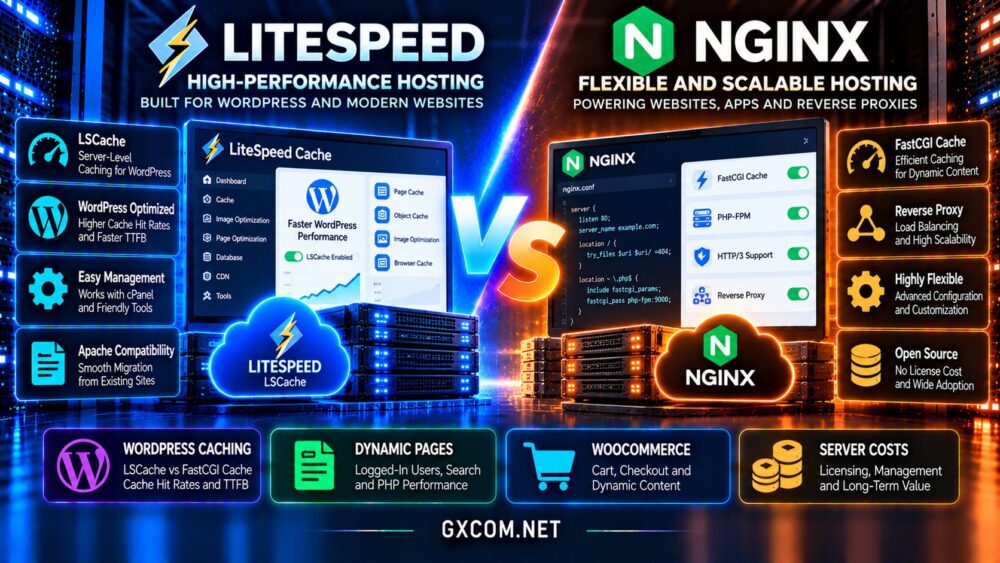
A major advantage for WordPress users is LiteSpeed Cache, commonly called LSCache, which can integrate server-level page caching with WordPress cache management.
What Is NGINX Hosting?
NGINX is a widely used web server and reverse proxy designed to handle network connections efficiently. It supports static content delivery, load balancing, TLS termination, and caching configurations.
For WordPress, NGINX commonly forwards PHP requests to PHP-FPM while serving static assets directly. Administrators can configure FastCGI caching or use other caching layers depending on their infrastructure.
NGINX Open Source is free to use, although managed hosting, commercial software, technical support, and server administration still carry costs.
For a broader introduction to hosting choices, explore our best web hosting services comparison.
WordPress Caching: LSCache vs NGINX FastCGI Cache
Page caching reduces the need to execute WordPress PHP code and database queries for every eligible request. When a visitor receives a valid cached response, the server can often deliver the page with substantially less application processing.
LiteSpeed Cache Integration
The LiteSpeed Cache WordPress plugin provides controls for page caching, exclusions, purging, and additional optimization features. Its server-level caching functionality requires a compatible LiteSpeed environment.
This integration can simplify cache management for website owners who prefer a WordPress dashboard over manual server configuration.
NGINX FastCGI Cache
NGINX FastCGI Cache can store responses generated by PHP applications. Properly configured, it can deliver cached WordPress pages efficiently without repeatedly executing PHP.

However, cache keys, expiration policies, exclusions, and purging must be coordinated with WordPress. Depending on the hosting platform, this may require additional configuration or integration tools.
The important metric is cache effectiveness, not simply which caching technology is installed.
Dynamic Pages: Where Performance Differences Matter
Not every WordPress request can be served from a full-page cache. Logged-in dashboards, personalized content, search results, and many account-related pages require application processing.
When a request bypasses caching, PHP execution, database queries, memory availability, and CPU scheduling become critical.
LiteSpeed and NGINX can both perform well under these conditions, but neither eliminates slow plugins, inefficient queries, or overloaded databases.
Measure uncached time to first byte, database response time, and server resource usage before attributing performance problems to the web server.
WooCommerce: Cart and Checkout Performance
WooCommerce creates additional complexity because shopping carts, customer sessions, and checkout information must remain accurate for each visitor.
Incorrect full-page caching can expose outdated cart information or interfere with customer transactions. Sensitive and personalized responses must be excluded or handled through an appropriate caching strategy.
LiteSpeed Cache offers WooCommerce-aware integration and features such as Edge Side Includes in supported configurations. These capabilities still require testing with the store’s plugins and checkout workflow.
NGINX can also support WooCommerce through carefully configured cache bypass rules, session handling, and PHP-FPM optimization.
For store-specific infrastructure considerations, read our WordPress hosting vs WooCommerce hosting guide.
LiteSpeed vs NGINX: Performance Benchmarks
Marketing benchmarks often emphasize maximum requests per second or cached page delivery. These measurements can be useful, but they rarely represent the complete experience of a production WordPress website.
A fair comparison should use similar hardware, PHP versions, database resources, cache policies, traffic patterns, and application content.
Test cached anonymous visits separately from uncached requests, logged-in sessions, and checkout transactions.
Pay attention to median latency, p95 response times, error rates, CPU consumption, and performance during traffic spikes.
A web server that wins one synthetic benchmark may not deliver the best results for your particular plugins or database workload.
HTTP/3, Compression and Security
Modern hosting performance also depends on transport protocols, TLS configuration, compression, and efficient delivery of static assets.
LiteSpeed and appropriately configured modern NGINX deployments can support HTTP/3, although availability depends on software versions, build options, and hosting provider settings.
Security features vary by deployment. Firewall policies, application updates, access restrictions, malware scanning, and web application firewall integration are more important than assuming one server is inherently secure.
Always verify which protections are included in the hosting plan rather than relying on general platform descriptions.
Apache Compatibility and WordPress Management
LiteSpeed Enterprise’s Apache compatibility is useful when migrating websites that depend on familiar rewrite rules and hosting control panel workflows.
NGINX does not interpret Apache .htaccess files directly. Rewrite rules and access restrictions must instead be implemented in the appropriate NGINX configuration.
This difference matters for migrations involving custom redirects, security rules, and application routing.
For managed environments, compare the provider’s support scope, not just the web server software. Our managed vs unmanaged hosting comparison explains the operational trade-offs.
Server Licensing and Total Hosting Costs
NGINX Open Source has no software license fee, making it attractive for self-managed VPS deployments and custom infrastructure.
LiteSpeed Enterprise uses commercial licensing, although hosting companies may bundle that expense into shared or managed hosting plans. OpenLiteSpeed offers a separate open-source alternative.
Monthly hosting cost also includes CPU, RAM, storage, backups, support, security services, and administration time.
A managed LiteSpeed plan may cost less overall than an inexpensive NGINX VPS requiring substantial maintenance. Conversely, an experienced administrator may prefer NGINX to control infrastructure expenses.
Compare renewal rates and included features rather than judging value from introductory discounts alone.
Hosting Providers Worth Comparing
ChemiCloud: WordPress-Focused Hosting
ChemiCloud is worth evaluating for buyers seeking managed website hosting with WordPress-oriented features. Compare its current web server stack, caching availability, backups, resource limits, and renewal terms for the selected plan.
HostArmada: Managed Hosting Alternatives
HostArmada offers hosting options relevant to WordPress users who prioritize managed services. Check the specific plan’s caching technology, server resources, support coverage, and performance policies before choosing.

Verpex: Shared and Reseller Hosting
Verpex is another candidate for businesses managing multiple websites or client accounts. Evaluate control panel access, server-level caching, account isolation, and resource allocations.
KnownHost: Managed Hosting and VPS Options
KnownHost is relevant when comparing managed hosting with more configurable server environments. Verify whether the selected service uses LiteSpeed, NGINX, or another stack and whether management includes caching optimization.
For additional WordPress buying criteria, see our managed WordPress vs shared hosting comparison.
Frequently Asked Questions
Is LiteSpeed always faster than NGINX?
No. Results depend on caching configuration, application behavior, server resources, and the workload being measured.
Does LiteSpeed Cache work with NGINX?
The plugin includes optimization features, but its native LiteSpeed server-level page caching requires a compatible LiteSpeed caching environment.
Which server is better for WooCommerce?
Both can support WooCommerce effectively. Correct session handling, cache exclusions, PHP performance, and database capacity matter more than the server brand.
Is NGINX free for commercial hosting?
NGINX Open Source is free software. Hosting infrastructure, management, support, and optional commercial products may still involve charges.
Final Verdict: LiteSpeed or NGINX Hosting?
The LiteSpeed vs NGINX Hosting decision should reflect your WordPress workload, technical experience, and total operating budget.
LiteSpeed is attractive for WordPress-focused hosting with integrated cache management and compatible control panel workflows. NGINX remains a strong choice for flexible, customized infrastructure and experienced server administrators.
Compare ChemiCloud, HostArmada, Verpex, and KnownHost based on their current plan configurations, support, renewal pricing, and measured application performance.
Whichever platform you choose, prioritize correctly configured caching, reliable backups, sufficient resources, and fast uncached responses over headline speed claims.