A Windows VPS and a Windows Cloud PC can both provide remote access to a Windows environment. However, they are designed for different purposes, and choosing the wrong product can create licensing problems, unnecessary expenses, or disappointing performance.
This Windows VPS vs Windows Cloud PC comparison examines RDP access, operating systems, Microsoft licensing, workload suitability, and total costs. Whether you need a remote workstation, a business application server, or a desktop for employees, understanding these differences is essential before purchasing.
Windows VPS vs Windows Cloud PC: Quick Verdict
Choose a Windows VPS when you need a remotely managed server for websites, business applications, automation, databases, or other supported server workloads.
Choose a Windows Cloud PC when you need a persistent Windows desktop for an individual employee, including productivity applications, business software, and remote work.
The distinction matters because Windows Server licensing and Windows desktop virtualization rights are not interchangeable. RDP access alone does not establish permission to use a particular Windows edition.
For infrastructure fundamentals, see our VPS vs shared hosting comparison.
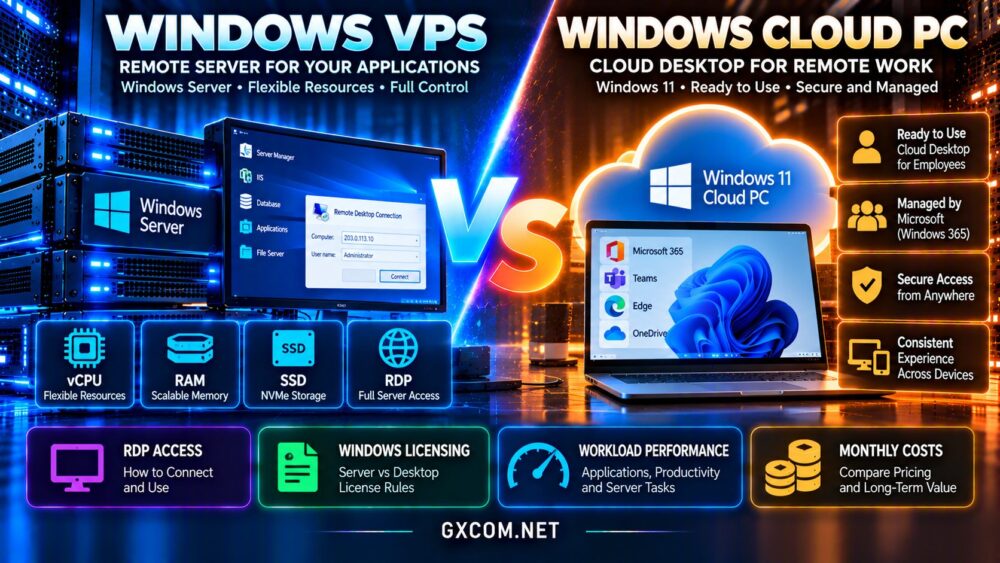
What Is a Windows VPS?
A Windows virtual private server is a virtual machine running a licensed Windows operating system, commonly Windows Server, on a hosting provider’s infrastructure.
Customers typically receive allocated virtual CPUs, RAM, storage, network connectivity, and administrative access. Depending on the plan, they may install compatible applications, configure services, and manage security settings.
Windows VPS hosting is useful for ASP.NET applications, IIS websites, database services, development environments, and supported Windows-based business software.
Most unmanaged VPS customers are responsible for operating system updates, firewall rules, backups, and application maintenance.
What Is a Windows Cloud PC?
A Windows Cloud PC is a remotely accessible desktop environment delivered through cloud infrastructure. Microsoft Windows 365 is a prominent example, providing persistent Windows desktops through subscription-based services.
Cloud PCs are designed around users rather than traditional server administration. Employees can access their assigned desktop, applications, and files from supported devices.
Organizations may also evaluate Azure Virtual Desktop, which provides desktop and application virtualization with a different deployment and management model.
Windows 365 and Azure Virtual Desktop are not identical products. Their provisioning, licensing, administration, and pricing structures differ.
Windows VPS vs Cloud PC: Main Differences
| Feature | Windows VPS | Windows Cloud PC |
|---|---|---|
| Typical operating system | Windows Server | Windows desktop |
| Primary purpose | Server workloads | Individual workspaces |
| Remote access | Administrative RDP | Supported desktop clients |
| Licensing | Server and access rights | User or desktop service rights |
| Administration | Server-focused | Endpoint and user-focused |
| Cost structure | Instance and related services | Subscription and service features |
Neither category guarantees faster performance. CPU allocation, storage latency, application requirements, and provider architecture determine actual results.
RDP Access: Similar Connection, Different Rights
Remote Desktop Protocol, or RDP, allows users to interact with a remote Windows environment. Both Windows VPS and cloud desktop services may use Microsoft remote desktop technologies.
On Windows Server, administrative remote connections are intended for server management. Providing regular interactive desktops to employees is a different use case and may require Remote Desktop Services licensing.

Administrative RDP vs Employee Desktops
Windows Server generally supports limited administrative remote sessions without deploying a full Remote Desktop Session Host environment.
Those administrative rights should not be treated as unrestricted licensing for multiple employees performing daily office work.
Organizations planning shared application sessions must review applicable RDS Client Access Licenses and other Microsoft requirements.
A Windows 365 Cloud PC, by contrast, is provisioned as a user-oriented desktop service under its applicable subscription terms.
Windows Licensing: The Most Important Difference
Windows licensing can be more complicated than comparing virtual CPU and memory specifications.
A hosting provider may include Windows Server licensing in its VPS price, charge separately, or offer a specific licensed configuration.
Customers should confirm the Windows edition, activation method, hosting rights, and whether the intended application requires additional licenses.
Can You Install Windows 11 on Any VPS?
Not automatically. Technical installation capability does not establish valid Windows client virtualization or hosting rights.
Windows 11 deployments on third-party infrastructure must satisfy the applicable Microsoft licensing and provider eligibility requirements.
Do not assume that a cheap Windows Server VPS can legally be converted into a general-purpose Windows 11 Cloud PC.
For additional licensing considerations, read our Windows Server licensing and hosting cost guide.
Which Is Better for Business Applications?
Windows VPS hosting is often appropriate for applications designed to run continuously as server services.
Examples include IIS-hosted websites, background processing, supported databases, scheduled tasks, and internal applications accessible through secured network connections.
A Cloud PC is generally better suited to interactive applications that an employee launches and operates within a desktop session.
Examples include Microsoft 365 productivity tools, browser-based business systems, and compatible desktop software.
Before choosing, check the software vendor’s supported operating systems, remote-use restrictions, and licensing terms.
Performance: CPU, RAM, Storage and Latency
Both products rely on virtualized infrastructure, but resource allocation and performance expectations differ.
For a Windows VPS, evaluate processor generation, shared versus dedicated CPU allocation, available RAM, NVMe storage performance, and network quality.
For a Cloud PC, evaluate interactive responsiveness, application compatibility, storage capacity, display requirements, and the user’s connection latency.
Why Network Latency Matters
Remote desktop responsiveness depends on network latency, packet loss, display encoding, and available bandwidth.
A powerful remote machine can still feel slow when accessed over a congested or geographically distant connection.
Choose an appropriate deployment region and test real applications rather than relying exclusively on advertised hardware specifications.
Our NVMe VPS performance guide explains another important infrastructure factor.
Windows VPS vs Cloud PC: Total Workload Costs
Windows VPS costs typically include compute resources, storage, bandwidth, Windows licensing, backup services, and optional management.
Cloud PC costs commonly depend on assigned user subscriptions, selected desktop specifications, and additional enterprise management or security requirements.
For one continuously running server application, a Windows VPS may provide better economic alignment than purchasing a desktop-oriented service.
For employees needing individual Windows desktops, a Cloud PC may reduce endpoint administration and simplify workspace provisioning.
Compare the Complete Monthly Budget
Calculate the number of users or server instances, required resources, licensing, storage, backups, administration time, and expected availability.
Include costs associated with monitoring, identity management, security controls, and application-specific licensing.
Do not compare the cheapest VPS price with a Cloud PC subscription without accounting for these differences.
Windows VPS Hosting Providers to Compare
Kamatera: Configurable Windows Cloud Servers
Kamatera is relevant for businesses evaluating configurable cloud servers for supported Windows workloads.
Check available Windows images, licensing charges, CPU and RAM options, backup arrangements, and management responsibilities.
Hostwinds: Windows VPS Hosting
Hostwinds provides Windows VPS options worth considering for remote server administration and compatible business applications.
Compare operating system licensing, resource allocations, network locations, and managed service terms.
For more detail, see our Hostwinds Windows and Linux VPS review.
AccuWeb Hosting: Windows Server Options
AccuWeb Hosting is another option for customers comparing Windows-based hosting and VPS configurations.
Verify the Windows Server edition, included licensing, remote administration permissions, and backup features before ordering.
VPSHostingService: Budget Windows VPS Evaluation
VPSHostingService can be included when comparing lower-cost Windows VPS configurations for supported server workloads.
Check the current processor allocation, memory, storage, licensing terms, and support scope rather than relying on headline pricing alone.
For related purchasing considerations, visit our affordable Windows dedicated server guide.
When Should You Choose Windows 365?
Windows 365 is particularly relevant when organizations want persistent, assigned Windows desktops for employees without operating conventional Windows Server remote desktop infrastructure.

Its suitability depends on supported applications, user identity requirements, security policies, and subscription costs.
Businesses needing pooled desktops, published applications, or more customized session architectures may also evaluate Azure Virtual Desktop.
Neither product should be selected solely because it supports remote desktop access.
Security and Backup Responsibilities
A Windows VPS requires appropriate patching, firewall configuration, account protection, and recoverable backups.
Exposing RDP directly to the internet increases attack exposure. Prefer restricted access, secure remote connectivity, strong authentication, and monitoring.
Cloud PC environments also require identity protection, endpoint policies, data protection, and appropriate administrative controls.
Determine who is responsible for backups and recovery before purchasing either service.
Frequently Asked Questions
Is a Windows VPS the same as a Cloud PC?
No. A VPS is generally a server environment, while a Cloud PC is designed as a remotely accessible user desktop.
Can I use RDP on a Windows VPS?
Yes, on appropriately configured Windows Server installations, subject to administrative and licensing requirements.
Is Windows 365 cheaper than a Windows VPS?
Not necessarily. Their pricing models serve different purposes, so compare costs against the intended workload.
Can multiple employees share one Windows VPS?
Potentially, but regular multiuser desktop access may require Remote Desktop Services infrastructure and applicable licenses.
Which is better for running Windows applications continuously?
Windows VPS hosting is generally better aligned with supported background services and server applications.
Final Verdict: Windows VPS or Windows Cloud PC?
The Windows VPS vs Windows Cloud PC decision should begin with the intended workload, not the availability of an RDP connection.
Choose Windows VPS hosting for supported server applications, infrastructure administration, and continuously running services.
Choose Windows Cloud PC for employee desktops, interactive productivity workloads, and managed remote workspaces.
Compare Kamatera, Hostwinds, AccuWeb Hosting, and VPSHostingService for Windows server hosting, while evaluating Windows 365 separately for desktop requirements.
Confirm Microsoft licensing, resource suitability, security responsibilities, and total costs before making your final decision.