Running large AI models is no longer only about raw computing power. GPU memory capacity, inference throughput, software compatibility, and long-term operating costs increasingly determine whether a deployment succeeds.
This NVIDIA RTX PRO 6000 Blackwell Server Review examines the 96GB GPU’s architecture, memory advantages, AI inference performance, fine-tuning potential, and server deployment requirements. It also compares rental approaches and explains when a different accelerator may offer better value.
NVIDIA RTX PRO 6000 Blackwell Server Review: Quick Verdict
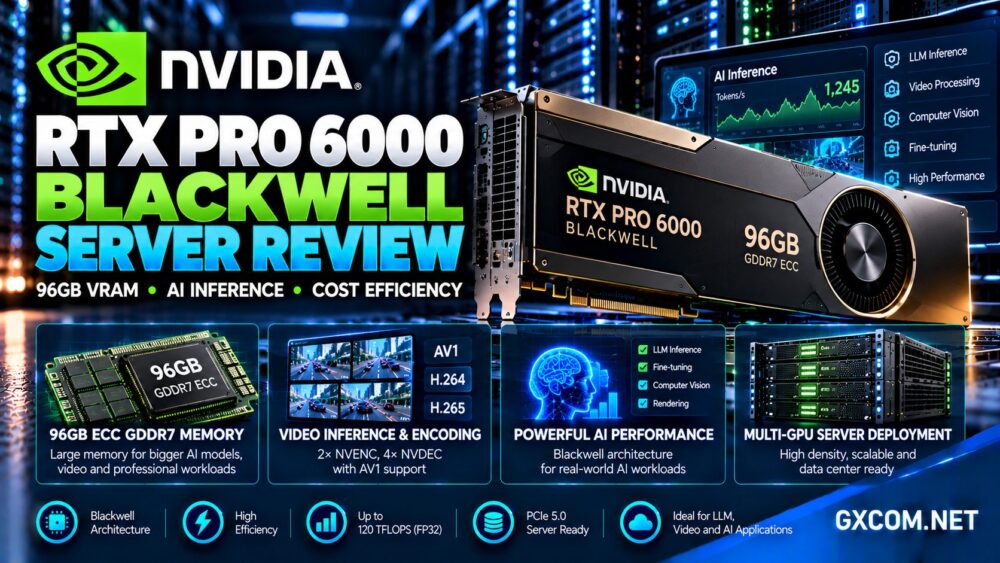
The RTX PRO 6000 Blackwell Server Edition is a powerful data center accelerator designed for enterprise AI, visual computing, rendering, and scientific applications.
Its standout feature is 96GB of ECC GDDR7 memory, supported by approximately 1.6TB/s of memory bandwidth and Blackwell-generation Tensor Cores.
That combination makes it attractive for larger language models, multimodal inference, demanding visual workloads, and organizations seeking substantial GPU memory without automatically moving to the most expensive accelerator class.
Our verdict: The RTX PRO 6000 Blackwell Server Edition deserves serious consideration for memory-intensive inference and professional GPU workloads. However, buyers should verify the exact hardware edition, power configuration, deployment architecture, and cost per completed task.
RTX PRO 6000 Blackwell Server Edition Specifications
NVIDIA positions the Server Edition as a data center product rather than a conventional desktop graphics card.
| Specification | Server Edition |
|---|---|
| Architecture | NVIDIA Blackwell |
| CUDA cores | 24,064 |
| GPU memory | 96GB GDDR7 with ECC |
| Memory bandwidth | 1,597GB/s |
| Memory interface | 512-bit |
| FP32 peak performance | 120 TFLOPS |
| Interface | PCIe 5.0 x16 |
| Maximum power | Up to 600W, configurable |
Peak specifications are useful for identifying hardware capabilities, but they should not be interpreted as guaranteed application throughput.
Actual results depend on model architecture, numerical precision, batch size, software optimization, and the surrounding server platform.
Server Edition vs Workstation and Max-Q Versions
The RTX PRO 6000 Blackwell family includes Server Edition, Workstation Edition, and Max-Q Workstation Edition variants.
All three offer 96GB GDDR7 ECC memory, but their cooling designs, power targets, and intended deployment environments differ.
The Server Edition is designed for data center systems and dense GPU configurations. NVIDIA specifies passive cooling for its conventional server form factor, with additional liquid-cooled deployment options.
The standard Workstation Edition targets professional desktop systems, while the Max-Q version emphasizes lower power consumption in suitable workstation configurations.
When purchasing a server, confirm the exact GPU SKU rather than relying on the generic name “RTX PRO 6000 Blackwell.”
Why 96GB VRAM Matters for AI Workloads
GPU memory is frequently the limiting factor in large language model deployment.
Model weights, activation buffers, attention caches, and framework overhead all compete for available VRAM.
A 96GB accelerator offers considerably more memory headroom than 24GB or 48GB GPUs, potentially allowing larger models or higher inference concurrency on a single device.
LLM Inference and Model Quantization
Quantization reduces the memory needed to store model weights, but practical inference memory requirements extend beyond the weights themselves.
Long context windows and concurrent requests increase key-value cache consumption. Additional runtime buffers also require capacity.
The RTX PRO 6000 can support substantial quantized models, but the ability to run a specific 70B-class model depends on precision, context length, software, and available headroom.
Our AI GPU VPS providers comparison explores deployment choices for different model sizes.

Does More VRAM Guarantee Faster Inference?
No. Memory capacity determines what can fit, while throughput depends on compute resources, memory bandwidth, batching, and software efficiency.
A larger GPU may deliver faster results for demanding workloads, but smaller models can sometimes run more economically on less expensive accelerators.
Measure time to first token, output tokens per second, and latency under realistic concurrent traffic.
Blackwell Tensor Cores and FP4 Performance
The Server Edition uses fifth-generation Tensor Cores and supports low-precision AI computation, including FP4.
Reduced-precision formats can improve throughput and memory efficiency when supported by the model and inference framework.
However, advertised FP4 peak performance represents specific computational conditions, not a universal performance result.
Applications must use compatible kernels, optimized inference engines, and appropriate quantization methods to benefit.
Model accuracy should also be evaluated after quantization, particularly for applications requiring consistent outputs.
AI Fine-Tuning: Is 96GB Enough?
The RTX PRO 6000 Blackwell Server Edition is relevant for parameter-efficient fine-tuning, experimentation, and selected larger-model training workflows.
Techniques such as LoRA and QLoRA can reduce the memory required to adapt pretrained models.
Full-parameter training is more demanding because gradients, optimizer states, and activations consume substantial memory.
A 96GB GPU does not automatically make full fine-tuning of every large model practical.
For distributed training, network connectivity, GPU communication, and storage throughput become increasingly important.
Multi-GPU Servers and Memory Scaling
NVIDIA positions the Server Edition for multi-GPU data center deployments, including configurations with several accelerators per system.
An eight-GPU server can provide an aggregate 768GB of GPU memory, but that memory is distributed across separate devices.
Applications require suitable parallelism strategies to distribute models and workloads effectively.
PCIe connectivity and network architecture influence communication overhead, especially when models exchange data frequently.
Our NVIDIA GPU server providers guide helps compare larger accelerator deployments.
GPU Partitioning and Workload Isolation
The RTX PRO 6000 Blackwell supports NVIDIA Multi-Instance GPU technology, allowing supported configurations to divide GPU resources into isolated instances.
NVIDIA has described configurations supporting up to four 24GB instances, depending on the applicable partitioning profile.
This can be useful for organizations running several smaller inference services instead of allocating an entire 96GB accelerator to each application.
However, a partitioned GPU instance is not equivalent to exclusive ownership of the complete accelerator.
Buyers should confirm whether a hosting plan provides a full GPU, a MIG partition, or another virtualization arrangement.
Rendering, Video and Professional Applications
The RTX PRO 6000 is not limited to language models.
Its Blackwell architecture, RT Cores, and video engines also support rendering, visualization, media processing, and computer vision.
Organizations developing digital twins, synthetic training data, or high-resolution visual content may benefit from the combination of GPU memory and graphics acceleration.
However, rendering speed depends on application support, scene complexity, driver configuration, and available GPU resources.
Where to Rent RTX PRO 6000 Blackwell GPUs
GPU rental platforms vary in hardware availability, billing methods, management tools, and infrastructure reliability.
RunPod: Published 96GB RTX PRO 6000 Options
RunPod lists RTX Pro 6000 GPU configurations with 96GB memory in its cloud GPU catalog.
It is a relevant starting point for developers who want to test inference workloads before committing to long-term infrastructure.
Confirm the exact edition, region, CPU allocation, storage charges, and availability at deployment time.
Vast.ai: Marketplace-Based GPU Rentals
Vast.ai offers a marketplace for renting GPU computing resources from different hosts.
It is useful for comparing hardware options and infrastructure economics, although availability of a specific RTX PRO 6000 configuration must be verified in current listings.
Review host reliability, networking, storage costs, and interruption conditions.
GPU Mart: GPU Server Alternatives
GPU Mart is another option for customers evaluating GPU-enabled hosting and dedicated server infrastructure.
Buyers should request the exact GPU model, memory capacity, server specifications, and management arrangements.
Do not assume that a general GPU server offering includes RTX PRO 6000 Blackwell hardware.
OVHcloud: Dedicated and Cloud GPU Infrastructure
OVHcloud provides GPU infrastructure options relevant to businesses seeking more traditional cloud or dedicated server environments.
Its GPU portfolio can serve as a comparison point for networking, geographic availability, and infrastructure management.
Confirm the available accelerator SKU rather than treating every NVIDIA GPU instance as equivalent.
Our affordable GPU servers comparison examines wider purchasing considerations.
RTX PRO 6000 vs L4, L40S and H100
| GPU | Memory | Primary Consideration |
|---|---|---|
| NVIDIA L4 | 24GB GDDR6 | Efficient video and smaller inference |
| NVIDIA L40S | 48GB GDDR6 | Graphics and larger inference workloads |
| RTX PRO 6000 Blackwell | 96GB GDDR7 | High-memory AI and visual computing |
| NVIDIA H100 SXM | 80GB HBM3 | High-throughput AI training and inference |
The RTX PRO 6000 offers substantially more memory than the L4 and L40S, but capacity alone does not determine overall performance.

H100-class GPUs use different memory and interconnect technologies that can be advantageous for demanding AI workloads.
Compare complete application performance instead of ranking GPUs by VRAM alone.
RTX PRO 6000 Server Pricing and Long-Term Value
GPU rental costs depend on accelerator availability, region, instance resources, storage, networking, and billing terms.
For continuous inference, calculate cost per million tokens or per completed request at the required latency.
For rendering, compare the cost per finished scene or video job.
Include idle capacity, persistent storage, backup retention, and data transfer when estimating monthly spending.
Our GPU vs CPU server comparison explains when acceleration provides meaningful economic value.
Frequently Asked Questions
How much VRAM does RTX PRO 6000 Blackwell have?
The RTX PRO 6000 Blackwell Server Edition includes 96GB of ECC GDDR7 memory.
Can it run 70B language models?
It can support appropriately configured and quantized 70B-class inference workloads, but usable context length and concurrency depend on memory overhead and software configuration.
Is the Server Edition different from the Workstation Edition?
Yes. The variants have different power, cooling, form-factor, and deployment characteristics despite sharing the same nominal memory capacity.
Does the RTX PRO 6000 support MIG?
Yes. Supported MIG configurations allow the GPU to be partitioned into smaller isolated instances.
Is it better than an H100?
Not universally. The RTX PRO 6000 offers substantial GDDR7 capacity and versatile graphics capabilities, while H100-class hardware can be better suited to workloads requiring its HBM memory subsystem and AI-oriented architecture.
Final Verdict: Who Should Choose RTX PRO 6000 Blackwell?
This NVIDIA RTX PRO 6000 Blackwell Server Review finds a compelling accelerator for high-memory inference, professional visualization, and selected AI fine-tuning workloads.
Its 96GB ECC GDDR7 memory, Blackwell Tensor Cores, and multi-GPU deployment capabilities provide significant flexibility.
RunPod offers a published 96GB rental option, while Vast.ai, GPU Mart, and OVHcloud are worth evaluating for alternative GPU infrastructure and deployment models.
Before purchasing, verify the exact Server Edition hardware, memory requirements, workload throughput, isolation model, and complete operating costs. The best GPU investment is the one that meets production requirements consistently rather than simply offering the largest specifications.