Choosing web hosting with email can simplify the process of launching a professional website. Instead of managing separate providers for your website and business email, some hosting plans let you create addresses such as [email protected] directly from your hosting account.
However, an included mailbox does not automatically provide reliable email delivery, generous storage, or advanced business features. Some plans charge separately for email, restrict outgoing messages, or offer only basic mailbox management.
This guide explains what to check before choosing website hosting with email, including account limits, SMTP, IMAP, DNS authentication, security, and long-term costs.
What Is Web Hosting with Email?
Web hosting with email combines website storage and server resources with the ability to send and receive email using your own domain name.
For example, a small business operating example.com might use [email protected] for customer inquiries and [email protected] for invoices.
Depending on the plan, the hosting provider may offer mailboxes, webmail access, forwarding, autoresponders, and standard email protocols.
Some providers bundle these features with website hosting. Others offer email as a paid add-on or through a separate email service.
Before purchasing, distinguish between a real mailbox and an email forwarding address. Forwarding alone does not necessarily provide independent mailbox storage or authenticated outgoing email.
Web Hosting Email vs Dedicated Business Email Hosting
Bundled hosting email and dedicated email platforms serve overlapping but different needs.
| Feature | Web Hosting Email | Dedicated Email Service |
|---|---|---|
| Website hosting | Usually included | Usually separate |
| Domain mailboxes | Plan-dependent | Core service |
| Mailbox storage | May share hosting resources | Typically allocated per mailbox or plan |
| Collaboration tools | Often basic | May include calendars and collaboration |
| Administration | Often managed through hosting control panel | Dedicated administration interface |
| Billing | Bundled or optional | Usually separate subscription |
Small websites with modest email requirements may find bundled hosting email convenient. Organizations requiring advanced administration, collaboration, or independent email infrastructure may prefer a dedicated service.
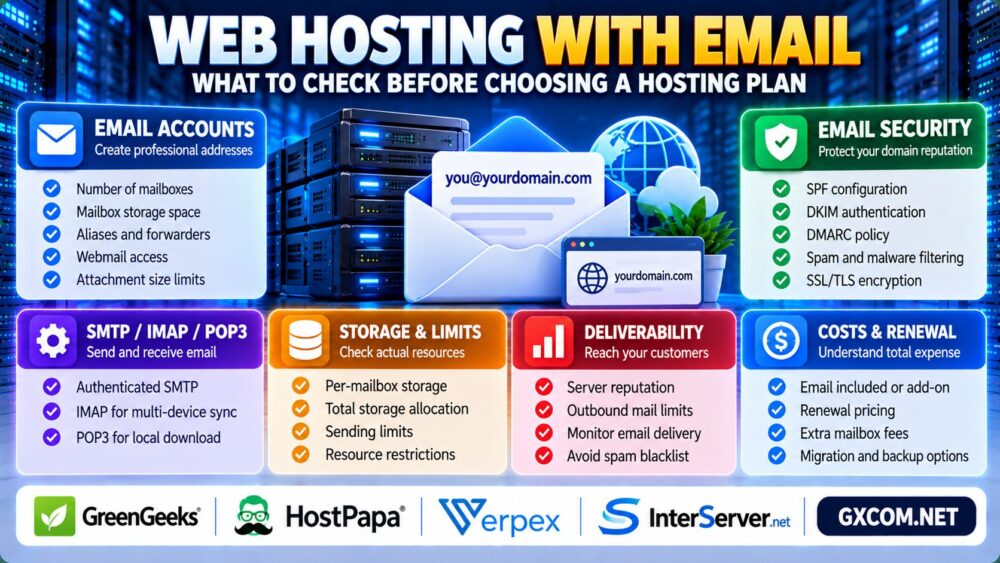
1. Check the Number of Email Accounts
Start by confirming how many mailboxes your hosting plan allows.
Some plans support only a limited number of accounts, while others advertise a larger allowance subject to storage, inode, or acceptable-use restrictions.
Ask whether email aliases, forwarders, and full mailboxes count differently toward account limits.
A company with several departments may need separate mailboxes for sales, support, billing, and management.
Do not assume that an “unlimited email” label means unlimited storage, sending capacity, or server resources.
2. Review Mailbox Storage and Attachment Limits
Email storage is especially important when users retain messages and attachments for long periods.
Some hosting environments count mailbox data against the same storage allocation used by website files and backups.
Check the following:
- Storage allocation per mailbox.
- Total account storage available for email.
- Maximum message and attachment sizes.
- Mailbox retention and deletion policies.
- Available upgrade options.
Also verify whether mailbox files contribute to account file-count or inode limits.

Storage capacity alone does not guarantee that an email service is suitable for a growing business.
3. SMTP, IMAP and POP3: Which Email Features Matter?
Standard email protocols determine how users send and retrieve messages.
SMTP for Sending Email
SMTP is used for outgoing mail submission and delivery between mail servers.
Check whether the provider supports authenticated submission with TLS and documents the correct server settings.
For WordPress contact forms and transactional notifications, a properly configured mail transport is generally preferable to relying on an unverified default PHP mail setup.
IMAP for Synchronizing Mailboxes
IMAP allows compatible email clients to synchronize messages and folders with the mail server.
It is useful when employees access the same mailbox from a laptop, phone, and webmail interface.
POP3 for Downloading Messages
POP3 is another retrieval protocol, commonly associated with downloading messages to an email client.
For modern multi-device workflows, IMAP is often more convenient, although the appropriate choice depends on the user's requirements.
4. SPF, DKIM and DMARC: Email Authentication Essentials
Professional email requires more than a working mailbox. DNS configuration and domain authentication influence whether receiving servers can verify legitimate messages.
Three important technologies are:
- SPF: Identifies servers authorized to send mail for a domain.
- DKIM: Adds a cryptographic signature that receiving systems can verify.
- DMARC: Defines how receivers should handle messages that fail aligned authentication checks and provides reporting options.
SPF, DKIM, and DMARC improve authentication but do not guarantee inbox placement.
Before enabling a strict DMARC policy, verify all legitimate sending sources, including website forms, newsletters, and third-party services.
Also confirm that your hosting provider supplies the necessary DNS records and setup documentation.
5. Email Deliverability and Shared Server Reputation
Successful message submission does not guarantee that the recipient will receive it in the inbox.
Email deliverability can be influenced by sender reputation, authentication, message content, recipient filtering, sending patterns, and infrastructure configuration.
On some shared hosting platforms, email services may use shared sending infrastructure. Abuse by unrelated senders can create reputation risks, depending on how the provider manages outbound mail.
Ask whether the provider monitors outbound abuse, applies rate limits, and offers troubleshooting for rejected or delayed messages.
Businesses sending important invoices or account notifications should test email delivery before relying on the service for critical communications.
6. Security, Spam Filtering and Mailbox Backups
Business email accounts frequently contain sensitive customer conversations, invoices, and account recovery messages.
Look for secure authentication, encrypted connections, spam filtering, malware scanning, and clear mailbox recovery procedures.
Two-factor authentication is valuable when supported by the relevant mailbox or account access system.
Confirm whether hosting backups include email data and whether individual mailboxes can be restored without restoring the entire website.
For general website security considerations, review our Best Web Hosting Services Guide.
7. Hidden Costs of Hosting with Email
An inexpensive hosting package may become less attractive if business email requires additional subscriptions or upgrades.
Potential charges include:
- Additional mailbox licenses.
- Increased email storage.
- Spam filtering or advanced security.
- Domain registration and renewal.
- Mailbox migration assistance.
- Backup and restoration services.
Compare the initial purchase cost and renewal terms before committing.
Our Web Hosting Renewal Costs Guide explains how introductory discounts and add-ons affect long-term expenses.
8. Comparing Web Hosting Providers with Email
When evaluating hosting providers, compare mailbox capabilities alongside website performance, support, resource limits, and renewal pricing.
GreenGeeks and HostPapa are relevant options to investigate for small-business website hosting requirements.
Verpex and InterServer are additional candidates when comparing shared hosting packages, control panels, and available email services.
Do not assume that all products from these providers include the same email features. Verify mailbox availability, sending limits, storage allowances, and paid add-ons for the specific plan.
For a broader selection of hosting promotions, see our Web Hosting Deals Guide.
9. When Should You Separate Email from Web Hosting?
Bundled email may be adequate for a personal website, a small organization, or a business with straightforward communication needs.
A separate email service becomes worth considering when email availability is business-critical, staff require collaboration features, or the organization needs more specialized administration and compliance controls.
Separating services can also reduce the operational dependency between website hosting and business communications, although it introduces another provider to manage.
Agencies managing several customer websites should consider account separation and administrative responsibility. Our Reseller Hosting for Agencies Guide explores related hosting management requirements.

Web Hosting with Email Buying Checklist
- Confirm that full email mailboxes are included.
- Check mailbox count and storage allowances.
- Verify SMTP, IMAP, TLS, and webmail support.
- Review SPF, DKIM, and DMARC setup options.
- Ask about outgoing mail limits and deliverability support.
- Confirm spam filtering, account security, and backups.
- Calculate email add-on and renewal costs.
- Understand mailbox migration and export options.
Before purchasing, compare the overall package against the options in our Cheap Hosting Offers Guide.
Frequently Asked Questions
Does web hosting always include email?
No. Some plans include mailboxes, while others require a separate email product or paid add-on.
Can I use my own domain for business email?
Yes, if your email provider supports custom domains and you configure the required DNS records.
Is hosting email suitable for WordPress contact forms?
It can be, provided the outgoing mail service is configured correctly and supports the website's sending requirements.
Is unlimited email storage really unlimited?
Usually, resource and acceptable-use restrictions still apply. Review mailbox, storage, inode, and sending limits.
Do SPF, DKIM, and DMARC guarantee inbox delivery?
No. They support authentication, but deliverability also depends on sender reputation, message characteristics, and recipient filtering.
Should small businesses use separate email hosting?
It depends on reliability, collaboration, security, budget, and administration needs. Bundled hosting email may be sufficient for simpler workloads.
Final Verdict: Choose Email Features, Not Just a Hosting Discount
The best web hosting with email plan is one that meets your website requirements and provides dependable, manageable business communications.
Evaluate mailbox limits, secure email protocols, domain authentication, deliverability support, backups, and renewal costs before choosing a provider.
For growing businesses, the right decision may be bundled hosting email or a separate dedicated email platform. Choose based on operational needs rather than the lowest advertised starting price.