Bare metal Kubernetes can be a compelling infrastructure choice when containerized applications need predictable computing resources, direct hardware access, or sustained high utilization. Instead of running every Kubernetes worker node inside a cloud virtual machine, organizations can deploy nodes directly on dedicated physical servers.
However, removing the virtualization layer does not automatically make a Kubernetes cluster faster, cheaper, or more reliable. Bare metal introduces responsibilities involving server provisioning, networking, persistent storage, upgrades, and hardware recovery.
This guide explains when dedicated Kubernetes nodes make sense, how bare metal compares with cloud virtual machines, which workloads benefit most, and what to evaluate before selecting a server provider.
What Is Bare Metal Kubernetes?
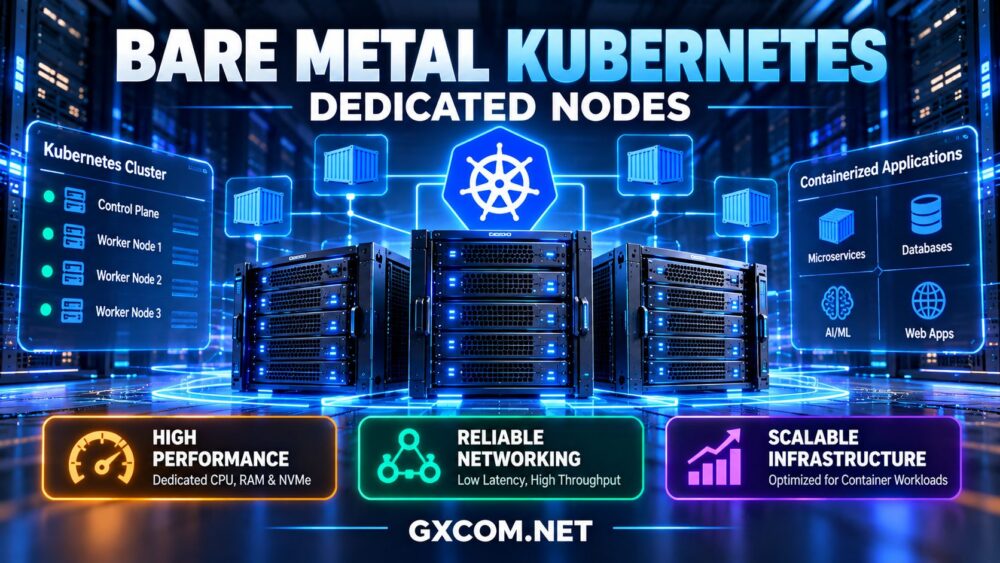
Bare metal Kubernetes refers to running Kubernetes cluster components on physical servers rather than relying entirely on virtualized compute instances. A physical server can run a Linux operating system, a container runtime, and Kubernetes node components directly.
In a typical deployment, worker nodes run application pods while the Kubernetes control plane manages scheduling, cluster state, and orchestration.
These nodes can be deployed in an organization's own data center or rented from a bare metal hosting provider.
The defining difference is the infrastructure layer: the customer receives access to dedicated physical hardware instead of sharing the underlying host through conventional multi-tenant virtualization.
For a broader introduction to physical infrastructure, see our bare metal server providers guide.
Bare Metal vs Virtual Machines for Kubernetes
Kubernetes can operate successfully on both physical servers and virtual machines. The better choice depends on workload behavior, deployment requirements, and the level of infrastructure automation available.
| Factor | Bare Metal Nodes | Virtual Machine Nodes |
|---|---|---|
| Hardware allocation | Dedicated physical resources | Virtualized resource allocation |
| Provisioning | Requires physical server provisioning | Often supports rapid instance creation |
| Performance control | Direct control over physical hardware | Depends on VM and host configuration |
| Scaling | Limited by hardware availability and provisioning time | Often more flexible through cloud APIs |
| Networking | May require additional network integration | Often integrated with cloud networking |
| Persistent storage | Requires suitable storage integration | May use managed cloud volumes |
| Operations | More hardware lifecycle responsibility | Provider generally handles physical host lifecycle |
Bare metal can reduce certain virtualization-related overheads and provide greater control over CPU placement, storage devices, and network interfaces. But the performance difference may be small for workloads that are not constrained by virtualization.
For a deeper comparison, read our bare metal vs virtual machines guide.
When Do Dedicated Kubernetes Nodes Make Sense?
1. Sustained CPU-Intensive Workloads
Applications with consistently high CPU utilization may benefit from dedicated physical resources, especially when performance predictability matters.
Examples include large-scale data processing, continuous analytics, media processing, and compute-heavy application services.
Dedicated hardware allows administrators to understand exactly which processor models, physical cores, and memory resources are available to their nodes.
However, Kubernetes CPU requests and limits, operating system scheduling, and application-level contention still affect performance.
2. Latency-Sensitive Applications
Some applications require predictable response times rather than simply high average throughput.
Examples include selected financial processing systems, real-time services, and network-intensive applications.
Bare metal may provide additional control over CPU pinning, NUMA alignment, network interface configuration, and specialized hardware.
Where necessary, Kubernetes features such as CPU Manager policies, Topology Manager, and device plugins can help coordinate resource allocation.
These optimizations require careful configuration and workload testing. Dedicated hardware does not eliminate latency caused by network distance, inefficient code, or application dependencies.
3. High-Throughput Networking
Container networking adds an important design consideration to any Kubernetes cluster.
Traffic may pass through a Container Network Interface (CNI) implementation, service routing components, load balancers, and network policy enforcement.
For demanding environments, physical nodes can offer direct access to supported network hardware and additional tuning options.
However, the real benefit depends on the network topology, CNI design, packet processing, and available connectivity.
Before selecting a server, compare physical port capacity, included traffic, data center location, and the network architecture required by your Kubernetes deployment.
4. Storage-Intensive Stateful Applications
Although Kubernetes is often associated with stateless microservices, it also supports stateful applications through PersistentVolumes, StatefulSets, and storage integrations.
Databases, analytics platforms, and other storage-intensive services may benefit from dedicated NVMe devices and carefully designed storage layouts.
But local physical storage introduces availability challenges.
If a node fails, locally stored data may not be immediately accessible from another node. Storage replication, application-level recovery, or network-attached storage may therefore be necessary.

For critical databases, backup and restoration procedures remain essential even when replicated storage is used.
5. Predictable Long-Running Resource Demand
Dedicated nodes may offer attractive economics when a Kubernetes cluster runs continuously at relatively high utilization.
Instead of paying for a changing collection of virtual machines, an organization can evaluate a defined pool of physical resources over a longer operating period.
However, the comparison must include unused capacity, hardware redundancy, bandwidth, software licensing, operations, and recovery infrastructure.
When Bare Metal Kubernetes Is Not the Best Choice
Physical infrastructure is not always the most practical Kubernetes platform.
Cloud-based Kubernetes may be more suitable when:
- Workloads scale up and down frequently.
- Teams need rapid node provisioning across multiple regions.
- Applications rely heavily on managed cloud services.
- Infrastructure engineers are not available to maintain physical nodes.
- Projects are short-lived or demand is difficult to predict.
- Built-in integrations for networking, storage, and cluster automation are priorities.
Managed Kubernetes services can reduce control plane maintenance, although customers still retain responsibility for applications, access controls, and other configuration decisions.
A hybrid design is also possible. Organizations can use dedicated physical nodes for steady workloads and virtualized infrastructure for other services, provided the networking and cluster architecture support that model.
How to Design a Production Bare Metal Kubernetes Cluster
Production readiness depends on more than installing Kubernetes on several servers.
Control Plane Availability
A production cluster should have a control plane design appropriate to its availability requirements.
For self-managed high-availability deployments, multiple control plane nodes and a resilient etcd configuration may be appropriate.
Control plane redundancy does not protect against every data center, network, or application failure. Failure domains and recovery procedures still matter.
Worker Node Capacity
Worker nodes should have sufficient CPU, memory, storage, and network capacity for the pods they host.
Account for Kubernetes system components, operating system processes, DaemonSets, and workload requests rather than allocating every available resource to applications.
Plan additional capacity so applications can be rescheduled during node maintenance or failure.
Networking and Load Balancing
Unlike many managed cloud Kubernetes environments, bare metal deployments may not include a cloud-provider load balancer integration by default.
Depending on the environment, solutions such as MetalLB, external load balancers, or provider-supported networking integrations may be appropriate.
Choose a CNI implementation compatible with your network design, routing requirements, and security policies.
Persistent Storage
Determine whether applications require local volumes, distributed storage, external storage systems, or database-managed replication.
Use a suitable Container Storage Interface (CSI) driver where applicable, and test volume provisioning, recovery, and node failure behavior.
Automated Provisioning
Infrastructure automation becomes increasingly important as the cluster grows.
Provisioning tools, operating system images, configuration management, and Kubernetes lifecycle tooling can help standardize node deployment.
Cluster API and infrastructure-specific providers may support some bare metal environments, but their capabilities and hardware integration requirements vary.
Hardware Requirements for Bare Metal Kubernetes
The right hardware depends on the applications running inside the cluster.
| Component | What to Evaluate | Why It Matters |
|---|---|---|
| CPU | Architecture, core count, per-core performance, NUMA | Application processing and workload scheduling |
| RAM | Capacity, memory pressure, workload requests | Pod stability and application caching |
| NVMe | Latency, endurance, redundancy, usable capacity | Stateful applications and local storage performance |
| Network | Port capacity, routing, latency, traffic policies | Pod communication and external connectivity |
| Management | Remote console, recovery access, provisioning | Maintenance and failure recovery |
| Availability | Multiple nodes, failure domains, spare capacity | Application resilience |
For deeper CPU, RAM, and NVMe purchasing considerations, see our dedicated server hardware guide.
Bare Metal Server Providers for Kubernetes Workloads
Several dedicated infrastructure providers are worth evaluating for self-managed Kubernetes clusters. The important distinction is that renting a bare metal server does not necessarily mean the provider delivers a fully managed Kubernetes platform.
The following companies are purchasing candidates based on their relevance to dedicated infrastructure. They are not ranked using independent Kubernetes benchmark results.
Cherry Servers: API-Oriented Bare Metal Infrastructure
Cherry Servers is a relevant option for teams evaluating dedicated physical nodes alongside infrastructure automation.
For Kubernetes deployment, investigate its current server provisioning capabilities, supported hardware configurations, networking options, and automation interfaces.
Best fit: Infrastructure teams seeking configurable bare metal resources for self-managed container clusters.
Check before buying: API support for the selected product, provisioning time, private networking, traffic policies, and node replacement procedures.
Hostwinds: Dedicated Servers for Persistent Cluster Nodes
Hostwinds is worth considering for organizations comparing traditional dedicated hosting with other infrastructure models.
Persistent Kubernetes workloads require careful assessment of CPU capacity, RAM, storage, operating system access, and network performance.
Best fit: Businesses planning stable, continuously running worker nodes.
Check before buying: Root or administrator access, Linux compatibility, provisioning options, support boundaries, and hardware recovery arrangements.
ServerMania: Dedicated Hardware and Network Planning
ServerMania is relevant for organizations with defined hardware requirements or network-intensive workloads.
For Kubernetes, compare available processors, memory capacity, physical networking, data center locations, and options for private connectivity.
Best fit: Teams running sustained application workloads that require dedicated server resources and deliberate network design.
Check before buying: Current hardware inventory, network configuration, bandwidth conditions, remote management, and service terms.
DediXLAB: Additional Dedicated Infrastructure Options
DediXLAB can be included in a shortlist when evaluating dedicated hardware configurations and rental conditions.
Its suitability for Kubernetes depends on whether the selected server supports the required operating system, network design, remote access, and cluster provisioning workflow.
Best fit: Buyers comparing physical node configurations for self-managed Kubernetes environments.
Check before buying: Processor models, available memory, storage, network topology, contract conditions, and technical support scope.
Cost Comparison: Bare Metal Kubernetes vs Cloud Kubernetes
Comparing infrastructure costs requires looking beyond the advertised rental price of an individual server.
A self-managed bare metal cluster may require additional expenditure for:
- Control plane nodes and redundant worker capacity.
- Networking, load balancing, and traffic transfer.
- Persistent storage and backups.
- Monitoring, logging, and security tools.
- Operating system and cluster maintenance.
- Hardware replacement planning and disaster recovery.
Cloud Kubernetes may introduce separate charges for control plane services, compute instances, block storage, network transfer, and load balancers, depending on the platform.

For an accurate comparison, use the same workload, availability target, storage requirements, and operating period.
Our bare metal server pricing guide explains hardware, bandwidth, and hidden infrastructure costs.
Common Bare Metal Kubernetes Mistakes
- Using a single worker node for critical applications: A hardware failure can interrupt every workload on that node.
- Ignoring control plane resilience: Cluster management components need their own recovery design.
- Assuming local storage is automatically portable: Stateful workloads require explicit storage and recovery planning.
- Overlooking network integration: Service exposure and load balancing may require additional infrastructure.
- Skipping node automation: Manual server configuration becomes difficult to maintain consistently.
- Confusing hardware isolation with pod isolation: Kubernetes workloads still need appropriate security controls.
- Underestimating operational costs: Staff time, monitoring, upgrades, and recovery affect total ownership cost.
Frequently Asked Questions
Can Kubernetes run directly on bare metal servers?
Yes. Kubernetes can run on physical Linux servers without requiring a virtualization layer beneath each node. The cluster still needs compatible container runtimes, networking, and appropriate control plane configuration.
Is Kubernetes faster on bare metal?
Some workloads can benefit from direct hardware access and reduced virtualization-related variability. However, performance depends on CPU, memory, storage, networking, application design, and cluster configuration. Benchmark the actual workload before drawing conclusions.
Does bare metal Kubernetes support autoscaling?
Kubernetes can scale pods on existing nodes, but adding physical nodes requires available hardware and suitable provisioning automation. Bare metal node scaling is generally more constrained by physical capacity and deployment time than cloud instance scaling.
Is bare metal Kubernetes cheaper than managed Kubernetes?
It can be cost-effective for stable, heavily utilized workloads, but not universally. Hardware rental, redundant capacity, staffing, networking, storage, and recovery must all be included in the comparison.
Do bare metal hosting providers manage Kubernetes?
Not necessarily. Many providers rent physical servers while leaving Kubernetes installation, configuration, upgrades, and troubleshooting to the customer. Confirm whether managed Kubernetes is explicitly included before purchasing.
Final Verdict: When Dedicated Kubernetes Nodes Are Worth It
Bare metal Kubernetes makes the most sense when an organization has predictable infrastructure demand, workloads that benefit from dedicated hardware, and the technical resources to manage physical nodes reliably.
Cloud virtual machines and managed Kubernetes services may remain more practical for highly variable demand, rapid provisioning, or teams seeking fewer infrastructure responsibilities.
When comparing providers such as Cherry Servers, Hostwinds, ServerMania, and DediXLAB, focus on actual hardware capabilities, networking, automation, recovery, and complete operating costs.
WORKLOAD → PERFORMANCE REQUIREMENTS → NODE DESIGN → NETWORK & STORAGE → AUTOMATION → RELIABILITY → TOTAL COST
The right choice is the infrastructure model that meets your application's performance and availability requirements without creating unnecessary operational complexity.