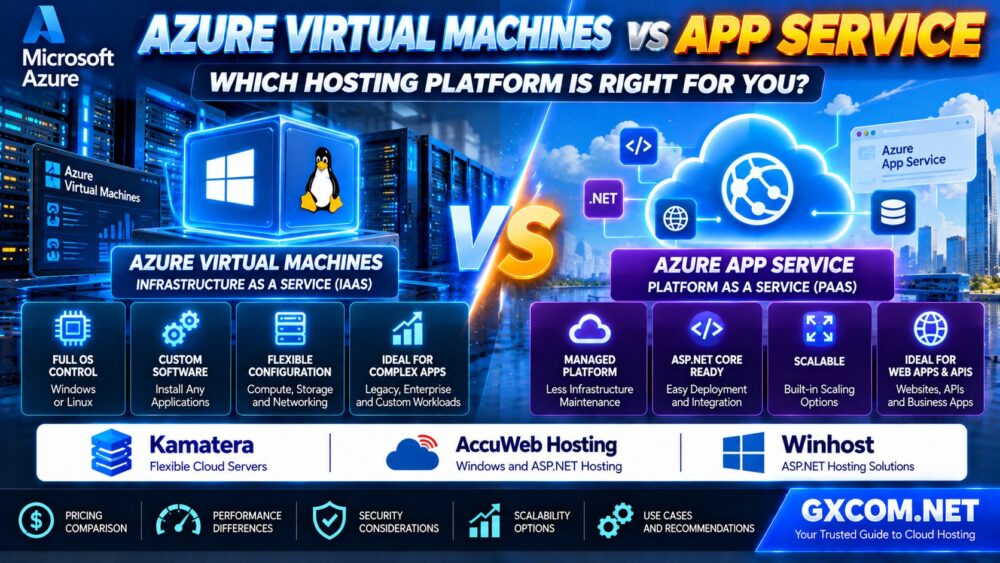
Choosing between Azure Virtual Machines and Azure App Service is an important decision when deploying websites, APIs, and business applications on Microsoft Azure. Both services can host production workloads, but they offer different levels of infrastructure control, application management, scalability, and operational responsibility.
Azure Virtual Machines provide an Infrastructure as a Service (IaaS) environment where you manage the operating system and most of the software stack. Azure App Service is a Platform as a Service (PaaS) offering designed to simplify hosting supported web applications and APIs.
The better option depends on your application architecture, technical requirements, budget, and available administration resources.
In this Azure VM vs App Service comparison, we explain performance, pricing, Windows and Linux compatibility, ASP.NET Core hosting, security, scaling, and alternatives to help you make an informed decision.
Azure VM vs App Service: Quick Comparison
| Feature | Azure Virtual Machines | Azure App Service |
|---|---|---|
| Service model | Infrastructure as a Service (IaaS) | Platform as a Service (PaaS) |
| Operating system control | Guest OS administration | Managed platform with limited OS access |
| Deployment | Install and configure the application stack | Deploy supported web applications and APIs |
| Windows and Linux | Supported VM images and configurations | Supported Windows and Linux App Service plans |
| Scaling | VM resizing and supported scale-set architectures | Plan-based scaling and supported autoscale options |
| Networking | Extensive virtual network control | Managed networking with plan-dependent integration features |
| Maintenance | Customer manages guest OS and application stack | Azure manages underlying platform infrastructure |
| Pricing | Compute, storage, networking and related services | App Service plan capacity and related services |
| Best fit | Custom software stacks and infrastructure requirements | Supported web applications with simpler operations |
Quick verdict: Choose Azure App Service for supported web applications when you want to reduce infrastructure administration. Choose Azure Virtual Machines when you need operating system control, custom software installation, or infrastructure configurations that App Service cannot provide.
1. What Are Azure Virtual Machines?
Azure Virtual Machines are cloud-based virtual servers that run supported operating systems, including Windows Server and various Linux distributions.
They allow administrators to configure operating systems, install software, manage services, and customize the hosting environment.
Common Azure VM workloads include:
- Legacy Windows applications
- Custom IIS web servers
- Applications requiring specific operating system components
- Linux application servers
- Self-managed databases
- Specialized enterprise software
- Development and testing environments
Azure manages the underlying physical infrastructure, but customers remain responsible for guest operating system administration, application security, patching, and many backup and recovery decisions.
VMs provide flexibility, but that flexibility increases the amount of infrastructure you must maintain.
2. What Is Azure App Service?
Azure App Service is a managed platform for hosting supported web applications, REST APIs, and application backends.
Instead of managing a complete virtual machine, developers deploy their application to a platform that handles much of the underlying operating environment.
App Service supports selected development stacks and deployment methods, including supported .NET, Java, Node.js, Python, PHP, and container-based configurations, depending on the operating system and plan.
Typical use cases include:
- ASP.NET Core websites
- Business web applications
- REST APIs
- Customer portals
- Supported Linux web applications
- Continuous deployment workflows
App Service offers capabilities such as managed platform updates, deployment slots on eligible plans, custom domains, TLS support, and scaling options.
However, App Service does not provide the same operating system access as a full Azure VM.
3. IaaS vs PaaS: The Biggest Difference
The fundamental difference between Azure VMs and App Service is how infrastructure responsibilities are divided.
Azure Virtual Machines: More Control, More Administration
With Azure VMs, you can configure the guest operating system, install custom services, and manage application dependencies.
This is useful when an application requires:
- Specific Windows Server components
- Custom background services
- Administrative access to the guest OS
- Specialized software installations
- Custom security and network configurations
However, you must also plan operating system updates, monitoring, backups, and recovery procedures.
Azure App Service: Less Infrastructure Management
With App Service, Azure handles much of the underlying platform infrastructure.
Developers can concentrate on application deployment, configuration, monitoring, and scaling.
App Service is often a better operational fit for applications that work within its supported runtimes, networking features, and platform restrictions.
It is not a universal replacement for virtual machines.
4. Azure VM vs App Service Pricing: Which Costs Less?
There is no universal winner on price. Azure VM and App Service billing models differ, and the final cost depends on workload requirements and supporting services.
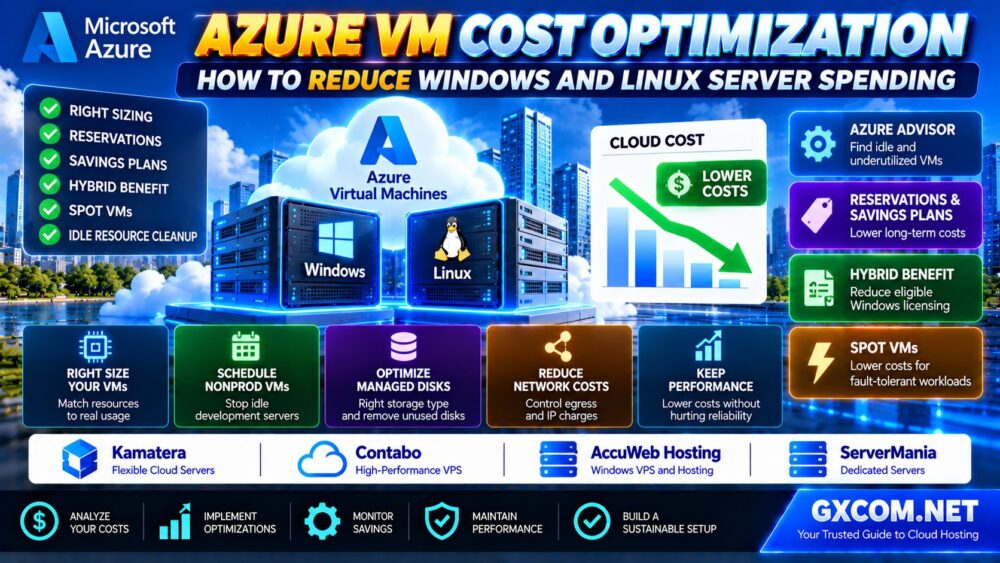
Already running Windows or Linux workloads on Azure Virtual Machines? Explore our Azure VM Cost Optimization Guide to learn how right sizing, Azure Reservations, Savings Plans, Hybrid Benefit, Spot VMs and managed disk optimization can reduce unnecessary cloud spending.
Azure Virtual Machine Cost Components
Azure VM costs may include:
- Compute instance usage
- Operating system licensing
- Managed disks
- Backup and snapshot services
- Outbound data transfer
- Public IP resources
- Load balancing and networking services
- Monitoring and management tools
Eligible workloads may benefit from purchasing options such as Azure Reservations, savings plans, or Azure Hybrid Benefit, subject to applicable terms.
Azure App Service Cost Components
App Service pricing primarily depends on the selected App Service plan and its computing capacity.
Additional costs may arise from:
- External databases
- Storage services
- Application monitoring
- Network connectivity
- Backup services
- Other integrated Azure resources
Multiple compatible applications may share an App Service plan, but they also share its available computing resources.
Do not assume each application receives an independent allocation of CPU and memory.
How to Compare Total Cost
For a fair comparison, estimate the same application's monthly requirements on both platforms.
Include compute capacity, storage, database hosting, network traffic, backup policies, monitoring, and administration time.
App Service may reduce operational overhead, while VMs can be more appropriate when existing software requires a custom environment.
For a broader understanding of infrastructure spending, read our Dedicated Server Total Cost Guide, which explains why hardware and compute charges are only part of the full operating cost.

5. Performance: Are Azure VMs Faster Than App Service?
Azure Virtual Machines are not automatically faster than Azure App Service.
Performance depends on the selected VM size or App Service plan, application architecture, memory usage, database response times, caching, and network configuration.
CPU and Memory
Azure VMs offer many instance families with different CPU and memory characteristics.
App Service provides defined computing capacity through its available plan tiers and configurations.
For either service, insufficient memory or CPU capacity can cause slow response times.
Storage and Database Performance
Database latency often has a greater effect on application performance than the hosting service name.
For App Service, persistent application data is commonly stored in suitable external services rather than relying on temporary local storage.
For Azure VMs, administrators can select and configure supported managed disk options according to application requirements.
Performance Testing
Before making a production decision, benchmark:
- Uncached application response times
- Concurrent requests
- Database query latency
- Memory utilization
- CPU utilization
- Application startup behavior
Recommendation: Choose capacity based on measured application behavior, not simply on the number of virtual CPUs advertised.
6. Azure VM vs App Service for ASP.NET Core Hosting
ASP.NET Core is one of the most relevant workloads when comparing Azure VMs and App Service.
Both services can host supported ASP.NET Core applications, but the deployment and administration experience differs.
Choose Azure App Service for ASP.NET Core When:
- Your application uses a supported runtime
- You want simplified deployment
- You prefer managed platform infrastructure
- You need supported deployment slots
- You want integration with Azure development and monitoring services
Choose Azure VMs for ASP.NET Core When:
- You need full guest operating system administration
- Your application requires specialized Windows components
- You must install unsupported third-party services
- You need a custom IIS or Linux server configuration
- Your software architecture cannot operate within App Service restrictions
For some applications, App Service can eliminate substantial server administration work. For others, a VM remains necessary because of software dependencies or architectural requirements.
7. Windows vs Linux Hosting on Azure
Azure Virtual Machines support Windows and Linux operating systems through compatible VM images.
Azure App Service also offers Windows and Linux hosting options, but the supported runtimes and features are not identical.
Before selecting App Service, confirm:
- Required runtime version
- Operating system compatibility
- Container support
- Filesystem behavior
- Background processing requirements
- Networking limitations
- App Service plan availability
For legacy .NET Framework applications, Windows hosting requirements may be particularly important.
Modern ASP.NET Core applications offer broader cross-platform deployment possibilities, but application dependencies must still be checked.
8. Scaling and High Availability
Azure VMs and App Service can both support scalable architectures, but they use different operational approaches.
Scaling Azure Virtual Machines
Azure VMs can be resized where supported, while Virtual Machine Scale Sets can support automated management of groups of VM instances.
More complex applications may require load balancing, shared services, external databases, and coordinated deployment procedures.
Scaling Azure App Service
App Service supports scaling up to different plan capacities and scaling out to additional instances, subject to the selected tier and configuration.
Some plans support autoscale capabilities.
However, adding instances does not automatically make every application horizontally scalable.
Applications should manage sessions, background tasks, persistent files, and database connections appropriately.
High Availability Is an Architecture Decision
Neither purchasing a VM nor selecting App Service automatically guarantees that every application component is highly available.
Availability depends on the service configuration, plan, region, application architecture, and dependencies.
9. Security and Shared Responsibility
Azure manages the physical infrastructure behind both services, but customers retain security responsibilities.
Azure VM Security Responsibilities
VM administrators typically manage:
- Guest operating system patches
- Application updates
- Administrative access
- Guest firewall settings
- Secrets and credentials
- Data protection
- Backup and recovery procedures
Azure App Service Security Responsibilities
App Service reduces operating system maintenance responsibilities, but customers still need to secure:
- Application code
- Identity and access permissions
- Application configuration
- Secrets and connection strings
- Dependencies and packages
- Data access
- Exposed application endpoints
Where supported, managed identities can help applications authenticate to Azure services without embedding long-lived credentials in source code.
Security principle: Managed infrastructure reduces some responsibilities, but it does not eliminate application security work.
10. Networking: Which Platform Offers More Control?
Azure Virtual Machines provide extensive network configuration options through Azure Virtual Network and related services.
These options are useful for multi-tier applications, private connectivity, and customized security architectures.
App Service provides managed networking features, including supported virtual network integration and private connectivity options.
However, networking capabilities depend on the plan, region, and specific feature.
Do not assume that App Service has unrestricted access to all VM networking features.
Before deployment, document required inbound connections, outbound dependencies, private endpoints, and DNS behavior.
11. Backups, Monitoring and Disaster Recovery
Both platforms require a recovery plan that reflects the application and its data.
Azure VM Backup Considerations
VM administrators can use supported Azure backup and recovery services, but must verify application consistency, retention, and restore procedures.
App Service Backup Considerations
App Service provides backup-related capabilities for eligible configurations, but support and scope vary by plan and feature.
External databases and storage resources may require separate backup policies.
For both platforms, define:
- Recovery Point Objective (RPO)
- Recovery Time Objective (RTO)
- Backup retention
- Restore testing procedures
- Disaster recovery responsibilities
Monitoring should include application response times, errors, resource utilization, and dependencies rather than relying only on infrastructure availability.
12. When Should You Consider Alternatives to Azure?
Azure VMs and App Service are strong options for workloads that benefit from Microsoft's cloud ecosystem.
However, not every website or business application requires native Azure infrastructure.
Businesses may also evaluate other hosting models when they prioritize direct server control, specialized Windows hosting, or simpler application management.
Kamatera, AccuWeb Hosting, and Winhost are three alternatives worth researching for different requirements.
Kamatera: Configurable Cloud Server Infrastructure
Kamatera is relevant for organizations that want configurable cloud server resources and direct control over supported operating system environments.
It may be worth evaluating when an application requires a VM-style deployment rather than a managed web application platform.
Before purchasing, verify available Windows or Linux images, licensing, storage, networking, and management responsibilities.
Best fit to investigate: Customizable cloud servers for applications requiring infrastructure-level control.
AccuWeb Hosting: Windows and ASP.NET Hosting Options
AccuWeb Hosting is relevant for buyers comparing Windows-oriented hosting and application server options.
It may be worth considering when the workload involves ASP.NET applications or Windows hosting requirements.
Review the exact plan's supported .NET versions, SQL Server availability, remote access options, and licensing terms.
Best fit to investigate: Windows application hosting and server configurations requiring Microsoft technology compatibility.
Winhost: Application-Focused ASP.NET Hosting
Winhost is another candidate for developers who need supported ASP.NET website hosting without necessarily managing a complete cloud virtual machine.
Compare the supported .NET runtime, database options, deployment methods, resource limits, and application requirements.
Traditional ASP.NET hosting is not identical to Azure App Service, so evaluate deployment features and scalability separately.
Best fit to investigate: ASP.NET website hosting for applications that do not require full operating system control.
For additional hosting models, see our Best Cloud Hosting Solutions Guide.
13. Azure VM vs App Service vs Third-Party Hosting
| Hosting Option | Primary Advantage | Suitable Evaluation Scenario |
|---|---|---|
| Azure Virtual Machines | Guest OS control and flexible infrastructure | Custom and legacy applications |
| Azure App Service | Managed web application platform | Supported websites and APIs |
| Kamatera | Configurable cloud servers | Alternative VM infrastructure |
| AccuWeb Hosting | Windows-oriented hosting options | ASP.NET and Windows applications |
| Winhost | Application-focused ASP.NET hosting | Supported .NET websites |
These products have different operating models and should not be treated as interchangeable.
Compare application compatibility, support scope, security responsibilities, and total operating cost.
14. Common Azure Hosting Mistakes
- Choosing Azure VMs when the application could run on a supported managed platform.
- Assuming App Service provides unrestricted operating system access.
- Comparing compute costs without including storage, databases, and networking.
- Ignoring operating system and runtime compatibility.
- Assuming scaling automatically fixes application bottlenecks.
- Running stateful applications without an appropriate persistence strategy.
- Failing to test backups and restores.
- Overlooking identity, secrets, and network security.
- Choosing a hosting platform before measuring workload requirements.
- Assuming a third-party hosting service includes every Azure platform capability.
For organizations comparing cloud infrastructure with traditional dedicated hardware, our Dedicated Server vs Cloud Server Comparison</a explains the broader architectural differences.

15. Azure VM vs App Service: Which Should You Choose?
Choose Azure Virtual Machines If:
- You need guest operating system administration.
- Your application requires custom software installation.
- You are migrating a legacy application with specialized dependencies.
- You need infrastructure configurations beyond App Service capabilities.
- Your team can manage server maintenance and security.
Choose Azure App Service If:
- Your web application uses a supported runtime.
- You want to reduce infrastructure maintenance.
- You need streamlined application deployment.
- Your application fits the platform's networking and filesystem restrictions.
- You want supported scaling and deployment management features.
Consider Alternative Hosting If:
- Your application does not depend on Azure-specific services.
- You prefer a different management or support model.
- You need to compare Windows hosting options.
- You want to evaluate total infrastructure costs across providers.
If you are still deciding whether a virtual server or a managed hosting service is more appropriate, read our Managed vs Unmanaged Hosting Guide.
Frequently Asked Questions
What is the main difference between Azure VM and App Service?
Azure VMs provide guest operating system control, while App Service is a managed platform for supported web applications and APIs. The main difference is the balance between infrastructure flexibility and operational responsibility.
Is Azure App Service cheaper than a VM?
Not necessarily. Pricing depends on the selected capacity, workload, storage, databases, networking, and management requirements. Compare complete deployment costs rather than compute charges alone.
Is Azure App Service better for ASP.NET Core?
App Service is often convenient for supported ASP.NET Core applications because it simplifies deployment and platform maintenance. A VM may be necessary when the application requires custom operating system components or specialized infrastructure.
Can Azure App Service run Linux applications?
Yes. Azure App Service supports selected Linux application stacks and container deployment options. Availability depends on the runtime, plan, and platform capabilities.
Can I install any software on Azure App Service?
No. App Service has platform restrictions and does not offer unrestricted guest operating system administration. Applications requiring unsupported system-level changes may need a VM or another hosting model.
Does Azure App Service support autoscaling?
Supported App Service plans provide scaling capabilities, including autoscale options where available. The exact behavior and limits depend on the selected plan and configuration.
Can I host SQL Server directly on Azure App Service?
App Service is designed for web applications rather than running a full SQL Server database engine inside the managed web hosting environment. Applications typically connect to a separate supported database service.
Are Azure VMs more secure than App Service?
Neither is automatically more secure. App Service reduces some infrastructure maintenance responsibilities, while VMs provide more control. Security depends on configuration, application code, access management, and operational practices.
Can I migrate an application from Azure VM to App Service?
Often, but not always. Migration requires checking runtime support, dependencies, filesystem behavior, networking, background processes, and database connectivity. Some applications need modifications before they can run on App Service.
Final Verdict: Choose Control or Convenience Based on Your Application
Azure Virtual Machines and Azure App Service are designed for different infrastructure requirements.
Azure VMs are a strong choice when you need operating system control, custom software, or specialized hosting configurations.
Azure App Service is often more convenient for supported web applications and APIs because it reduces the need to administer underlying server infrastructure.
For applications that do not require native Azure services, Kamatera, AccuWeb Hosting, and Winhost are additional hosting options worth comparing.
Before choosing, evaluate your application's runtime compatibility, operational requirements, security needs, scalability, and total cost.
APPLICATION REQUIREMENTS → PLATFORM CONTROL → DEPLOYMENT → SECURITY → SCALING → TOTAL COST.
The best hosting platform is the one that supports your application reliably without creating unnecessary infrastructure complexity.