Choosing the best Linux dedicated server hosting is not just about getting the most CPU cores, RAM, or storage for your money. The right dedicated server should match your workload, support your preferred Linux distribution, provide reliable network connectivity, and give you the level of administrative control your project requires.
Linux dedicated servers are popular among developers, system administrators, hosting businesses, and organizations running applications that benefit from predictable access to physical hardware.
But not every dedicated hosting offer provides the same value. An inexpensive server with an outdated processor, limited recovery options, or unclear support responsibilities may become more expensive to operate than a better-matched alternative.
MORE HARDWARE DOES NOT ALWAYS MEAN BETTER HOSTING.
This guide explains how to compare Linux dedicated server providers, what features matter before purchasing, and how to choose a server that supports your applications without unnecessary operational costs.

What Is Linux Dedicated Server Hosting?
Linux dedicated server hosting provides exclusive access to a physical server running a Linux operating system.
Unlike shared hosting or a conventional VPS, a dedicated server assigns an entire physical machine to one customer. This gives administrators control over the operating system, installed software, storage configuration, and resource allocation.
Common workloads include:
- High-traffic websites and web applications
- Database hosting and data processing
- Docker and containerized applications
- Development and continuous integration environments
- Game server hosting
- Self-hosted business applications
- Virtualization and private infrastructure
- Hosting multiple websites or customer projects
Linux dedicated hosting can be especially useful when consistent hardware access, operating system customization, or application isolation matters more than rapid cloud-style scaling.
However, a dedicated server is not automatically the best choice for every project. Small applications and highly variable workloads may be better served by a VPS or another hosting model.
Best Linux Dedicated Server Hosting Providers to Consider
Before selecting a Linux dedicated hosting provider, compare actual hardware configurations, Linux distribution support, network terms, recovery tools, and the responsibilities included in the service agreement.
The following providers are relevant candidates for Linux dedicated infrastructure. They are presented as a practical shortlist rather than a benchmark-based ranking.
1. Cherry Servers: For Linux Bare Metal and Infrastructure Flexibility
Cherry Servers is worth considering when evaluating bare metal infrastructure for Linux-based applications and development environments.
When comparing its available configurations, focus on the processor generation, memory capacity, storage arrangement, deployment options, and the level of control offered over the server environment.
Linux administrators should also confirm which operating system images are supported and whether the selected product provides suitable remote management or recovery options.
Best suited for: Developers and infrastructure teams evaluating configurable Linux bare metal environments.
Before ordering: Verify the selected hardware, supported Linux distributions, remote access features, bandwidth terms, and administrative responsibilities.
2. DediXLAB: For Budget-Conscious Linux Dedicated Hosting
DediXLAB is another candidate for buyers comparing dedicated hardware value and self-managed Linux server requirements.
For cost-sensitive projects, avoid evaluating a configuration by its advertised core count alone. An older processor with more cores may deliver weaker performance for certain applications than a newer processor with fewer cores.
Storage type, memory capacity, and network connectivity should also be evaluated against the actual workload.
Best suited for: Technically experienced administrators looking to compare Linux dedicated server configurations against a defined budget.
Before ordering: Confirm hardware specifications, deployment arrangements, management access, backup responsibilities, and support coverage.
3. ServerMania: For Business Linux Dedicated Infrastructure
ServerMania can be considered when comparing dedicated infrastructure for business applications, database workloads, and projects requiring specific hardware resources.
For Linux deployments, review the availability of suitable operating system configurations, storage options, data center locations, and technical support arrangements.
Organizations hosting important business services should also examine hardware replacement procedures and the provider's documented service commitments.
Best suited for: Businesses evaluating dedicated server infrastructure for production Linux applications.
Before ordering: Verify the required Linux distribution, server configuration, network terms, remote recovery options, and support responsibilities.
Linux Dedicated Server Provider Comparison
The most useful provider comparison is based on your technical requirements rather than generic marketing claims.
| Provider | Primary Evaluation Focus | What to Verify |
|---|---|---|
| Cherry Servers | Bare metal configuration and infrastructure flexibility | Hardware selection, Linux images, recovery tools |
| DediXLAB | Budget-oriented dedicated hardware evaluation | CPU generation, storage, network, support scope |
| ServerMania | Business infrastructure and dedicated server requirements | Linux deployment options, hardware, service terms |
Product specifications and service availability can change. Request current details for the exact configuration you intend to purchase.
1. Choose the Right Linux Distribution
One of the first decisions when buying a Linux dedicated server is selecting an operating system that matches your application stack and administration experience.
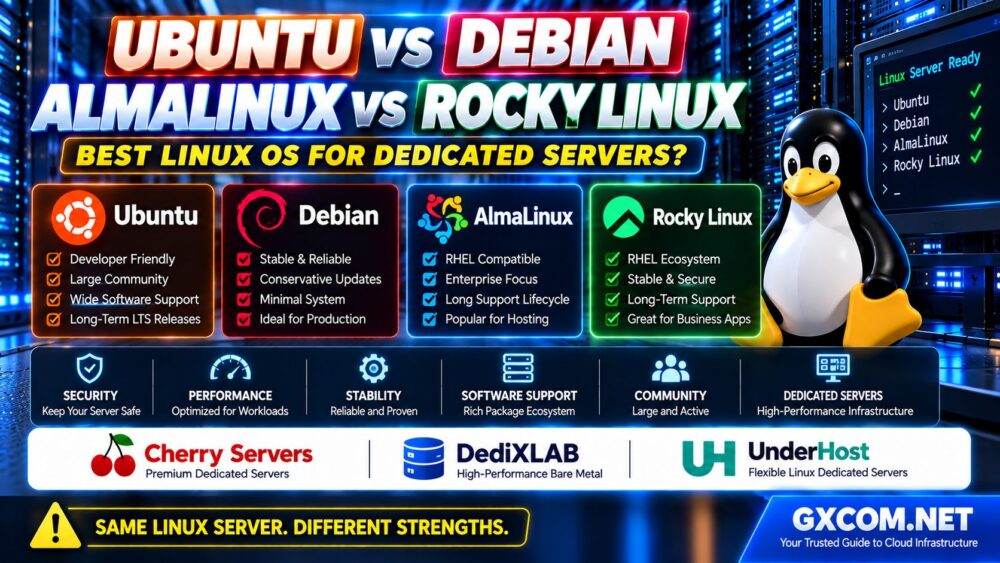
Popular Linux distributions for dedicated servers include Ubuntu Server, Debian, AlmaLinux, and Rocky Linux.
Not sure which Linux operating system to install? Read our Ubuntu vs Debian vs AlmaLinux vs Rocky Linux Comparison to understand package management, security updates, application compatibility and long-term support before choosing a distribution.
Ubuntu Server
Ubuntu Server is commonly selected for web applications, development environments, containers, and modern software stacks.
Its long-term support releases provide a predictable maintenance framework, although support periods depend on the release and applicable support arrangements.
Debian
Debian is known for its conservative approach to stable releases and broad package availability.
It can be a suitable choice for administrators who prioritize predictable software behavior and are comfortable managing the operating system directly.
AlmaLinux and Rocky Linux
AlmaLinux and Rocky Linux are often considered for enterprise-oriented Linux environments and applications associated with the RHEL ecosystem.
They may be relevant when control panel compatibility, package ecosystems, or existing operational procedures influence the deployment.
Before choosing a distribution, verify:
- Application and runtime compatibility
- Security update availability
- Supported release lifecycle
- Control panel requirements
- Kernel and driver compatibility
- Availability of experienced administrators
THE BEST LINUX DISTRIBUTION IS THE ONE YOUR WORKLOAD CAN SUPPORT RELIABLY.

2. CPU Performance: Look Beyond Core Count
Processor selection is one of the most important decisions when comparing Linux dedicated servers.
A server with many older CPU cores may perform well for certain parallel workloads but struggle with applications that depend heavily on single-thread speed.
For example, some PHP applications, game servers, and latency-sensitive processes benefit from strong per-core performance.
Virtualization, parallel builds, and selected data-processing workloads may benefit more from additional cores and threads.
Compare the following:
- Exact CPU model and generation
- Single-thread performance
- Multi-thread performance
- Memory bandwidth
- Supported virtualization features
- Expected sustained workload behavior
Do not assume that a dual-processor system automatically outperforms a modern single-socket platform.
For more detailed hardware selection guidance, read our Dedicated Server Hardware Guide, which explains CPU, RAM, NVMe storage, and network specifications.
3. How Much RAM Does a Linux Dedicated Server Need?
Linux itself can operate with relatively modest memory resources, but production applications often require significantly more.
Memory planning should account for:
- Operating system processes
- Web server workers
- Application runtimes
- Database buffer pools
- Filesystem caching
- Background jobs
- Containers or virtual machines
- Expected growth
A lightweight web application may require far less memory than a busy database server or a machine hosting multiple virtual environments.
Instead of choosing RAM based on a universal recommendation, estimate memory consumption under realistic traffic and concurrency.
Also consider whether the server allows future memory upgrades and whether the configuration uses an appropriate memory type for its hardware platform.
Planning to run containers on bare metal? Read our Linux Dedicated Server for Docker Hosting Guide to understand CPU sizing, RAM requirements, NVMe storage, Docker Compose, security and production deployment considerations.
4. NVMe, SATA SSD or HDD: Which Storage Is Best?
Storage performance can strongly influence the responsiveness of Linux applications.
NVMe Storage
NVMe SSDs can deliver low latency and high throughput, making them attractive for database-intensive applications, container workloads, and other I/O-sensitive services.
SATA SSD Storage
SATA SSDs may offer sufficient performance for general-purpose web hosting, business applications, and workloads without demanding storage requirements.
HDD Storage
Traditional hard drives may still be appropriate for some capacity-oriented workloads, but they generally provide much lower random I/O performance than SSDs.
For production systems, also consider storage redundancy and recovery procedures.
RAID can protect against certain drive failures, but it does not replace independent backups.
FAST CPU + SLOW STORAGE = POSSIBLE APPLICATION BOTTLENECK.
5. Network Performance and Data Center Location
A powerful Linux server can still deliver poor application performance if its network connection is unsuitable.
When comparing dedicated hosting offers, examine:
- Available data center locations
- Network port speed
- Monthly traffic allowance
- Metered or unmetered bandwidth policies
- Routing quality and latency
- Network redundancy
- Traffic overage conditions
A 10 Gbps port does not necessarily mean that a server can sustain 10 Gbps of unrestricted internet traffic.
Similarly, an unmetered service may still be subject to a fixed port speed or acceptable-use provisions.
For websites serving a geographically concentrated audience, data center location can influence response times.
However, routing quality and network congestion also matter, so geography should not be the only selection factor.
6. Root Access and Server Management Control
Full administrative control is a major reason organizations choose Linux dedicated hosting.
Root access allows authorized administrators to install software, modify system configurations, manage services, and customize the server environment.
Before purchasing, confirm whether the provider permits the level of control your workload requires.
Important questions include:
- Is full root access available?
- Can you install supported Linux distributions?
- Is a custom installation image permitted?
- Are kernel changes supported?
- Can you configure virtualization or containers?
- Are there restrictions on specific workloads?
Some hosting products provide greater configuration flexibility than others, even when both are marketed as dedicated servers.
Verify the selected product's technical and acceptable-use terms before committing to a deployment.
7. Managed vs Unmanaged Linux Dedicated Hosting
Linux dedicated hosting is frequently offered with unmanaged administration, but managed service options may also be available.
Unmanaged Linux Dedicated Servers
With unmanaged hosting, the customer generally handles operating system administration, software installation, security updates, monitoring, backups, and application troubleshooting.
This arrangement can provide extensive control and may be cost-effective for experienced administrators.
Managed Linux Dedicated Servers
Managed hosting may include selected administration, security, monitoring, and maintenance services.
However, the exact scope varies by provider and contract.
Do not assume that managed hosting includes custom application debugging, database optimization, compliance consulting, or complete disaster recovery.
For teams managing their own servers, our Unmanaged Dedicated Server Setup Checklist covers essential Linux deployment tasks, including SSH access, firewall configuration, and initial backup preparation.
8. Linux Server Security and Maintenance Requirements
Dedicated hardware does not automatically make a Linux environment secure.
Security depends on how the operating system, applications, network access, and administrative credentials are managed.
Important practices include:
- Keeping the operating system and packages updated
- Using secure SSH authentication
- Restricting unnecessary network ports
- Applying least-privilege access controls
- Reviewing authentication and application logs
- Monitoring disk capacity and resource pressure
- Maintaining independent backups
- Testing recovery procedures
Security maintenance is an ongoing process rather than a one-time installation task.
For long-term operations, our Unmanaged Dedicated Server Maintenance Guide explains monitoring, patch management, backup verification, and disaster recovery planning.
9. Remote Management and Disaster Recovery
Before buying a Linux dedicated server, consider how you will regain access if the operating system fails to boot or SSH becomes unavailable.
Depending on the hardware and provider, recovery capabilities may include:
- Remote power controls
- IPMI or another hardware management interface
- KVM over IP
- Rescue environments
- Remote installation media
- Provider-assisted hardware diagnostics
These capabilities are not guaranteed across all dedicated hosting products.
Ask whether the selected configuration includes them, whether access is restricted, and what support is available during a hardware failure.
For important production applications, maintain backups outside the physical server and document the steps required to restore service.
ROOT ACCESS ≠ RECOVERY ACCESS.
10. Linux Dedicated Hosting for Different Workloads
The best server configuration depends on how the application uses hardware resources.
| Workload | Main Resource Priority | What to Evaluate |
|---|---|---|
| WordPress and PHP | CPU responsiveness, database I/O | Per-core performance, SSD latency, caching |
| Database Hosting | RAM, storage performance | Memory allocation, IOPS, backup consistency |
| Docker Applications | CPU, RAM, storage, networking | Container density, persistent storage, isolation |
| Game Servers | Single-thread performance, latency | CPU generation, location, network quality |
| Virtualization | CPU threads, RAM, storage I/O | Hardware virtualization support and capacity |
| Development and CI | CPU, storage throughput | Build concurrency, caching, deployment flexibility |
A Linux dedicated server should be sized for its actual workload, not for the largest specification advertised by the provider.
11. Calculate the Real Cost of Linux Dedicated Hosting
Linux dedicated hosting is often associated with lower operating system licensing expenses, particularly when using distributions that do not require a paid subscription.
However, that does not mean the complete server environment is free of software or administration costs.
Potential expenses include:
- Physical server rental
- Setup or deployment fees
- Paid control panel licenses
- Commercial Linux subscriptions or support
- Backup storage
- Additional IP addresses
- Bandwidth upgrades
- System administration
- Migration and disaster recovery services
For organizations without dedicated Linux administrators, operational labor can become a substantial part of the total cost.
Compare the full cost of ownership rather than selecting a provider solely on the advertised monthly rental price.
Our Dedicated Server Total Cost of Ownership Guide explains how hidden fees, bandwidth, licensing, and support expenses influence infrastructure budgets.
12. Linux Dedicated Server Buying Checklist
Use the following checklist when comparing providers such as Cherry Servers, DediXLAB, and ServerMania.
- Linux Support: Confirm the required distribution and version.
- CPU: Compare the exact processor model and generation.
- RAM: Estimate application requirements and growth.
- Storage: Choose suitable SSD or NVMe performance and redundancy.
- Network: Review location, port speed, and traffic terms.
- Root Access: Verify administrative control and installation options.
- Recovery: Check KVM, IPMI, rescue mode, and hardware support.
- Security: Establish patching and access management responsibilities.
- Backups: Confirm independent storage and restoration procedures.
- Billing: Check setup fees, recurring charges, and cancellation terms.
- Support: Understand what the provider will and will not manage.
- Growth: Consider future upgrades and migration options.
A provider that meets these requirements for your workload may offer better long-term value than a cheaper server with unsuitable hardware or limited operational support.

13. Which Linux Dedicated Hosting Provider Should You Choose?
There is no single Linux dedicated hosting provider that is best for every application.
Consider Cherry Servers when evaluating configurable bare metal infrastructure and Linux deployment flexibility.
Include DediXLAB when comparing hardware value for self-managed Linux environments.
Evaluate ServerMania when dedicated hardware, network requirements, and business infrastructure planning are important to the project.
Before choosing any provider, verify that the exact server configuration supports your Linux distribution, performance requirements, recovery procedures, and operational budget.
The strongest purchasing decision is based on verified technical specifications rather than broad claims about speed or reliability.
Frequently Asked Questions
What is the best Linux dedicated server hosting?
The best Linux dedicated hosting is the service that matches your workload, preferred Linux distribution, hardware requirements, network location, support expectations, and budget. Cherry Servers, DediXLAB, and ServerMania are candidates to evaluate for relevant dedicated infrastructure requirements.
Which Linux distribution is best for a dedicated server?
Ubuntu, Debian, AlmaLinux, and Rocky Linux are common options. The right choice depends on application compatibility, support lifecycle, administration experience, and software requirements.
Is Linux dedicated hosting cheaper than Windows dedicated hosting?
Linux deployments may avoid certain operating system license expenses, but total cost also depends on hardware, administration, commercial software, support, and backup services.
Do Linux dedicated servers include root access?
Many unmanaged Linux dedicated hosting services provide root access, but permissions and installation options should be verified for the selected product.
Can I run Docker on a Linux dedicated server?
Yes, provided the operating system, kernel, hardware, and hosting terms support the intended container workload. Plan sufficient memory, storage, networking, and backup capacity.
Is NVMe necessary for Linux dedicated hosting?
Not always. NVMe can benefit I/O-intensive workloads, while SATA SSD storage may be adequate for less demanding applications. Choose storage based on measured requirements.
Is a Linux dedicated server better than a VPS?
A dedicated server provides exclusive physical hardware, but a modern VPS may offer better value for smaller workloads or projects requiring flexible scaling. Compare actual performance and operational costs.
Do Linux dedicated servers include managed support?
Management services vary by provider and plan. Many dedicated products are unmanaged, leaving operating system and application administration to the customer.
What should I check before buying a Linux dedicated server?
Confirm the Linux distribution, CPU model, RAM, storage, network terms, root access, remote recovery tools, backup arrangements, support responsibilities, and complete billing terms.
Final Verdict: Choose Linux Dedicated Hosting Around Your Workload
The best Linux dedicated server hosting combines suitable physical hardware, a compatible operating system, reliable connectivity, clear administrative control, and realistic long-term operating costs.
Start by defining your application's requirements. Compare processor generations, select appropriate memory and storage, verify Linux distribution support, and understand who is responsible for maintenance and recovery.
Cherry Servers, DediXLAB, and ServerMania can be included in your shortlist, but the final choice should depend on the exact product specifications and service terms available when you purchase.
WORKLOAD → LINUX OS → HARDWARE → NETWORK → SUPPORT → TOTAL COST.
MORE HARDWARE DOES NOT ALWAYS MEAN BETTER HOSTING.
The right Linux dedicated server is not simply the most powerful machine you can afford. It is the infrastructure that supports your applications reliably, securely, and efficiently over time.