Ubuntu, Debian and AlmaLinux are three of the most practical Linux distributions for VPS hosting—but which one should you choose?
For many beginners, Ubuntu offers the easiest starting point. Debian is an excellent choice for users who value simplicity, stability and a relatively minimal system. AlmaLinux is particularly attractive for hosting environments that prefer the RHEL-compatible ecosystem.
But there is no single best Linux OS for VPS hosting for every workload.
The right choice depends on what you intend to run:
WORKLOAD → SOFTWARE → CONTROL PANEL → ADMIN EXPERIENCE → LINUX OS
This guide compares Ubuntu vs Debian vs AlmaLinux for VPS hosting, including ease of use, stability, software availability, resource usage, WordPress, Docker, control panels and server administration.
Ubuntu vs Debian vs AlmaLinux Best Linux OS for VPS Hosting Compared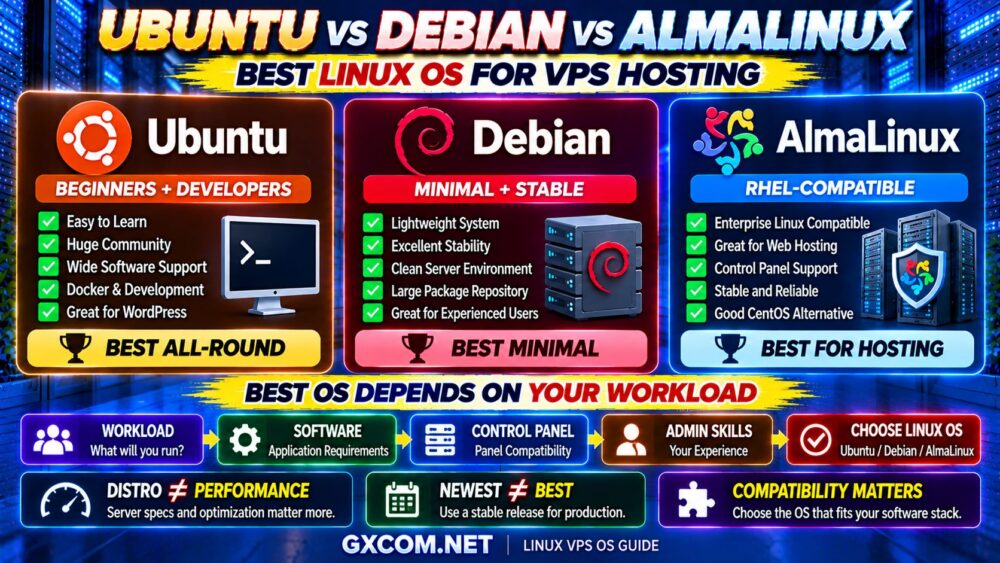
Ubuntu vs Debian vs AlmaLinux: Quick Comparison
| Feature | Ubuntu | Debian | AlmaLinux |
|---|---|---|---|
| Best For | Beginners, developers, general VPS | Minimal, stable servers | Hosting and RHEL-compatible environments |
| Package System | APT / DEB | APT / DEB | DNF / RPM |
| Beginner Friendly | Excellent | Good | Good |
| Documentation | Excellent | Excellent | Good |
| Minimal Installation | Good | Excellent | Good |
| Hosting Ecosystem | Excellent | Excellent | Excellent |
| Docker / Development | Excellent | Excellent | Good |
| RHEL Compatibility | No | No | Yes |
The simplest recommendation is:
UBUNTU → EASIEST GENERAL-PURPOSE CHOICE
DEBIAN → MINIMAL + STABLE
ALMALINUX → RHEL-COMPATIBLE HOSTING
Does the Linux Distribution Affect VPS Performance?
Yes—but usually less than many VPS buyers assume.
The Linux distribution can influence:
- Baseline memory usage
- Installed services
- Package versions
- Kernel and system configuration
- Administration workflow
However, application performance is usually affected much more by:
- CPU performance
- Available RAM
- NVMe or SSD performance
- Database configuration
- Web server configuration
- Caching
- Network latency
A poorly configured application on a powerful Ubuntu VPS can easily perform worse than a properly optimized application on Debian or AlmaLinux.
LINUX DISTRO ≠ VPS PERFORMANCE BY ITSELF.
If you are still deciding how much memory your server needs, read our Linux VPS RAM Requirements guide before choosing a plan.
Ubuntu for VPS Hosting
Ubuntu is one of the easiest Linux distributions to recommend for general-purpose VPS hosting.
It is based on Debian but provides its own release cycle, ecosystem and extensive documentation.
Ubuntu Server is commonly used for:
- Web hosting
- WordPress
- Docker
- Development environments
- Cloud servers
- APIs
- Databases
- Application servers
Its biggest advantage is not that Ubuntu is automatically faster.
Its biggest advantage is the ecosystem.
Why Ubuntu Is Popular on VPS Servers
Ubuntu benefits from a large user and developer community.
When you search for instructions such as:
- Install Nginx on VPS
- Install Docker
- Configure PHP
- Install MySQL
- Configure Redis
- Secure SSH
you will frequently find Ubuntu-specific instructions.
This can reduce the learning curve for new VPS administrators.
For beginners, good documentation can be more valuable than saving a small amount of RAM.
Ubuntu LTS vs Regular Releases for VPS
For production VPS hosting, Ubuntu Long Term Support releases are usually the more straightforward choice.
LTS releases are designed around longer support lifecycles than interim releases, reducing the need for frequent operating-system upgrades.
This is particularly useful for:
- Production websites
- Business applications
- WordPress
- Long-running servers
Unless you specifically need features from a newer interim release, stability and maintenance simplicity usually matter more on a production VPS.
Advantages of Ubuntu VPS
- Large community
- Extensive tutorials
- Broad software support
- Excellent Docker ecosystem
- Easy package management
- Strong cloud adoption
- Good choice for beginners
- Long-term support releases available
Ubuntu is particularly attractive when you want a Linux VPS that is easy to learn and widely documented.
Disadvantages of Ubuntu VPS
Ubuntu is not automatically the best option for everyone.
Potential disadvantages include:
- May include more components than a very minimal Debian installation
- Some experienced administrators prefer Debian's simpler base
- Not RHEL-compatible
- Some traditional hosting environments prefer AlmaLinux
These are generally ecosystem and administration differences rather than reasons to avoid Ubuntu.
Debian for VPS Hosting
Debian is one of the longest-established Linux distributions and is known for stability and a conservative approach to software packages.
It is an excellent choice for VPS users who want a clean and relatively minimal server environment.
Common Debian VPS workloads include:
- Web servers
- WordPress
- Docker
- Databases
- APIs
- VPN services
- Infrastructure services
Debian is especially attractive to administrators who know exactly what they want installed on the server.
Why Choose Debian Instead of Ubuntu?
The two systems are closely related, but they serve somewhat different preferences.
Ubuntu often emphasizes accessibility, ecosystem and convenience.
Debian often appeals to administrators who prefer:
- A minimal base installation
- Stable package branches
- Fewer unnecessary components
- Long-running server environments
This does not mean Debian is inherently faster.
It means you can build a very lean VPS environment around it.
Advantages of Debian VPS
- Excellent stability reputation
- Minimal installations
- Large package repositories
- APT package management
- Strong documentation
- Good for experienced administrators
- Excellent for web and infrastructure servers
For users comfortable with Linux administration, Debian can be an extremely efficient general-purpose VPS operating system.
Disadvantages of Debian VPS
- Some beginners may find Ubuntu tutorials easier to follow
- Stable repositories may prioritize proven packages over the newest versions
- Some commercial hosting tools target RHEL-compatible distributions instead
Again, these are tradeoffs rather than major weaknesses.
AlmaLinux for VPS Hosting
AlmaLinux occupies a different position from Ubuntu and Debian.
It is a community-driven, RHEL-compatible Linux distribution and became an important option for hosting providers and server administrators after the traditional CentOS model changed.
AlmaLinux is especially relevant for:
- Web hosting servers
- Control-panel environments
- Business servers
- RHEL-compatible applications
- Administrators familiar with CentOS/RHEL
If your software ecosystem expects an Enterprise Linux-style environment, AlmaLinux can be the natural choice.
Why AlmaLinux Became Popular in Web Hosting
For years, CentOS was widely used across the hosting industry.
Changes to the CentOS ecosystem created demand for alternative RHEL-compatible operating systems.
AlmaLinux became one of the major choices for users who wanted to remain within that ecosystem.
This is particularly important for server administrators already familiar with:
RHEL → CentOS → AlmaLinux
rather than:
DEBIAN → UBUNTU
Advantages of AlmaLinux VPS
- RHEL-compatible ecosystem
- Strong hosting-industry adoption
- Good control-panel compatibility
- Familiar environment for former CentOS users
- Enterprise-oriented approach
- Good long-term server use case
For traditional web hosting environments, these advantages can outweigh Ubuntu's larger beginner-oriented tutorial ecosystem.

Disadvantages of AlmaLinux VPS
- Less beginner-focused documentation than Ubuntu
- Uses RPM/DNF rather than Debian's APT ecosystem
- May be unnecessary if your entire application stack is already built around Ubuntu
- Some developer tutorials assume Ubuntu or Debian commands
Ubuntu vs Debian: Which Is Better for VPS?
This is probably the closest comparison of the three.
| Factor | Ubuntu | Debian |
|---|---|---|
| Beginner Experience | Excellent | Good |
| Minimal Server | Good | Excellent |
| Documentation | Excellent | Excellent |
| Developer Ecosystem | Excellent | Excellent |
| Package Approach | More convenience-oriented | More conservative/stability-oriented |
| Production Server | Excellent | Excellent |
Choose Ubuntu if you value tutorials, broad commercial support and a beginner-friendly ecosystem.
Choose Debian if you want a minimal, stable environment and are comfortable administering Linux directly.
For most workloads, the performance difference between properly configured Ubuntu and Debian is far less important than CPU, RAM, storage and application configuration.
Ubuntu vs AlmaLinux: Which Is Better?
The answer depends more on ecosystem than raw performance.
Choose Ubuntu when:
- You are a developer
- You use Docker heavily
- You want abundant tutorials
- You want a general-purpose cloud server
- You are new to Linux VPS hosting
Choose AlmaLinux when:
- You want a RHEL-compatible environment
- You previously used CentOS
- You run a traditional hosting stack
- Your control panel or software ecosystem favors Enterprise Linux
THE BEST OS IS THE ONE THAT FITS YOUR SOFTWARE STACK.
Debian vs AlmaLinux: Which Is Better?
Debian and AlmaLinux are both strong production server operating systems, but they come from different Linux ecosystems.
Debian uses:
APT + DEB
AlmaLinux uses:
DNF + RPM
For an administrator experienced with Debian-based servers, Debian may feel more natural.
For someone coming from CentOS or RHEL, AlmaLinux will usually feel more familiar.
The decision should generally follow the application and administration environment rather than an assumption that one distribution is universally faster.
Which Linux OS Uses the Least RAM?
VPS buyers often ask whether Debian uses less RAM than Ubuntu or AlmaLinux.
A minimal Debian installation can be extremely lightweight, which makes Debian attractive for low-memory VPS configurations.
However, comparing idle operating-system RAM alone can be misleading.
Consider:
OS = SMALL PART OF TOTAL WORKLOAD
Once you add:
- Nginx
- PHP
- MySQL
- Redis
- Docker
- Control panel
- WordPress
application memory can become much more important than small differences in the base operating system.
If RAM is your main concern, use actual workload requirements rather than choosing an OS based solely on idle memory consumption.
Best Linux OS for a 1GB VPS
For a very small 1GB VPS, a minimal installation becomes particularly valuable.
Debian is an excellent candidate because it can be installed with a lean server configuration.
Ubuntu Server can also work on a small VPS when unnecessary services are avoided.
The bigger question is what you intend to install afterward.
A minimal OS may fit easily within 1GB, while adding a database, PHP, control panel and multiple applications can quickly create memory pressure.
Best Linux OS for a 2GB or 4GB VPS
At 2GB or 4GB, the operating-system choice becomes less constrained by base memory usage.
You can choose based more on:
- Software compatibility
- Administration experience
- Documentation
- Control-panel support
- Application requirements
Ubuntu, Debian and AlmaLinux can all be excellent choices in this range.
CHOOSE THE ECOSYSTEM, NOT JUST THE IDLE RAM NUMBER.
Best Linux OS for WordPress VPS
Ubuntu and Debian are both excellent choices for WordPress.
A typical stack might include:
LINUX → NGINX/APACHE → PHP → MYSQL/MARIADB → REDIS → WORDPRESS
AlmaLinux is also well suited to WordPress, particularly when you are using a hosting-oriented control panel or RHEL-compatible server stack.
The WordPress site's performance will usually depend more heavily on:
- CPU quality
- PHP configuration
- Database performance
- RAM
- NVMe
- Caching
For the complete infrastructure comparison, see our Best VPS for WordPress guide.
Best Linux OS for Docker
Ubuntu and Debian are particularly popular choices for Docker VPS environments.
Ubuntu can be attractive for developers because so much cloud and container documentation uses it in examples.
Debian is attractive when you want a clean, stable base for containerized workloads.
AlmaLinux can also run container workloads, especially when the surrounding infrastructure is based on the RHEL ecosystem.
The most important factor is compatibility with your deployment tooling and team expertise.
Best Linux OS for Web Hosting
All three distributions can run web servers such as Apache and Nginx.
However, the answer changes when a hosting control panel enters the picture.
Traditional hosting environments frequently use Enterprise Linux-compatible systems, making AlmaLinux especially relevant.
For manually managed web servers, Ubuntu and Debian are both extremely strong choices.
A useful rule is:
MANUAL WEB STACK → UBUNTU OR DEBIAN
TRADITIONAL HOSTING / RHEL ECOSYSTEM → ALMALINUX
This is a guideline rather than a technical restriction.
Best Linux OS for cPanel VPS
If your VPS will run cPanel or another commercial control panel, operating-system compatibility should be checked before purchasing or installing the server.
Do not assume every control panel supports every Linux distribution and every release.
For hosting-oriented control-panel environments, AlmaLinux is often a natural distribution to evaluate because of its Enterprise Linux compatibility.
Always check the control-panel vendor's current supported operating-system list before deployment.
Best Linux OS for Developers
Ubuntu is difficult to beat as a general developer recommendation.
The reason is not benchmark superiority.
It is convenience.
Developers benefit from:
- Large community
- Cloud documentation
- Docker documentation
- Development tutorials
- Broad package availability
- Large troubleshooting knowledge base
Debian remains an excellent alternative for experienced developers who prefer a more minimal system.
Best Linux OS for Beginners
For someone buying a first Linux VPS, Ubuntu is usually the easiest recommendation.
A beginner will eventually encounter questions about:
- SSH
- Firewall configuration
- Nginx
- Apache
- PHP
- MySQL
- Docker
- SSL certificates
The availability of tutorials and community answers matters.
This makes Ubuntu's ecosystem a meaningful advantage.
Best Linux OS for Experienced Server Administrators
Experienced administrators should generally choose the distribution that matches their operational workflow.
If your existing infrastructure uses Debian, there may be little reason to switch.
If your organization uses Ubuntu extensively, standardizing on Ubuntu can simplify automation.
If your infrastructure is built around RHEL-compatible systems, AlmaLinux may reduce operational friction.
STANDARDIZATION CAN BE MORE VALUABLE THAN DISTRO HOPPING.
Which Linux OS Is Best for Security?
Ubuntu, Debian and AlmaLinux can all provide secure VPS environments when properly maintained.
Security depends heavily on administration practices.
Important steps include:
- Install security updates
- Use SSH keys where appropriate
- Restrict unnecessary services
- Configure a firewall
- Protect privileged accounts
- Monitor authentication attempts
- Maintain application software
- Use reliable backups
A theoretically secure distribution that is never patched is less secure than a properly maintained alternative.
SECURITY = OS + CONFIGURATION + UPDATES + MONITORING.
For a practical server-hardening workflow, see our Unmanaged VPS Security Checklist.
Which Linux OS Is Fastest?
There is no useful universal answer.
Benchmark results can change depending on:
- Kernel
- Packages
- Services
- Application
- CPU
- Memory
- Storage
- Configuration
For most VPS buyers, choosing a server with better CPU and storage performance will have a greater impact than obsessing over small differences between Ubuntu, Debian and AlmaLinux.
If storage performance matters to your workload, see our NVMe VPS Performance guide.
Ubuntu vs Debian vs AlmaLinux Package Management
Ubuntu
Ubuntu uses Debian packages and the APT package-management system.
sudo apt update
sudo apt upgrade
Debian
Debian also uses APT and DEB packages, making administration familiar to Ubuntu users.
sudo apt update
sudo apt upgrade
AlmaLinux
AlmaLinux belongs to the RPM ecosystem and uses DNF.
sudo dnf updateIf you already administer one ecosystem, staying within it can reduce learning time and configuration mistakes.
Ubuntu vs Debian vs AlmaLinux for VPS Control Panels
Control-panel compatibility can determine the operating system before performance considerations even begin.
Before ordering a VPS:
- Choose the control panel.
- Check its current OS requirements.
- Select a supported Linux release.
- Then choose the VPS.
Do not reverse the process and discover after deployment that your preferred control panel does not support the installed operating system.
Which VPS Providers Support Ubuntu, Debian or AlmaLinux?
Major VPS providers commonly make multiple Linux distributions available, but the exact operating systems and versions offered can change.
DigitalOcean is particularly relevant to developers building Ubuntu- or Debian-based cloud environments.
Vultr is another option when you want flexible Linux VPS deployment across multiple infrastructure locations.
Contabo can be worth evaluating when your Linux workload prioritizes larger resource allocations such as RAM or storage.
Before ordering, confirm that the provider currently offers the exact distribution and release your software stack requires.
More importantly, do not choose a VPS based on the OS dropdown alone.
Compare:
- CPU generation
- Shared vs dedicated CPU
- RAM
- NVMe performance
- Network
- Location
- Backups
- Scaling options
For the broader provider comparison, continue to our Best Linux VPS Hosting guide.
Can You Change Linux OS Later?
Usually, changing the operating system is not comparable to changing a simple application setting.
In many VPS environments, switching to another Linux distribution involves reinstalling or rebuilding the server.
This means you should plan for:
- Backups
- Application migration
- Database migration
- Configuration files
- DNS
- Downtime
Choosing an appropriate distribution at the beginning can reduce unnecessary migration work later.
Should You Use the Newest Linux Version?
Not automatically.
A production server needs compatibility as much as new features.
Before adopting a new OS release, check whether your:
- Control panel
- Application
- Database
- Runtime
- Backup software
- Monitoring tools
support it.
The newest release is not automatically the best production release.
COMPATIBILITY > NOVELTY.
Ubuntu vs Debian vs AlmaLinux: Which Should You Choose?
Choose Ubuntu If:
- You are new to Linux VPS hosting
- You want extensive tutorials
- You are a developer
- You use Docker
- You want a general-purpose VPS
- You value broad software documentation
Choose Debian If:
- You want a minimal server
- You prioritize stability
- You are comfortable with Linux administration
- You prefer the Debian ecosystem
- You want tight control over installed components
Choose AlmaLinux If:
- You want RHEL compatibility
- You previously used CentOS
- You operate traditional hosting infrastructure
- Your control panel favors Enterprise Linux
- Your organization already uses RPM-based systems
Linux VPS OS Decision Checklist
- ✓ What application will you run?
- ✓ Does it officially support the OS?
- ✓ Which package ecosystem do you know?
- ✓ Do you need a control panel?
- ✓ Does the panel support this OS version?
- ✓ Do you use Docker?
- ✓ Do you need RHEL compatibility?
- ✓ How much RAM does the VPS have?
- ✓ Are tutorials important?
- ✓ Is this a production server?
- ✓ How long will the OS release be supported?
- ✓ Can your team administer it?
Then ask:
WHICH OS BEST MATCHES MY SOFTWARE AND ADMINISTRATION WORKFLOW?
Ubuntu vs Debian vs AlmaLinux FAQ
Which Linux OS is best for VPS hosting?
Ubuntu is an excellent general-purpose choice, particularly for beginners and developers. Debian is ideal for users who prefer a minimal and stable environment, while AlmaLinux is attractive for RHEL-compatible and traditional web-hosting environments.
Is Ubuntu or Debian better for VPS?
Ubuntu is often easier for beginners because of its extensive tutorials and broad cloud ecosystem. Debian is an excellent alternative for experienced administrators who value minimalism and stability. Both are suitable for production VPS hosting.
Is AlmaLinux better than Ubuntu?
Not universally. AlmaLinux is better suited to some RHEL-compatible hosting environments, while Ubuntu is often more convenient for developers, Docker users and beginners.
Is Debian faster than Ubuntu?
A minimal Debian installation can use fewer resources than some Ubuntu configurations, but real application performance depends much more on server resources, installed services and application optimization.
Which Linux OS uses the least RAM?
Debian can be configured as a particularly lightweight server environment. However, total RAM usage is usually dominated by applications, databases and services rather than the base operating system alone.
Which Linux OS is best for WordPress?
Ubuntu and Debian are both excellent WordPress VPS operating systems. AlmaLinux is also a strong choice for hosting-oriented environments and compatible control panels.
Which Linux OS is best for Docker?
Ubuntu and Debian are especially popular for Docker deployments because of their large ecosystems and extensive documentation. AlmaLinux is also suitable where RHEL compatibility is preferred.
Which Linux OS is best for beginners?
Ubuntu is generally the easiest starting point because of its large community, extensive documentation and abundance of tutorials.
Should I use AlmaLinux instead of CentOS?
AlmaLinux is one of the major RHEL-compatible distributions adopted by users and hosting environments that previously relied on traditional CentOS Linux. The right choice still depends on software and operational requirements.
Final Verdict: Ubuntu vs Debian vs AlmaLinux
Ubuntu, Debian and AlmaLinux are all capable VPS operating systems.
There is no universal winner.
Ubuntu is the strongest general-purpose recommendation for beginners, developers and users who value documentation and ecosystem support.
Debian is an excellent choice for experienced administrators who want a minimal, stable and highly controllable server environment.
AlmaLinux is particularly valuable for RHEL-compatible infrastructure, hosting control panels and administrators coming from the CentOS ecosystem.
Use this decision path:
WORKLOAD
↓
SOFTWARE COMPATIBILITY
↓
CONTROL PANEL
↓
ADMIN EXPERIENCE
↓
RESOURCE REQUIREMENTS
↓
LINUX DISTRIBUTION
Remember:
UBUNTU = EASIEST GENERAL-PURPOSE CHOICE.
DEBIAN = MINIMAL + STABLE.
ALMALINUX = RHEL-COMPATIBLE HOSTING.
LINUX DISTRO ≠ VPS PERFORMANCE BY ITSELF.
THE NEWEST OS ≠ THE BEST PRODUCTION OS.
The best Linux OS for VPS hosting is the distribution that fits your applications, control panel, administration skills and long-term maintenance requirements—not simply the distribution that wins a synthetic benchmark.