Vultr has grown from a developer-focused VPS provider into a global cloud infrastructure platform offering virtual machines, dedicated CPU compute, GPU infrastructure, bare metal servers, Kubernetes, storage, networking, and AI infrastructure.
Its biggest attraction is flexibility. A small website can begin with an inexpensive shared-vCPU Cloud Compute instance, while larger applications can move to dedicated CPU infrastructure, physical bare metal, or powerful NVIDIA and AMD GPU systems without leaving the same cloud ecosystem.
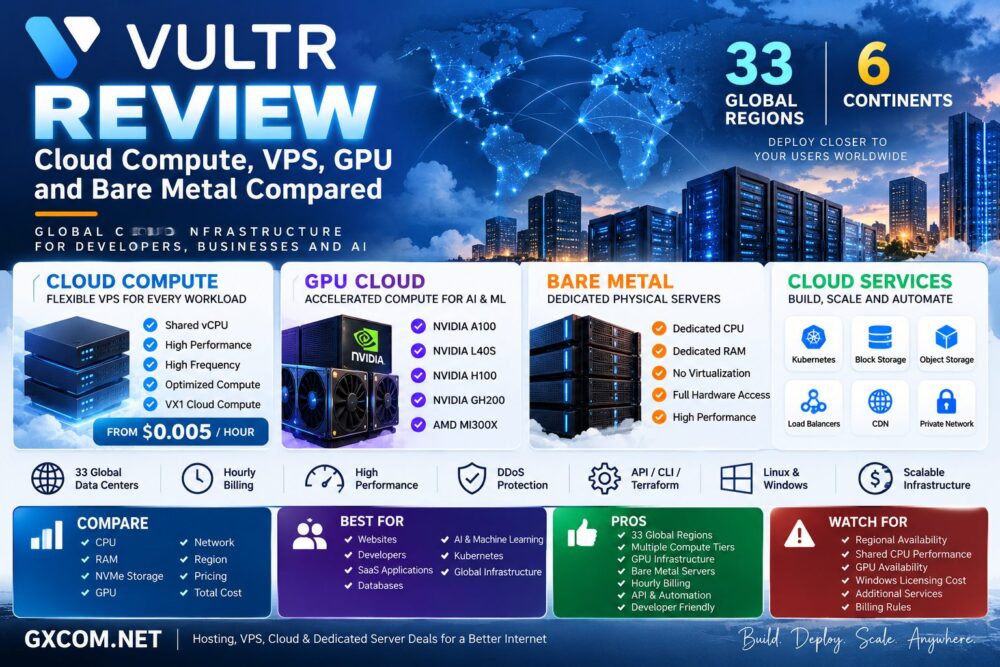
Vultr now operates across 33 global cloud data center regions, giving developers and businesses a broad geographic footprint for deploying websites, applications, databases, SaaS platforms, AI workloads, and globally distributed infrastructure.
In this Vultr Review, we compare Vultr Cloud Compute, VPS-style virtual machines, Optimized Cloud Compute, Cloud GPU, Bare Metal, pricing, performance, networking, locations, and the main pros and cons of the platform.
Vultr Review: Quick Overview
| Feature | Vultr |
|---|---|
| Cloud Compute | Yes |
| Shared vCPU | Yes |
| Dedicated vCPU | Yes |
| Optimized Cloud Compute | Yes |
| VX1 Cloud Compute | Yes |
| Cloud GPU | Yes |
| Bare Metal | Yes |
| Bare Metal GPU | Yes |
| Kubernetes | Yes |
| Block Storage | Yes |
| Object Storage | Yes |
| Load Balancers | Yes |
| Global Regions | 33 |
| Hourly Billing | Yes |
| Linux | Yes |
| Windows | Yes |
| API / CLI | Yes |
| Best For | Developers, websites, SaaS, cloud applications, AI, databases and global infrastructure |
What Is Vultr?
Vultr is an independent cloud infrastructure provider offering compute, GPU, bare metal, storage, networking, Kubernetes, and related cloud services.
For many users, Vultr is still associated primarily with VPS hosting. Technically, however, the platform has evolved far beyond a traditional VPS provider.
Its current compute portfolio includes:
- Cloud Compute
- High Performance Cloud Compute
- High Frequency Compute
- Optimized Cloud Compute
- VX1 Cloud Compute
- Cloud GPU
- Bare Metal
- GPU Bare Metal
- Compute Clusters
This gives customers a relatively straightforward upgrade path from a small virtual machine to enterprise and AI infrastructure.
Vultr Cloud Compute
Cloud Compute is Vultr's general-purpose virtual machine platform and is the product most users mean when referring to a Vultr VPS.
Current entry-level Cloud Compute pricing starts at approximately $0.005 per hour for a small instance with 1 vCPU, 0.5GB RAM, and 10GB storage.
Vultr offers several Cloud Compute performance categories, allowing customers to balance price, CPU performance, memory, and storage according to workload.
Typical uses include:
- Websites
- WordPress
- Development servers
- VPNs
- Small databases
- Game servers
- APIs
- Business applications
The advantage is that users can deploy quickly without committing to a physical server.
Is Vultr a VPS Provider or Cloud Provider?
Both descriptions can be correct depending on context.
A Vultr Cloud Compute instance functions much like a conventional VPS: users receive virtual CPU, RAM, storage, an operating system, and network connectivity.
However, Vultr's wider infrastructure includes Kubernetes, managed services, storage, networking, GPUs, bare metal, load balancing, and automation.
It is therefore more accurate today to describe Vultr as a cloud infrastructure provider rather than simply a VPS hosting company.
Vultr Cloud Compute Performance Tiers
Not every Vultr virtual machine is designed for the same workload.
Users can choose between different compute categories based on performance requirements.
| Compute Type | Best For |
|---|---|
| Cloud Compute | General websites, development and everyday workloads |
| High Performance | Performance-sensitive applications |
| High Frequency | Clock-sensitive workloads |
| Optimized Cloud Compute | Production applications requiring dedicated vCPU |
| VX1 | Modern cloud-native workloads and high network performance |
The important lesson is that the cheapest instance is not necessarily the best-value instance.
Same vCPU Count ≠ Same CPU Performance.
Vultr Optimized Cloud Compute
Optimized Cloud Compute is designed for workloads that require more predictable CPU performance.
Unlike shared-vCPU Cloud Compute, these instances use dedicated vCPU resources and are available in configurations optimized for different workload profiles.
They are particularly relevant for:
- Production websites
- Databases
- Application servers
- CI/CD
- High-traffic services
- Business applications
For sustained CPU-intensive workloads, dedicated vCPU can reduce the performance variability associated with shared compute.
Vultr VX1 Cloud Compute
VX1 represents a newer generation of Vultr Cloud Compute designed around modern cloud-native workloads.
The platform combines high-performance compute with Vultr Block Storage and high-speed networking.
Current VX1 configurations can provide network capacity ranging into tens of gigabits per second, depending on the plan.
Vultr also supports booting VX1 instances from high-performance Block Storage, allowing storage capacity to be managed separately from the compute instance.
This architecture can be useful for:
- Cloud-native applications
- Distributed services
- High-throughput APIs
- Data workloads
- Containerized applications
Vultr Cloud GPU
Vultr has become increasingly important in the GPU cloud market.
Cloud GPU infrastructure allows customers to deploy accelerated compute for:
- Artificial intelligence
- Machine learning
- LLM training
- AI inference
- Generative AI
- Rendering
- Scientific computing
- HPC
Unlike a conventional CPU VPS, GPU instances include hardware accelerators designed for massively parallel workloads.
This makes Vultr relevant not only to traditional hosting customers but also to AI developers and machine learning teams.
Vultr NVIDIA and AMD GPU Infrastructure
Vultr's GPU portfolio extends across both NVIDIA and AMD accelerator infrastructure.
Depending on product, region, and availability, the broader GPU platform includes hardware designed for different levels of AI and graphics workloads.
Its bare-metal GPU documentation currently covers options including:
- NVIDIA A100 PCIe
- NVIDIA A100 SXM
- NVIDIA L40S
- NVIDIA H100
- NVIDIA GH200
- AMD Instinct MI300X
These GPUs target very different workloads, so customers should compare GPU memory, memory bandwidth, architecture, software compatibility, interconnect, and price rather than simply choosing the newest accelerator.
Vultr GPU for LLM Training
Large language model training can require substantial GPU memory and high-speed communication between accelerators.
For smaller fine-tuning and development workloads, a single GPU may be sufficient.
Large-scale training can require multiple high-memory accelerators and high-bandwidth interconnects.
Vultr now supports GPU fabric cluster infrastructure using technologies such as RoCE or InfiniBand for applicable distributed workloads.
For additional options, see our
Best GPU Servers for LLM Training and AI Inference
guide.
Vultr GPU for AI Inference
Inference has different requirements from model training.
Important metrics include:
- VRAM
- Time to first token
- Tokens per second
- Concurrent requests
- Batch size
- Latency
- GPU utilization
- Cost per request
An expensive H100-class GPU is not automatically the most economical inference option.
The correct GPU depends on model size, quantization, traffic patterns, latency targets, and utilization.
Vultr Bare Metal
Vultr Bare Metal provides single-tenant physical servers without a virtualization layer.
Unlike Cloud Compute, where physical hardware is virtualized into multiple instances, Bare Metal gives the customer direct access to dedicated server hardware.
This can provide:
- Dedicated CPU resources
- Dedicated RAM
- No virtualization overhead
- Greater hardware control
- Predictable sustained performance
Typical workloads include databases, virtualization, high-traffic applications, compute-intensive software, private infrastructure, and specialized enterprise applications.
Vultr Bare Metal vs Cloud Compute
| Factor | Cloud Compute | Bare Metal |
|---|---|---|
| Infrastructure | Virtual Machine | Physical Server |
| Deployment | Very Fast | Hardware dependent |
| CPU | Shared or dedicated depending on plan | Physical dedicated CPU |
| Hardware Control | Limited | High |
| Virtualization Overhead | Present | None |
| Entry Cost | Low | Higher |
| Best For | Flexible cloud workloads | Sustained demanding workloads |
Bare Metal is not automatically better than Cloud Compute.
For many websites and applications, virtualization provides better flexibility and economics.
Vultr Bare Metal GPU
Vultr also combines dedicated physical infrastructure with high-end GPUs.
Bare Metal GPU can be useful when a workload needs direct access to powerful accelerators without sharing underlying physical hardware with other tenants.
Current documented GPU variants span NVIDIA A100, L40S, H100, GH200 and AMD MI300X infrastructure.
Potential workloads include:
- LLM training
- Generative AI
- AI inference
- Machine learning
- Scientific simulations
- 3D rendering
- HPC
Vultr Kubernetes Engine
Vultr Kubernetes Engine allows developers to deploy and manage Kubernetes clusters using Vultr infrastructure.
This makes it possible to combine container orchestration with Vultr compute, storage, networking, and other cloud services.
Typical use cases include:
- Microservices
- Containerized applications
- DevOps pipelines
- Scalable web applications
- Cloud-native SaaS
Kubernetes is powerful, but it also adds operational complexity. Small applications may be easier and cheaper to run on a conventional Cloud Compute instance.
Vultr Storage
Vultr provides multiple storage options for different workloads.
These include services such as:
- Block Storage
- Object Storage
- File System storage
- Local instance storage
- Backups and snapshots
Separating compute from persistent storage can improve infrastructure flexibility because applications can scale or replace compute nodes without tying all persistent data to a single virtual machine.
Vultr Networking
Vultr's networking ecosystem extends beyond the network interface attached to a VPS.
The platform includes technologies and services such as:
- Private networking
- Load Balancers
- Global Load Balancers
- DDoS protection
- CDN
- Reserved IPs
- Cloud firewalls
Global Load Balancers can distribute traffic across multiple regions, which is useful for applications requiring geographic redundancy or lower latency for globally distributed users.
Vultr Global Locations
One of Vultr's strongest characteristics is its geographic footprint.
With the addition of Milan in 2026, Vultr reached 33 global cloud data center regions.
Its infrastructure spans major markets across:
- North America
- South America
- Europe
- Asia
- Australia
- Africa
European locations include cities such as Amsterdam, Frankfurt, London, Madrid, Manchester, Milan, Paris, Stockholm, and Warsaw.
The broad geographic footprint makes Vultr useful for applications where users need infrastructure close to their audience.
User Location → Cloud Region → Network Latency → Application Experience.
Vultr Pricing
Vultr uses usage-based pricing across much of its infrastructure.
Cloud Compute currently begins at approximately $0.005 per hour, while higher-performance compute, dedicated CPU, GPUs, and Bare Metal cost substantially more.
Pricing should always be evaluated at the complete infrastructure level rather than comparing only the base virtual machine.
Potential additional costs can include:
- Compute
- GPU resources
- Block Storage
- Object Storage
- Backups
- Snapshots
- Bandwidth
- Load balancing
- Windows licensing
- Additional IP resources
For production workloads, calculate the expected monthly total before deployment.
How Vultr Hourly Billing Works
Vultr bills server products hourly, but there is an important detail users should understand.
Cloud Compute, Optimized Cloud Compute, and Bare Metal use a monthly billing cap based on up to 672 hours, while GPU products use a different 730-hour monthly calculation.
Another important point is that simply powering off a Vultr instance does not stop billing.
The reserved compute resources continue to generate charges until the instance is destroyed.
This can surprise users accustomed to cloud services where stopping a virtual machine may suspend some compute charges.
Linux and Windows Support
Vultr supports both Linux and Windows workloads.
Linux users can deploy common distributions and custom environments, while Windows users can connect using Remote Desktop where supported.
Windows licensing can increase total infrastructure cost, so Windows customers should compare the configured checkout price rather than the Linux base price.
Vultr API, CLI and Terraform
Vultr is particularly attractive to developers because infrastructure does not have to be managed manually through the web dashboard.
Deployment and infrastructure management can be automated using:
- Vultr API
- Vultr CLI
- Terraform
- Application integrations
Bare Metal, for example, can be provisioned through the console, API, CLI, or Terraform.
This makes Vultr suitable for infrastructure-as-code workflows and automated deployments.
Vultr Performance
There is no meaningful single benchmark that represents the performance of every Vultr product.
A low-cost shared-vCPU Cloud Compute instance, a dedicated-vCPU Optimized instance, an H100 GPU server, and a Bare Metal machine are completely different infrastructure products.
Performance depends on:
- CPU architecture
- Shared vs dedicated CPU
- Clock speed
- RAM
- Storage
- GPU
- Network
- Region
- Application design
For this reason, customers should benchmark the actual workload instead of assuming that more vCPUs automatically mean better performance.
Have We Independently Benchmarked Vultr?
This review evaluates Vultr using its current published specifications, product documentation, pricing structure, infrastructure capabilities, and service information.
Unless GXCOM.NET explicitly publishes benchmark methodology and measured results, provider specifications should not be interpreted as independent GXCOM.NET performance tests.
For production workloads, useful tests include:
- Single-core CPU performance
- Multi-core performance
- Storage IOPS
- Storage latency
- Network throughput
- Database performance
- Application response time
- GPU throughput
- Cost per completed workload
Vultr vs DigitalOcean
| Factor | Vultr | DigitalOcean |
|---|---|---|
| Cloud VMs | Yes | Yes |
| Global Footprint | Very broad | Broad |
| GPU Infrastructure | Yes | Yes |
| Bare Metal | Yes | Different infrastructure focus |
| Kubernetes | Yes | Yes |
| Block Storage | Yes | Yes |
| Object Storage | Yes | Yes |
| Developer Focus | Strong | Strong |
Both platforms target developers, but their infrastructure portfolios and regional availability differ.
For more information, see our
DigitalOcean VPS Review.
Vultr vs Kamatera
Vultr and Kamatera both provide globally distributed cloud infrastructure, but their configuration models differ.
Kamatera emphasizes highly customizable cloud server configurations, while Vultr combines multiple predefined compute tiers with a broader ecosystem that includes GPU infrastructure, Bare Metal, Kubernetes, storage, and cloud networking.
Read our
Kamatera Cloud Review
for a detailed look at the alternative platform.
Vultr Cloud vs Bare Metal
The choice between virtual cloud infrastructure and physical hardware should be based on workload requirements rather than the assumption that dedicated hardware is always better.
Cloud Compute is generally better suited to workloads requiring:
- Fast deployment
- Lower entry cost
- Flexible scaling
- Temporary infrastructure
Bare Metal becomes more attractive when workloads require:
- Dedicated physical CPU
- No virtualization layer
- Sustained heavy compute
- Greater hardware control
- Predictable physical resources
Vultr Pros and Cons
| Pros | Cons |
|---|---|
| 33 global cloud regions | Not every product is available in every region |
| Low-cost Cloud Compute entry point | Shared-vCPU performance depends on workload |
| Multiple compute tiers | Many product choices can complicate selection |
| Dedicated CPU options | Windows licensing adds cost |
| NVIDIA and AMD GPU infrastructure | High-end GPU availability can vary |
| Bare Metal servers | Bare Metal costs more than entry-level VPS |
| Kubernetes and cloud-native services | Advanced infrastructure requires technical knowledge |
| Block and Object Storage | Additional services increase total cost |
| API, CLI and Terraform | Stopped servers continue billing until destroyed |
| Hourly billing | GPU billing uses a different monthly calculation |
Who Should Consider Vultr?
Vultr is particularly relevant for:
- Developers
- System administrators
- WordPress and web hosting
- Startups
- SaaS applications
- Databases
- DevOps teams
- Kubernetes workloads
- AI developers
- Machine learning
- Globally distributed applications
- Bare-metal workloads
The platform is especially useful when a project may grow from a small virtual machine into more advanced infrastructure over time.
Who May Prefer an Alternative?
Users who want fully managed traditional web hosting with cPanel, email, WordPress management, and hands-on hosting support may find a conventional managed hosting provider easier to use.
Likewise, organizations deeply dependent on a particular hyperscaler ecosystem may require services or integrations that Vultr does not replicate directly.
Vultr is primarily infrastructure. The customer still needs to choose and manage the correct architecture.
Is Vultr Good Value?
Vultr's value proposition is strongest when customers take advantage of its combination of global regions, multiple compute tiers, hourly infrastructure, GPUs, Bare Metal, storage, networking, and developer automation.
However, comparing cloud providers only by the advertised VPS starting price is rarely useful.
A better calculation is:
Compute + Storage + Bandwidth + Backups + Network Services + Licenses + Management = Real Cloud Cost.
Performance also matters. A more expensive instance that completes a workload faster can provide better total value than the cheapest VM.
Vultr Review: Final Thoughts
Vultr is no longer simply a VPS provider. Its current platform spans general-purpose Cloud Compute, dedicated CPU infrastructure, VX1, GPU cloud, physical Bare Metal, GPU Bare Metal, Kubernetes, storage, networking, and distributed AI infrastructure.
Its 33-region global footprint is a major advantage for developers and businesses that need to deploy applications closer to users in multiple parts of the world.
The biggest strength is infrastructure choice. Customers can start with an inexpensive virtual machine and move toward dedicated CPU, GPU, Bare Metal, or distributed cloud architecture as workload requirements increase.
The trade-off is that more choice creates more responsibility. Customers need to understand CPU type, storage, bandwidth, region, GPU requirements, billing behavior, and total infrastructure cost before selecting a plan.
For developers, SaaS platforms, globally distributed applications, AI workloads, and businesses that want an alternative to the largest hyperscale clouds, Vultr is a platform worth comparing.
Before deploying, use this decision path:
Workload → CPU / GPU → Shared or Dedicated → RAM → Storage → Network → Region → Cloud or Bare Metal → Total Cost.