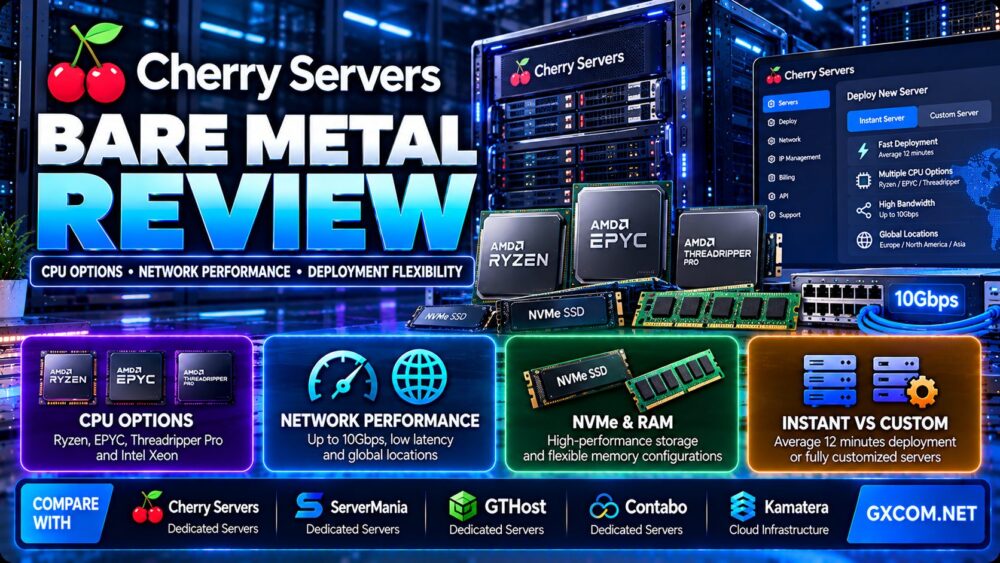
This Cherry Servers bare metal review examines CPU options, network performance, storage, deployment flexibility, and long-term operating costs. Cherry Servers offers dedicated physical infrastructure for customers who need exclusive hardware resources, low-level server control, and more predictable resource allocation than conventional shared virtual machines.
Its bare metal portfolio includes preconfigured Instant Servers and customizable dedicated systems. Depending on the selected product, customers can choose AMD Ryzen, AMD EPYC, AMD Threadripper Pro, and Intel-based configurations, alongside different memory, NVMe storage, and networking options.
However, bare metal is not automatically the best choice for every workload. Physical servers can deliver useful isolation and control, but hardware selection, network design, deployment time, maintenance responsibilities, and total cost must be evaluated carefully.
In this review, we explain where Cherry Servers fits, which CPU configurations are worth considering, how to evaluate network performance, and when alternative providers such as ServerMania, GTHost, Contabo, and Kamatera may be more appropriate.
Editorial methodology: This review is based on published product documentation, hardware specifications, and infrastructure evaluation criteria. GXCOM.NET has not independently benchmarked Cherry Servers CPU performance, network throughput, uptime, or customer support response times. Product availability and contractual terms should be confirmed before ordering.
Cherry Servers Bare Metal Review: Quick Verdict
Cherry Servers is worth considering for developers, infrastructure teams, hosting businesses, and organizations that need dedicated physical hardware with modern deployment and automation capabilities.
Its main advantages include multiple CPU families, hardware isolation, NVMe-based storage options, flexible billing, API-based provisioning, and network features suitable for advanced infrastructure deployments.
Its main trade-offs are the operational responsibilities of bare metal hosting, potential delays for custom hardware, and the need to match the selected configuration to the workload.
| Evaluation Area | Cherry Servers Assessment |
|---|---|
| Hosting category | Dedicated bare metal infrastructure |
| Server products | Instant, Custom, and selected GPU servers |
| CPU options | AMD Ryzen, EPYC, Threadripper Pro, and selected Intel processors |
| Resource isolation | Single-tenant physical hardware |
| Memory | Configuration-dependent, including high-capacity options |
| Storage | NVMe and other supported disk configurations |
| Network ports | Configuration-dependent, including multi-gigabit options |
| Traffic allowance | Varies by server and product |
| Provisioning | Automated Instant Servers and technician-assisted custom builds |
| Server access | Full root-level administration on supported unmanaged servers |
| Automation | REST API and infrastructure management integrations |
| Billing | Hourly or fixed-period options |
| Best fit | Dedicated compute, virtualization, databases, and infrastructure workloads |
| Main limitation | Greater operational responsibility than managed hosting |
What Is Cherry Servers Bare Metal Hosting?
Cherry Servers provides dedicated physical servers for customers who need direct access to hardware resources rather than a virtual machine sharing a host with unrelated tenants.
On a bare metal server, the customer controls the operating system and workloads running on the assigned machine, subject to the provider's service terms.
This model is useful for applications that require predictable resource allocation, specialized software, custom virtualization environments, or large memory and storage configurations.
Cherry Servers combines traditional dedicated hardware with cloud-style features such as automated deployment, APIs, and flexible billing.
That combination is important because bare metal hosting historically involved lengthy provisioning cycles and rigid contracts.
For a broader explanation of physical infrastructure, read our dedicated server hosting guide.
Cherry Servers Instant vs Custom Dedicated Servers
One of the most important decisions in this Cherry Servers bare metal review is whether to choose an Instant Server or a Custom Server.
Instant Dedicated Servers
Instant Servers are preconfigured physical machines designed for faster provisioning.
Cherry Servers advertises average deployment times of approximately 12 minutes for supported Instant Server configurations.
This is a provider-reported average, not a guaranteed provisioning time for every server or region.
Instant Servers are relevant to customers who want to deploy a dedicated machine quickly without waiting for custom hardware assembly.
Custom Dedicated Servers
Custom Servers allow customers to select supported hardware options, including memory and storage configurations.
These deployments can require additional preparation and technician involvement.
Cherry Servers documentation indicates that custom builds may take approximately 24–72 hours, depending on configuration and location.
Customers planning a migration should confirm the expected delivery date before scheduling production changes.
Instant vs Custom Comparison
| Factor | Instant Servers | Custom Servers |
|---|---|---|
| Hardware selection | Preconfigured plans with selected options | Broader supported customization |
| Provisioning | Automated, typically faster | May require technician preparation |
| Deployment planning | Suitable for urgent requirements | Requires more lead time |
| Memory options | Plan-dependent | More configuration flexibility |
| Storage options | Plan-dependent | More tailored disk configurations |
| Best use case | Fast deployment with known requirements | Specialized production workloads |
Choose Instant when speed and a suitable prebuilt configuration are priorities.
Choose Custom when precise memory, storage, or other hardware requirements matter more than immediate provisioning.
Cherry Servers CPU Options: Ryzen vs EPYC vs Threadripper
CPU selection is one of the strongest reasons to consider a dedicated server.
Unlike a generic VPS specification listing only virtual CPU counts, dedicated hardware plans identify physical processor models and their characteristics.
Cherry Servers lists multiple AMD and Intel processor families across its bare metal portfolio.
AMD Ryzen: High-Frequency Workloads
AMD Ryzen configurations can be attractive for applications that benefit from high per-core performance.
Examples include certain game servers, latency-sensitive applications, web workloads, and software with limited parallelism.
Cherry Servers lists Ryzen models including the Ryzen 9950X on supported server products.
However, a high advertised boost clock does not mean every core sustains that frequency under continuous load.
Cooling, power limits, instruction mix, and workload characteristics affect sustained performance.
AMD EPYC: Memory and Parallel Compute
AMD EPYC processors are designed for server workloads requiring substantial core counts, memory capacity, and I/O connectivity.
Cherry Servers offers multiple EPYC generations and configurations.
EPYC-based systems may suit virtualization hosts, database servers, large application stacks, analytics workloads, and other parallel processing environments.
However, an older high-core-count EPYC processor may perform differently from a newer lower-core-count CPU on lightly threaded tasks.
AMD Threadripper Pro: Specialized Workstations and Compute
Threadripper Pro combines high core counts with platform features relevant to demanding compute and workstation-style applications.
It can be appropriate for workloads requiring substantial parallel CPU capacity, memory bandwidth, or expansion capabilities.
Actual value depends on the selected processor generation and workload.
Intel Xeon Options
Cherry Servers also documents Intel-based dedicated server configurations.
Intel options may be relevant where application compatibility, processor-specific instructions, or established deployment standards influence purchasing decisions.
Customers should compare actual processor generations rather than treating all Xeon configurations as equivalent.
CPU Selection Guide
| Workload | CPU Priority | Configuration Direction |
|---|---|---|
| Game servers | Strong per-core performance | High-frequency Ryzen or comparable CPUs |
| Virtualization hosts | Core count, RAM, I/O capacity | EPYC or other server-class CPUs |
| Large databases | Memory, storage latency, CPU balance | Server-class CPUs with adequate RAM |
| Parallel analytics | Core count and memory bandwidth | High-core-count EPYC or Threadripper Pro |
| Web applications | Single-thread and multi-thread balance | CPU selected from measured workload needs |
| CPU-based AI processing | Instruction support, cores, memory | Workload-specific server configuration |
The best processor is not necessarily the one with the most cores or the highest listed clock speed.
For serious production deployments, benchmark the actual application using representative datasets and concurrency.
Cherry Servers RAM and NVMe Storage Options
Memory and storage can be just as important as processor choice.
Memory Capacity
Cherry Servers offers dedicated systems with a wide range of memory configurations, including high-capacity server options.

Large memory allocations can support database caching, virtual machines, analytics, and memory-intensive applications.
However, memory capacity alone does not determine performance.
Memory channels, CPU architecture, NUMA topology, and application behavior can influence throughput and latency.
NVMe Storage
Many Cherry Servers dedicated configurations include NVMe SSDs.
NVMe storage is useful for workloads requiring low storage latency and high I/O throughput.
Examples include transactional databases, virtualization hosts, indexing systems, and data-processing pipelines.
Actual performance depends on the drive model, capacity, firmware, RAID configuration, and sustained workload.
RAID and Data Protection
Some configurations support multiple disks and RAID arrangements.
RAID can improve redundancy or performance depending on its design, but it is not a substitute for independent backups.
RAID 1 can protect against certain individual disk failures, but it does not protect against accidental deletion, ransomware, or every hardware incident.
Storage Planning Checklist
- Confirm the number of physical drives.
- Check NVMe generation and drive specifications where available.
- Identify the supported RAID configuration.
- Estimate sustained read and write requirements.
- Plan database and application growth.
- Separate backup storage from primary storage.
- Verify restoration procedures before production use.
Cherry Servers Network Performance: Ports, Bandwidth and Latency
Cherry Servers advertises dedicated server configurations with multi-gigabit networking, including selected 3Gbps and 10Gbps options.
However, network performance requires more analysis than reading the port-speed specification.
Port Speed vs Real Throughput
A 10Gbps network port represents a nominal interface capacity under suitable conditions.
It does not guarantee that every remote client can transfer data at 10Gbps.
Actual throughput depends on routing, network congestion, remote endpoint capacity, packet loss, TCP behavior, and application design.
Storage speed and CPU utilization can also limit end-to-end transfer rates.
Monthly Traffic Allowances
Cherry Servers lists traffic allowances that vary by product and configuration.
Some server products advertise 30TB to 100TB of included monthly traffic.
Customers should check whether the allowance covers outbound traffic, how inbound traffic is treated, and what happens when usage exceeds the included amount.
Traffic pooling and overage rules may differ by service.
Bandwidth Calculation Example
Consider a hypothetical service that transfers 40TB of outbound data in a 30-day month.
Using decimal units, the approximate average outbound rate is:
40TB × 8 / (30 × 24 × 3,600) ≈ 123Mbps.
This does not mean a 123Mbps port is sufficient for the workload.
Traffic often arrives in bursts, and peak throughput can be many times higher than the monthly average.
Capacity planning should account for both sustained demand and peak transfer requirements.
Network Location and Latency
Cherry Servers operates infrastructure in multiple geographic regions.
Its published product listings include European, North American, and Asian locations, with availability depending on the server configuration.
Choose a region based on actual user distribution, application dependencies, and data-handling requirements.
A geographically close data center can reduce latency, but routing quality and network interconnection also matter.
Private Networking
Cherry Servers documents private VLAN and related networking capabilities.
These features can help connect application, database, and management systems without exposing every internal service directly to the public internet.
Customers should confirm region-specific availability and network design requirements.
DDoS Protection
Cherry Servers advertises DDoS protection features for supported infrastructure.
Protection scope and mitigation capabilities should be reviewed in the applicable service terms.
No DDoS protection service should be assumed to prevent every possible attack or application-layer disruption.
Cherry Servers Deployment Flexibility and Automation
Deployment flexibility is one of the distinguishing features of Cherry Servers bare metal infrastructure.
The platform combines physical hardware with provisioning tools more commonly associated with cloud environments.
REST API
Cherry Servers provides a REST API for supported server management and provisioning operations.
API access can help infrastructure teams automate repetitive tasks and integrate deployment into existing workflows.
Infrastructure as Code
Cherry Servers advertises integrations and tooling relevant to infrastructure automation, including Terraform and Ansible support.
These tools can help maintain consistent infrastructure configurations and reduce manual setup errors.
Operating System Selection
Supported server products provide several Linux operating system options.
Cherry Servers also offers Windows Server configurations, but Windows licensing can add substantial cost and must be checked separately.
Customers requiring a specific OS version should verify availability before ordering.
IP KVM and Recovery Access
Out-of-band management capabilities can be important when a server becomes unreachable through its normal network connection.
Cherry Servers documents remote console and IP KVM functionality on supported products.
These features can assist with operating system installation, troubleshooting, and recovery.
Custom Images and Configuration
Advanced customers may need custom operating system images or specialized deployment settings.
Compatibility depends on the selected hardware and management features.
Verify support for custom ISOs, boot modes, disk layouts, and network configurations before committing to a production deployment.
Cherry Servers for Virtualization and Private Cloud
Bare metal servers are particularly useful for customers who want to run their own virtualization environments.
Cherry Servers markets dedicated infrastructure for virtualization platforms including Proxmox, KVM, and other supported hypervisors.
However, virtualization performance depends on the physical CPU, RAM, storage design, and number of guest workloads.
Virtual Machine Density
A high-core-count server can host many virtual machines, but oversubscribing resources may reduce performance.
CPU scheduling, memory allocation, storage contention, and network demand must be considered together.
Private Cloud Architecture
Dedicated servers can form part of a private cloud deployment when combined with virtualization software, network segmentation, monitoring, and storage systems.
However, a single bare metal server does not automatically provide high availability.
Resilient architectures may require multiple nodes, redundant networking, replicated storage, and tested failover procedures.
Bare Metal vs VPS
VPS hosting can be more convenient for smaller workloads requiring rapid scaling and lower initial resource commitments.
Bare metal is more relevant when exclusive hardware resources and low-level control are essential.
For a broader comparison, read our dedicated server vs VPS guide.
Cherry Servers Security, Backups and Management Responsibilities
Physical server isolation can reduce certain multi-tenant risks, but it does not eliminate the need for security management.
Operating System Security
Customers managing their own servers are generally responsible for operating system updates, access controls, application security, and monitoring.
Root access provides flexibility but also increases administrative responsibility.
Network Security
Use firewalls, restricted management access, private networks, and appropriate authentication controls.
Production databases should not be exposed publicly unless the application architecture specifically requires it and suitable controls are in place.
Backup Strategy
Cherry Servers offers backup storage features on supported products.
However, customers should confirm capacity, backup frequency, storage location, and recovery procedures.
Independent off-site backups are important for protecting against accidental deletion, compromised systems, and broader infrastructure incidents.
Hardware Failure
Dedicated hardware can fail just like any other physical system.
Organizations with strict uptime requirements should plan for hardware replacement, failover, data recovery, and application continuity.
Service-level agreements should be reviewed separately from marketing uptime statements.
Cherry Servers Pricing and Long-Term Cost
Cherry Servers offers hourly and fixed-period billing options on supported dedicated server products.
This can make bare metal more accessible for short-term testing, development, and production infrastructure planning.
However, total cost depends on more than the base server configuration.
CPU and Memory Costs
Processor generation, core count, RAM capacity, and hardware availability affect the price of dedicated infrastructure.
A newer CPU may cost more but complete some workloads faster.
Compare cost per completed workload rather than price per core alone.
Storage Costs
Additional NVMe capacity, extra disks, backup storage, and storage-related services can affect total spending.
Review which storage components are included and which require additional charges.
Network and Traffic Costs
Port speed, included traffic, additional IP addresses, and excess data transfer may affect long-term costs.
High-bandwidth workloads should calculate expected monthly egress and potential overage charges.
Operating System Licensing
Windows Server licensing may add a separate recurring expense.
Customers should not assume that Windows licensing is included in a Linux-based bare metal plan.
Administration Costs
Unmanaged dedicated servers require ongoing maintenance.
Organizations should account for administrator time, monitoring, security updates, incident response, and backup testing.
Total Cost Formula
Annual bare metal cost = Server rental + Hardware upgrades + Storage services + Network overages + Software licenses + Backup services + Administration + Applicable taxes.
For longer commitments, compare the full contractual term and any cancellation or renewal conditions.
Hypothetical Bare Metal Cost Comparison
The following example illustrates why a lower base rental does not always produce a lower total cost. These figures are fictional and do not represent current Cherry Servers quotations.
| Illustrative Monthly Cost | Server A | Server B |
|---|---|---|
| Base server rental | $150 | $220 |
| Additional storage | $20 | $0 |
| Backup services | $15 | $15 |
| Network overages | $30 | $0 |
| Administration allocation | $80 | $80 |
| Illustrative monthly total | $295 | $315 |
| Illustrative annual total | $3,540 | $3,780 |
All figures are hypothetical budgeting examples, not provider prices, offers, or measured operating costs.
Server B has a higher base rental but includes more of the required resources in this example.
However, Server A still has a slightly lower illustrative annual cost. The final decision would depend on CPU performance, storage capacity, network requirements, and operational needs.
Cherry Servers vs ServerMania vs GTHost vs Contabo vs Kamatera
Cherry Servers operates in a competitive infrastructure market, but not every provider offers the same product model.
| Provider | Primary Evaluation Focus | Potential Fit |
|---|---|---|
| Cherry Servers | Automated and customizable bare metal | Dedicated compute with cloud-style deployment tools |
| ServerMania | Dedicated server configurations and network options | Businesses evaluating tailored physical infrastructure |
| GTHost | Instant dedicated server deployment | Customers prioritizing fast provisioning |
| Contabo | VPS and dedicated infrastructure options | Budget-conscious customers comparing resource packages |
| Kamatera | Configurable cloud infrastructure | Customers prioritizing virtual cloud flexibility |
Cherry Servers vs ServerMania
ServerMania offers dedicated server products relevant to customers evaluating physical infrastructure and network requirements.
Cherry Servers emphasizes a combination of bare metal hardware, automated deployment, and infrastructure management tools.
Compare exact CPU models, storage configurations, geographic availability, support responsibilities, and bandwidth policies.
Cherry Servers vs GTHost
GTHost is relevant to customers searching for quickly provisioned dedicated servers.
Cherry Servers also offers Instant Servers, while its Custom Servers provide additional hardware flexibility.
Actual delivery times should be verified for the selected configuration and region.
Cherry Servers vs Contabo
Contabo offers several infrastructure products, including VPS and dedicated hosting options.
Customers should avoid comparing a low-cost shared-resource VPS directly with a higher-capacity dedicated server as though they were equivalent.
Instead, compare resource isolation, hardware specifications, network policies, and total operating cost.
Cherry Servers vs Kamatera
Kamatera provides configurable cloud infrastructure.
Cloud instances can offer flexible provisioning and resizing, while dedicated bare metal provides physical hardware allocation.
Kamatera may suit workloads that benefit from virtualized cloud flexibility. Cherry Servers may suit applications requiring exclusive physical resources or specific hardware configurations.
Who Should Choose Cherry Servers Bare Metal?
Good Candidates
- Developers requiring dedicated physical compute.
- Businesses operating resource-intensive applications.
- Teams building virtualization clusters.
- Organizations with high memory or storage requirements.
- Database operators needing predictable hardware resources.
- Infrastructure teams using APIs and automation.
- Customers who need customized CPU and NVMe configurations.
- Businesses planning private cloud environments.
Who Should Consider Alternatives?
- Small websites that fit comfortably on shared hosting.
- Users who need fully managed application administration.
- Projects requiring instant scaling across many virtual machines.
- Customers without the skills or budget to maintain unmanaged servers.
- Applications that need only a small fraction of a physical server.
- Businesses that require a specific hardware configuration unavailable in their preferred region.
Cherry Servers Bare Metal Pros and Cons
Advantages
- Dedicated single-tenant physical hardware.
- Multiple AMD and Intel CPU options.
- Instant and custom deployment models.
- NVMe storage and high-memory configurations.
- Multi-gigabit networking on selected products.
- API and automation capabilities.
- Private networking and additional IP options.
- Hourly and fixed-period billing choices.
- Root-level administration on supported unmanaged servers.
- Suitable for virtualization and specialized infrastructure.
Limitations
- Custom hardware can require additional provisioning time.
- Hardware inventory varies by region.
- Higher administration requirements than managed hosting.
- Not every configuration offers identical network capacity.
- Traffic overages and optional services may add costs.
- Windows licensing may involve significant additional expense.
- Physical hardware scaling can be less immediate than cloud VM resizing.
- High availability requires appropriate architecture.
- Performance must be validated for the actual workload.
Cherry Servers Buying Checklist
- Identify the application's CPU requirements.
- Choose between high-frequency and high-core-count processors.
- Confirm the exact CPU generation.
- Estimate required RAM capacity and memory bandwidth.
- Select the appropriate NVMe configuration.
- Review RAID and backup requirements.
- Confirm the selected data center location.
- Check port speed and included monthly traffic.
- Estimate peak and average network throughput.
- Choose Instant or Custom provisioning.
- Verify the expected delivery time.
- Confirm operating system compatibility.
- Review root access and remote console capabilities.
- Check API and automation requirements.
- Calculate all recurring and optional charges.
- Review support and hardware replacement procedures.
- Plan monitoring, security updates, and disaster recovery.
Frequently Asked Questions
Is Cherry Servers a bare metal hosting provider?
Yes. Cherry Servers offers dedicated physical servers, including Instant and Custom configurations, with single-tenant hardware resources.

How fast does Cherry Servers deploy dedicated servers?
Cherry Servers advertises average deployment times of approximately 12 minutes for supported Instant Servers. Custom configurations can take longer, often requiring technician preparation.
Does Cherry Servers offer AMD EPYC servers?
Yes. Cherry Servers lists multiple AMD EPYC configurations alongside Ryzen, Threadripper Pro, and selected Intel options.
Does Cherry Servers provide NVMe storage?
Yes. Many dedicated server configurations include NVMe SSDs, with storage options varying by hardware plan.
Does Cherry Servers offer 10Gbps networking?
Selected dedicated server products advertise 10Gbps network ports. Actual throughput depends on the server configuration, routing, traffic policy, and remote endpoints.
Can I run Proxmox on Cherry Servers?
Cherry Servers markets dedicated infrastructure for virtualization, including Proxmox and other hypervisors. Verify compatibility with the selected hardware and installation method.
Does Cherry Servers provide root access?
Supported unmanaged dedicated servers provide full root-level administration, subject to the provider's service terms.
Is Cherry Servers better than a VPS?
It depends on the workload. Bare metal provides exclusive physical resources, while a VPS may be more economical and easier to resize for smaller applications.
Does Cherry Servers offer hourly billing?
Cherry Servers advertises hourly billing on supported dedicated server products, alongside fixed-period options.
Is Cherry Servers suitable for databases?
It can be suitable for database workloads that benefit from dedicated CPU, RAM, and storage resources. The correct configuration depends on database size, transaction volume, and recovery requirements.
Final Verdict: Is Cherry Servers Bare Metal Worth It?
Our Cherry Servers bare metal review finds that the provider is a credible option to evaluate for dedicated physical infrastructure with a useful combination of hardware choice, automation, and flexible deployment.
Instant Servers can suit customers who need a supported preconfigured machine quickly, while Custom Servers provide more room to match hardware to demanding workloads.
The strongest reasons to consider Cherry Servers are exclusive physical resources, multiple CPU families, NVMe storage options, multi-gigabit networking, and cloud-style provisioning tools.
However, customers should verify actual CPU specifications, hardware availability, network allowances, custom deployment lead times, and total administration costs.
For further purchasing context, compare available products in our bare metal server comparison and review our affordable dedicated server deals guide.
WORKLOAD → CPU ARCHITECTURE → MEMORY → NVMe STORAGE → NETWORK → DEPLOYMENT → MANAGEMENT → TOTAL COST → BARE METAL DECISION