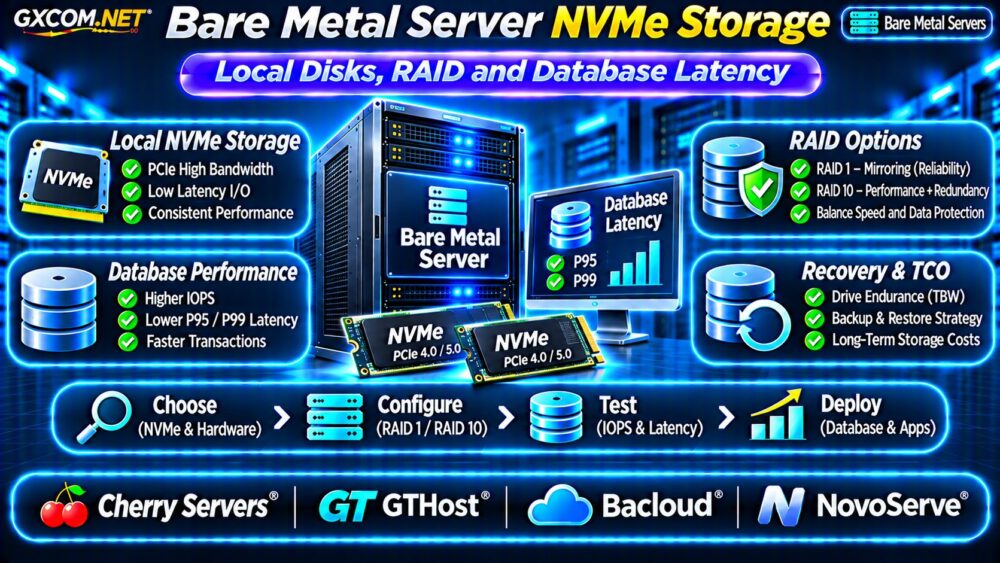
Bare metal server NVMe storage can improve database responsiveness by providing direct access to fast local drives without the storage contention sometimes associated with shared infrastructure. However, NVMe hardware alone does not guarantee low application latency or reliable data recovery.
Before choosing a bare metal server, evaluate local disk performance, RAID architecture, database write behavior, replacement procedures, and total storage costs. This guide explains how to compare those factors without relying solely on advertised IOPS.
Why NVMe Storage Matters for Bare Metal Servers
NVMe uses a storage interface designed for solid-state devices, commonly connected through PCIe. Compared with traditional SATA SSD configurations, suitable NVMe drives can support higher throughput and greater command parallelism.
Database workloads benefit when storage operations frequently block transactions or queries. Examples include transaction logs, temporary files, index updates, and random reads.
Performance still depends on CPU resources, database configuration, drive quality, filesystem behavior, and workload concurrency.
Local NVMe vs Network Storage
Local NVMe drives connect directly to the physical server, reducing dependence on an external storage network. This can simplify the I/O path and provide predictable access under suitable conditions.
Network storage offers different advantages, including centralized capacity management, shared access, and potentially easier infrastructure migration.
| Factor | Local NVMe | Network Storage |
|---|---|---|
| Data path | Directly attached | Network-dependent |
| Latency | Potentially lower | Depends on architecture |
| Capacity expansion | Hardware-dependent | Often more flexible |
| Failure recovery | Requires local recovery planning | Depends on storage service |
| Migration | Data transfer usually required | May support shared access |
Neither option is universally superior. The correct choice depends on workload characteristics and operational requirements.
RAID 1 vs RAID 10 for NVMe Databases
RAID configurations influence redundancy, usable capacity, and performance. RAID 1 mirrors data across drives, while RAID 10 combines mirroring and striping.
RAID 10 can provide additional parallelism when sufficient drives are available, but actual results depend on workload and implementation.

For a detailed redundancy comparison, read our Dedicated Server RAID 1 vs RAID 10 Guide.
RAID Does Not Replace Backups
RAID cannot protect against every failure, including accidental deletion, ransomware, application corruption, or catastrophic server damage.
Maintain independent backups and test restoration procedures. Database-consistent backups may require engine-specific tools rather than ordinary file copying.
Database Latency: Why P95 and P99 Matter
Average storage latency can conceal occasional slow operations. P95 and P99 measurements help reveal the slower portion of observed requests.
For example, a database may show acceptable average query response times while occasional storage stalls delay customer transactions.
Measure application-level latency alongside storage metrics. A fast disk benchmark does not necessarily translate into faster database queries.
Important Database Storage Metrics
- Random read and write IOPS under realistic queue depths.
- Sequential throughput for backups and large transfers.
- P95 and P99 read/write latency.
- Database transaction commit and fsync behavior.
- Performance during sustained writes and recovery.
Use representative datasets and test durations long enough to expose thermal throttling, cache effects, and sustained-write limitations.
NVMe Hardware Quality and Endurance
Not all NVMe drives are equivalent. Enterprise-oriented models may offer different endurance ratings, power-loss protection, firmware behavior, and warranty conditions from consumer devices.
Ask providers about drive models, capacity, PCIe generation, replacement policies, and whether hardware monitoring is available.
Power-loss protection deserves particular attention for write-intensive databases, but its benefits depend on the complete storage and application configuration.
Our NVMe vs SSD Performance Guide provides additional context on storage specifications and benchmarks.
Four Bare Metal NVMe Providers to Compare
The following GXCOM.NET-approved affiliate providers are candidates for dedicated infrastructure. Verify current NVMe availability and hardware specifications before ordering.
Cherry Servers: Flexible Bare Metal Hardware
Cherry Servers is worth evaluating when database workloads require dedicated hardware and configurable storage. Compare available NVMe configurations, drive replacement procedures, management access, and upgrade options.
GTHost: NVMe and Network Requirements
GTHost provides another comparison option for dedicated infrastructure. Examine NVMe capacity, processor specifications, network location, and recovery responsibilities.
Bacloud: Budget-Oriented Storage Choices
Bacloud may appeal to organizations balancing storage capacity and monthly costs. Confirm whether quoted drives are NVMe rather than SATA SSDs, and request details about hardware age and replacement policies.
NovoServe: Storage and Connectivity Planning
NovoServe is another candidate when bare metal deployment location and network connectivity matter. Verify NVMe availability, private networking options, hardware support, and provisioning conditions.
Do not assume every provider offers identical RAID configurations, hot-swap capability, or database management services.
Calculate Bare Metal NVMe Storage Costs
Monthly rental is only one component of total cost. Additional expenses may include larger drives, backup storage, replacement infrastructure, managed support, and data transfer.
Consider a hypothetical deployment costing $140 monthly for hardware, $35 for independent backups, and $25 for monitoring and recovery services.
The combined monthly estimate is $200, or $7,200 over 36 months before taxes, setup fees, and administrative labor.

These are illustrative planning figures, not current provider quotations.
Compare alternative infrastructure using our Dedicated vs Cloud Server Comparison.
NVMe Bare Metal Buying Checklist
- Confirm actual NVMe drive models and capacities.
- Check RAID support and usable storage capacity.
- Benchmark database latency under realistic workloads.
- Verify backup independence and recovery procedures.
- Review drive endurance and replacement policies.
- Calculate three-year infrastructure and operating costs.
Frequently Asked Questions
Is Local NVMe Faster Than Network Storage?
Local NVMe can reduce storage-path overhead, but performance depends on the specific hardware, network storage architecture, and workload.
Does RAID 10 Improve Database Performance?
RAID 10 may improve throughput and parallelism with suitable drives, but benchmark results vary. It does not replace independent backups.
Should Every Database Use NVMe?
No. Applications with modest I/O requirements may gain little benefit. Profile database bottlenecks before paying for premium storage.
Final Verdict
Bare metal server NVMe storage is most valuable when database performance is constrained by storage latency or throughput. Prioritize realistic benchmarks, suitable RAID design, independent backups, and documented recovery procedures.
Compare Cherry Servers, GTHost, Bacloud, and NovoServe using complete hardware specifications and current quotations. Choose storage that supports your workload and recovery objectives rather than the highest advertised IOPS.