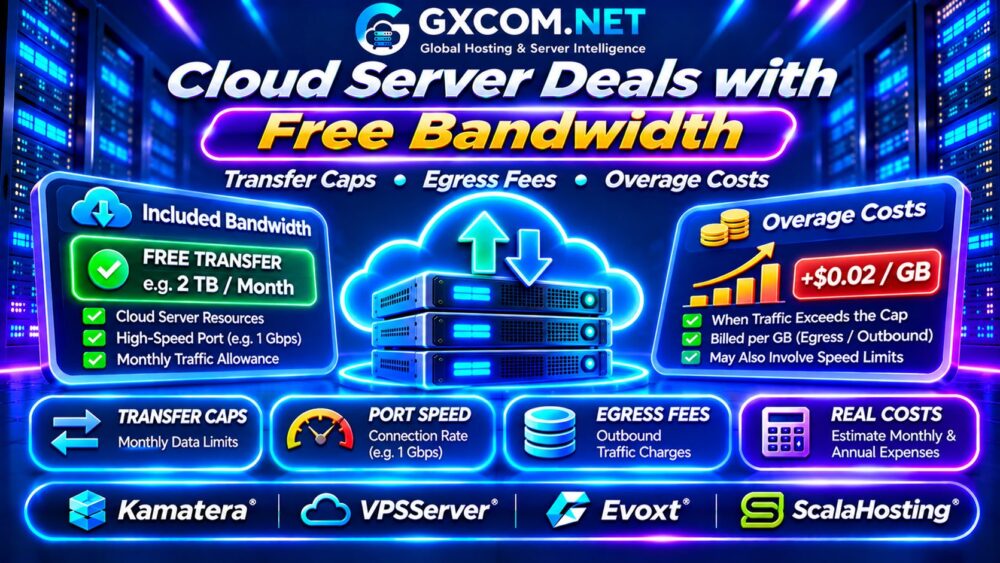
Finding worthwhile cloud server deals with free bandwidth requires more than comparing monthly hosting prices. A cloud instance may include a generous transfer allowance, yet unexpected outbound traffic, backup downloads, or bandwidth restrictions can increase your bill.
For SaaS startups, WordPress publishers, developers, and online businesses, network costs can become significant as traffic grows. This guide explains included bandwidth, transfer caps, overage charges, and how to compare cloud server offers using realistic monthly expenses.
What Does Free Bandwidth Mean in Cloud Hosting?
Free bandwidth generally refers to network transfer included in a hosting subscription. It does not necessarily mean unlimited traffic, unrestricted port speed, or free data movement between every service.
Some providers include a fixed monthly traffic allowance. Others use fair-use policies, metered transfer, or separate charges for particular network destinations.
Always distinguish three specifications:
- Included transfer: The amount of traffic covered by the subscription.
- Port speed: The maximum advertised network connection rate.
- Overage policy: What happens after the allowance is exhausted.
A 1Gbps connection does not automatically provide unlimited monthly transfer. Our Cloud VPS Bandwidth Costs Guide explains these technical differences.
Inbound vs Outbound Data Transfer
Inbound traffic, also called ingress, enters your cloud server. Outbound traffic, or egress, leaves it. Many cloud billing models distinguish these directions, but the treatment varies by provider.
Websites serving images, downloads, video, or API responses may generate substantial outbound transfer. Database replication, external backups, and cross-region transfers can also affect costs.
Check whether the advertised allowance counts outbound traffic only, combined traffic, or another measurement. Never assume inbound data is free without verifying the applicable service terms.
Transfer Caps and Bandwidth Throttling
Reaching a traffic limit can produce different outcomes. A provider might charge for additional gigabytes, reduce connection speed, suspend network access, or require a plan upgrade.
| Traffic Policy | Possible Outcome |
|---|---|
| Fixed allowance | Additional usage may be billed |
| Speed throttling | Lower throughput after a threshold |
| Hard transfer cap | Traffic may be restricted |
| Unmetered port | Traffic governed by port speed and usage terms |
Ask whether limits reset monthly, whether unused traffic carries forward, and whether alerts appear before overages occur.

Four Cloud Hosting Providers to Compare
Kamatera: Configurable Cloud Infrastructure
Kamatera is relevant to businesses needing adjustable cloud server resources. Compare the selected configuration’s network transfer policy, data center location, billing model, and optional services.
Check whether additional network usage is charged separately and how the platform reports consumption.
VPSServer: Cloud VPS Hosting
VPSServer is another candidate for cloud VPS workloads. Review the included transfer allowance, network connection specifications, upgrade options, and contract terms.
Evaluate the total price of the exact configuration rather than assuming every plan has identical bandwidth allowances.
Evoxt: Budget VPS Alternatives
Evoxt is worth investigating for budget-conscious Linux or Windows VPS deployments. Compare included traffic, available server locations, CPU resources, and monthly subscription costs.
Confirm what happens when traffic exceeds the selected plan’s allowance and whether additional bandwidth can be purchased.
ScalaHosting: Managed Cloud VPS
ScalaHosting is relevant to website owners who prefer managed hosting. Examine network policies alongside CPU, RAM, storage, security, and administrative support.
A managed package may cost more initially but reduce operational responsibilities. Verify renewal pricing and applicable traffic restrictions.
These providers are comparison candidates, not a verified list of currently active free-bandwidth promotions.
Calculate Cloud Bandwidth Overage Costs
Consider a hypothetical cloud server costing $20 monthly with 2TB of included outbound transfer. Assume the provider charges $0.02 per additional GB.
Using decimal units for this example, 3TB of outbound traffic means 1,000GB exceeds the allowance.
| Monthly Item | Illustrative Cost |
|---|---|
| Cloud server subscription | $20 |
| Included outbound transfer | 2,000GB |
| Actual outbound transfer | 3,000GB |
| Additional transfer | 1,000GB |
| Overage charge | $20 |
| Total monthly cost | $40 |
The overage doubles the base hosting bill. These figures are illustrative, not current supplier prices. Actual calculations depend on billing units, regional rates, and transfer classifications.
Compare Two Cloud Server Deals Over 12 Months
Suppose Plan A costs $15 monthly with a smaller allowance, producing an average $12 monthly overage. Plan B costs $24 monthly and covers the same workload without additional transfer charges.
Plan A totals $27 monthly, or $324 annually. Plan B totals $288 annually, saving $36 despite its higher advertised subscription price.
This simplified comparison assumes stable usage and excludes taxes, backups, and optional services. Estimate expected traffic before deciding which offer is cheaper.
How CDNs Affect Cloud Transfer Bills
A content delivery network can cache static assets closer to visitors, potentially reducing requests and outbound transfer from your origin server.
However, CDN traffic may have separate charges. Cache misses, dynamic content, and origin fetches can still consume server bandwidth.
For growing websites, compare infrastructure options in our Best Cloud Hosting Solutions Guide.
Hidden Network Charges to Check
Cloud bills may include more than ordinary website traffic. Review cross-region data movement, load balancers, backup exports, additional IP addresses, and managed networking services.
Large application migrations can temporarily increase transfer requirements. Our Cloud Server Migration Guide covers migration planning considerations.
Also verify whether network usage is measured per server, account, project, or billing region. These differences can change the economics of multi-server deployments.
When Is Unmetered Bandwidth Better?
Unmetered hosting can be attractive for predictable, high-volume traffic, but it does not guarantee unlimited throughput. Port speed, fair-use rules, network congestion, and acceptable-use policies still matter.

For sustained heavy transfer, compare dedicated infrastructure and network capacity. Our Dedicated vs Cloud Server Comparison explains the broader tradeoffs.
Cloud Server Bandwidth Buying Checklist
- Confirm whether transfer allowances cover ingress, egress, or both.
- Check monthly traffic caps and advertised port speed.
- Verify overage rates, throttling, and suspension policies.
- Estimate traffic growth and seasonal demand.
- Review CDN, backup, and cross-region transfer charges.
- Calculate annual costs using realistic traffic estimates.
Frequently Asked Questions
Does Free Cloud Bandwidth Mean Unlimited Traffic?
No. Free bandwidth may refer to a fixed included allowance, and additional restrictions can apply.
What Happens When Cloud Transfer Exceeds the Limit?
Depending on the provider, extra traffic may incur charges, reduced speeds, or service restrictions.
Is 1Gbps Cloud Hosting Unlimited?
No. A 1Gbps port describes connection speed, not necessarily the amount of monthly data included.
Final Verdict
The best cloud server deals with free bandwidth combine suitable compute resources, useful transfer allowances, transparent overage policies, and predictable renewal costs.
Compare Kamatera, VPSServer, Evoxt, and ScalaHosting against your actual network requirements. Prioritize total monthly cost and clear traffic policies over impressive bandwidth claims.
For additional pricing context, review our Shared vs Cloud Hosting Costs Comparison.