Understanding Pterodactyl VPS requirements is essential before deploying a self-hosted game server control panel. Pterodactyl can manage Minecraft, Rust, ARK, and other supported workloads, but the panel itself is only one part of the infrastructure. Docker containers, game processes, databases, and operating-system services all consume resources.
A cheap VPS may run the dashboard successfully yet struggle when players join. This guide explains how to size CPU, RAM, storage, networking, and Docker support before choosing between self-managed VPS hosting and managed game servers.
What Is Pterodactyl and How Does It Work?
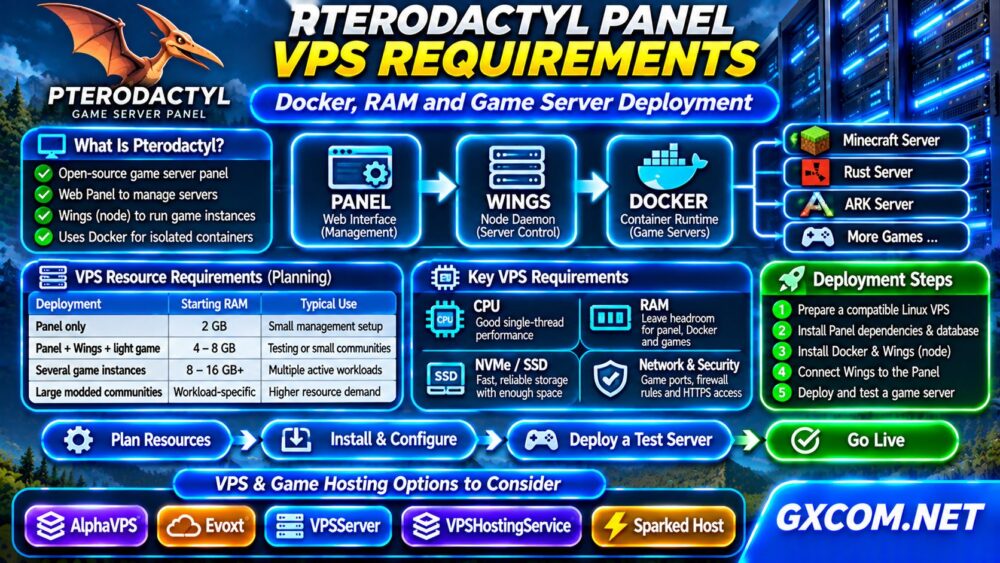
Pterodactyl is an open-source game server management platform. Its web-based Panel handles administration, users, permissions, and server configuration. Wings is the node daemon responsible for communicating with Docker and managing game server containers.
A deployment typically includes:
- Panel: Web interface, application runtime, database, and supporting services.
- Wings: Node daemon coordinating game containers.
- Docker: Container runtime providing workload isolation.
- Game instances: Actual Minecraft, Rust, ARK, or other supported servers.
The Panel and Wings can share a VPS for small installations, but larger deployments may benefit from separating management services and game nodes.
Minimum vs Recommended Pterodactyl VPS Resources
There is no universal RAM allocation suitable for every Pterodactyl installation. The game workload usually determines the practical hardware requirements.
| Deployment | Starting RAM Budget | Typical Use |
|---|---|---|
| Panel only | 2 GB | Small management installation |
| Panel, Wings, light game | 4–8 GB | Testing or small communities |
| Several game instances | 8–16 GB+ | Multiple active workloads |
| Large modded communities | Workload-specific | Dedicated resource planning |
These figures are planning estimates, not official minimum requirements or performance guarantees. Leave memory for Linux, Docker, databases, caching, and background processes. Never allocate the VPS’s entire advertised RAM to game containers.
1. Choose CPU Resources for Your Games
CPU performance matters more than the ability to display the Pterodactyl dashboard. Minecraft often benefits from strong single-thread performance, while other game workloads can have different threading characteristics.
Check CPU generation, sustained performance, shared versus dedicated vCPU policies, and resource contention. A plan advertising many virtual cores does not automatically outperform one with fewer, faster cores.

For additional hardware context, read our Game Server Hosting guides.
2. Confirm Docker and Virtualization Compatibility
Wings uses Docker to run game containers. Your VPS must permit a supported Docker installation and the necessary Linux kernel features.
Modern KVM-based VPS platforms are often suitable, but compatibility should be verified rather than assumed. Some restricted container-based VPS environments cannot provide the required capabilities.
Before purchasing, confirm root or equivalent administrative access, supported operating systems, container networking, and Docker installation permissions.
On a compatible Linux host, administrators can inspect the environment using:
uname -r
cat /etc/os-release
docker info
The final command works only after Docker is installed and accessible. Follow the official Pterodactyl and Docker documentation for supported versions and installation steps.
3. Plan RAM Allocation and Prevent Container Exhaustion
Separate the memory reserved for management services from memory allocated to game servers. For example, a VPS with 8 GB RAM cannot safely promise the entire 8 GB to a Minecraft container while also running the Panel, Wings, database, and operating system.
Monitor actual usage during startup, world generation, and peak player activity. Java heap settings do not represent the complete memory footprint of a Minecraft server.
Use Linux tools to inspect available resources:
free -h
docker stats
Repeated out-of-memory kills, unexpected container exits, or severe swapping indicate that allocation settings or the hosting plan need adjustment.
4. Use SSD or NVMe Storage with Enough Headroom
Pterodactyl installations store game files, worlds, logs, configuration, and temporary data. Modpacks and backups can increase disk usage substantially.
Prefer storage with reliable random I/O performance and enough free capacity for updates and recovery. NVMe branding alone does not guarantee consistent performance on an oversubscribed VPS.
Check disk availability with:
df -hKeep backups outside the same VPS when possible. A provider snapshot is useful, but it should not replace a tested, independent backup strategy.
5. Configure Networking, Ports, and Security
Game servers require the correct TCP or UDP ports for their specific protocols. Pterodactyl also needs secure communication between the Panel and Wings.
Configure DNS, HTTPS, firewall rules, and node allocations according to the current official installation documentation. Do not expose Docker’s administrative socket or database services publicly without a compelling, secured requirement.
Use least-privilege access, strong credentials, and regular updates. Our Unmanaged Server Security Checklist covers additional VPS protection measures.
6. Deploy Panel and Wings in the Correct Order
Begin with a supported Linux distribution and update the operating system. Install the Panel’s required application dependencies, database, and supporting services using the documentation for your selected Pterodactyl release.
Next, configure the Panel’s environment, HTTPS access, background workers, and scheduled tasks. Install Docker and Wings on the intended game node, then register that node through the Panel.
Finally, configure network allocations, install an appropriate game template, and launch a small test server before migrating production worlds.
Do not copy outdated installation commands blindly. Supported PHP, database, Docker, and operating-system versions can change between releases.
7. Test a Game Server Before Migrating Players
Create one test instance and verify container startup, console access, file management, player connections, restart behavior, and backup recovery.
Monitor CPU, RAM, disk utilization, and network traffic while players connect. Confirm that scheduled maintenance and software updates do not unexpectedly interrupt production instances.
If your goal is simply to run one game without managing Linux, Docker, and security patches, a managed hosting plan may be more economical in administrator time.

8. Compare Gaming VPS and Managed Game Hosting
AlphaVPS, Evoxt, VPSServer, and VPSHostingService are VPS providers to investigate for self-managed deployments. Confirm their current Linux options, Docker compatibility, CPU allocation, storage limits, and networking policies before buying.
Sparked Host represents an alternative for readers who prefer a managed game hosting service rather than maintaining their own infrastructure. Product availability and management responsibilities vary by plan.
Explore our Best VPS Providers comparison, Game Hosting Comparisons, and Managed vs Unmanaged VPS guide to compare infrastructure and support models.
Frequently Asked Questions
Can Pterodactyl Run on a 2 GB VPS?
A small Panel-only deployment may fit within that budget, depending on its software stack and activity. Running meaningful game workloads usually requires additional resources.
Does Pterodactyl Require Docker?
Wings uses Docker for game containers. Verify that your VPS supports the required container runtime and kernel features.
Is Pterodactyl Better Than Managed Game Hosting?
It offers greater administrative control but also creates maintenance responsibilities. Managed hosting may suit users who prioritize convenience and support.
Final Verdict
Successful Pterodactyl hosting starts with workload planning. Choose compatible virtualization, reserve memory for system services, prioritize reliable CPU and storage, and test Docker networking before deploying production game servers. Compare VPS and managed hosting based on total operating effort, not monthly price alone.