Understanding cheap dedicated server renewal costs is essential before committing to a low-priced hosting plan. An attractive introductory offer may look affordable, but setup charges, renewal rates, hardware upgrades, and contract restrictions can significantly change the total cost of ownership.
For small businesses, developers, and growing SaaS projects, the cheapest server today is not necessarily the most economical choice over two years.
This guide explains how to evaluate dedicated server renewal pricing, identify additional charges, compare contract terms, and calculate realistic hosting expenses. It also outlines purchasing considerations for InterServer, Bacloud, GTHost, and NovoServe.
Why Cheap Dedicated Server Renewal Costs Matter
Dedicated hosting typically involves renting an entire physical server. Unlike many shared hosting products, the final bill may depend on hardware availability, billing frequency, optional management, and customized infrastructure.
Some providers advertise promotional pricing, while others display standard recurring rates. Neither approach should be assumed to apply universally.
Before ordering, distinguish the initial payment from the recurring invoice. Confirm whether taxes, installation, software licenses, or additional IP addresses are included.
Our cheap dedicated servers for small businesses guide explains when renting physical hardware makes financial sense.
1. Compare Introductory Prices With Renewal Rates
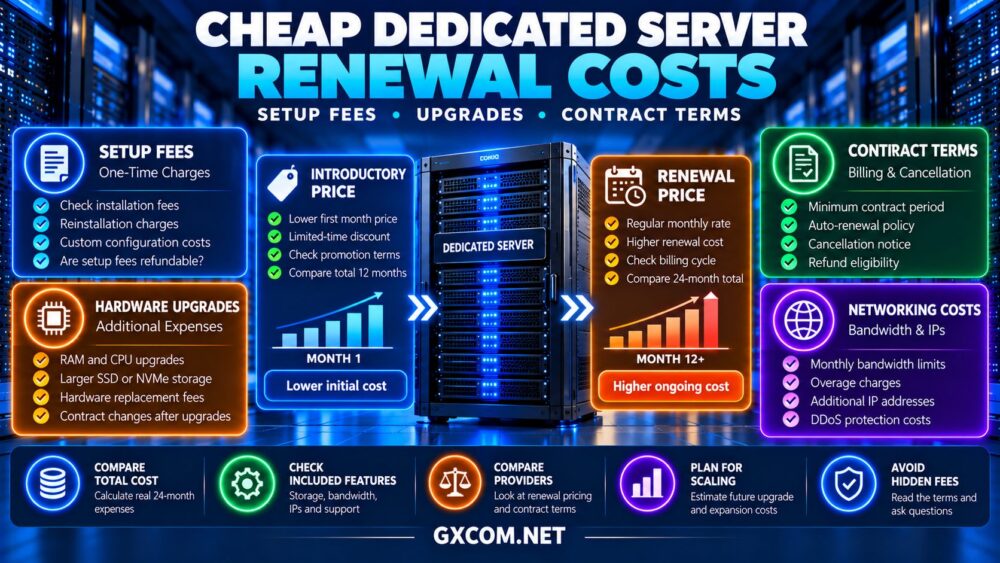
A low first-month price may reflect a temporary discount rather than the server’s normal recurring cost.
For example, consider a hypothetical dedicated server advertised at $55 for the first month and $85 for subsequent months.
The first-year rental cost would be $55 plus eleven payments of $85, totaling $990 before additional fees.
If the recurring rate remains $85 throughout the second year, that year’s rental cost would be $1,020.
Always check the order summary, promotional conditions, and renewal invoice schedule. Do not assume a discount remains active indefinitely.
2. Check One-Time Setup and Installation Fees
Setup fees may cover hardware provisioning, installation, or custom configuration. Their amount and applicability vary by provider and server model.
A plan with a lower monthly rental price can become more expensive than an alternative when a substantial one-time charge is included.
For instance, a hypothetical $65 monthly server with a $120 setup fee costs $900 during its first twelve months.
A competing server costing $72 monthly with no setup fee totals $864 over the same period.
Before payment, verify whether setup charges are refundable, whether reinstallations incur fees, and whether changing hardware triggers another provisioning charge.
3. Understand Hardware Upgrade Pricing
Growing applications may eventually require additional RAM, larger SSDs, faster processors, or higher network capacity.
Dedicated server upgrades are different from resizing many virtual servers. Physical changes can require compatible components, technician intervention, and scheduled downtime.

Some upgrades may involve replacing the entire server rather than modifying existing hardware.
Ask whether the quoted upgrade price is recurring or one-time, whether a new contract begins, and whether data migration is included.
Review our dedicated server hardware guide before choosing specifications that may be difficult to upgrade later.
4. Review Bandwidth and Network Charges
Traffic allowances can influence the long-term cost of budget dedicated hosting.
Plans may use monthly transfer limits, metered bandwidth, or unmetered ports subject to specified network policies.
Exceeding a transfer allowance can result in additional charges, throttling, or other actions depending on the service agreement.
Also confirm whether faster ports, private networking, DDoS protection, or extra IP addresses cost more.
Our dedicated server bandwidth planning guide explains how transfer limits and port speeds affect infrastructure decisions.
5. Compare Cheap Dedicated Server Providers
The following providers are worth investigating when comparing affordable dedicated infrastructure. Pricing, discounts, hardware availability, and contract conditions should be checked directly before ordering.
InterServer: Dedicated Hosting for Budget Planning
InterServer is a relevant option for buyers comparing dedicated hardware configurations and ongoing operating expenses.
Review the selected server’s recurring price, available upgrades, operating system options, and support responsibilities.
Best for: Businesses seeking a clear comparison between hardware specifications and monthly budgets.
Bacloud: Cost-Conscious Dedicated Infrastructure
Bacloud deserves consideration for buyers evaluating lower-cost physical server options.
Check whether the chosen configuration includes setup charges, what happens when hardware requires replacement, and whether the billing period changes the total price.
Best for: Experienced administrators balancing infrastructure cost and operational responsibility.
GTHost: Dedicated Server Location Choices
GTHost is worth evaluating when geographic deployment requirements affect server selection.
Compare available locations, hardware generations, network allowances, renewal conditions, and any fees associated with changing configurations.
Best for: Buyers comparing dedicated infrastructure across different deployment locations.
NovoServe: Network-Focused Dedicated Hosting
NovoServe is relevant when traffic capacity and connectivity requirements influence the purchase.
Examine recurring charges, server availability, bandwidth terms, and potential costs for additional network or hardware services.
Best for: Workloads requiring careful evaluation of network capacity and ongoing rental costs.
6. Compare Provider Contract Questions
| Provider | Primary Buying Focus | Question to Confirm |
|---|---|---|
| InterServer | Hardware and recurring cost | What is the post-promotion rate? |
| Bacloud | Budget server configuration | Are setup or upgrade fees applicable? |
| GTHost | Location and network options | Do terms vary by server location? |
| NovoServe | Bandwidth and infrastructure | Which additional services affect renewal? |
This comparison identifies questions to ask; it does not claim that any provider currently charges specific fees.
7. Calculate the 24-Month Total Cost
Comparing monthly prices alone can conceal important differences. Use a consistent calculation covering the entire expected ownership period.
24-month cost = initial rental + remaining monthly rentals + setup fees + recurring extras + expected one-time charges.
Consider two hypothetical offers:
| Cost Component | Server A | Server B |
|---|---|---|
| First month | $49 | $75 |
| Next 23 months | $89/month | $75/month |
| Setup fee | $100 | $0 |
| 24-month total | $2,196 | $1,800 |
Despite the cheaper introductory price, Server A costs $396 more over two years. Both examples exclude taxes, optional services, and usage-related charges.

For additional purchasing research, visit our affordable dedicated server deals comparison.
8. Read Cancellation and Auto-Renewal Terms
Before placing an order, check the minimum commitment, renewal frequency, cancellation notice period, refund eligibility, and any early termination conditions.
Some services renew automatically unless canceled according to the provider’s stated procedure.
Ask whether cancellation takes effect immediately or at the end of the paid period. Also confirm when access to server data ends.
Document important dates and export critical information before terminating service.
9. Include Management and Recovery Expenses
A low rental price does not include every operational expense. Self-managed dedicated servers may require paid administration, monitoring, backups, security updates, and incident response.
These costs can exceed the difference between competing hardware offers.
Businesses should evaluate whether internal technical resources can support the server throughout its lifecycle.
For a broader comparison of operational responsibility, see our managed versus unmanaged dedicated hosting guide.
Final Verdict
The best way to control cheap dedicated server renewal costs is to compare complete contract expenses rather than introductory rental prices.
InterServer, Bacloud, GTHost, and NovoServe offer dedicated infrastructure options worth evaluating. Verify each configuration’s renewal rate, setup charges, upgrade conditions, network policies, and cancellation terms before purchasing.
A transparent, predictable server contract can provide better long-term value than a temporary discount with uncertain operating expenses.