A managed cloud database can eliminate much of the infrastructure maintenance involved in running MySQL or PostgreSQL. Yet its monthly bill may be considerably higher than renting a VPS and installing the database yourself. Does that premium buy meaningful reliability, or are you paying for convenience?
This managed cloud database vs self-hosted database comparison examines backups, performance, availability, security responsibilities, and total cost. Whether you operate WordPress, WooCommerce, a SaaS platform, or a business application, the right decision depends on your workload and operational capabilities.
Managed Cloud Database vs Self-Hosted: Quick Verdict
Choose a managed cloud database when your business needs simplified maintenance, integrated backup tools, monitoring, and optional high-availability features without operating every infrastructure component yourself.
Choose a self-hosted database when you need deeper operating system control, specialized database configurations, or more predictable infrastructure spending supported by an experienced administration team.
Neither option guarantees better performance or protection against data loss. Architecture, configuration, and recovery testing remain essential.
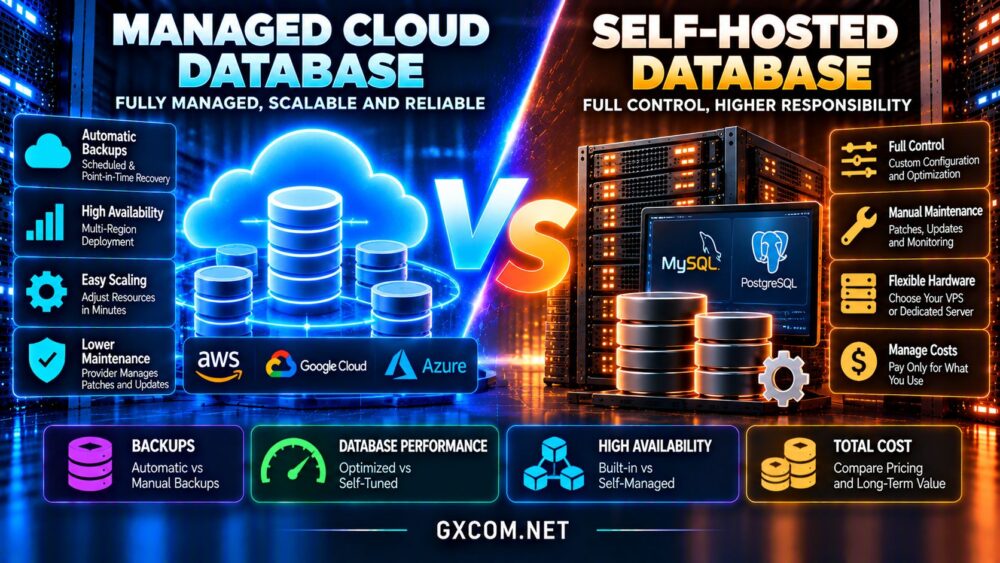
What Is a Managed Cloud Database?
A managed database is a database service operated partly by a cloud provider. The provider typically handles infrastructure provisioning, certain maintenance tasks, monitoring integrations, and supported backup mechanisms.
Depending on the product, customers may receive automated patching, point-in-time recovery, read replicas, and high-availability configurations.
These features are not universally included. Some require higher service tiers or additional charges.
Customers still manage application schemas, query performance, access permissions, and the consequences of accidental or malicious data changes.
For related infrastructure choices, see our managed cloud hosting comparison.
What Is a Self-Hosted Database?
A self-hosted database runs on infrastructure you administer, such as a cloud VPS, dedicated server, or private virtualization environment.
You select the operating system, database version, storage layout, monitoring tools, and replication architecture.
This flexibility can be valuable for custom PostgreSQL extensions, specialized MySQL configurations, or applications requiring detailed resource control.
However, your team must maintain security updates, backups, recovery procedures, monitoring, and capacity planning.
Self-hosting does not require physical hardware ownership. A rented cloud server still qualifies when you operate the database software yourself.
Managed vs Self-Hosted Database: Key Differences
| Factor | Managed Database | Self-Hosted Database |
|---|---|---|
| Provisioning | Provider-managed workflow | Administrator deployment |
| Backup operations | Integrated options | Custom configuration |
| High availability | Available on selected plans | Self-designed replication and failover |
| System access | Often restricted | Greater operating system control |
| Maintenance | Shared responsibilities | Primarily customer-managed |
| Billing | Service and usage charges | Infrastructure plus operations |
The best option is the one that meets reliability requirements without introducing unnecessary costs or operational risks.
Database Backups and Point-in-Time Recovery
Backup design is one of the most important differences between managed and self-hosted database environments.
Managed services often provide automated snapshots or backup scheduling. Some also support point-in-time recovery, commonly called PITR, using transaction logs.

PITR can restore a database to a supported moment within its retention window, which is useful after accidental deletions or damaging application changes.
However, recovery capabilities, retention periods, and backup storage charges differ between products.
Self-Hosted Backup Responsibilities
Self-hosted MySQL and PostgreSQL deployments can achieve strong protection using database-native backup tools, transaction logs, independent storage, and scheduled verification.
The challenge is operational discipline. Backups must be monitored, protected against unauthorized deletion, and regularly restored in tests.
A storage snapshot alone may not provide the database consistency required for reliable recovery.
Our VPS snapshots vs backups comparison explains the distinction between convenient rollback and durable data protection.
Performance: Which Database Is Faster?
Managed databases are not automatically faster than self-hosted databases. Query performance depends on CPU resources, memory, storage latency, indexes, concurrency, and network architecture.
A well-configured database on a dedicated server may outperform an undersized managed instance.
Conversely, a managed service with appropriate resources and operational tooling may deliver more consistent performance than a poorly maintained VPS.
Network Latency and Application Placement
Database queries can suffer when the application and database run in distant regions or communicate through inefficient network paths.
Place application servers and database instances close together when possible, while following security and availability requirements.
For latency-sensitive workloads, compare connection overhead and actual query response times rather than relying only on advertised CPU specifications.
Storage IOPS and Memory
Database workloads frequently depend on storage performance and available memory for caching.
Managed services may separate compute and storage charges, while self-hosted deployments can use local NVMe or network-attached volumes.
Each approach involves different durability and performance tradeoffs.
Read our cloud block storage vs local NVMe comparison for a deeper analysis.
High Availability and Disaster Recovery
A single managed database instance is not necessarily highly available. High availability typically requires redundant infrastructure, replication, and a supported failover mechanism.
Some managed products provide multi-zone deployment options, while others offer only a single primary instance.
Self-hosted environments can also use replication, automated failover, and geographically separated recovery systems.
However, these designs require careful testing to avoid split-brain conditions, inconsistent data, or unexpected recovery delays.
Define your recovery time objective and recovery point objective before purchasing either solution.
Security, Patching and Access Control
Managed database providers generally maintain underlying service infrastructure, but customers remain responsible for database credentials, access policies, application vulnerabilities, and sensitive data handling.
Self-hosted administrators must additionally manage operating system hardening, database patches, firewall rules, and backup infrastructure.
Both models benefit from encrypted connections, least-privilege access, restricted network exposure, and credential rotation.
Do not expose a production database directly to the public internet unless a justified architecture requires it and suitable controls are implemented.
Managed Database vs Self-Hosted Total Cost
Monthly instance pricing is only one component of database total cost of ownership.
A managed database bill may include compute, provisioned storage, backup retention, additional replicas, network transfer, and premium availability features.
Self-hosted costs include server rental, storage, backup capacity, monitoring, software administration, patching, and incident response.
The Hidden Cost of Administration
If an engineer spends several hours each month maintaining a database, that labor belongs in the cost comparison.
Unplanned outages can add further expenses through lost transactions, emergency recovery work, and customer dissatisfaction.
For a small application, a self-hosted VPS may remain economical. For a revenue-critical service, managed operations may justify their premium.
Our affordable cloud VPS deals guide helps compare infrastructure alternatives.
Database Hosting Providers to Compare
Vultr: Managed Databases and Cloud Compute
Vultr is relevant because buyers can compare managed database offerings with cloud compute infrastructure for self-managed deployments.
Review supported database engines, available regions, backup policies, scaling options, and the complete monthly bill.
Kamatera: Configurable Self-Hosted Cloud Servers
Kamatera provides configurable cloud servers suitable for teams building and administering their own database environments.
Evaluate CPU allocation, RAM, storage performance, backup arrangements, and management responsibilities before deployment.
OVHcloud: Managed and Self-Managed Infrastructure
OVHcloud offers cloud infrastructure and database-related services that may support either managed or self-administered architectures.
Compare product-specific availability features, database compatibility, regional deployment options, and operational requirements.
Cherry Servers: Dedicated Database Infrastructure
Cherry Servers is worth considering for database workloads that benefit from dedicated bare metal resources and greater infrastructure control.

Check processor specifications, memory capacity, storage redundancy, network connectivity, and backup design.
For dedicated hardware decisions, explore our bare metal server comparison.
Which Option Fits Your Workload?
For a small WordPress site, running MySQL on an appropriately sized hosting environment may be sufficient. A separate managed database is not always necessary.
For WooCommerce or SaaS applications, evaluate transaction volume, availability requirements, and the operational impact of downtime.
For large analytical workloads or specialized extensions, self-hosting may offer valuable flexibility, provided the team can maintain the environment.
Benchmark realistic queries, test recovery procedures, and compare annual costs before committing to either model.
Frequently Asked Questions
Is a managed cloud database worth the extra cost?
It can be when reduced administration, integrated recovery tools, and supported availability features provide measurable business value.
Is self-hosted PostgreSQL faster?
Not inherently. Performance depends on hardware, configuration, storage, query design, and network latency.
Do managed databases include automatic backups?
Many offer backup capabilities, but schedules, retention, recovery options, and charges vary by service and plan.
Can a VPS host a production database?
Yes, when appropriately sized, secured, monitored, backed up, and operated according to the application’s reliability requirements.
Final Verdict: Managed or Self-Hosted?
The managed cloud database vs self-hosted database decision comes down to operational responsibility, recovery requirements, performance needs, and total cost.
Choose managed databases when reducing maintenance and simplifying infrastructure operations are priorities.
Choose self-hosted databases when customization, infrastructure control, and internal expertise make direct management worthwhile.
Compare Vultr, Kamatera, OVHcloud, and Cherry Servers using verified product capabilities rather than assumptions about managed or unmanaged hosting.
The right database is the one your team can operate, recover, and afford reliably over time.