High-traffic websites need more than a hosting plan with a large storage allowance and an impressive bandwidth number.
As traffic grows, website performance increasingly depends on CPU capacity, memory, database efficiency, caching, storage performance, network quality and the ability to scale when demand suddenly increases.
A hosting environment that works perfectly at 10,000 monthly visits may struggle when traffic reaches 100,000, 500,000 or several million visits—especially if the website generates dynamic pages, processes ecommerce transactions or receives unpredictable traffic spikes.
That makes choosing the best hosting for high-traffic websites fundamentally different from choosing basic hosting for a small brochure website.
The right solution could be managed VPS, cloud hosting, a dedicated server or a scalable combination of infrastructure and CDN services.
In this guide, GXCOM.NET explains what high-traffic websites actually need, compares the major hosting architectures and looks at providers such as ScalaHosting, DigitalOcean, Vultr, Kamatera, Hostwinds, Cherry Servers and ServerMania for different high-performance workloads.
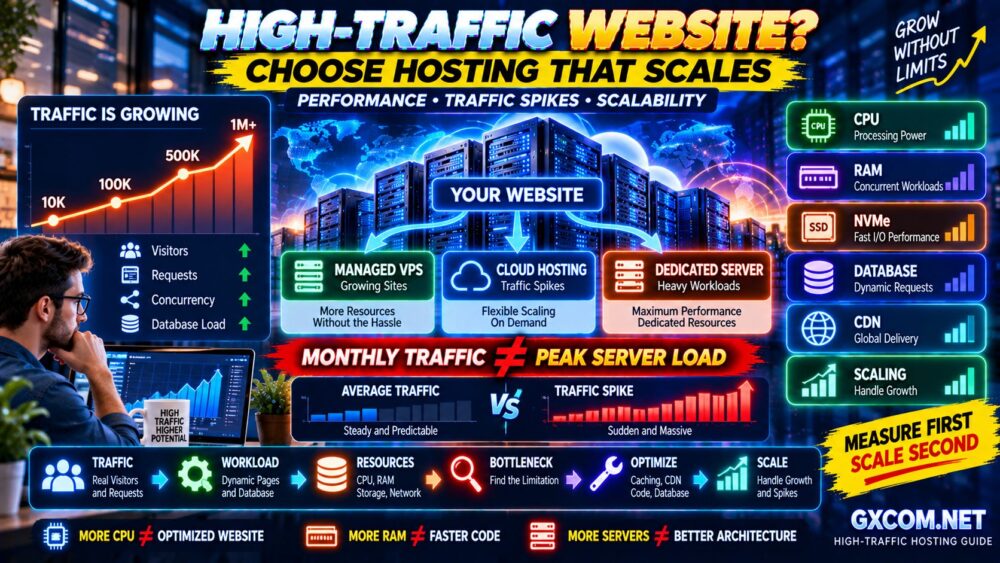
Best Hosting for High-Traffic Websites at a Glance
| Hosting Option | Best For | Main Advantage |
|---|---|---|
| Managed VPS | Growing WordPress & Business Sites | Performance without full server administration |
| Cloud Hosting | Traffic Spikes & Growing Applications | Flexible scaling |
| High-Performance VPS | Developers & Technical Teams | Control and predictable resources |
| Dedicated Server | Very Heavy Workloads | Dedicated physical resources |
| CDN + Origin Hosting | Global Audiences | Reduced origin load and latency |
Quick recommendation: a managed VPS is often a practical next step for a growing WordPress or business website, while cloud infrastructure becomes more attractive when demand changes quickly. High-resource applications may benefit from VPS or dedicated infrastructure, especially when predictable CPU and memory performance matter.
What Counts as a High-Traffic Website?
There is no universal visitor number that automatically makes a website “high traffic.”
Traffic alone does not determine server load.
Consider two websites:
WEBSITE A
500,000 monthly page views
Mostly cached articles
CDN enabled
Few database writes
WEBSITE B
100,000 monthly page views
WooCommerce
Logged-in users
Dynamic searches
Frequent database activity
Website B could potentially require more server resources despite receiving less traffic.
A better formula is:
SERVER LOAD = TRAFFIC × PAGE COMPLEXITY × DYNAMIC ACTIVITY × CONCURRENCY
Therefore, do not choose hosting only by monthly visitor estimates.
What High-Traffic Websites Actually Need
As a website grows, seven infrastructure components become increasingly important:
- CPU performance
- Available RAM
- Storage I/O and IOPS
- Database performance
- Caching
- Network capacity
- Scalability
The complete performance chain looks more like:
VISITORS
↓
CDN
↓
WEB SERVER / CACHE
↓
APPLICATION
↓
DATABASE
↓
STORAGE
A bottleneck at any layer can slow the website.
1. Managed VPS — Best for Growing WordPress and Business Websites
Best for: High-traffic websites that need more resources without requiring the owner to become a server administrator.
Managed VPS hosting is one of the most practical upgrade paths for businesses outgrowing conventional shared hosting.
Compared with shared hosting, a VPS generally provides greater resource isolation and more predictable access to CPU, RAM and storage resources.
With a managed VPS, the provider also handles some or most server-level administration depending on the service.
This can include:
- Operating system maintenance
- Security updates
- Server monitoring
- Control panel management
- Backup assistance
- Server troubleshooting
ScalaHosting is particularly relevant in this category because managed VPS is a major part of its hosting portfolio.
Hostwinds also provides VPS options suitable for businesses requiring more control than ordinary shared hosting.
When Managed VPS Makes Sense
Consider managed VPS when:
- Your WordPress site repeatedly reaches shared hosting limits
- Dynamic pages are becoming slow
- WooCommerce needs more resources
- You want greater resource isolation
- You need better server-level control
- You do not want to manage the operating system yourself
For the management tradeoffs, see our Managed vs Unmanaged VPS guide.
2. Cloud Hosting — Best for Scalability and Traffic Spikes
Best for: Websites and applications with changing or unpredictable resource requirements.
Cloud infrastructure can provide significantly more flexibility than a traditional fixed hosting plan.
Providers such as DigitalOcean, Vultr and Kamatera offer cloud infrastructure that can support websites ranging from relatively small applications to more complex architectures.
The key advantage is flexibility.
A cloud-based architecture can evolve from:
ONE SERVER
into:
LOAD BALANCER
↓
MULTIPLE APPLICATION SERVERS
↓
DATABASE
↓
OBJECT STORAGE / CDN
This can be extremely powerful for growing websites.
But cloud infrastructure is not automatically easy.
More flexibility often means more architectural decisions.
Our Best Cloud Hosting Solutions guide compares cloud options in more detail.
3. High-Performance VPS — Best for Technical Teams
Best for: Developers and businesses that want stronger resource control and can manage server infrastructure.
An unmanaged or self-managed VPS can offer excellent performance per dollar when the technical team knows how to configure it properly.
Platforms such as DigitalOcean and Vultr make it relatively easy to deploy virtual machines with different CPU, memory and storage configurations.
But deploying a server is the easy part.
You are also responsible for areas such as:
- Operating system updates
- Firewall configuration
- SSH security
- Web server configuration
- Database optimization
- Monitoring
- Backups
- Incident recovery
For technical teams, this flexibility can be valuable.
For a non-technical business owner, managed hosting may provide better overall value.
CHEAPER INFRASTRUCTURE ≠ LOWER TOTAL OPERATING COST.
4. Dedicated Servers — Best for Heavy and Predictable Workloads
Best for: Resource-intensive websites, large databases and workloads requiring dedicated physical resources.
A dedicated server gives one customer access to the physical server rather than sharing the underlying machine with unrelated VPS tenants.
This can provide:
- Dedicated CPU resources
- Large memory configurations
- High storage capacity
- Greater hardware control
- Predictable resource availability
Providers such as Cherry Servers and ServerMania specialize in infrastructure that includes dedicated or bare-metal server options.
Dedicated servers can make sense when workloads are consistently large enough to justify the hardware.
However:
HIGH TRAFFIC ≠ AUTOMATICALLY NEED A DEDICATED SERVER.
A well-optimized cloud or VPS architecture may handle substantial traffic efficiently.
See our Best Dedicated Server Hosting Providers guide when dedicated infrastructure becomes relevant.

Managed VPS vs Cloud vs Dedicated Server
| Feature | Managed VPS | Cloud | Dedicated Server |
|---|---|---|---|
| Ease of Management | High | Varies | Varies |
| Scalability | Moderate | High | Lower / Manual |
| Resource Isolation | Good | Good | Excellent |
| Root Control | Depends | Usually Available | Usually Available |
| Traffic Spikes | Moderate | Excellent with Correct Architecture | Limited by Server Capacity |
| Technical Complexity | Lower | Medium to High | Medium to High |
| Best For | Growing Business Sites | Scalable Applications | Heavy Predictable Workloads |
The correct choice depends on workload behavior rather than simply total visitor count.
CPU: The First Resource to Watch
CPU processes application code, PHP requests, database operations and many other tasks required to generate pages.
High-traffic dynamic websites can become CPU-bound quickly.
But CPU specifications can be misleading.
Four virtual CPUs on one platform may not deliver the same performance as four virtual CPUs elsewhere.
Performance depends on:
- CPU generation
- Clock speed
- Shared vs dedicated CPU allocation
- Host contention
- Application efficiency
4 vCPU ≠ 4 vCPU EVERYWHERE.
For high-traffic hosting, CPU quality can matter as much as core count.
How Much RAM Does a High-Traffic Website Need?
RAM is used by the operating system, web server, PHP processes, databases and caching systems.
There is no universal amount because requirements depend on the software stack.
Memory demand can increase with:
- More concurrent PHP workers
- Large databases
- Redis or object caching
- Search services
- Background processes
- Control panels
Adding RAM helps when memory is actually the bottleneck.
It will not automatically fix slow code or an overloaded CPU.
MORE RAM ≠ AUTOMATICALLY FASTER WEBSITE.
NVMe Storage and High-Traffic Websites
Storage performance matters when applications frequently read or write data.
NVMe can provide strong IOPS and low latency compared with older storage technologies.
This can benefit:
- Databases
- WooCommerce
- Busy WordPress sites
- Search indexes
- Logging
- Dynamic applications
But storage is only one part of the system.
Our NVMe VPS Performance guide explains why IOPS, latency and workload type matter more than simply seeing “NVMe” in a hosting specification.
Database Performance Can Become the Real Bottleneck
High-traffic websites often reach a stage where database performance matters more than raw storage capacity.
Common problems include:
- Slow queries
- Missing indexes
- Large tables
- Excessive WordPress autoload data
- Too many concurrent queries
- Heavy ecommerce operations
A faster server can hide inefficient database behavior temporarily.
It does not eliminate the underlying problem.
The correct process is:
MEASURE → IDENTIFY BOTTLENECK → OPTIMIZE → SCALE
not:
WEBSITE SLOW → BUY BIGGER SERVER.
Caching Is Critical for High-Traffic Hosting
Caching can dramatically reduce the amount of work required to serve repeated requests.
A modern website may use several caching layers:
- Browser cache
- Page cache
- Server cache
- Object cache
- Database cache
- CDN edge cache
A cached page may require far less origin-server processing than a fully dynamic request.
This is why two websites receiving identical traffic can have completely different infrastructure requirements.
Read our Website Caching Explained guide for the differences between browser, server, CDN and object caching.
CDN: Reduce the Load on Your Origin Server
A content delivery network distributes cacheable content across geographically distributed edge locations.
Instead of every visitor requesting every asset directly from the origin server:
WITHOUT CDN
Visitor → Origin Server
Visitor → Origin Server
Visitor → Origin Server
With CDN caching:
WITH CDN
Visitor → Nearby Edge
Visitor → Nearby Edge
Only necessary requests → Origin
This can reduce origin traffic while improving latency for geographically distributed visitors.
Our CDN vs No CDN guide explains when a CDN becomes worthwhile.
High Traffic vs Traffic Spikes
These are not the same problem.
A website receiving steady traffic throughout the day may be relatively easy to provision.
A website receiving massive traffic in five minutes after:
- A viral social post
- A television appearance
- A product launch
- An email campaign
- A breaking news event
has a different infrastructure challenge.
Consider:
AVERAGE LOAD
versus
PEAK LOAD
Your hosting architecture needs enough capacity—or enough scalability—to survive the peak.
Why Concurrency Matters More Than Monthly Visitors
Monthly visitor counts can hide the most important performance problem.
Imagine:
SITE A
300,000 visits/month
Traffic evenly distributed
SITE B
100,000 visits/month
20,000 arrive during one major event
Site B may require substantially more peak capacity.
For infrastructure planning, monitor:
- Concurrent users
- Requests per second
- PHP workers
- CPU utilization
- Memory usage
- Database connections
MONTHLY TRAFFIC ≠ PEAK SERVER LOAD.
Bandwidth and Network Port Speed
High-traffic sites can transfer substantial amounts of data.
But two numbers are often confused:
PORT SPEED = How fast data can theoretically move at a moment in time.
TRAFFIC ALLOWANCE = How much data you can transfer during the billing period.
A server with a fast network port may still have traffic limits.
Similarly:
1 Gbps PORT ≠ 1 Gbps REAL-WORLD PERFORMANCE.
Network congestion, routing, upstream capacity and application performance also matter.
Do High-Traffic WordPress Sites Need Special Hosting?
WordPress can handle substantial traffic when properly optimized.
The key is reducing unnecessary dynamic work.
A high-traffic WordPress architecture may include:
CDN
↓
FULL-PAGE CACHE
↓
NGINX / LITESPEED / WEB SERVER
↓
PHP
↓
REDIS OBJECT CACHE
↓
DATABASE
Plugins, themes and database design can significantly affect how efficiently this architecture performs.
A poorly optimized WordPress site can overload a powerful server.
A well-optimized site can serve much larger traffic volumes using fewer resources.
High-Traffic WooCommerce Hosting
WooCommerce is more challenging because many important pages cannot simply be cached like static content.
Examples include:
- Cart
- Checkout
- Customer account
- Inventory updates
- Dynamic pricing
- Search and filtering
This places more pressure on:
- CPU
- PHP workers
- Database
- Object caching
- Storage I/O
A high-traffic ecommerce site should therefore be capacity-planned differently from a high-traffic content blog.
Vertical Scaling vs Horizontal Scaling
There are two fundamental ways to increase hosting capacity.
Vertical Scaling
Make one server larger:
4 vCPU / 8 GB RAM
↓
8 vCPU / 16 GB RAM
↓
16 vCPU / 32 GB RAM
This is relatively simple.
But one server eventually reaches practical limits.
Horizontal Scaling
Add more servers:
LOAD BALANCER
↓
WEB SERVER 1
WEB SERVER 2
WEB SERVER 3
This architecture can provide greater scalability and redundancy but introduces additional complexity.
Cloud infrastructure is particularly useful when horizontal scaling becomes necessary.
Autoscaling: Powerful but Not Magic
Autoscaling can automatically increase or decrease resources based on demand.
This is useful for unpredictable workloads.
However, applications must be designed to scale correctly.
Adding more web servers does not automatically fix:
- A database bottleneck
- Bad application code
- Slow external APIs
- Poor cache configuration
- Session architecture problems
AUTOSCALING ≠ AUTOMATIC OPTIMIZATION.
How to Choose Hosting for a High-Traffic Website
Use this process.
Step 1: Measure the Current Workload
Collect:
- Monthly visits
- Peak concurrent users
- Requests per second
- CPU usage
- RAM usage
- Disk I/O
- Database load
- Bandwidth
Step 2: Identify the Bottleneck
Do not upgrade blindly.
Determine whether the limitation is:
CPU → RAM → STORAGE → DATABASE → CACHE → NETWORK → APPLICATION
Step 3: Optimize Before Scaling
Fix inefficient queries, enable appropriate caching, optimize images, remove unnecessary plugins and configure a CDN where useful.
Step 4: Add Capacity
Once optimization is complete, increase resources where measurements show they are needed.
Step 5: Load Test
Test the infrastructure under realistic concurrent load before major launches or traffic events.
When Should You Leave Shared Hosting?
Shared hosting can handle more traffic than many people assume when the website is lightweight and properly cached.
However, consider upgrading when you repeatedly encounter:
- CPU throttling
- Memory limits
- I/O restrictions
- Process limits
- Slow dynamic pages
- Database bottlenecks
- Traffic spikes causing errors
Do not upgrade because a traffic counter reaches an arbitrary number.
Upgrade because measurements show the existing platform is limiting the workload.
Which Hosting Provider Should You Consider?
ScalaHosting is worth considering for businesses that want a managed VPS path without handling every server administration task themselves.
DigitalOcean is relevant to developers and technical teams building scalable cloud infrastructure.
Vultr is another option for businesses that want flexible cloud compute across multiple configurations and locations.
Kamatera can be considered when configurable cloud infrastructure and resource flexibility are priorities.
Hostwinds provides VPS and other infrastructure options that may suit websites moving beyond ordinary shared hosting.
Cherry Servers becomes relevant when dedicated or bare-metal infrastructure is required for heavier workloads.
ServerMania is also worth evaluating for workloads that have grown into dedicated server territory.
The provider should follow the workload decision—not the other way around.
High-Traffic Hosting Checklist
Before choosing a platform, check:
- ✓ CPU type and allocation
- ✓ Shared vs dedicated CPU
- ✓ RAM capacity
- ✓ NVMe/storage performance
- ✓ Disk I/O limits
- ✓ Network port speed
- ✓ Traffic allowance
- ✓ Datacenter location
- ✓ CDN compatibility
- ✓ Backup architecture
- ✓ DDoS protection
- ✓ Monitoring
- ✓ Vertical scaling options
- ✓ Horizontal scaling options
- ✓ Load balancer availability
- ✓ Managed vs unmanaged support
- ✓ Upgrade process
- ✓ Long-term infrastructure cost
Then ask:
CAN THIS PLATFORM HANDLE MY PEAK WORKLOAD—NOT JUST MY AVERAGE TRAFFIC?
Best Hosting for High-Traffic Websites FAQ
What is the best hosting for a high-traffic website?
The best option depends on the workload. Managed VPS can work well for growing business and WordPress sites, cloud hosting is attractive for scalable applications and traffic spikes, while dedicated servers are appropriate for heavy workloads requiring dedicated physical resources.
How many visitors can a VPS handle?
There is no fixed visitor number. Capacity depends on CPU, RAM, caching, database activity, page complexity and concurrent requests. A heavily cached content site may support far more visitors than a dynamic ecommerce site on similar hardware.
Is cloud hosting better for high traffic?
Cloud infrastructure can be particularly useful when workloads need flexible scaling or multiple-server architectures. However, cloud hosting is not automatically faster than every VPS or dedicated server.
Is VPS better than shared hosting for high traffic?
VPS generally provides greater resource isolation and control. It becomes useful when shared hosting resource limits consistently affect performance, but an optimized shared hosting site may still handle significant cached traffic.
Do I need a dedicated server for one million visitors?
Not necessarily. Monthly visitor count alone cannot determine server requirements. Caching, CDN usage, concurrency, application complexity and database activity can dramatically change infrastructure needs.
Does a CDN help with high traffic?
Yes, particularly when significant content can be cached at edge locations. A CDN can reduce origin requests and improve latency for geographically distributed users.
How much RAM does a high-traffic WordPress site need?
There is no universal amount. Requirements depend on concurrent PHP processes, database size, caching, plugins and background services. Measure memory utilization before deciding how much RAM to provision.
What is more important for high traffic: CPU or RAM?
Both can become bottlenecks. CPU is critical for processing dynamic requests, while RAM supports application processes, databases and caching. Monitor actual resource utilization instead of assuming one is always more important.
Final Verdict: Scale for the Workload, Not the Traffic Counter
The best hosting for a high-traffic website is not determined by one visitor number.
It depends on how those visitors interact with the application.
A cached content website, busy WooCommerce store and SaaS application may all receive the same number of visitors while requiring completely different infrastructure.
The correct process is:
TRAFFIC
↓
CONCURRENCY
↓
WORKLOAD
↓
RESOURCE USAGE
↓
BOTTLENECK
↓
OPTIMIZATION
↓
SCALING
Managed VPS is a strong option for growing businesses that want more resources without taking on full server administration.
Cloud infrastructure becomes particularly powerful when applications need flexible or horizontal scaling.
Dedicated servers remain relevant for heavy, predictable workloads that benefit from dedicated physical resources.
But infrastructure alone cannot compensate indefinitely for inefficient software.
MORE CPU ≠ OPTIMIZED WEBSITE.
MORE RAM ≠ FASTER CODE.
MORE SERVERS ≠ BETTER ARCHITECTURE.
Measure first, optimize second and scale third.
That is how high-traffic websites grow without turning infrastructure into an unnecessarily expensive problem.