GPU servers have become essential infrastructure for AI training, LLM inference, machine learning, generative AI, rendering, scientific computing, and other highly parallel workloads.
But finding the best GPU server deals requires more than comparing the hourly or monthly price. An inexpensive RTX 4090 instance can provide excellent value for some AI workloads, while larger models may require the additional VRAM, memory bandwidth, enterprise features, or multi-GPU capabilities of NVIDIA A100, H100, H200, or newer Blackwell GPUs.
This GXCOM.NET guide tracks current GPU cloud and dedicated GPU server offers, including hourly cloud GPUs, marketplace instances, dedicated NVIDIA servers, and long-running AI infrastructure.
Instead of ranking providers only by price, we compare GPU model, VRAM, billing model, CPU and RAM resources, storage, bandwidth, availability, and workload suitability.
Deal Update: GPU prices and availability can change quickly. Marketplace pricing can change even faster as supply and demand fluctuate. Always verify the current configuration and final price before deploying a workload.
Best GPU Server Deals: Quick Comparison
| Provider | GPU Model Examples | Pricing Model | Best For |
|---|---|---|---|
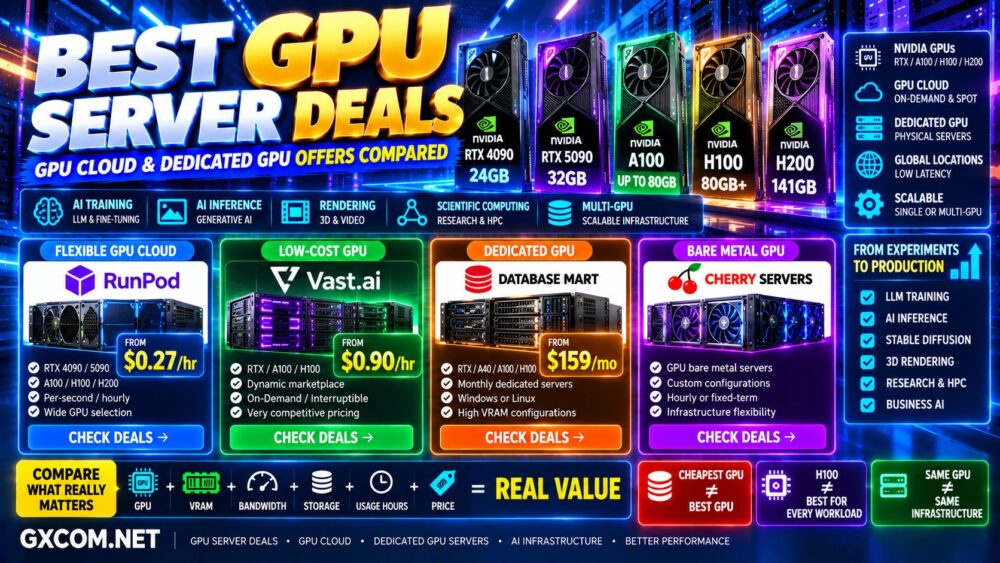
| RunPod | RTX 4090 / 5090 / A100 / H100 / H200 / B200 / B300 | Per-second / hourly | AI cloud and flexible GPU workloads |
| Vast.ai | RTX / A100 / H100 / H200 / Blackwell | Dynamic marketplace pricing | Low-cost GPU rentals |
| Database Mart | RTX / A40 / A100 / H100 | Monthly dedicated servers | Long-running dedicated GPU workloads |
| Cherry Servers | GPU bare metal configurations | Hourly / fixed-term infrastructure | Bare metal and infrastructure flexibility |
There is no universal cheapest GPU provider because the best value depends heavily on GPU model, region, availability, billing type, and how many hours per month you actually use the hardware.
🔥 Featured GPU Server Deals Worth Checking Now
If you are ready to deploy an AI workload, start with the workload rather than the GPU name.
FLEXIBLE GPU CLOUD → RunPod
LOW-COST GPU MARKETPLACE → Vast.ai
DEDICATED GPU SERVER → Database Mart
GPU / BARE METAL INFRASTRUCTURE → Cherry Servers
Then compare:
Workload + VRAM + Memory Bandwidth + Compute + Usage Hours + Infrastructure Cost = Real GPU Value
1. RunPod GPU Cloud Deals
RunPod is one of the most interesting GPU cloud platforms for AI developers because it offers a broad range of NVIDIA GPUs without requiring customers to purchase physical hardware.
Its current GPU catalog spans affordable workstation-class GPUs through modern data-center accelerators and NVIDIA Blackwell hardware.
Current Secure Cloud reference prices include:
| GPU | VRAM | Current Price* | Best Fit |
|---|---|---|---|
| RTX A5000 | 24 GB | From $0.27/hr | Budget AI workloads |
| A40 | 48 GB | From $0.49/hr | Inference / larger models |
| RTX A6000 | 48 GB | From $0.53/hr | AI / rendering |
| RTX 4090 | 24 GB | From $0.74/hr | Cost-effective AI |
| RTX 5090 | 32 GB | From $0.99/hr | High-performance consumer GPU workloads |
| H100 NVL | 94 GB | From $3.19/hr | Large AI workloads |
| H200 | 141 GB | From $4.59/hr | Large-model AI |
| B200 | 180 GB | From $6.79/hr | Advanced AI workloads |
*Reference pricing at the time of update. GPU availability, cloud type, region, and pricing can change.
RunPod also offers Serverless GPU infrastructure and multi-node clusters, so the cheapest deployment model depends on whether the workload runs continuously or only responds to requests.
Why RunPod Can Be Cost-Effective
Hourly GPU cloud infrastructure is particularly attractive when you do not need a GPU running continuously.
For example, if an AI workload only needs 100 GPU hours each month, renting by usage can be far more economical than maintaining a dedicated GPU server for the entire month.
RunPod is particularly relevant for:
- LLM inference
- Model training
- Fine-tuning
- Stable Diffusion
- Image generation
- AI development
- Research
- Batch processing
Hourly Price × Actual Usage Hours = More Useful Cost Metric.
2. Vast.ai GPU Deals
Vast.ai takes a different approach by operating a marketplace where GPU prices are influenced by available supply and demand.
This can produce extremely competitive pricing, particularly for developers who are flexible about hardware, location, host characteristics, and availability.
The platform currently provides access to dozens of GPU types, ranging from consumer RTX hardware through A100, H100, H200, and newer Blackwell GPUs.
Vast.ai Pricing Models
Vast.ai currently offers three primary pricing models:
- On-Demand: designed for workloads requiring reliable continuous availability.
- Interruptible: lower-cost instances that can be reclaimed, suitable for fault-tolerant workloads.
- Reserved: longer-term commitments with potential discounts for steady workloads.
Interruptible instances can be particularly attractive for batch training when your workflow supports checkpointing and resuming.
However, marketplace pricing means the cheapest offer is not always available in the location or hardware configuration you want.
Lowest GPU Price ≠ Guaranteed GPU Availability.
Who Should Consider Vast.ai?
Vast.ai can be especially attractive for:
- Budget-conscious AI developers
- Experimental workloads
- Batch training
- Stable Diffusion
- Research
- Flexible inference workloads
- Users comfortable comparing marketplace instances
When comparing instances, evaluate more than GPU price.
Host reliability, CPU resources, RAM, storage speed, network performance, region, and availability can all affect the experience.
3. Database Mart Dedicated GPU Server Deals
Database Mart becomes more interesting when you want a physical or long-running dedicated GPU environment rather than an ephemeral cloud instance.
Its current GPU server catalog includes NVIDIA RTX, A40, A100, H100, and multi-GPU configurations.
Current reference configurations include:
| GPU | GPU Memory | Current Price* |
|---|---|---|
| RTX 2060 | 6 GB | About $159/mo |
| A40 | 48 GB | About $439/mo |
| A100 | 40 GB | About $639/mo |
| A100 | 80 GB | About $1,559/mo |
| H100 | 80 GB | About $2,099/mo |
*Current reference pricing. Hardware availability and promotional pricing can change.
Dedicated GPU servers become more interesting when the workload runs continuously because you are paying for exclusive access to a physical configuration rather than repeatedly starting and stopping cloud instances.
When Dedicated GPU Can Beat GPU Cloud
Suppose a cloud GPU costs $3 per hour.
Running continuously for 730 hours would produce:
$3 × 730 = $2,190/month
If an equivalent dedicated server costs substantially less than that and you actually need near-continuous utilization, dedicated infrastructure may provide better economics.
But the comparison must use equivalent hardware and include CPU, RAM, storage, bandwidth, management, and flexibility.
Hourly GPU Price × Utilization = The Key Cloud vs Dedicated Calculation.
4. Cherry Servers GPU and Bare Metal Infrastructure
Cherry Servers is worth considering when you want infrastructure closer to bare metal than conventional shared cloud computing.
Its broader platform provides dedicated server deployment, API-based infrastructure management, fixed-term and hourly billing, storage services, private networking, and other components useful for building custom compute environments.
This model can appeal to teams that need:
- Bare metal infrastructure
- AI workloads
- Custom server configurations
- High-speed storage
- Private networking
- Infrastructure automation
When evaluating a GPU configuration, compare the complete system rather than the accelerator alone.
A powerful GPU can still be constrained by insufficient CPU, system memory, storage throughput, or network bandwidth.
RTX 4090 GPU Server Deals
The NVIDIA RTX 4090 remains attractive for cost-conscious AI users because its 24 GB VRAM and strong compute performance can handle many small-to-medium AI workloads.
Typical use cases include:
- Stable Diffusion
- Image generation
- Smaller LLM inference
- Fine-tuning
- Rendering
- AI development
Its biggest limitation for AI is often memory.
A workload requiring more than 24 GB of VRAM may force you to use quantization, offloading, multiple GPUs, or a higher-memory accelerator.
Fast GPU + Insufficient VRAM = Wrong GPU.
RTX 5090 GPU Server Deals
The RTX 5090 increases GPU memory to 32 GB and provides newer-generation performance, making it an increasingly interesting option for AI workloads that need more capacity than an RTX 4090 but do not necessarily require an enterprise accelerator.
It can be particularly attractive for:
- AI inference
- Generative AI
- Rendering
- Fine-tuning
- Development
- Medium-size models
However, consumer RTX GPUs and enterprise data-center GPUs are designed for different operating environments.
Do not choose purely by benchmark performance.
NVIDIA A100 GPU Server Deals
The NVIDIA A100 remains relevant because it combines large HBM memory options, high memory bandwidth, enterprise features, and multi-GPU capabilities.
A100 configurations can be particularly useful for:
- AI training
- Large-model inference
- Multi-GPU workloads
- Scientific computing
- Enterprise AI
80 GB configurations provide a major memory advantage over 24 GB consumer GPUs when model size becomes the limiting factor.
Read our NVIDIA A100 vs H100 comparison before deciding whether the newer H100 is worth the additional cost.
NVIDIA H100 GPU Server Deals
The H100 is designed for demanding AI training and inference workloads and provides substantially greater AI-focused performance than previous-generation accelerators in many modern workloads.
But H100 pricing remains significantly higher than consumer GPUs.
It makes the most sense when:
- Training time has substantial economic value
- You need large VRAM capacity
- You need high memory bandwidth
- Your workload benefits from modern Tensor Core capabilities
- You operate at significant AI scale
For smaller models, an RTX 4090, RTX 5090, A40, L40-series GPU, or A100 may provide better price/performance.
H100 Is Faster ≠ H100 Is More Cost-Effective for Every Workload.
NVIDIA H200 GPU Server Deals
H200 becomes particularly interesting for memory-intensive AI because it substantially increases GPU memory capacity compared with H100 configurations.
RunPod currently lists H200 instances with 141 GB of VRAM, making them attractive for large models that benefit from keeping more weights and context in GPU memory.
The larger memory capacity can reduce the need for multi-GPU partitioning in some workloads.
See our NVIDIA H100 vs H200 comparison for a detailed analysis.
GPU Cloud vs Dedicated GPU Server
| Factor | GPU Cloud | Dedicated GPU |
|---|---|---|
| Initial Cost | Low | Higher monthly commitment |
| Billing | Hourly / per-second | Usually monthly |
| Scaling | Easy | Hardware dependent |
| Short Jobs | Excellent | Often inefficient |
| Continuous Usage | Can become expensive | Can provide better value |
| Hardware Control | Platform dependent | Greater control |
| Availability | Can fluctuate | Reserved hardware |
For the complete analysis, read our GPU Server vs GPU Cloud comparison.
How Many GPU Hours Do You Actually Need?
This is one of the most important questions in GPU hosting.
If your workload runs:
2 hours/day → approximately 60 GPU hours/month
8 hours/day → approximately 240 GPU hours/month
24 hours/day → approximately 730 GPU hours/month
Now multiply the hourly rate by your actual expected utilization.
This provides a much more meaningful comparison with a dedicated monthly server.
GPU VRAM Matters More Than Many Buyers Expect
For AI workloads, GPU memory can determine whether a model runs at all.
A faster GPU with insufficient VRAM may be less useful than a slower accelerator with enough memory for the model.
Compare:
- Model size
- Precision
- Quantization
- Context length
- Batch size
- Training vs inference
Choose VRAM First, Then Compare GPU Performance and Price.
Don't Compare GPU Deals by GPU Name Alone
Two offers advertising the same H100 can still provide very different overall value.
Check:
- PCIe vs SXM configuration
- GPU memory
- CPU resources
- System RAM
- NVMe storage
- Network bandwidth
- Region
- Multi-GPU interconnect
- Billing granularity
- Persistent storage costs
Same GPU ≠ Same Infrastructure.
Spot and Interruptible GPU Deals
Spot or interruptible GPU instances can dramatically reduce AI infrastructure costs.
They are particularly suitable for:
- Batch processing
- Fault-tolerant training
- Rendering
- Experiments
- Workloads with frequent checkpoints
They are less appropriate when an unexpected interruption would break a production service or cause substantial work to be lost.
Lower Price → Higher Interruption Risk.
GPU Server Deal Red Flags
Be cautious when a GPU offer looks dramatically cheaper than everything else without clearly explaining the infrastructure.
Check for:
- Very limited CPU resources
- Insufficient system RAM
- Slow storage
- Expensive persistent storage
- Limited bandwidth
- Poor host reliability
- Interruptible instances presented as normal instances
- Unclear GPU variant
- Limited availability
A cheap GPU is not useful if the surrounding infrastructure prevents it from performing efficiently.
Should You Wait for Black Friday GPU Deals?
GPU cloud pricing changes throughout the year, so you do not necessarily need to wait for Black Friday to find competitive rates.
However, Black Friday can be particularly interesting for dedicated GPU servers, reserved infrastructure, and longer-term commitments.
If your purchase is flexible, compare current prices on this page with our Black Friday GPU Server Deals.
How GXCOM.NET Evaluates GPU Server Deals
GXCOM.NET does not rank GPU infrastructure solely by the lowest hourly or monthly price.
We consider:
- GPU model
- VRAM
- Memory bandwidth
- GPU architecture
- CPU resources
- System RAM
- Storage
- Bandwidth
- Region
- Billing granularity
- Availability
- Dedicated vs shared infrastructure
- Long-term cost
- Workload suitability
The objective is:
Workload → VRAM → GPU → Infrastructure → Utilization → Total Cost → Best GPU Deal.
Best GPU Server Deals FAQ
What is the cheapest GPU cloud?
The answer changes frequently because marketplace and cloud GPU prices vary by model, region, availability, and billing type. Vast.ai can offer very aggressive marketplace pricing, while RunPod provides a broad range of on-demand GPU options with transparent pricing.
Is RTX 4090 good for AI?
Yes. Its 24 GB VRAM and strong compute performance make it attractive for many AI inference, image generation, development, and smaller training workloads. Larger models may require more GPU memory.
Should I rent an A100 or H100?
H100 can provide substantially stronger performance for many modern AI workloads, while A100 can offer better value when maximum H100 performance is unnecessary. Model size, precision, memory requirements, training time, and hourly price should determine the choice.
Is H200 better than H100?
H200 provides substantially more GPU memory and is particularly attractive for memory-intensive large-model workloads. H100 may still provide better economics when the additional memory is unnecessary.
Is GPU cloud cheaper than a dedicated GPU server?
GPU cloud is generally more economical for intermittent workloads because you pay only while using the accelerator. Dedicated GPU servers can become more cost-effective when utilization is consistently high.
What matters most when choosing an AI GPU?
Start with VRAM requirements, then compare memory bandwidth, compute performance, model compatibility, multi-GPU requirements, infrastructure, and total cost.
Best GPU Server Deals: Final Verdict
The best GPU server deal depends much more on your workload than on the GPU with the lowest advertised price.
RunPod is particularly attractive for flexible GPU cloud workloads and provides access to a wide range of NVIDIA hardware. Vast.ai can deliver extremely aggressive marketplace pricing for buyers willing to compare hosts and availability carefully.
Database Mart becomes more interesting when you want dedicated GPU hardware for continuously running workloads, while Cherry Servers is worth comparing for customizable bare metal infrastructure.
Before renting any GPU server, use this process:
Workload → VRAM → Memory Bandwidth → GPU → Usage Hours → Infrastructure → Total Cost.
Do not automatically rent an H100 because it is faster, and do not automatically rent the cheapest RTX instance because the hourly rate looks attractive.
The Best GPU Deal Is the Least Expensive GPU Infrastructure That Runs Your Workload Efficiently.