AWS EC2 cost optimization is not simply about choosing the cheapest virtual machine. The goal is to reduce unnecessary cloud spending while maintaining application performance, availability, and the flexibility your business needs.
Amazon EC2 offers a wide range of instance families, purchasing models, storage configurations, and scaling options. That flexibility is valuable, but it can also create unnecessary costs when resources are oversized, left running, or purchased using the wrong billing model.
A successful optimization strategy starts with workload measurements rather than assumptions. Before downsizing an instance or committing to a long-term discount, you need to understand CPU utilization, memory pressure, storage performance, network usage, and demand patterns.
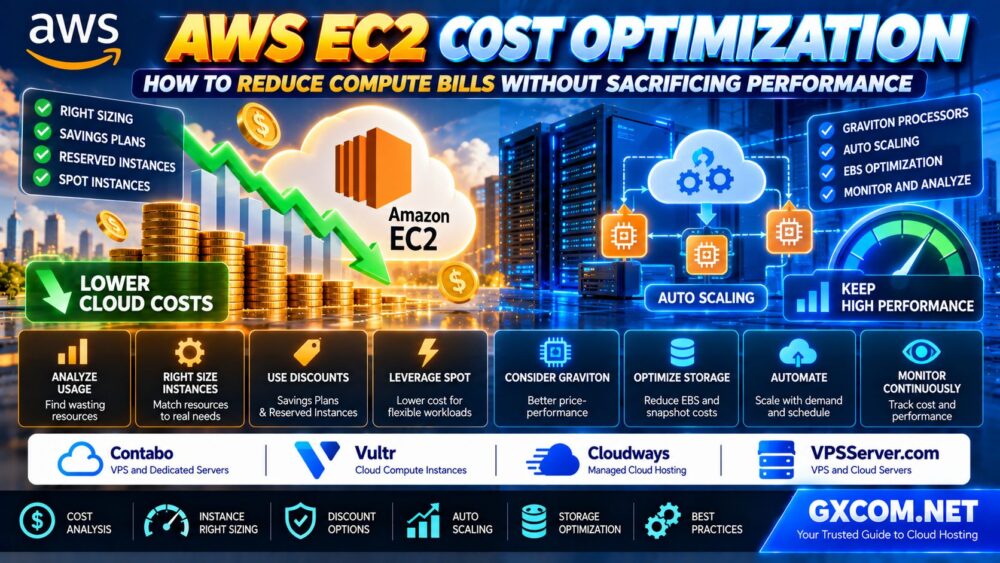
This guide explains how to reduce AWS EC2 costs through right sizing, Savings Plans, Reserved Instances, Spot Instances, Graviton processors, Auto Scaling, EBS optimization, and practical cloud cost management.
AWS EC2 Cost Optimization: Quick Checklist
| Optimization Method | Potential Benefit | Important Tradeoff |
|---|---|---|
| EC2 right sizing | Reduce oversized compute capacity | Requires performance testing |
| Savings Plans | Discount eligible committed usage | Long-term spending commitment |
| Reserved Instances | Discount qualifying EC2 usage | Configuration and commitment restrictions |
| Spot Instances | Lower cost for flexible compute | Capacity can be interrupted |
| Graviton instances | Potentially better price-performance | ARM64 software compatibility |
| Auto Scaling | Match capacity to demand | Requires scalable architecture |
| Instance scheduling | Reduce unnecessary running hours | Not suitable for every workload |
| EBS optimization | Reduce storage overspending | Must preserve I/O performance |
| IPv4 and network review | Identify networking waste | Architecture changes may be needed |
Quick recommendation: Measure utilization, remove idle resources, rightsize compute and storage, and only then evaluate longer-term purchasing commitments.
1. Understand What Is Driving Your EC2 Bill
Before optimizing AWS EC2 costs, identify the services and usage patterns responsible for your spending.
An EC2 deployment may generate charges from more than the instance itself.
- Instance compute usage
- Operating system and software licensing
- Amazon EBS volumes
- EBS snapshots
- Public IPv4 addresses
- Outbound data transfer
- Load balancers
- NAT gateways and other networking resources
- Monitoring and backup services
Use AWS Cost Explorer to analyze spending by service, account, Region, usage type, and relevant cost allocation tags.
For more detailed analysis, AWS Cost and Usage Reports or supported billing data exports can help teams investigate resource-level cost patterns.
Separate predictable production workloads from temporary development, testing, and batch environments.
This distinction is important because each workload category may require a different cost optimization strategy.
2. Right Size EC2 Instances Before Buying Discounts
EC2 right sizing means matching instance resources to actual application requirements.
Many organizations select oversized instances to avoid performance problems. While some capacity headroom is necessary, excessive provisioning can lead to ongoing waste.
Measure More Than Average CPU Usage
Average CPU utilization alone is not enough to determine whether an instance is oversized.
Review:
- Peak and percentile CPU utilization
- Memory consumption and swapping
- CPU credit behavior on burstable instances
- Disk IOPS and throughput
- Network throughput and packet behavior
- Application response time
- Database query latency
- Seasonal and daily traffic patterns
A server showing low average CPU usage may still need substantial capacity during traffic spikes.
Use AWS Compute Optimizer
AWS Compute Optimizer analyzes supported resource configurations and utilization data to recommend potentially more efficient instance choices.
For better decisions, review available memory metrics and configure recommendation preferences that reflect your workload's performance requirements.
When evaluating projected savings, consider existing Savings Plans and Reserved Instance coverage so you do not mistake theoretical On-Demand savings for actual bill reductions.
Test Before Downsizing
Before changing a production instance:
- Collect representative performance metrics.
- Identify a smaller or more efficient candidate.
- Test application behavior under realistic load.
- Check CPU, memory, disk, and network headroom.
- Plan a rollback procedure.
- Monitor performance after deployment.
Important: Right sizing should improve resource efficiency without compromising the application's service-level objectives.
3. Choose the Right EC2 Instance Family
EC2 offers different instance families for general-purpose, compute-optimized, memory-optimized, storage-focused, and specialized workloads.
Selecting the wrong family can waste money even when the instance size appears reasonable.
General-Purpose Instances
These may suit balanced web applications and services that require a practical combination of CPU and memory.
Compute-Optimized Instances
Compute-focused configurations may be more appropriate for CPU-intensive processing, selected application servers, and compute-heavy workloads.
Memory-Optimized Instances
Memory-intensive databases, caching platforms, and in-memory applications may benefit from a higher RAM-to-vCPU ratio.
Storage-Optimized Instances
Applications with demanding local storage or I/O requirements should evaluate suitable storage-focused configurations.
Compare instance families using actual workload benchmarks rather than selecting the newest or largest instance automatically.
4. AWS Savings Plans vs Reserved Instances
Savings Plans and Reserved Instances can reduce the cost of eligible EC2 usage in exchange for longer-term commitments.
However, these mechanisms differ in flexibility and coverage.
Compute Savings Plans
Compute Savings Plans offer flexible discount coverage for eligible compute usage, including qualifying EC2, AWS Fargate, and AWS Lambda consumption.
They can be useful when your organization expects stable overall compute spending but may change instance families, sizes, or Regions.
EC2 Instance Savings Plans
EC2 Instance Savings Plans are more closely associated with an instance family in a specific Region.
They may be suitable when your workload requirements are predictable and you expect to continue using the relevant instance family.
Reserved Instances
Reserved Instances provide discounted billing for qualifying EC2 usage under specified terms.
Standard and Convertible Reserved Instances have different flexibility characteristics.
Some zonal Reserved Instances also provide capacity reservation benefits, whereas discount coverage alone should not be confused with guaranteed capacity.
Which Commitment Should You Choose?
| Situation | Option to Evaluate |
|---|---|
| Stable compute spending with changing instance choices | Compute Savings Plans |
| Predictable instance family in one Region | EC2 Instance Savings Plans |
| Stable configuration with RI-specific requirements | Reserved Instances |
| Uncertain workload or short-term testing | On-Demand |
| Interruptible batch processing | Spot Instances |
Before purchasing commitments, evaluate historical usage, expected growth, existing discounts, and potential architecture changes.

Buying a commitment for oversized infrastructure can lock in inefficient spending.
5. Use Spot Instances for Fault-Tolerant Workloads
Amazon EC2 Spot Instances use spare AWS compute capacity and can offer substantial discounts compared with On-Demand usage.
However, Spot capacity is interruptible and availability varies.
Spot is often appropriate for:
- Batch processing
- Fault-tolerant worker fleets
- CI/CD workloads
- Distributed data processing
- Restartable development jobs
- Applications designed to handle instance replacement
Spot is generally a poor choice for a critical single-instance application that cannot tolerate interruption.
How to Reduce Spot Interruption Risk
Use multiple compatible instance types and Availability Zones where possible.
Design workloads with checkpointing, retries, durable queues, and externalized state.
For production applications, a mixed-capacity architecture may combine On-Demand capacity with Spot instances for flexible portions of the workload.
Best practice: Treat interruption handling as an application design requirement, not an optional feature.
6. Evaluate AWS Graviton for Better Price-Performance
AWS Graviton processors use ARM-based architecture and are designed to provide competitive price-performance for supported workloads.
Moving a compatible application from x86-based instances to Graviton may improve compute efficiency.
However, migration requires compatibility testing.
Check ARM64 Compatibility
Review:
- Application binaries
- Container images
- Operating system packages
- Third-party dependencies
- Database drivers
- Monitoring agents
- Build and deployment pipelines
Many modern applications support ARM64, but not every dependency does.
Benchmark the Complete Application
Compare response time, throughput, CPU utilization, memory use, and total compute cost.
A lower hourly rate is not useful if the workload requires significantly more resources or introduces compatibility problems.
7. Stop Nonproduction EC2 Instances When They Are Not Needed
Development and testing environments are common sources of unnecessary EC2 spending.
Some instances run continuously even when they are used only during business hours.
For suitable workloads, scheduled start and stop automation can reduce compute running time.
Possible candidates include:
- Developer test servers
- Staging environments
- Temporary demonstration systems
- Internal tools with limited operating hours
- Nonproduction application environments
Before automating shutdowns, confirm that the application can tolerate downtime and that startup procedures are reliable.
Remember that stopping an EBS-backed instance generally stops its instance compute charges, but attached EBS storage and other retained resources may continue to generate costs.
8. Optimize EC2 Auto Scaling Without Hurting Availability
EC2 Auto Scaling helps organizations adjust computing capacity in response to demand.
For suitable applications, scaling can reduce unnecessary capacity during quieter periods while preserving additional resources for traffic increases.
Use Appropriate Scaling Metrics
CPU utilization can be useful, but it is not always the best scaling signal.
Depending on the workload, consider:
- Request volume per target
- Application latency
- Queue depth
- CPU utilization
- Custom business metrics
Set Safe Capacity Limits
Configure minimum, desired, and maximum capacity according to availability and cost requirements.
Applications should be designed to handle instance replacement, shared sessions, database connections, and graceful shutdown.
Scaling down too aggressively can create performance instability.
Optimization goal: Remove genuinely unnecessary capacity without reducing the resources required to meet service objectives.
9. Optimize Amazon EBS Storage Costs
EC2 cost optimization should include Amazon EBS because storage charges can continue independently of instance compute usage.
Common sources of waste include:
- Oversized EBS volumes
- Unattached volumes
- Unnecessary snapshots
- Provisioned IOPS beyond workload requirements
- Storage types that do not match application needs
Evaluate gp3 Storage
For eligible workloads, Amazon EBS gp3 volumes may provide a cost-effective balance of storage capacity and performance.
However, provisioned performance beyond included levels can generate additional charges.
Compare the required IOPS, throughput, latency, and storage capacity before changing volume types.
Review Unattached Volumes
An EBS volume can continue generating storage charges after the associated instance has been terminated or detached.
Identify unused volumes, verify ownership, and confirm retention requirements before deletion.
Manage Snapshots Carefully
Review snapshot retention policies and obsolete backups.
Do not delete snapshots without understanding recovery requirements and snapshot dependencies.
10. Reduce Public IPv4 and Network Waste
Network-related costs are frequently overlooked during EC2 optimization.
AWS charges for public IPv4 addresses, including addresses associated with running instances and Elastic IP addresses.
Applications that do not require direct public connectivity may be able to use private networking and supported access methods.
However, architecture changes should be evaluated carefully because NAT gateways, load balancers, and data transfer can introduce their own charges.
Review:
- Public IPv4 address inventory
- Unused network resources
- Outbound data transfer
- Cross-Availability-Zone traffic
- NAT gateway processing and usage
- Load balancer utilization
Use actual traffic data and current AWS pricing to evaluate whether a proposed network change reduces total cost.
11. Optimize Cloud Infrastructure Without Losing Performance
Reducing EC2 spending should not compromise application availability or user experience.
Establish performance requirements before making changes.
Define Performance Guardrails
Track:
- Application response-time percentiles
- Error rates
- CPU and memory headroom
- Database latency
- Storage performance
- Network saturation
- Availability objectives
Use controlled rollouts and compare performance before and after optimization.
If an instance change causes unacceptable latency or error rates, revert the change and investigate the bottleneck.
Optimization is successful only when savings are sustainable and the workload remains reliable.
12. When Is an AWS Alternative Worth Comparing?
Some workloads depend heavily on AWS-specific services, networking, security controls, and integrations. Migrating those applications may create more complexity than savings.
Other workloads are relatively portable, especially straightforward Linux web servers, small business websites, development systems, and self-managed applications.
For these workloads, alternative cloud infrastructure may be worth comparing.
Contabo and Vultr are two candidates for organizations reviewing conventional VPS or cloud server configurations outside AWS.
Contabo may be relevant when the workload has stable resource requirements and the buyer wants to compare bundled VPS resources against a complete EC2 deployment.
Vultr may be relevant for developers comparing cloud compute instance options, available locations, storage characteristics, and operational responsibilities.
Neither should be assumed to reproduce the complete AWS service ecosystem.
For a broader comparison of infrastructure providers, read our Best Cloud Hosting Solutions Guide.
13. Managed Hosting vs Self-Managed EC2
Infrastructure spending is not the only cost of operating a cloud application.
Self-managed EC2 deployments also require time for operating system updates, security, backups, monitoring, and incident response.
For supported web applications, a managed hosting model may reduce administration work.
Cloudways is one option to investigate when comparing managed application hosting with self-managed EC2 infrastructure.
However, managed hosting fees and supported features must be evaluated against the full operational cost of the existing environment.
For teams that prefer direct server administration, VPSServer.com is another candidate for comparing cloud VPS infrastructure and resource configurations.
Before switching providers, confirm application compatibility, data transfer requirements, backup procedures, support scope, and migration effort.
Our Managed vs Unmanaged Hosting Guide explains the tradeoffs between operational convenience and infrastructure control.
14. AWS EC2 vs Alternative Cloud Hosting: Cost Comparison Framework
| Platform | What to Compare | Key Consideration |
|---|---|---|
| Amazon EC2 | Compute, EBS, networking and discounts | Full AWS integration and cost complexity |
| Contabo | VPS resources, storage and traffic policies | Suitability for predictable workloads |
| Vultr | Cloud instance types and infrastructure options | Resource configuration and regional availability |
| Cloudways | Managed hosting features and total service cost | Operational convenience |
| VPSServer.com | Cloud VPS configuration and support scope | Self-managed infrastructure requirements |
Compare equivalent workload requirements rather than assuming two servers with the same advertised vCPU and RAM specifications deliver identical performance.
Include migration effort and operational responsibilities in any total cost comparison.
15. A Practical AWS EC2 Cost Optimization Plan
A structured process helps teams identify savings without making risky changes to production infrastructure.
Step 1: Establish a Cost Baseline
Review recent AWS spending and identify the largest EC2-related cost categories.
Step 2: Identify Idle Resources
Find unused instances, unattached EBS volumes, obsolete snapshots, and unnecessary networking resources.
Step 3: Measure Workload Utilization
Collect CPU, memory, disk, network, and application performance metrics over a representative period.
Step 4: Test Right-Sizing Recommendations
Evaluate AWS Compute Optimizer recommendations and benchmark candidate configurations.

Step 5: Optimize Running Hours
Schedule eligible nonproduction workloads and evaluate scaling policies for variable demand.
Step 6: Review Instance Architecture
Consider suitable instance families and Graviton alternatives after compatibility testing.
Step 7: Evaluate Purchasing Commitments
Use updated workload forecasts to determine whether Savings Plans or Reserved Instances are appropriate.
Step 8: Review Storage and Networking
Optimize EBS configurations, snapshot retention, IPv4 resources, and data transfer patterns.
Step 9: Compare Portable Workloads
For applications without strong AWS dependencies, evaluate alternative hosting models using equivalent performance and availability requirements.
Step 10: Monitor Results Continuously
Track both financial savings and application performance after each change.
Repeat the process as workloads, traffic patterns, and infrastructure requirements evolve.
16. Common AWS EC2 Cost Optimization Mistakes
- Purchasing long-term commitments before right sizing.
- Using average CPU utilization as the only performance metric.
- Moving critical workloads to Spot without interruption handling.
- Ignoring ARM64 compatibility before migrating to Graviton.
- Stopping instances without checking dependent services.
- Forgetting that EBS storage can remain billable after compute stops.
- Overlooking public IPv4 and networking charges.
- Scaling down without testing application performance.
- Comparing providers based only on advertised vCPU counts.
- Ignoring existing discounts when estimating future savings.
If you are still deciding which AWS compute product fits your application, read our Amazon EC2 vs Lightsail Comparison before committing to a more complex deployment.
Frequently Asked Questions
What is the best way to reduce AWS EC2 costs?
Start by measuring utilization and identifying idle resources. Then evaluate right sizing, instance scheduling, Auto Scaling, storage optimization, and appropriate purchasing commitments.
Do Savings Plans reduce EC2 costs?
Yes. Savings Plans provide discounts on eligible compute usage in exchange for a one-year or three-year spending commitment. The value depends on your actual usage and existing coverage.
Are Reserved Instances better than Savings Plans?
Not universally. Savings Plans offer different flexibility characteristics, while Reserved Instances may suit specific EC2 usage and capacity requirements. Compare the terms against your workload forecast.
Can Spot Instances be used for production workloads?
Yes, when applications are designed to tolerate interruption and replacement. They are not a suitable direct replacement for every critical production instance.
Does stopping an EC2 instance stop all charges?
No. Stopping an eligible EBS-backed instance generally stops instance compute charges, but attached EBS volumes, public IPv4 resources, and other retained services may continue to incur charges.
Is AWS Graviton cheaper than x86 EC2?
Graviton can provide better price-performance for supported workloads, but the result depends on the application, instance configuration, and software compatibility.
Can AWS Compute Optimizer reduce costs automatically?
Compute Optimizer provides recommendations. Implementing changes safely requires evaluating workload requirements, testing performance, and using an appropriate deployment process.
How do I reduce EBS costs?
Review volume types, provisioned performance, unattached storage, and snapshot retention. Confirm performance and recovery requirements before deleting or modifying resources.
Should I move from EC2 to a cheaper VPS provider?
Only when the workload is portable and the full comparison supports migration. Evaluate application compatibility, performance, networking, management, security, and total operating cost.
Final Verdict: Optimize the Workload Before Optimizing the Price
AWS EC2 cost optimization works best when decisions are based on actual workload requirements.
Right sizing, efficient instance families, appropriate purchasing commitments, Auto Scaling, and storage optimization can reduce unnecessary spending without sacrificing performance.
However, every change should be evaluated against application latency, availability, security, and operational requirements.
For portable workloads, Contabo, Vultr, Cloudways, and VPSServer.com are additional hosting options worth comparing, but switching providers is not automatically the most economical solution.
MEASURE → RIGHTSIZE → AUTOMATE → COMMIT → MONITOR.
The most effective cloud cost strategy is not to buy the cheapest compute resources. It is to pay for the capacity your applications actually need, when they need it.