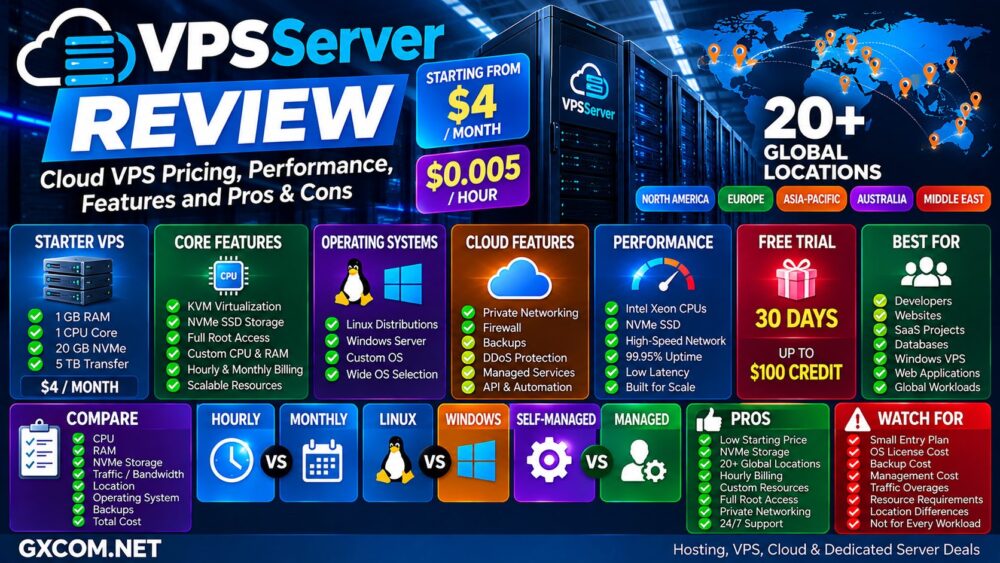
VPSServer.com is a global cloud VPS provider focused on flexible virtual servers, NVMe storage, hourly and monthly billing, scalable resources, Windows and Linux support, and a large selection of international server locations.
Its entry-level cloud VPS currently starts from $4 per month or approximately $0.005 per hour, making VPSServer particularly interesting for developers, website owners, SaaS projects, remote applications, databases, testing environments, and businesses that want cloud flexibility without immediately moving to a hyperscale platform.
Price alone, however, does not determine whether a VPS is good value. CPU allocation, RAM, NVMe storage, bandwidth, location, operating-system licensing, backups, management, and scaling costs all affect the real cost of running a server.
In this VPSServer Review, we examine current cloud VPS pricing, performance infrastructure, NVMe storage, global locations, Windows VPS support, scalability, security, backups, and the main pros and cons to consider before deploying a server.
VPSServer Review: Quick Overview
| Feature | VPSServer |
|---|---|
| Starting Price | $4/month |
| Hourly Pricing | From $0.005/hour |
| Virtualization | KVM |
| Storage | NVMe SSD |
| Linux | Yes |
| Windows | Yes |
| Root Access | Yes |
| Custom CPU / RAM | Yes |
| Private Networking | Yes |
| Firewall | Yes |
| Backups | Available |
| Global Locations | 20+ |
| Uptime Guarantee | 99.95% |
| Support | 24/7 |
| Free Trial | 30 days, up to $100 service credit |
What Is VPSServer?
VPSServer.com provides virtual private servers and cloud infrastructure designed around customizable resources and global deployment.
Rather than forcing every customer into a small number of fixed server packages, the platform allows users to configure CPU, RAM, NVMe storage, operating system, traffic requirements, and server location.
The platform can be used for:
- Website hosting
- WordPress
- Web applications
- SaaS
- Development environments
- Databases
- Game servers
- Business applications
- Windows applications
- Remote servers
- Testing and staging
This places VPSServer somewhere between a traditional fixed-plan VPS provider and a more flexible cloud infrastructure platform.
VPSServer Cloud VPS Pricing
One of the strongest selling points is the relatively low entry price.
Current configurations start from approximately:
- $4 per month
- $0.005 per hour
Hourly servers are billed according to usage, while monthly billing provides a more predictable cost for workloads that run continuously.
The entry-level configuration currently advertised includes:
| Resource | Entry Configuration |
|---|---|
| RAM | 1 GB |
| CPU | 1 Core |
| Storage | 20 GB NVMe SSD |
| Transfer | 5 TB |
| Price | $4/month |
Larger configurations increase according to CPU, memory, storage, operating system, traffic, management, and optional services.
Hourly vs Monthly Billing
VPSServer supports both hourly and monthly pricing, which is useful because not every cloud workload runs continuously.
| Billing | Best For |
|---|---|
| Hourly | Testing, development, temporary workloads |
| Monthly | Websites, applications and always-on servers |
A temporary development environment may be cheaper under usage-based billing, while a production website running 24/7 can be easier to budget with monthly pricing.
Cheapest Hourly Price ≠ Lowest Long-Term Cost.
Custom CPU, RAM and Storage
A major advantage of the VPSServer platform is configuration flexibility.
Users can select:
- Server type
- vCPU
- RAM
- NVMe SSD storage
- Operating system
- Traffic requirements
- Server location
This reduces the need to buy an oversized fixed plan just because one resource needs to be increased.
For example, a database may need more RAM but relatively little storage, while a web server could require more storage without needing a large CPU allocation.
Workload → CPU + RAM + Storage → Right Configuration.
VPSServer Server Types
The VPSServer cloud calculator currently organizes configurations into several server types:
- Starter / Type A
- Standard / Type B
- Enterprise / Type D
The correct server type depends on workload characteristics rather than simply choosing the most expensive tier.
Small websites and development servers may not require enterprise-level resources, while databases and sustained business workloads may benefit from more predictable compute capacity.
NVMe SSD Storage
Current VPSServer cloud servers use NVMe SSD storage.
Compared with conventional SATA SSD technology, NVMe can provide lower latency and substantially higher storage throughput.
That can be particularly useful for:
- Databases
- Dynamic websites
- WooCommerce
- Application servers
- Development environments
- Storage-intensive workloads
However, storage technology is only one component of server performance.
NVMe ≠ Automatically Fast Application.
CPU performance, available memory, caching, database optimization, software configuration, and network latency remain important.
KVM Virtualization
VPSServer uses KVM-based cloud infrastructure.
KVM provides an isolated virtual machine with its own operating-system environment, allowing users to install software and configure the server with root-level control.
This is useful for developers and administrators who need more flexibility than conventional shared hosting.
Users can deploy a VPS, select an operating system, configure resources, and manage the environment through the platform's control interface.
VPSServer Performance
VPSServer currently describes its VPS infrastructure as using Intel Xeon processors alongside enterprise NVMe storage.
Actual application performance will depend on:
- CPU allocation
- CPU generation
- RAM
- NVMe allocation
- Virtualization
- Server location
- Network routing
- Application optimization
For this reason, there is no single meaningful performance number that represents every VPSServer configuration.
A $4 entry server should not be expected to behave like a larger multi-core cloud instance under sustained production load.
Have We Independently Benchmarked VPSServer?
This review evaluates VPSServer using current published pricing, specifications, infrastructure information, and provider documentation.
Unless GXCOM.NET explicitly publishes benchmark methodology and measured test results, provider specifications should not be interpreted as independent GXCOM.NET benchmark results.
For production workloads, useful tests include:
- Single-core CPU performance
- Multi-core CPU performance
- NVMe IOPS
- Disk latency
- Network throughput
- Database performance
- Application response time
- Sustained CPU load
VPSServer Global Locations
Geographic coverage is one of VPSServer's stronger features.
The company currently advertises more than 20 globally distributed datacenter locations across North America, Europe, Asia-Pacific, Australia, and the Middle East.
Current locations include:
- Chicago
- Dallas
- New York
- Silicon Valley
- Miami
- Atlanta
- Los Angeles
- Seattle
- Toronto
- Amsterdam
- Frankfurt
- London
- Milan
- Madrid
- Stockholm
- Bucharest
- Hong Kong
- Singapore
- Tokyo
- Sydney
- Multiple locations in Israel
Why VPS Location Matters
The nearest server is not automatically the best server, but geographic proximity can significantly reduce network latency.
For a website serving U.S. West Coast visitors, Los Angeles, Silicon Valley, or Seattle may be worth testing.
European applications can choose among locations such as London, Amsterdam, Frankfurt, Madrid, Milan, Stockholm, and Bucharest.
Asian workloads can consider Hong Kong, Singapore, or Tokyo.
User → Server Location → Network Route → Latency → Application Experience.
VPSServer Windows VPS
VPSServer supports both Linux and Windows environments.
Windows VPS can be useful for:
- Remote Desktop
- .NET applications
- Windows development
- Business software
- Testing environments
- Windows-based web applications
However, customers should carefully check the final configuration price because operating-system licenses and other add-ons may not be included in the advertised base cloud-server price.
$4 Cloud VPS ≠ $4 Fully Configured Windows VPS.
Linux Operating Systems
VPSServer provides a broad selection of Linux and Unix-like operating systems.
Available options currently include distributions such as:
- Ubuntu
- Debian
- AlmaLinux
- Rocky Linux
- Fedora
- Arch Linux
- Alpine Linux
- Gentoo
- Linux Mint
- FreeBSD
Users can also work with custom operating-system images for more specialized deployments.
Root Access and Server Control
VPSServer provides full root access, giving administrators control over the operating system, packages, web server, databases, firewall rules, and applications.
That makes the service substantially more flexible than shared hosting.
It also means users need to understand the responsibilities that come with server administration.
Root access provides control, but it also increases responsibility for updates, application security, software configuration, and server maintenance.
Private Networking
Private networking can be useful when applications are spread across multiple virtual machines.
For example:
Web Server → Private Network → Database Server
This can reduce the need to expose backend services directly to the public internet.
Private networking becomes increasingly useful when a project evolves from a single VPS into a multi-server architecture.
Firewall and Security
VPSServer provides customizable firewall functionality that allows users to define ports, protocols, and access rules.
The platform also advertises DDoS mitigation and infrastructure redundancy.
However, cloud security remains a shared responsibility.
Customers should still maintain:
- Strong authentication
- SSH key access
- Operating-system updates
- Application updates
- Firewall rules
- Database security
- Independent backups
VPSServer Backups
Backup services are available for cloud servers.
Current options include automated backups, daily backups, and high-availability backup solutions.
Backup requirements should be evaluated separately from the base VPS price.
For business-critical workloads, maintain at least one independent copy outside the production VPS.
VPS Snapshot / Backup ≠ Complete Disaster-Recovery Strategy.
99.95% Uptime Guarantee
VPSServer currently advertises a 99.95% uptime guarantee backed by redundant infrastructure.
The provider describes redundant network transits, switches, routers, power systems, and failover infrastructure across its network.
An uptime SLA is useful when comparing providers, but application availability also depends on the customer's own software stack, database, DNS, configuration, and architecture.
VPSServer Free Trial
One of the more attractive features for new users is the current 30-day trial.
VPSServer states that eligible users can receive up to $100 in service credits during the trial period.
The trial can be used to:
- Deploy a VPS
- Choose a datacenter
- Select an operating system
- Configure CPU
- Configure RAM
- Configure storage
- Test network latency
- Evaluate the management platform
Trial eligibility and billing conditions should always be reviewed before deployment.
VPSServer Bandwidth and Traffic
Current server configurations can include between 1 TB and 5 TB of monthly traffic depending on the configuration, while the commonly advertised entry configuration includes 5 TB.
Additional traffic is currently listed at approximately $0.01 per GB.
Bandwidth costs become important for:
- Media websites
- Large downloads
- CDN origins
- Game servers
- Backup servers
- High-traffic applications
A cheap server can become expensive if the workload consistently exceeds the included traffic allowance.
Managed vs Self-Managed VPS
VPSServer can also provide managed services for users who do not want to handle every aspect of server administration themselves.
| Factor | Self-Managed | Managed |
|---|---|---|
| Server Control | High | High |
| Administration | Customer | Provider assistance |
| Technical Skill | Higher | Lower |
| Cost | Lower | Higher |
| Best For | Developers / sysadmins | Businesses needing support |
Read our
Managed vs Unmanaged VPS
guide before deciding which model fits your workload.
VPSServer vs Kamatera
VPSServer and Kamatera both target users who want customizable cloud servers rather than conventional fixed VPS packages.
Both platforms support flexible CPU and RAM configurations, global infrastructure, hourly billing, Windows and Linux, and scalable cloud resources.
The correct choice depends on the exact CPU allocation, RAM, storage, network, datacenter, management requirements, operating-system licensing, and total monthly cost.
See our
Kamatera VPS Review
for a detailed look at another flexible cloud VPS platform.
VPSServer vs Contabo
VPSServer and Contabo approach the VPS market differently.
Contabo is particularly known for large RAM and storage allocations at aggressive fixed prices, while VPSServer emphasizes customizable cloud resources, NVMe storage, hourly billing, and a broad global datacenter footprint.
Users should therefore compare the workload rather than simply comparing headline prices.
Read our
Contabo VPS Review
for more information.
VPSServer vs Cloud Clusters
Cloud Clusters can be attractive to users seeking inexpensive U.S.-focused VPS configurations, while VPSServer provides a much broader international location network and more cloud-style resource customization.
The better fit depends on whether the priority is low fixed pricing, large resource allocations, global deployment, NVMe storage, or hourly flexibility.
See our
Cloud Clusters VPS Review
for another budget VPS option.
VPSServer Pros and Cons
| Pros | Watch For |
|---|---|
| Cloud VPS from $4/month | Entry price represents a small configuration |
| Hourly billing from $0.005/hour | Always-on workloads can accumulate hourly costs |
| NVMe SSD storage | Storage size affects total cost |
| Custom CPU and RAM | More resources increase pricing |
| KVM virtualization | Self-management requires technical skills |
| 20+ global locations | Test latency for your target audience |
| Linux and Windows | Licenses and add-ons can cost extra |
| Full root access | Greater administrative responsibility |
| Private networking and firewall | Security still requires proper configuration |
| 30-day trial | Review trial and billing conditions |
| 99.95% uptime guarantee | SLA does not guarantee application uptime |
| 24/7 support | Managed services can add cost |
Who Should Consider VPSServer?
VPSServer is particularly relevant for:
- Developers
- Startups
- Website owners
- Web applications
- SaaS projects
- Database workloads
- Windows VPS users
- Development and testing
- Global applications
- Users needing hourly billing
- Projects that need scalable resources
Who May Prefer an Alternative?
Users who only want the largest possible RAM or storage allocation for the lowest fixed monthly price may find conventional budget VPS providers easier to compare.
Beginners who want a fully managed website without administering an operating system may also be better served by managed web hosting.
At the other end of the market, organizations requiring a very large ecosystem of managed databases, serverless computing, AI services, analytics, and enterprise cloud integrations may prefer a hyperscale cloud provider.
Is VPSServer Good Value?
VPSServer can provide good value when flexibility, global deployment, NVMe storage, and hourly billing matter more than simply maximizing RAM or disk space for the lowest fixed price.
The $4 entry price makes it inexpensive to begin, while the ability to customize resources means projects can scale as requirements change.
However, buyers should calculate the complete server cost.
Base VPS + CPU + RAM + NVMe + Traffic + OS License + Backups + Management = Real Cloud Cost.
This is a more useful comparison than looking only at the headline monthly price.
VPSServer Review: Final Thoughts
VPSServer combines several characteristics normally associated with cloud infrastructure with the simplicity of a VPS platform.
Current plans start from $4 per month or $0.005 per hour, while users can customize CPU, RAM, NVMe storage, operating system, traffic, and deployment location.
The 20+ global locations are a significant advantage for projects serving users across different regions, while KVM virtualization, NVMe storage, root access, private networking, firewall controls, Windows and Linux support, backups, and scalable resources provide a flexible infrastructure foundation.
The main consideration is total cost. The cheapest configuration may be sufficient for testing or a small website, but production applications can require additional CPU, RAM, storage, backups, traffic, licensing, or management.
Cheapest Cloud VPS ≠ Right Cloud VPS.
A better decision path is:
Workload → CPU + RAM → NVMe → Traffic → Location → OS → Management → Total Cost → Long-Term Value.