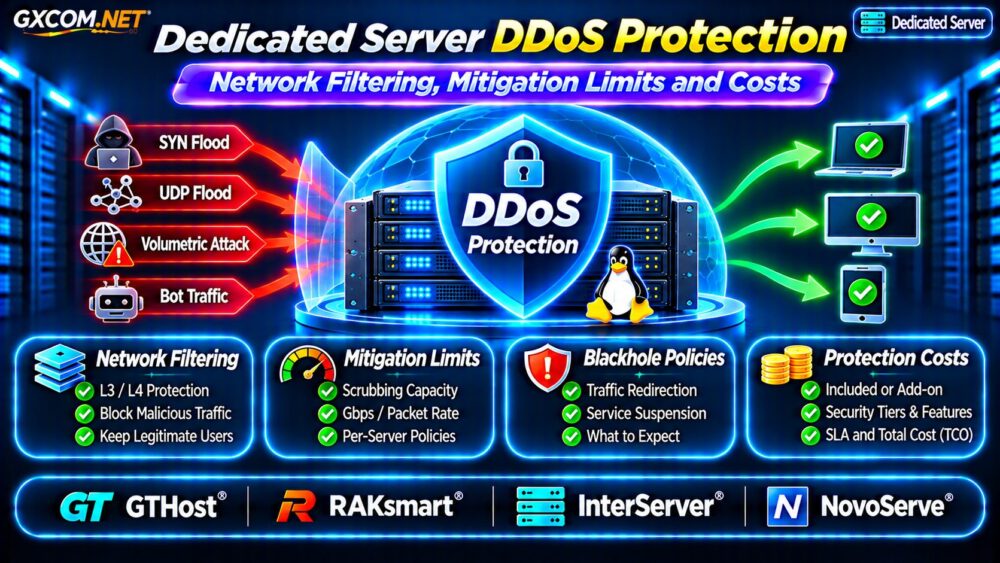
Dedicated server DDoS protection is a critical purchasing consideration for SaaS platforms, gaming communities, ecommerce websites, and other services that cannot tolerate prolonged network outages. A dedicated machine may provide exclusive CPU and memory resources, but those resources cannot prevent an upstream connection from becoming saturated during a distributed denial-of-service attack.
Effective protection depends on network filtering, mitigation capacity, routing policies, and application security. This guide explains what dedicated hosting buyers should verify before paying for DDoS protection.
How DDoS Protection Works on Dedicated Servers
DDoS attacks attempt to overwhelm network links, infrastructure, or applications with traffic from multiple sources. Protection systems identify suspicious patterns and filter unwanted requests while preserving legitimate connections.
Providers may use edge filtering, automated detection, traffic scrubbing, rate controls, or upstream mitigation partners. Protection effectiveness depends on attack characteristics and where filtering occurs.
Server-level firewalls remain useful, but they cannot solve upstream bandwidth saturation after malicious traffic has already filled the connection.
Layer 3, Layer 4 and Layer 7 Protection
Different attacks require different defenses. A provider advertising anti-DDoS hosting may cover only selected network and transport protocols.
| Protection Layer | Typical Threat | Common Defense |
|---|---|---|
| Layer 3 | Network-layer floods | Upstream filtering |
| Layer 4 | TCP SYN and UDP floods | Traffic scrubbing and rate controls |
| Layer 7 | HTTP request floods | WAF, bot controls and application rules |
Network and Transport Attacks
Large volumetric attacks can saturate connectivity before packets reach the dedicated server. Upstream mitigation is therefore essential for protecting the available network path.
Application-Layer Attacks
HTTP floods may resemble legitimate user activity. Network scrubbing alone cannot always distinguish malicious requests from real customers. A web application firewall, CDN, and application-aware rate limiting may provide additional protection.
Ask whether Layer 7 services are included or require a separate subscription.
Mitigation Capacity: What Does the Advertised Number Mean?
Some providers advertise protection using gigabits per second or terabits per second. These figures can describe different capabilities, including aggregate network capacity, regional scrubbing resources, or specific product limits.
A large advertised number does not guarantee that every customer receives the same protection level.

Request clarification on:
- Maximum supported attack bandwidth and packet rate.
- Whether limits apply per server, IP address, or network.
- Available capacity in the selected data center.
- Protocols covered by automatic mitigation.
- Actions taken when an attack exceeds supported limits.
Packet-processing capacity matters because high packet-rate attacks may overwhelm equipment even when total bandwidth appears manageable.
Always-On Filtering vs On-Demand Mitigation
Always-on protection continuously processes traffic through mitigation infrastructure. This can reduce detection delays, although routing design and filtering policies may affect latency.
On-demand protection activates after suspicious traffic is detected. It may reduce routine processing overhead but can allow disruption during detection and redirection.
Neither approach guarantees uninterrupted service. Ask about detection thresholds, activation time, false positives, and how traffic returns to normal routing.
Blackhole Routing and Provider Suspension Policies
Remote-triggered blackholing redirects traffic toward a discard destination. Providers may use it to protect shared network infrastructure when an attack becomes too large or difficult to filter.
Unfortunately, blackholing can make the protected IP address unreachable to legitimate users.
Before purchasing, determine whether the provider can suspend an IP, temporarily disable service, or require additional mitigation charges during repeated attacks.
Request written explanations of attack handling, notification procedures, and restoration requirements. A provider’s acceptable-use policy can be as important as its advertised mitigation capacity.
How Much Does Dedicated Server DDoS Protection Cost?
Protection may be bundled into server rental, offered as an upgrade, or billed through specialized network services. Additional costs can include premium filtering, protected IP addresses, managed WAF services, and higher bandwidth commitments.
Consider a hypothetical monthly budget:
- Dedicated server rental: $100.
- Enhanced network mitigation: $30.
- Application-layer protection: $20.
- External monitoring: $10.
The illustrative total is $160 monthly, or $1,920 annually. These figures are budgeting examples, not current provider quotations.
Compare costs against expected downtime impact, operational requirements, and the limitations of each protection tier.
Four Dedicated Hosting Providers to Compare
The following approved infrastructure providers are candidates for security-focused procurement. Product-specific DDoS coverage must be verified independently.
GTHost: Network Protection Requirements
GTHost is worth evaluating when dedicated hardware and network resilience are priorities. Ask about mitigation availability, protected protocols, geographic differences, and policies for attacks exceeding supported thresholds.
RAKsmart: Regional Mitigation Options
RAKsmart can be compared for location-specific dedicated infrastructure. Confirm whether DDoS protection is included with the selected server, which attack types are covered, and whether additional filtering requires payment.
InterServer: Security and Hosting Costs
InterServer provides another comparison option for dedicated infrastructure. Evaluate the current server configuration, network protections, bandwidth policies, support responsibilities, and complete recurring charges.
NovoServe: Network Capacity and Filtering
NovoServe deserves consideration for network-intensive deployments. Request clarification on upstream mitigation arrangements, traffic policies, available protection features, and service behavior during sustained attacks.
Do not assume that every server from these providers includes identical mitigation capacity or application-layer security.
Build Defense Beyond the Hosting Network
Reliable protection combines provider-side filtering with secure application configuration. Use appropriate firewall rules, authentication controls, caching, rate limits, and external availability monitoring.
Our Unmanaged Server Security Checklist covers additional operational safeguards.
High-traffic applications may benefit from CDN-based filtering and distributed infrastructure. Compare architecture choices in our Dedicated vs Cloud Server Guide.

For applications requiring predictable recovery, review our High Availability Cloud Servers Guide. Redundancy helps address certain infrastructure failures but does not replace attack mitigation.
DDoS Protection Buying Checklist
- Confirm covered attack layers and protocols.
- Verify per-server bandwidth and packet-rate limits.
- Ask about blackholing and suspension policies.
- Check detection time, escalation procedures, and support availability.
- Calculate protection, bandwidth, and monitoring costs.
- Test application resilience and maintain incident documentation.
For broader server purchasing considerations, see our Bare Metal Server Providers Comparison.
Frequently Asked Questions
Does Every Dedicated Server Include DDoS Protection?
No. Coverage varies by provider, location, product, and protection tier. Confirm exact terms before ordering.
Can a Firewall Stop a Large DDoS Attack?
A firewall can filter unwanted traffic, but it cannot restore upstream bandwidth already saturated by an attack. Network-level mitigation may be necessary.
Does DDoS Protection Guarantee Zero Downtime?
No. Large attacks, false positives, routing changes, and application-layer overload can still disrupt services.
Final Verdict
Effective dedicated server DDoS protection depends on verified mitigation capabilities, transparent network policies, application-layer safeguards, and realistic operating costs.
Compare GTHost, RAKsmart, InterServer, and NovoServe using written product specifications and incident-response terms. Choose protection based on your actual exposure rather than headline mitigation numbers alone.