Effective dedicated server network redundancy is essential for businesses that cannot afford prolonged connectivity failures. A powerful server with fast storage and abundant CPU resources becomes inaccessible when its only network path fails. For SaaS applications, e-commerce platforms, and enterprise services, this can interrupt transactions and customer access.
However, two network ports do not automatically create a resilient connection. True redundancy depends on switches, upstream providers, routing design, and tested failover procedures. This guide explains dual uplinks, BGP routing, recovery options, and costs while examining infrastructure choices from Cherry Servers, ServerMania, NovoServe, and GTHost.
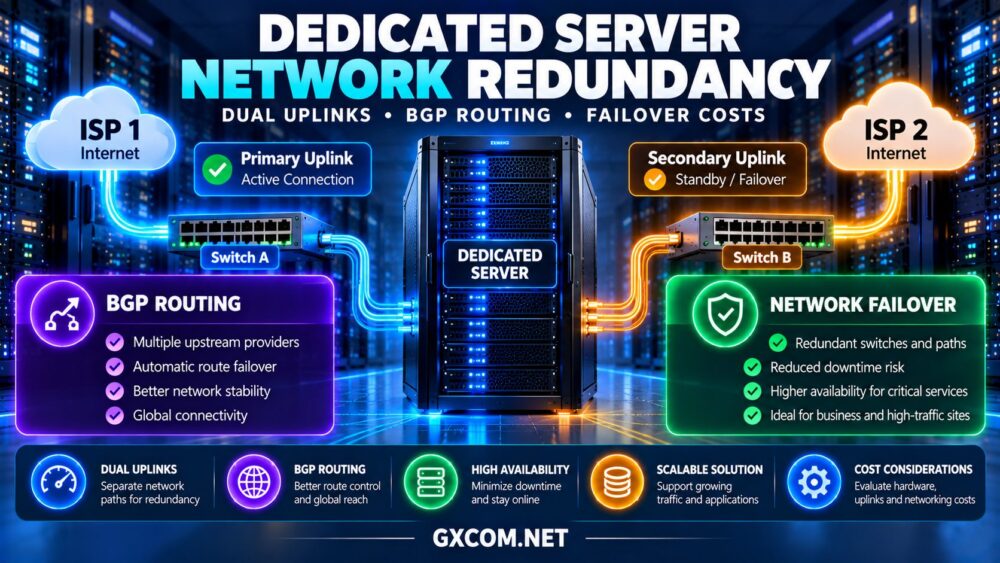
What Is Dedicated Server Network Redundancy?
Network redundancy means providing alternative connectivity paths so that a single network component failure does not necessarily disconnect a service. The design may include multiple network interfaces, separate switches, independent upstream connections, and redundant routing equipment.
The key principle is eliminating single points of failure. Two cables connected to the same switch may protect against a cable failure but not against a switch outage.
Similarly, two upstream carriers sharing the same physical fiber route may remain vulnerable to one construction accident. Evaluate physical diversity rather than counting connections.
Dual Uplinks: What Actually Provides Protection?
Dual Network Interfaces
A dedicated server with two network interface cards can connect through separate physical paths. Linux bonding or Windows NIC teaming may support redundancy, depending on the operating system, drivers, and switch configuration.
Active-backup bonding typically uses one interface while keeping another available for failover. Link aggregation can distribute traffic across interfaces, but it does not automatically protect against every upstream failure.
Separate Switches and Network Paths
For meaningful protection, ask whether each server interface connects to an independent switch and whether those switches have separate upstream paths.
LACP configurations require compatible switch architecture. Connecting interfaces to unrelated switches without appropriate multi-chassis support can create connectivity problems instead of improving reliability.
Our dedicated server hardware guide covers additional infrastructure considerations beyond network design.
How BGP Routing Supports Network Resilience
Border Gateway Protocol (BGP) exchanges routing information between autonomous systems. Hosting networks can use BGP with multiple upstream providers to advertise reachable IP prefixes through alternative paths.
When a route becomes unavailable, routing changes may direct traffic through another provider. However, BGP convergence is not instantaneous, and routing policies can influence which paths remain usable.
Businesses should not assume that purchasing two internet connections automatically provides customer-controlled BGP. Public autonomous system numbers, suitable IP address resources, provider support, and routing expertise may be required.
For many customers, provider-managed upstream redundancy is simpler than operating their own routing infrastructure.

Network Failover vs Server Failover
Network failover preserves connectivity when a link or routing component fails. Server failover moves an application or service to another functioning machine when the original host becomes unavailable.
These solve different problems. Dual uplinks cannot recover a failed motherboard, corrupted operating system, or inaccessible database.
Critical applications may require multiple dedicated servers, replicated data, load balancing, and independent recovery mechanisms.
For architectural context, read our high-availability infrastructure guide. Its redundancy principles also apply to dedicated hosting.
Dedicated Hosting Providers to Evaluate
The following providers are relevant to businesses researching dedicated infrastructure. Advanced redundancy features are not assumed to be included in standard server plans. Request confirmation of available networking services before purchasing.
1. Cherry Servers: Bare Metal Network Flexibility
Cherry Servers is worth evaluating for engineering teams seeking bare metal infrastructure and customizable networking arrangements.
Ask about additional network interfaces, private connectivity, available data center locations, and whether separate physical network paths can be arranged for the selected server.
Best for: Technical teams designing self-managed infrastructure with specific networking requirements.
2. ServerMania: Business Dedicated Infrastructure
ServerMania is a candidate for organizations that need dedicated hardware alongside defined network and support requirements.
Evaluate available uplink options, traffic policies, infrastructure monitoring, and escalation procedures. Confirm whether advanced network redundancy requires a custom configuration or separate agreement.
Best for: Business applications requiring documented infrastructure and operational arrangements.
3. NovoServe: Network-Sensitive Deployments
NovoServe deserves consideration when network connectivity and regional routing are important to dedicated server selection.
Compare deployment locations, port capacities, upstream connectivity arrangements, and available options for resilient network design. Request written clarification about the failure domains covered.
Best for: Network-intensive applications and businesses with location-specific connectivity requirements.
4. GTHost: Dedicated Server Connectivity Options
GTHost offers dedicated infrastructure worth reviewing when server location and connectivity requirements influence the buying decision.
Check whether the selected configuration supports additional interfaces, separate uplinks, private networking, and the necessary administrative access.
Best for: Businesses comparing dedicated server locations and custom networking requirements.
Provider Evaluation Checklist
| Provider | Evaluation Focus | Important Question |
|---|---|---|
| Cherry Servers | Bare metal network customization | Are independent physical paths available? |
| ServerMania | Business infrastructure support | What failures are covered by network commitments? |
| NovoServe | Connectivity and regional routing | How are upstream failures handled? |
| GTHost | Location and uplink requirements | Can redundant connectivity be configured? |
This table is a procurement checklist, not a verified ranking of provider network redundancy.
How Much Does Network Redundancy Cost?
Additional costs may include network interfaces, switch ports, cross-connects, routing services, IP resources, monitoring, and engineering support.
Consider a hypothetical dedicated server costing $140 monthly. A redundant uplink arrangement might add $35, enhanced monitoring $20, and specialist network administration $45.
The illustrative total becomes $240 monthly, or $2,880 annually. Actual pricing depends on data center architecture and provider agreements.
More complex multi-site deployments may require additional servers, data replication, and load balancing, increasing costs substantially.
Compare base infrastructure pricing through our dedicated server deals guide, then request quotations for redundancy features separately.
Testing Network Failover Before Production
Redundancy should be verified through controlled testing rather than accepted solely from a network diagram.
With provider authorization, test an individual interface failure, switch-path interruption, or supported routing failover scenario. Record packet loss, connection interruption, recovery time, and application behavior.
Existing TCP sessions may reset during some transitions, even when connectivity returns quickly. Application retries and session management can therefore affect the user experience.

Define a recovery time objective (RTO) and compare observed results against business requirements. Repeat tests after major infrastructure changes.
Common Network Redundancy Mistakes
Using one switch: Two server ports connected to the same switch leave a shared failure point.
Confusing speed with resilience: A 10Gbps uplink can still fail completely if no alternative path exists.
Assuming BGP guarantees instant recovery: Route convergence and application reconnection can introduce interruptions.
Ignoring physical diversity: Separate carriers may share facilities, conduits, or power dependencies.
Skipping operational testing: Incorrect bonding, routing, or firewall configurations can prevent expected failover.
For related capacity planning, see our dedicated server bandwidth planning guide.
When Is a Redundant Dedicated Server Worth It?
Redundant connectivity is most valuable when outages create meaningful financial or operational consequences. Payment systems, customer-facing SaaS products, enterprise portals, and critical APIs may justify additional investment.
Smaller websites with flexible recovery requirements may be better served by reliable standard hosting, backups, and a documented restoration plan.
Compare infrastructure models in our dedicated server vs VPS comparison before committing to more complex architecture.
Final Verdict
Successful dedicated server network redundancy requires more than dual network ports. Independent switching paths, appropriate upstream routing, clearly defined failure domains, and tested recovery procedures determine whether a design is genuinely resilient.
Cherry Servers, ServerMania, NovoServe, and GTHost provide infrastructure options to investigate. Select a provider based on verified connectivity capabilities, support responsibilities, recovery requirements, and total operating costs.