Choosing the right location for a Rust server can make the difference between responsive combat and frustrating multiplayer sessions. Even a powerful server with generous RAM and a modern processor may deliver a disappointing experience when players connect through distant or unstable network routes.
The best Rust server hosting locations depend on where your community plays, how internet traffic reaches the data center, and whether the hosting provider offers reliable network connectivity. Selecting the nearest country is a useful starting point, but distance alone does not guarantee the lowest latency.
This guide explains how to choose a hosting region for Rust, compare latency across continents, test network performance, and evaluate hosting providers before committing to a server location.
Why Rust Server Location Matters
Rust is a competitive multiplayer survival game where timing, positioning, movement, and combat responsiveness influence the player experience. Every interaction requires communication between the player’s device and the game server.
When a server is geographically distant, network packets generally travel farther and may pass through additional routing points. This can increase round-trip latency, commonly displayed as ping.
However, physical distance is only part of the equation. Internet service providers, network peering arrangements, congestion, and packet loss also affect connection quality.
Server location is particularly important for communities that emphasize PvP encounters, raids, and frequent player interaction. For a broader comparison of hosting options, see our best Rust server hosting guide.
Understanding Ping, Latency, Jitter, and Packet Loss
Before choosing a data center, administrators should understand four network measurements.
- Ping: An estimate of round-trip communication time, usually measured in milliseconds.
- Latency: The time required for data to travel between endpoints.
- Jitter: Variation in packet delivery timing, which can make gameplay feel inconsistent.
- Packet loss: Network packets that fail to reach their destination, potentially causing connection problems.
Lower latency is generally preferable, but a connection with slightly higher, stable ping may perform better than one experiencing frequent spikes or packet loss.
These measurements should also be distinguished from server-side performance. A struggling CPU can cause simulation delays even when players have excellent network connections.
Best Rust Server Regions by Player Location
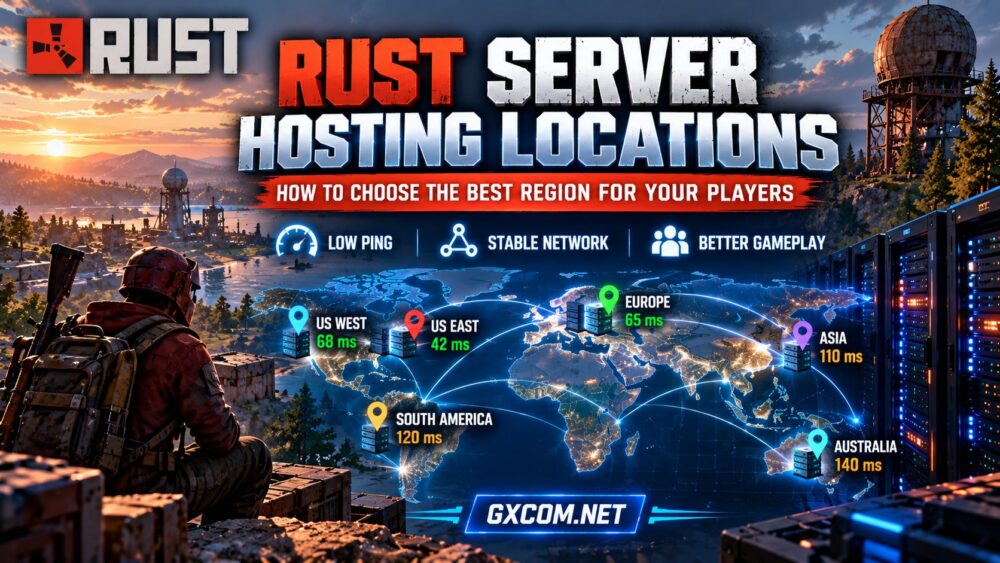
The following table provides a starting framework for choosing a region. It is not a guarantee of latency or an inventory of available provider data centers.
| Primary Player Location | Regions to Evaluate | Key Consideration |
|---|---|---|
| Eastern United States and Canada | US East, Eastern Canada | East Coast connectivity |
| Western United States and Canada | US West, Western Canada | West Coast routing |
| Central United States | US Central, US East, US West | Balance regional connections |
| United Kingdom and Western Europe | UK, Netherlands, Germany, France | Regional network peering |
| Central and Eastern Europe | Germany, Poland, nearby European hubs | Cross-border routing |
| Southeast Asia | Singapore, nearby Asian hubs | Regional carrier connectivity |
| Australia and New Zealand | Sydney, Melbourne, nearby Oceania hubs | Local connectivity |
| South America | Brazil, nearby regional facilities | Domestic and international routes |
Actual results vary by city, internet provider, and destination network. Test specific facilities rather than assuming every data center within a country performs equally.

How to Choose a Region for Players Across Multiple Countries
Many Rust communities have players spread across several countries. In these cases, choosing the location closest to the administrator may disadvantage most of the community.
Step 1: Identify Your Main Player Population
Estimate where active players live and when they normally connect. Give more weight to regular participants and peak-hour concurrency than to occasional visitors.
For example, a community with most players in Germany and the Netherlands may benefit from a well-connected European location even if its administrator lives in North America.
Step 2: Compare Realistic Regional Candidates
Select two or three regions that could serve the largest share of players. Ask representatives from each major geographic group to test those locations.
A central geographic position is not necessarily a central network position. A data center with better carrier connections may outperform one that looks closer on a map.
Step 3: Balance Average and Worst-Case Latency
Consider both the average player experience and the players with the weakest connections. Selecting a region solely because it produces the lowest overall average may leave an important part of the community with unacceptable latency.
For a competitive Rust community, stable performance for the main active population is often more valuable than attempting to serve every continent equally.
How to Test Rust Hosting Locations Before Buying
Whenever possible, request a test IP address or network testing endpoint for the exact hosting region under consideration. A provider’s website location does not establish where its game servers are physically hosted.
Use a repeatable testing process:
- Collect test endpoints for each candidate region.
- Ask players from different networks to measure latency.
- Repeat measurements during local evening peak hours.
- Look for packet loss and inconsistent response times.
- Compare results alongside hosting resources and terms.
Tools such as ping, traceroute, and MTR can help investigate network paths. Some endpoints block ICMP traffic, so a failed ping does not automatically indicate that a game server is unreachable.
For the most meaningful comparison, test an actual Rust connection when the provider offers a trial or suitable temporary deployment. Keep the server configuration consistent between regions.
Comparing Rust Hosting Providers by Location
When evaluating hosting companies, compare the locations offered for the specific Rust plan rather than relying on a general list of company data centers.
Host Havoc and GameServerKings
Host Havoc and GameServerKings are two game-hosting providers to investigate when comparing managed Rust hosting. Review the available deployment regions, control-panel options, server specifications, and location-change policies before purchasing.
Ask whether moving to another region requires a new service or whether the provider can assist with migration. This matters if your community’s geographic distribution changes.
Survival Servers and Sparked Host
Survival Servers and Sparked Host offer additional game-hosting options worth comparing. Evaluate their currently advertised Rust availability, region choices, resource allocations, and support arrangements.
Do not assume that a provider’s locations for Minecraft or another game are automatically available for Rust. Verify the selected game and region together during checkout.
AlphaVPS for Self-Managed Rust Hosting
Administrators comfortable managing Linux or Windows servers can also investigate AlphaVPS as an infrastructure-oriented option. A VPS offers more system-level control, but administrators must handle installation, security, updates, monitoring, and troubleshooting.
Before choosing a VPS, verify that its available locations, CPU resources, networking policies, and service terms fit your Rust deployment.
Our Rust dedicated server setup guide explains the additional responsibilities involved in self-managed hosting.
Server Location vs Hardware: Which Matters More?
Location and hardware solve different problems. Choosing a nearby server can reduce network latency, while sufficient CPU and memory help the server process game activity consistently.
A nearby server with inadequate resources may still suffer from slow simulation, particularly during busy periods. Conversely, a powerful machine on another continent cannot eliminate the physical and routing delays of long-distance connections.
Use our Rust server requirements guide to assess hardware needs, then compare regions using network tests.
When Should You Move a Rust Server to Another Region?
Migration may be worthwhile when your community shifts geographically, a provider’s network quality deteriorates, or another region consistently performs better for active players.
Before moving, confirm that the destination supports your existing Rust setup, plugins, world files, and required resources. Schedule downtime, create verified backups, and explain any connection-address changes to players.
Keep the previous server available until the new deployment has been tested whenever your hosting arrangements allow it.

For additional troubleshooting, read our Rust server lag and performance guide.
Rust Server Location Selection Checklist
- Identify the countries and cities where regular players connect.
- Shortlist regions based on player distribution.
- Test latency, jitter, and packet loss from multiple networks.
- Confirm the provider supports Rust in the chosen location.
- Compare CPU, memory, storage, and network specifications.
- Review migration policies, support, and cancellation terms.
- Recheck performance during realistic peak-hour gameplay.
Frequently Asked Questions
What is the best location for a Rust server?
The best location is generally a well-connected region that provides stable, low-latency access for your main player population. There is no universally optimal country or city.
Is a server closer to players always faster?
No. Geographic proximity helps, but routing, peering, congestion, and the player’s internet connection can make a more distant data center perform better.
Can one Rust server serve players in Europe and North America?
Yes, but transatlantic latency creates unavoidable trade-offs. Compare candidate regions using tests from both continents and prioritize the experience of your core community.
Does changing Rust server location improve FPS?
Changing location can improve network responsiveness, but it does not directly increase a player’s rendering frame rate. Client FPS, server simulation performance, and network latency are separate measurements.
Final Thoughts
Choosing among Rust server hosting locations requires more than selecting the nearest city. Player geography, routing stability, packet loss, and server hardware all contribute to multiplayer performance.
Start with your community’s actual locations, test several suitable regions, and compare providers using current deployment options. Host Havoc, GameServerKings, Survival Servers, Sparked Host, and AlphaVPS provide a useful shortlist for further evaluation, depending on whether you prefer managed game hosting or self-managed infrastructure.
The right region is the one that consistently serves your players well—not simply the one with the shortest distance on a map.