Cheap dedicated servers can deliver excellent value when you need physical CPU resources, large amounts of RAM, dedicated storage, predictable performance, or greater control than a VPS can provide.
But the best dedicated server deals are not necessarily the servers with the lowest monthly price. CPU generation, core count, RAM, NVMe or SSD storage, bandwidth, data center location, setup fees, operating system licensing, and management can dramatically change the real value of a bare metal offer.
This GXCOM.NET guide tracks current cheap dedicated server and bare metal deals from providers offering everything from budget Intel Xeon servers to modern AMD Ryzen and EPYC infrastructure.
Instead of ranking servers only by price, we compare the hardware and services behind each offer so you can choose the right server for your workload.
Deal Update: Dedicated server prices, promotions, and inventory can change frequently. Always verify the current configuration and final checkout price before ordering.
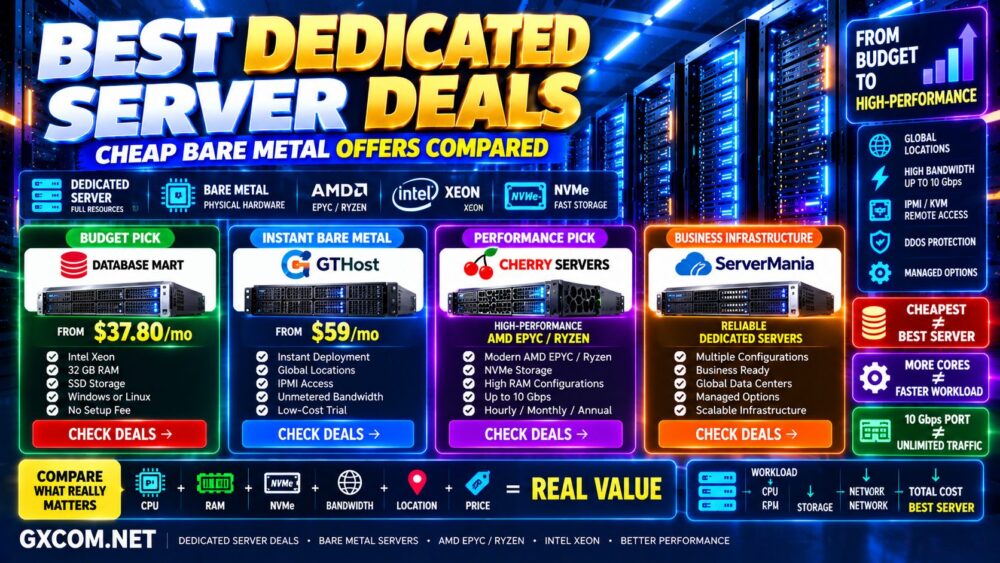
Best Dedicated Server Deals: Quick Comparison
| Provider | Current Price* | Key Advantage | Best For |
|---|---|---|---|
| Database Mart | From about $37.80/mo | Very low-cost dedicated servers | Budget / Windows / Linux |
| GTHost | From about $59/mo | Instant bare metal deployment | Global locations / testing |
| Cherry Servers | Varies by configuration | Modern AMD Ryzen / EPYC | High-performance bare metal |
| ServerMania | Varies by configuration | Dedicated infrastructure | Business workloads |
*Current reference pricing at the time of update. Hardware, locations, promotions, and availability can change.
🔥 Featured Dedicated Server Deals Worth Checking
If you are ready to rent a physical server, start by matching the provider to your workload.
LOWEST-COST BARE METAL → Database Mart
INSTANT GLOBAL BARE METAL → GTHost
MODERN AMD EPYC / RYZEN → Cherry Servers
BUSINESS DEDICATED INFRASTRUCTURE → ServerMania
Do not choose by monthly price alone.
CPU + RAM + Storage + Bandwidth + Location + Management + Fees = Real Dedicated Server Value
1. Database Mart Dedicated Server Deals
Database Mart is one of the more interesting options for buyers searching specifically for a cheap dedicated server.
Its current dedicated hosting catalog includes both Windows and Linux servers, with configurations ranging from inexpensive single-CPU systems to larger servers with significantly more RAM and storage.
One current promotional configuration is the Express Dedicated Server SSD at approximately $37.80 per month.
The configuration includes:
- Intel Xeon E3-1230 processor
- 4 CPU cores
- 32 GB RAM
- 120 GB SSD + 960 GB SSD
- 100 Mbps to 1 Gbps bandwidth options
- Windows or Linux
- Dedicated IPv4 address
- No setup fee
The current offer is advertised with a recurring discount, which is particularly important for long-running dedicated servers.
Recurring Discount > Large First-Month Discount
when you intend to keep the server for a year or longer.
Who Should Consider Database Mart?
Database Mart can make sense for:
- Budget bare metal
- Windows Server workloads
- Remote desktop environments
- Development servers
- Databases
- Storage workloads
- Web hosting
- Legacy applications
However, some low-cost configurations use older Intel Xeon processors.
That is not necessarily a problem when the workload is light, but do not compare an older Xeon server directly with a modern Ryzen or EPYC server based only on CPU core count.
More Old Cores ≠ More Modern Performance.
2. GTHost Dedicated Server Deals
GTHost takes a different approach by focusing heavily on instant dedicated server inventory across multiple worldwide locations.
Current entry-level bare metal pricing starts at approximately $59 per month.
One current entry configuration includes:
- Intel Xeon D-1531
- 6 cores / 12 threads
- 16 GB DDR4 RAM
- 480 GB SSD
- 300 Mbps unmetered bandwidth
- IPMI
GTHost also advertises short low-cost trials on selected servers, which can be particularly useful before committing to a longer rental.
Why a Dedicated Server Trial Matters
Two servers with similar specifications can behave differently in the real world because of network routing, storage hardware, data center connectivity, and application requirements.
Before making a longer commitment, test:
- CPU performance
- Disk I/O
- Network throughput
- Latency
- Routing
- Application performance
This is particularly valuable when the server will host latency-sensitive applications or production workloads.
3. Cherry Servers Bare Metal Deals
Cherry Servers targets a different segment of the dedicated server market.
Instead of competing primarily with inexpensive older-generation hardware, its bare metal platform includes modern AMD Ryzen, AMD EPYC, Threadripper PRO, and Intel server configurations.
Depending on the server, available features can include:
- Modern AMD EPYC processors
- High-clock AMD Ryzen processors
- DDR5 memory
- NVMe storage
- Large memory configurations
- High-speed networking
- IP KVM
- DDoS protection
- Private networking
- Large traffic allowances
- Hourly, monthly, or annual billing
This makes Cherry Servers more relevant to buyers who care about modern CPU performance and infrastructure flexibility rather than simply finding the lowest possible monthly price.
Modern Hardware Can Be Better Value Than Cheap Hardware
A $50 dedicated server is not automatically better value than a $150 server.
Suppose an older CPU takes three times longer to complete a workload while consuming infrastructure resources continuously.
The more expensive modern server may produce better economics despite the higher monthly price.
For CPU-intensive workloads, evaluate:
Performance per Core + Total Throughput + Runtime + Monthly Cost
rather than monthly price alone.
4. ServerMania Dedicated Server Deals
ServerMania is worth comparing for business and infrastructure workloads where dedicated hardware, network capacity, and configuration flexibility matter.
Dedicated infrastructure can be useful for:
- Business applications
- Web hosting
- Databases
- Virtualization
- Private infrastructure
- Game servers
- High-traffic applications
When comparing ServerMania with cheaper bare metal providers, check the complete configuration rather than CPU and RAM alone.
Support, network capacity, storage options, data center location, and management can all affect the real cost of operating a production server.
Cheap Dedicated Server vs Best-Value Dedicated Server
There is an important difference between the cheapest server and the best-value server.
Consider:
Server A: $40/mo — Older Xeon + 32 GB RAM + SSD
Server B: $90/mo — Modern CPU + 64 GB RAM + NVMe
Server A clearly costs less.
But Server B may provide better value for a CPU-intensive database, busy website, virtualization environment, or application server.
The correct question is:
What Is the Cheapest Server That Meets My Performance Requirement?
Dedicated Server vs Bare Metal: What's the Difference?
Dedicated server and bare metal are often used to describe essentially the same core concept: a physical server dedicated to one customer.
However, the term “bare metal cloud” is increasingly associated with:
- Fast automated deployment
- Hourly billing
- API-based provisioning
- Cloud-style management
- Private networking
- Flexible infrastructure
Traditional dedicated hosting is more commonly associated with monthly billing and longer-running infrastructure.
For a detailed comparison, read our
Bare Metal vs Dedicated Server comparison.
AMD Ryzen Dedicated Server Deals
AMD Ryzen can be an excellent dedicated server CPU when strong per-core performance and high clock speeds matter.
Typical workloads include:
- Game servers
- Web applications
- WordPress hosting
- Application servers
- Development
- Smaller databases
A modern Ryzen CPU can outperform older enterprise CPUs in workloads that depend heavily on single-thread performance.
More Cores ≠ Faster Application.
AMD EPYC Dedicated Server Deals
AMD EPYC is more appropriate for workloads requiring high core counts, large RAM capacities, modern memory platforms, substantial PCIe connectivity, and enterprise virtualization.
Common use cases include:
- Virtualization
- Private cloud
- Containers
- Large databases
- Analytics
- High-density applications
- Enterprise infrastructure
Modern EPYC systems cost more than budget bare metal, but the additional performance and memory capacity can justify the price for demanding workloads.
Read our
AMD EPYC vs Intel Xeon Server comparison
before choosing a CPU platform.
Intel Xeon Dedicated Server Deals
Intel Xeon remains extremely common in the low-cost dedicated hosting market.
Older Xeon hardware can still provide excellent value for workloads that do not require modern per-core performance.
Examples include:
- Backup servers
- Storage servers
- Development
- Remote desktops
- Low-to-medium traffic websites
- Light virtualization
- Legacy applications
The important factor is CPU generation.
Do not evaluate a server using only:
“8 Cores vs 16 Cores”
Compare architecture, clock speed, age, and benchmark performance as well.
NVMe Dedicated Server Deals
NVMe storage can significantly improve performance for I/O-heavy workloads.
It is particularly useful for:
- Databases
- Virtual machines
- Containers
- Search indexes
- Busy websites
- High-I/O applications
However, the word NVMe alone does not tell you everything.
Check:
- Drive model
- Capacity
- Number of drives
- RAID options
- Enterprise vs consumer drives
- Backup strategy
NVMe ≠ Same Storage Performance.
High-RAM Dedicated Server Deals
Physical servers become particularly attractive when your workload requires large amounts of memory.
128 GB, 256 GB, 512 GB, and even larger RAM configurations can be useful for:
- Virtual machines
- Databases
- In-memory applications
- Private cloud
- Enterprise workloads
But unused RAM does not make a server faster.
Measure actual memory utilization before buying the largest configuration available.
Dedicated Server Bandwidth Deals
Network specifications deserve the same attention as CPU and RAM.
Check:
- Port speed
- Included monthly traffic
- Unmetered or metered transfer
- Fair-use policies
- Overage pricing
- Network routing
- Data center location
A 10 Gbps port does not automatically mean you can continuously transfer 10 Gbps without traffic restrictions.
10 Gbps Port ≠ Unlimited 10 Gbps Traffic.
Windows Dedicated Server Deals
Windows dedicated servers require another important calculation: licensing.
A server advertised at $50 per month may cost considerably more after Windows Server and other commercial software licenses are added.
Before ordering, check:
- Windows Server version
- Whether the license is included
- License surcharge
- Remote Desktop requirements
- Control panel licensing
- Backup costs
Read our
Windows Dedicated Server Cost and Licensing Guide
before comparing Windows offers.
Managed vs Unmanaged Dedicated Server Deals
Most of the cheapest dedicated servers are unmanaged.
This means you may be responsible for:
- Operating system installation
- Updates
- Security hardening
- Web server configuration
- Monitoring
- Backups
- Troubleshooting
Managed dedicated hosting costs more but can reduce the technical workload.
Compare the two models in our
Managed vs Unmanaged Dedicated Server guide.
Dedicated Server vs VPS: Which Deal Is Better?
Cheap dedicated servers can sometimes approach the price of larger VPS plans.
| Factor | VPS | Dedicated Server |
|---|---|---|
| Entry Price | Usually lower | Usually higher |
| Physical Hardware | Shared host | Dedicated hardware |
| CPU Isolation | Plan dependent | Full physical CPU |
| Scaling | Usually easier | Hardware dependent |
| Large RAM | Can become expensive | Often attractive |
| Hardware Control | Limited | Greater control |
For smaller workloads, a VPS may still provide better economics.
Read our
Dedicated Server vs VPS comparison
before moving to physical hardware.
Dedicated Server vs Cloud Server
Cloud servers prioritize rapid provisioning, flexible virtual resources, and easier scaling.
Dedicated servers provide physical hardware and predictable resource isolation.
Dedicated infrastructure can be attractive for stable, continuously running workloads, while cloud infrastructure can be better for rapidly changing demand.
See our
Dedicated Server vs Cloud Server comparison
for the complete analysis.
What to Check Before Buying a Dedicated Server Deal
- CPU Generation: Do not compare processors by core count alone.
- RAM: Verify capacity, generation, and ECC support where relevant.
- Storage: Compare HDD, SSD, and NVMe carefully.
- RAID: Determine whether redundancy is required.
- Bandwidth: Check port speed and included transfer.
- Location: Choose a data center appropriate for your users.
- IPMI/KVM: Remote hardware access can be extremely useful.
- Setup Fee: Include one-time fees in the real cost.
- OS License: Windows can add significant cost.
- Management: Know whether the server is managed or unmanaged.
Dedicated Server Deal Red Flags
Be cautious when a provider advertises an extremely cheap server without clearly showing the complete configuration.
Watch for:
- Very old CPU generations
- Slow HDD-only storage
- Small traffic allowances
- Large setup fees
- Expensive Windows licensing
- No remote management
- Unclear hardware replacement policies
- Unclear cancellation terms
A cheap server becomes expensive when hidden costs or poor performance force an early migration.
Should You Wait for Black Friday?
Dedicated server promotions run throughout the year, so you do not necessarily need to wait for Black Friday.
If your project needs infrastructure now, compare current offers first.
If your purchase is flexible and Black Friday is approaching, seasonal promotions can be particularly attractive for long-term server rentals.
See our Black Friday Dedicated Server Deals page for seasonal offers and compare them against the year-round prices on this page.
How GXCOM.NET Evaluates Dedicated Server Deals
GXCOM.NET does not rank dedicated servers simply by the lowest monthly price or largest advertised discount.
We consider:
- CPU generation and performance
- Core and thread count
- RAM
- Storage type and capacity
- RAID options
- Bandwidth
- Traffic allowance
- Data center location
- Remote management
- Setup fees
- Operating system costs
- Management
- Billing terms
Our objective is:
Workload → Hardware → Performance → Network → Reliability → Total Cost → Best Deal.
Best Dedicated Server Deals FAQ
How much does a cheap dedicated server cost?
Budget dedicated servers can start below $50 per month, particularly when using older Intel Xeon hardware. Modern Ryzen, EPYC, high-memory, NVMe, or managed servers can cost significantly more.
Is a $40 dedicated server worth buying?
It can be excellent value for storage, development, backup, lightweight web hosting, remote desktop, or legacy applications. For CPU-intensive production workloads, check the processor generation and performance before buying.
Is bare metal the same as a dedicated server?
Both generally refer to physical hardware dedicated to one customer. Bare metal platforms often emphasize automated provisioning, API management, hourly billing, and cloud-style infrastructure.
Is AMD Ryzen good for dedicated hosting?
Yes. Modern Ryzen processors can provide excellent per-core performance for game servers, websites, application servers, and other workloads that benefit from high clock speeds.
Is AMD EPYC better for servers?
EPYC can be particularly attractive for virtualization, high-core workloads, large memory configurations, databases, and enterprise infrastructure. The best processor still depends on the workload and price.
Should I choose NVMe or SSD?
NVMe is preferable for I/O-intensive workloads when the price difference is reasonable. Conventional SSD storage can still be sufficient for many websites, backup systems, and lighter applications.
Should I buy a dedicated server or VPS?
A VPS is usually better for smaller workloads and easier scaling. Dedicated servers become more attractive when you need physical hardware, sustained CPU resources, large RAM capacities, dedicated storage, or greater infrastructure control.
Best Dedicated Server Deals: Final Verdict
The best dedicated server deal is not simply the cheapest physical server you can find.
Database Mart currently stands out for extremely inexpensive dedicated hardware and can be attractive for budget Windows and Linux workloads. GTHost is particularly interesting when fast deployment, worldwide locations, IPMI, and short-term testing matter.
Cherry Servers occupies a different part of the market, with modern AMD Ryzen and EPYC infrastructure better suited to demanding applications where CPU performance, NVMe, large memory, and high-speed networking justify a higher price.
ServerMania is another option worth comparing for business-oriented dedicated infrastructure.
Before ordering, use this process:
Workload → CPU → RAM → Storage → Network → Location → Management → Fees → Final Cost.
Most importantly, do not compare dedicated servers by RAM, CPU core count, or monthly price alone.
The Best Dedicated Server Deal Is the Cheapest Hardware That Reliably Meets Your Actual Workload.