AccuWeb Hosting has built a broad hosting portfolio around affordable web hosting, WordPress, Windows hosting, Linux and Windows VPS, cloud infrastructure, application hosting, and dedicated servers.
One area where the company particularly stands out is Windows infrastructure. While many budget hosting providers focus almost entirely on Linux, AccuWeb Hosting offers Windows shared hosting and a substantial Windows VPS lineup supporting Remote Desktop, IIS, ASP.NET, .NET Core, SQL Server, and business applications.
At the same time, its entry-level web hosting currently starts from $1.99 per month, making the provider relevant to both conventional website owners and users looking for more technical server environments.
In this AccuWeb Hosting Review, we examine its web hosting, Windows hosting, Windows VPS, pricing, storage, global locations, performance features, support, and the major pros and cons to consider before choosing a plan.
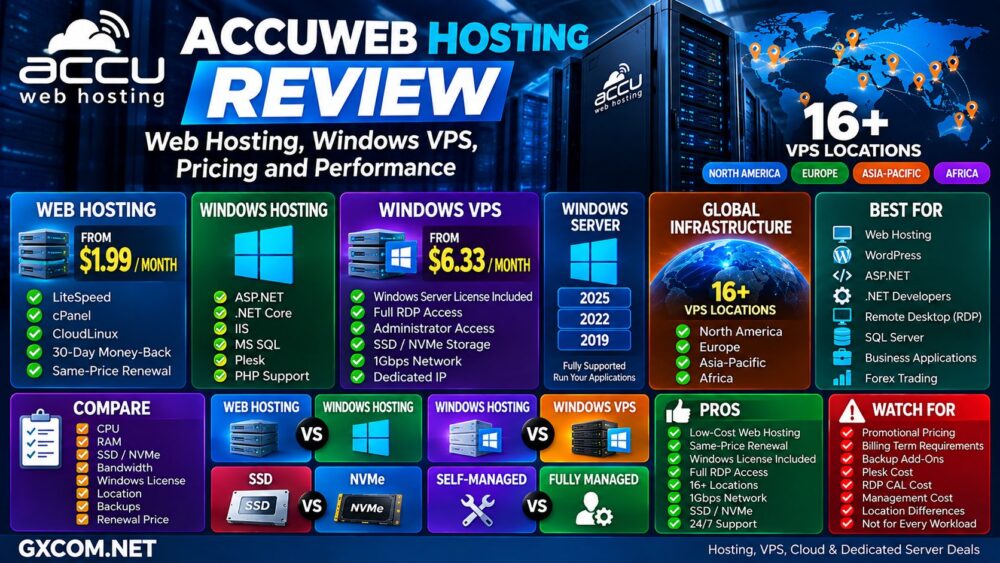
AccuWeb Hosting Review: Quick Overview
| Feature | AccuWeb Hosting |
|---|---|
| Cheap Web Hosting | Yes |
| WordPress Hosting | Yes |
| Windows Web Hosting | Yes |
| Linux VPS | Yes |
| Windows VPS | Yes |
| Forex VPS | Yes |
| Cloud VPS | Yes |
| Dedicated Servers | Yes |
| Windows Server License | Included on standard Windows VPS plans |
| RDP | Yes |
| SSD / NVMe | Yes, depending on plan/location |
| VPS Connectivity | At least 1Gbps |
| Global Windows VPS Locations | 16+ |
| Best For | Websites, Windows VPS, RDP, ASP.NET, developers and business applications |
What Is AccuWeb Hosting?
AccuWeb Hosting is a hosting and infrastructure provider with more than two decades of industry experience.
Its current product portfolio includes:
- Cheap Web Hosting
- Managed Web Hosting
- WordPress Hosting
- Windows Web Hosting
- Linux VPS
- Windows VPS
- Forex VPS
- Cloud VPS
- Application Hosting
- Dedicated Servers
This broad product range allows customers to start with conventional website hosting and move toward virtual or dedicated infrastructure as their workload becomes more demanding.
AccuWeb Web Hosting
AccuWeb Hosting currently offers several different website hosting products rather than a single shared hosting plan.
The main options include:
- Cheap Web Hosting
- Managed Web Hosting
- WordPress Hosting
- Windows Hosting
Cheap Web Hosting currently starts from $1.99 per month, while Managed Web Hosting starts from $2.49 per month.
For WordPress users, Fast WordPress Hosting also starts from $1.99 per month at the time of this review.
AccuWeb Cheap Web Hosting
The budget hosting product is particularly interesting because AccuWeb currently advertises the $1.99 per month starting plan as renewing at the same price.
This is worth highlighting because introductory hosting prices frequently increase substantially after the first billing period.
Current cheap hosting features include:
- LiteSpeed Web Server
- LSCache
- cPanel
- CloudLinux
- Monthly billing availability
- 30-day money-back guarantee
For small websites and budget-conscious users, long-term pricing can matter just as much as the initial discount.
Cheap Intro Price ≠ Cheap Renewal Price.
AccuWeb's same-price renewal positioning therefore deserves attention when comparing conventional shared hosting providers.
AccuWeb Managed Web Hosting
Users who want additional hosting features can consider the managed web hosting lineup.
Current plans start from approximately $2.49 per month and can include features such as:
- Free domain registration
- Guaranteed resources
- SSD storage
- SSL
- Email accounts
- Daily backups
- CDN
- Multiple hosting locations
The appropriate choice depends on the number of websites, required storage, RAM, bandwidth, and management features.
AccuWeb Windows Web Hosting
Windows web hosting is one of the more distinctive parts of the AccuWeb product portfolio.
Unlike a Windows VPS, Windows shared hosting is designed for customers who need Microsoft web technologies without administering an entire Windows Server environment.
Current Windows hosting supports technologies including:
- Windows Server
- IIS
- ASP.NET
- .NET Core
- PHP
- MS SQL
- MariaDB
- Plesk
AccuWeb Windows Hosting Pricing
| Plan | Starting Price | Domains | Storage | Bandwidth |
|---|---|---|---|---|
| Beginner++ | $3.49/mo | 1 | 10 GB | 500 GB |
| Professional++ | From around $8/mo | 3 | 30 GB | 1 TB |
| Turbo++ | From around $14/mo | 5 | 50 GB | 1.5 TB |
Promotional pricing can vary with the billing term, so users should confirm the live checkout price before ordering.
Windows Hosting vs Windows VPS
| Factor | Windows Web Hosting | Windows VPS |
|---|---|---|
| Server Administration | Mostly provider managed | Greater customer control |
| Administrator Access | No full server access | Yes |
| RDP Desktop | No full desktop server | Yes |
| ASP.NET / IIS | Yes | Yes |
| Custom Applications | Limited | Flexible |
| Resource Control | Hosting-plan based | Dedicated VPS allocation |
| Best For | Windows websites | Windows apps and server workloads |
Users should not purchase a Windows VPS simply because their website uses ASP.NET.
If the workload only needs a Windows-compatible website environment, shared Windows hosting can be simpler and cheaper.
AccuWeb Windows VPS
AccuWeb Windows VPS is one of the provider's most important infrastructure products.
Current Windows VPS plans provide full Remote Desktop and Administrator access along with dedicated server resources.
The platform supports:
- Windows Server 2025
- Windows Server 2022
- Windows Server 2019
- Full RDP access
- Administrator access
- Dedicated resources
- SSD / NVMe storage
- At least 1Gbps connectivity
- Dedicated IP address
- VPS management panel
AccuWeb Windows VPS Pricing
Standard Windows VPS pricing currently starts from approximately $6.33 per month for the entry-level Opal plan on eligible billing terms.
| Plan | RAM | vCPU | Storage | Starting Price |
|---|---|---|---|---|
| Opal | 1 GB | 1 vCPU | 40 GB SSD | $6.33/mo |
| Pearl | 2 GB | 1 vCPU | 60 GB SSD | $9.99/mo |
| Diamond | 4 GB | 3 vCPU | 100 GB SSD | $19.99/mo |
| Emerald | 8 GB | 4 vCPU | 125 GB SSD | $39.99/mo |
| Mellite | 16 GB | 4 vCPU | 200 GB SSD | $79.99/mo |
These are promotional prices available at the time of this review and can depend on the billing period and server location.
Always compare the renewal price rather than assuming the discounted price continues indefinitely.
Is the Windows License Included?
Yes. AccuWeb's current standard Windows VPS product pages state that the Windows Server license is included.
This is an important pricing factor because some VPS providers advertise an inexpensive base server and then charge separately for Windows licensing.
When comparing Windows VPS providers, calculate:
VPS + Windows License + Backup + Control Panel + Management = Real Monthly Cost.
AccuWeb Windows VPS for RDP
Full Remote Desktop access makes the Windows VPS suitable for users who need a remotely accessible Windows Server environment.
Typical workloads include:
- Remote Windows applications
- Development
- Business software
- ERP and CRM
- Accounting software
- ASP.NET applications
- SQL databases
- Testing environments
AccuWeb states that standard plans generally include support for up to two concurrent RDP users, while additional RDP CALs are available separately.
AccuWeb Windows VPS for ASP.NET and IIS
The platform provides a fairly complete Microsoft-oriented application environment.
Supported technologies currently include:
- IIS 10
- ASP.NET
- .NET Core
- PHP
- MVC frameworks
- WebSockets
- Web services
- DLL support
This makes the Windows VPS more relevant to developers who need control beyond conventional Windows shared hosting.
AccuWeb Windows VPS for SQL Server
Database users also receive several options.
Current Windows VPS features include:
- MSSQL Express
- MSSQL Web Edition as an add-on
- MySQL
- phpMyAdmin
- Remote SQL login
- SQL Server drivers for PHP
For database-heavy applications, RAM and storage performance can become more important than simply choosing the cheapest VPS configuration.
AccuWeb SSD vs NVMe
AccuWeb uses SSD and NVMe storage depending on the specific VPS product and location.
NVMe generally offers substantially greater storage throughput and lower latency than traditional SATA SSD technology.
However:
NVMe ≠ Automatically Faster Application.
Application performance still depends on CPU allocation, RAM, database configuration, caching, network latency, and software optimization.
AccuWeb Windows VPS Network
AccuWeb states that its Windows VPS servers provide at least a 1Gbps port connection.
That can be useful for remote applications, websites, databases, trading tools, and other network-dependent workloads.
However, port speed should not be confused with guaranteed sustained throughput.
Actual performance depends on:
- Server location
- User location
- ISP routing
- Network congestion
- Application behavior
- Bandwidth allocation
AccuWeb Global Windows VPS Locations
One of AccuWeb's stronger Windows VPS features is its geographic coverage.
The provider currently advertises more than 16 Windows VPS locations across North America, Europe, Africa, and Asia-Pacific.
Published locations include:
- Denver
- New York
- Northern Virginia
- Ohio
- Oregon
- Montreal
- London
- Frankfurt
- Paris
- Dublin
- Stockholm
- Johannesburg
- Hyderabad
- Singapore
- Sydney
- Tokyo
- Seoul
Available products and backup options can vary by location, so always verify the specific location during checkout.
Why Server Location Matters
For RDP in particular, latency can noticeably affect the user experience.
A Windows desktop hosted thousands of miles away may technically work, but keyboard input, screen refreshes, application interaction, and database access can feel less responsive.
A useful rule is:
User → Closest Suitable Datacenter → Lower Latency → Better Remote Experience.
AccuWeb Windows VPS Backups
Current Windows VPS plans include complimentary backups in selected locations, while paid daily backup options are available more broadly.
AccuWeb currently identifies Denver, New York, Hyderabad, London, and Frankfurt among locations offering complimentary backups.
Users should still check:
- Backup frequency
- Retention
- Restore process
- Location availability
- Additional backup cost
For business-critical applications, maintain an independent backup strategy rather than relying on a single provider copy.
AccuWeb VPS Management
Windows VPS users receive a management panel for monitoring and administering their virtual server.
AccuWeb currently offers:
- VPS management interface
- CPU monitoring
- Memory monitoring
- Disk monitoring
- SolidCP at no additional cost
- Plesk as a paid option
- Resource upgrades
Additional CPU, RAM, storage, IP addresses, licenses, and other services can affect the final monthly cost.
Basic Support vs Fully Managed Support
AccuWeb provides 24/7 basic support with its Windows VPS plans, while fully managed support is available as an additional option.
This distinction matters.
A VPS that provides Administrator access also gives the customer substantially more responsibility than ordinary web hosting.
Users should determine whether they need assistance with the infrastructure itself or ongoing management of the operating system and applications.
24/7 Support ≠ Fully Managed Server Administration.
AccuWeb Performance
There is no single meaningful performance number for all AccuWeb products because shared web hosting and Windows VPS operate in very different environments.
Performance can depend on:
- CPU allocation
- RAM
- SSD / NVMe
- Virtualization platform
- Network
- Datacenter location
- Application stack
- Database configuration
- Caching
For a small website, a properly configured shared hosting plan can outperform a poorly configured VPS.
For custom Windows applications, however, a VPS provides the server-level control that shared hosting cannot.
Have We Independently Benchmarked AccuWeb Hosting?
This review evaluates AccuWeb Hosting using current published specifications, pricing, product documentation, infrastructure information, and service features.
Unless GXCOM.NET explicitly publishes benchmark methodology and measured results, provider specifications should not be interpreted as independent GXCOM.NET performance testing.
For important Windows workloads, consider testing:
- RDP latency
- CPU performance
- Memory usage
- Disk IOPS
- Disk latency
- SQL performance
- Network throughput
- Application response time
AccuWeb Hosting vs Hostwinds
AccuWeb Hosting and Hostwinds both provide conventional hosting alongside Windows VPS infrastructure.
The correct comparison depends on Windows licensing, CPU and RAM allocation, storage, bandwidth, location, backup policy, management, and recurring price.
Read our
Hostwinds Review
for a closer look at the alternative.
AccuWeb Hosting vs IONOS
IONOS also offers both conventional web hosting and Windows VPS products, making it another relevant comparison.
IONOS has a particularly broad hosting-to-cloud infrastructure ecosystem, while AccuWeb provides a strong selection of Microsoft-oriented hosting and Windows VPS configurations.
Users should compare the actual Windows configuration and long-term cost rather than judging either provider by its cheapest Linux or web-hosting price.
See our
IONOS Review
for the broader comparison.
AccuWeb Hosting Pros and Cons
| Pros | Watch For |
|---|---|
| Web hosting from $1.99/mo | Different products use different pricing structures |
| Same-price renewal on cheap web hosting | Check billing-term requirements |
| Strong Windows product range | Windows VPS costs more than basic web hosting |
| Windows license included on standard VPS | Some software licenses cost extra |
| Full RDP and Administrator access | Extra RDP CALs cost more |
| SSD / NVMe options | Storage type varies by plan |
| 16+ Windows VPS locations | Features can vary by location |
| At least 1Gbps VPS connectivity | Port speed does not guarantee sustained throughput |
| Complimentary backups in selected locations | Daily backups may be an add-on |
| 24/7 support | Fully managed support can cost extra |
Who Should Consider AccuWeb Hosting?
AccuWeb Hosting can be particularly relevant for:
- Budget website owners
- WordPress users
- ASP.NET websites
- .NET developers
- Windows VPS users
- Remote Desktop users
- SQL Server workloads
- Business applications
- Developers
- Forex VPS users
- Users requiring global Windows VPS locations
Who May Prefer an Alternative?
Users who only need a simple Linux VPS may want to compare specialist budget VPS providers with larger RAM or storage allocations.
Likewise, organizations looking for a hyperscale cloud ecosystem with extensive serverless, managed database, AI, and enterprise cloud services may prefer a larger cloud platform.
AccuWeb's more distinctive proposition is the combination of affordable website hosting and a particularly broad Windows hosting and VPS ecosystem.
Which AccuWeb Product Should You Choose?
| Workload | Starting Point |
|---|---|
| Simple Website | Cheap Web Hosting |
| WordPress | WordPress Hosting |
| ASP.NET Website | Windows Web Hosting |
| Linux Application | Linux VPS |
| Windows Application | Windows VPS |
| Remote Desktop | Windows VPS |
| SQL / .NET Application | Windows VPS |
| Forex Trading | Forex VPS |
| Heavy Physical Workload | Dedicated Server |
AccuWeb Hosting Review: Final Thoughts
AccuWeb Hosting is particularly interesting because it serves two quite different audiences under one platform.
Website owners can start with inexpensive shared or WordPress hosting, while developers and businesses that depend on Microsoft technologies can move into Windows hosting or full Windows VPS infrastructure.
The Windows VPS lineup is the standout part of this review. Current plans provide Windows Server licensing, RDP, Administrator access, dedicated resources, SSD or NVMe options, at least 1Gbps connectivity, and a broad selection of global locations.
The entry-level web hosting also deserves attention because AccuWeb currently advertises its $1.99 per month cheap hosting plan with same-price renewal rather than the steep post-introductory increase common in the hosting market.
Still, the correct choice depends on workload rather than the lowest advertised price.
Cheap Hosting ≠ Right Hosting for Every Workload.
Before ordering, follow this path:
Website / Application → Linux / Windows → CPU + RAM → SSD / NVMe → Location → Management → Backup → Renewal Price → Total Cost.