Cloud Clusters is a U.S.-focused infrastructure provider offering affordable Linux VPS, dedicated servers, GPU servers, and application hosting. Its VPS plans stand out for an aggressive combination of CPU, RAM, SSD storage, and unmetered bandwidth at relatively low monthly prices.
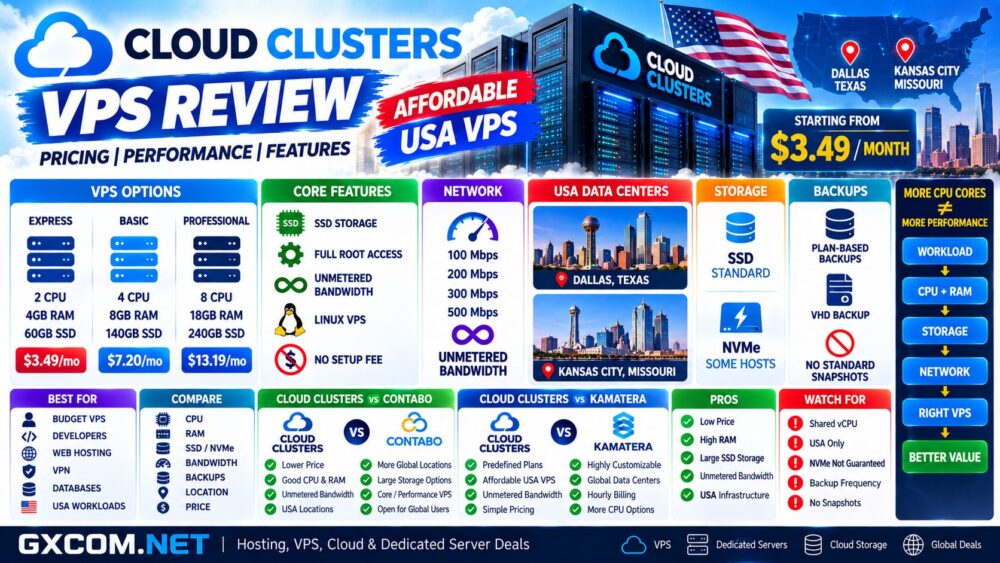
For example, the entry-level Linux VPS currently starts at just $3.49 per month with 2 CPU cores, 4GB RAM, and 60GB SSD storage, while larger configurations provide significantly more memory and disk capacity.
But specifications alone do not determine VPS performance. CPU virtualization, storage technology, network limits, data center location, backup frequency, and resource sharing can all affect real-world results.
In this Cloud Clusters VPS review, we examine current pricing, hardware specifications, SSD and NVMe availability, network performance, backups, U.S. data centers, root access, scalability, and the major pros and cons you should understand before ordering.
Cloud Clusters VPS Review: Quick Overview
| Feature | Cloud Clusters |
|---|---|
| Founded | 2017 |
| Company | Cloud Clusters LLC |
| Linux VPS | Yes |
| Windows VPS | Available through related infrastructure/services |
| Storage | SSD; some hosts may use NVMe |
| Root Access | Yes |
| Bandwidth | 100Mbps–500Mbps on current Linux VPS plans |
| Traffic | Unmetered, subject to network/resource policies |
| Backups | Included at plan-specific intervals |
| Snapshots | No traditional VPS snapshot feature |
| Data Centers | Dallas and Kansas City |
| Uptime | 99.9% SLA |
| Support | 24/7 |
| Best For | Budget U.S. VPS, websites, development, VPNs and self-managed servers |
What Is Cloud Clusters?
Cloud Clusters LLC was established in 2017 and is backed by the same team associated with Database Mart, a hosting business with infrastructure experience dating back much further.
The company currently provides several infrastructure categories:
- Linux VPS
- GPU VPS
- Dedicated servers
- GPU dedicated servers
- Cloud application hosting
- Kubernetes-based application hosting
Unlike global cloud providers with dozens of international regions, Cloud Clusters currently concentrates its physical server infrastructure in the United States.
That makes it particularly relevant for users targeting U.S. workloads and audiences.
Cloud Clusters VPS Pricing
Price-to-resource ratio is one of the strongest aspects of the current Cloud Clusters VPS lineup.
At the time of this review, the provider publishes the following Linux VPS configurations:
| Plan | CPU | RAM | SSD | Bandwidth | Current Price* |
|---|---|---|---|---|---|
| Express | 2 Cores | 4 GB | 60 GB | 100 Mbps | $3.49/mo |
| Express Plus | 3 Cores | 6 GB | 100 GB | 100 Mbps | $7.99/mo |
| Basic | 4 Cores | 8 GB | 140 GB | 200 Mbps | $7.20/mo |
| Basic Plus | 6 Cores | 12 GB | 180 GB | 200 Mbps | $12.99/mo |
| Professional | 8 Cores | 18 GB | 240 GB | 300 Mbps | $13.19/mo |
| Professional Plus | 8 Cores | 24 GB | 280 GB | 300 Mbps | $27.99/mo |
| Advanced | 10 Cores | 28 GB | 320 GB | 500 Mbps | $28.15/mo |
| Advanced Plus | 16 Cores | 32 GB | 400 GB | 500 Mbps | $51.99/mo |
*Promotional prices and discounts can change. Always verify the live price, billing term, renewal conditions, and server configuration before ordering.
The particularly interesting configuration is the Basic Linux VPS: 4 CPU cores, 8GB RAM, 140GB SSD, and 200Mbps unmetered bandwidth at a currently advertised promotional price of $7.20 per month.
Cloud Clusters VPS Performance
Cloud Clusters allocates virtual CPU, memory, storage, and network resources to each VPS, but the underlying VPS infrastructure remains multi-tenant.
This distinction is important when evaluating performance.
A VPS advertised with 4, 8, or 16 CPU cores does not necessarily provide exclusive access to the same number of physical CPU cores.
Actual CPU performance can depend on:
- Underlying processor generation
- Host utilization
- Virtualization overhead
- Other tenants
- Application workload
- Storage activity
Therefore, buyers should not compare VPS providers using CPU core count alone.
A better comparison is:
CPU Architecture + CPU Allocation + RAM + Storage + Network + Workload.
Have We Performance-Tested Cloud Clusters?
The specifications and feature analysis in this review are based on the provider's currently published VPS documentation and infrastructure information.
Unless explicitly stated alongside benchmark methodology and results, GXCOM.NET does not present provider specifications as independent hands-on benchmark results.
For performance-sensitive production workloads, we recommend testing the VPS with your own application before committing critical infrastructure.
Useful tests include:
- CPU benchmark
- Disk I/O
- Database queries
- Network latency
- Download throughput
- WordPress response time
- Application-specific workloads
This is more useful than relying on a generic benchmark because VPS performance depends heavily on the application you intend to run.
Cloud Clusters SSD vs NVMe
The current standard VPS product is advertised primarily with SSD storage.
Cloud Clusters states that some server hosts contain NVMe disks, but it does not guarantee that a standard VPS will automatically be provisioned on an NVMe host.
This is an important distinction.
| Storage | Cloud Clusters VPS |
|---|---|
| SSD | Standard VPS storage |
| NVMe | Available on some server infrastructure |
| Guaranteed NVMe Placement | Not standard |
If NVMe is essential for your database or application, contact the provider before ordering rather than assuming that every VPS includes NVMe.
Users specifically shopping for guaranteed NVMe infrastructure can also see our
Best NVMe VPS Hosting
comparison.
Cloud Clusters Bandwidth and Network Performance
Cloud Clusters currently offers VPS port speeds ranging from 100Mbps to 500Mbps depending on the selected Linux VPS plan.
The plans advertise unmetered bandwidth, which can be attractive for websites, VPNs, development servers, and other transfer-heavy workloads.
However, unmetered traffic does not mean that every server continuously receives its maximum advertised port speed.
Cloud Clusters explicitly states that real-time throughput can depend on rack network load, congestion, other servers sharing network resources, the customer's local connection, and geographic distance.
Therefore:
500Mbps Port ≠ Guaranteed 500Mbps Application Throughput.
Cloud Clusters Data Center Locations
Cloud Clusters currently operates its VPS infrastructure exclusively in the United States.
The provider lists two primary data center locations:
- Dallas, Texas — South US
- Kansas City, Missouri — Central US
All current Cloud Clusters IP addresses originate from U.S. data centers.
This can be useful for projects specifically requiring U.S. infrastructure.
The trade-off is geographic coverage.
Users targeting Europe, Asia, Africa, or Oceania do not currently have a local Cloud Clusters VPS region in those markets.
Kansas City Infrastructure
Cloud Clusters publishes relatively detailed information about its Kansas City infrastructure.
The facility includes redundant power systems, generator backup, UPS infrastructure, redundant cooling, physical security, video surveillance, and 24/7 facility monitoring.
Network connectivity includes multiple providers and connections to major internet exchanges.
These infrastructure features are relevant to availability, but they do not eliminate the need for application-level redundancy and backups for mission-critical workloads.
Cloud Clusters VPS Backups
One useful feature of the current VPS plans is that backup frequency is included according to the selected plan level.
Entry-level plans currently include a backup approximately once every four weeks, while higher plans may include backups approximately once every two weeks.
However, Cloud Clusters currently states that daily VPS backups are not provided as a standard option.
It also does not currently offer a conventional VPS snapshot function.
Instead, VHD backup functionality is available as an alternative.
For production servers, we recommend maintaining your own independent backup strategy using external object storage, another server, or local storage.
Cloud Clusters Root Access
Cloud Clusters VPS plans provide full administrator privileges.
For Linux servers, this means root-level control over the environment.
You can install and configure:
- Apache
- NGINX
- MySQL
- MariaDB
- Docker
- WordPress
- Control panels
- VPN software
- Development environments
- Custom applications
Full root access provides flexibility, but it also places more responsibility on the administrator for security, software updates, firewall configuration, and backups.
Cloud Clusters Linux VPS
Current Linux VPS operating-system choices include popular distributions such as:
- Ubuntu
- CentOS
- Debian
- AlmaLinux
- Fedora
- OpenSUSE
Linux is particularly suitable for web servers, development environments, databases, APIs, VPNs, containers, and self-hosted applications.
It also avoids the licensing costs normally associated with commercial Windows Server editions.
What About Cloud Clusters Windows VPS?
Cloud Clusters' current primary VPS page focuses on Linux VPS and directs users looking for Windows-oriented VPS solutions toward its related Database Mart infrastructure.
This relationship is useful to understand when comparing the two brands.
Cloud Clusters is currently positioned strongly around Linux VPS, application hosting, dedicated infrastructure, and GPU hosting, while Database Mart has a long history of Windows VPS and server hosting.
Cloud Clusters Uptime
Cloud Clusters currently advertises a 99.9% uptime SLA for its infrastructure.
Theoretical downtime at 99.9% availability is approximately:
8 hours and 46 minutes per year.
An uptime SLA is not equivalent to an independent measurement of every customer's VPS.
Users operating important production systems should implement independent uptime monitoring and, where necessary, redundancy.
Cloud Clusters Support
Cloud Clusters advertises 24/7 technical support, with support available through channels including ticket, email, and live chat.
However, VPS users should distinguish technical infrastructure support from fully managed application administration.
Root-level server management can still require knowledge of:
- Linux administration
- Security updates
- Firewall configuration
- Web server configuration
- Database management
- Application troubleshooting
Users who prefer the provider to manage more of the server can compare
Best Managed VPS Hosting Providers.
Cloud Clusters vs Contabo
Cloud Clusters and Contabo both compete strongly on resource value, but their infrastructure strategies differ.
| Factor | Cloud Clusters | Contabo |
|---|---|---|
| Primary Strength | Affordable U.S. VPS | High RAM and storage value |
| Locations | United States | Multiple global regions |
| Standard Storage | SSD | SSD / NVMe depending on tier |
| Root Access | Yes | Yes |
| Low-Cost Plans | Yes | Yes |
| Best Fit | U.S.-focused workloads | Global budget workloads |
Users should compare the actual workload rather than simply choosing whichever provider advertises more CPU cores.
Cloud Clusters vs Kamatera
| Factor | Cloud Clusters | Kamatera |
|---|---|---|
| Pricing Model | Traditional monthly plans | Highly configurable cloud pricing |
| Main Strength | Resource value | Cloud flexibility |
| Locations | U.S. only | Global |
| Configuration | Predefined plans | Highly customizable |
| Storage | SSD / some NVMe hosts | NVMe |
| Best For | Budget U.S. VPS | Flexible cloud infrastructure |
For users who know exactly how much CPU, RAM, and storage they need, Cloud Clusters' predefined plans can be straightforward.
For workloads requiring highly granular resource customization and global deployment, a cloud platform such as Kamatera may offer greater flexibility.
Cloud Clusters VPS Pros and Cons
| Pros | Cons |
|---|---|
| Very competitive entry pricing | Data centers currently limited to the United States |
| Large RAM allocations for the price | Standard VPS does not guarantee NVMe placement |
| Generous SSD storage | No conventional VPS snapshot feature |
| Unmetered bandwidth | Daily VPS backups are not standard |
| Full administrator/root access | CPU cores are virtualized rather than guaranteed dedicated physical cores |
| Backups included by plan | Real-world bandwidth can vary |
| Multiple Linux distributions | Global region selection is limited |
| 24/7 support | Advanced server administration may require technical knowledge |
| No setup fee on current Linux VPS plans | — |
Who Should Consider Cloud Clusters VPS?
Cloud Clusters is particularly interesting for:
- Budget VPS buyers
- Developers
- Linux administrators
- U.S.-focused websites
- VPN servers
- Development environments
- Databases
- Web applications
- Self-hosted applications
- Users needing relatively large RAM and SSD allocations
The current pricing makes it particularly attractive when you need more memory and storage than many entry-level cloud VPS plans provide.
Who May Prefer an Alternative?
Cloud Clusters may be less suitable if you need a server physically located in Europe, Asia, Australia, or another non-U.S. region.
Users requiring guaranteed NVMe VPS infrastructure should also confirm availability before ordering or compare providers where NVMe is explicitly guaranteed for the selected plan.
Similarly, businesses requiring daily managed backups, advanced snapshot workflows, or extensive fully managed administration may prefer another VPS platform.
Is Cloud Clusters Good for Cheap VPS Hosting?
On published specifications, Cloud Clusters is highly competitive in the budget VPS category.
A $3.49 entry plan with 2 CPU cores, 4GB RAM, and 60GB SSD is an unusually resource-heavy configuration at this price point.
The $7.20 Basic configuration is also notable because it currently includes 4 CPU cores, 8GB RAM, 140GB SSD, and 200Mbps unmetered bandwidth.
However, specification quantity is only one component of value.
CPU sharing, storage type, network performance, location, backup frequency, support, and your application's actual resource usage should all be considered.
For additional options, see our
Best Cheap VPS Hosting
comparison.
Cloud Clusters VPS Review: Final Thoughts
Cloud Clusters' strongest advantage is straightforward: it provides substantial CPU, RAM, SSD storage, and unmetered bandwidth at aggressive monthly prices.
Its U.S.-focused infrastructure can make it particularly attractive for developers, websites, VPNs, databases, and other workloads that specifically need an American VPS.
There are trade-offs. The company currently operates only U.S. data centers, NVMe placement is not guaranteed on standard VPS plans, conventional snapshots are unavailable, and CPU resources operate on multi-tenant virtualized infrastructure.
Those limitations do not automatically make the service unsuitable. They simply mean that buyers should match the infrastructure to the workload rather than comparing VPS providers by RAM and CPU numbers alone.
For a cost-sensitive U.S. workload, Cloud Clusters deserves consideration based on its current resource-to-price ratio.
Before ordering, use this decision path:
Workload → U.S. Location → CPU → RAM → SSD/NVMe → Bandwidth → Backup → Administration → Total Cost.